Page 132 of 518
Shifting Out of Park (P)
Your vehicle has an automatic transmission shift
lock control system.
To shift out of PARK (P):
1. Apply the regular brake pedal.
2. Then press the shift lever button.
3. Move the shift lever to the desired gear.
If you are still unable to shift out of PARK (P):
1. Fully release the shift lever button.
2. While holding down the brake pedal, press
the shift lever button again.
3. Move the shift lever to the desired gear.
If you still cannot move the shift lever from
PARK (P), consult your dealer.
Parking Your Vehicle
(Manual Transmission)
Before you get out of your vehicle, place the
shift lever in REVERSE (R) and rmly apply the
parking brake. Turn the ignition key to OFF, press
the release button and remove the key. See
“Key Release Button” underIgnition Positions on
page 117for more information.
If you are towing a trailer, seeTowing a Trailer on
page 328.
132
Page 135 of 518

Running the Engine While Parked
It is better not to park with the engine running. But if
you ever have to, here are some things to know.
{CAUTION:
Idling the engine with the climate control
system off could allow dangerous exhaust
into your vehicle. See the earlier caution
underEngine Exhaust on page 134.
Also, idling in a closed-in place can let
deadly carbon monoxide (CO) into your
vehicle even if the climate control fan is at
the highest setting. One place this can
happen is a garage. Exhaust — with
CO — can come in easily. NEVER park in
a garage with the engine running.
Another closed-in place can be a blizzard.
SeeWinter Driving on page 316.
{CAUTION:
It can be dangerous to get out of your
vehicle if the automatic transmission shift
lever is not fully in PARK (P) with the
parking brake rmly set. Your vehicle can
roll. Do not leave your vehicle when the
engine is running unless you have to.
If you have left the engine running, the
vehicle can move suddenly. You or others
could be injured. To be sure your vehicle
will not move, even when it is on fairly
level ground, always set the parking brake
and move the automatic transmission
shift lever to PARK (P), or the manual
transmission shift lever to NEUTRAL.
Follow the proper steps to be sure your vehicle will
not move. SeeShifting Into Park (P) (Automatic
Transmission) on page 130andParking Your
Vehicle (Manual Transmission) on page 132.
If you are parking on a hill and if you are pulling a
trailer, seeTowing a Trailer on page 328.
135
Page 136 of 518

Mirrors
Automatic Dimming Rearview Mirror
with OnStar
®
The vehicle may have an automatic dimming
inside rearview mirror with OnStar®controls.
For more information about OnStar®, seeOnStar®
System on page 142.
O(On/Off):The on/off button, located on the
lower left side of the mirror, is used for the
automatic dimming functions of the rearview mirror.
Mirror Operation
The automatic dimming feature comes on each
time the vehicle is started. Automatic dimming
reduces the glare of lights from behind the vehicle.
To turn the automatic dimming feature on or off,
press and release the on/off button. The indicator
light will come on when this feature is on.
Passenger Airbag Indicator
The mirror may have a passenger airbag indicator
on the mirror glass, just above the buttons.
If the vehicle has this feature, the mirror will
display the word ON, or an airbag symbol
in Canada, when the passenger airbag is enabled.
SeePassenger Sensing System on page 82for
more information.
Cleaning the Mirror
When cleaning the mirror, use a paper towel or
similar material dampened with glass cleaner.
Do not spray glass cleaner directly on the mirror
as that may cause the liquid cleaner to enter
the mirror housing.
136
Page 137 of 518

Automatic Dimming Rearview Mirror
with OnStar
®and Compass
The vehicle may have an automatic dimming
inside rearview mirror with a compass and
OnStar
®controls. For more information about
OnStar®, seeOnStar®System on page 142.
The mirror has an eight-point compass display in
the upper right corner of the mirror. When on,
the compass automatically calibrates, or sets the
driving direction, as the vehicle is driven. If the
vehicle has the navigation option, the direction the
vehicle is facing will be displayed on the
navigation screen.
O(On/Off):The on/off button is located on the
lower left side of the mirror and is used for
the automatic dimming and compass functions of
the rearview mirror.
Mirror Operation
The automatic dimming feature comes on each
time the vehicle is started.
To turn the automatic dimming feature on or off,
press the on/off button. The indicator light will
illuminate when this feature is on.
Compass Operation
Press the on/off button once to turn the compass
on or off.
When the ignition and the compass feature are
on, the compass will show two character boxes for
approximately two seconds. After two seconds,
the mirror will display the current compass
direction.
137
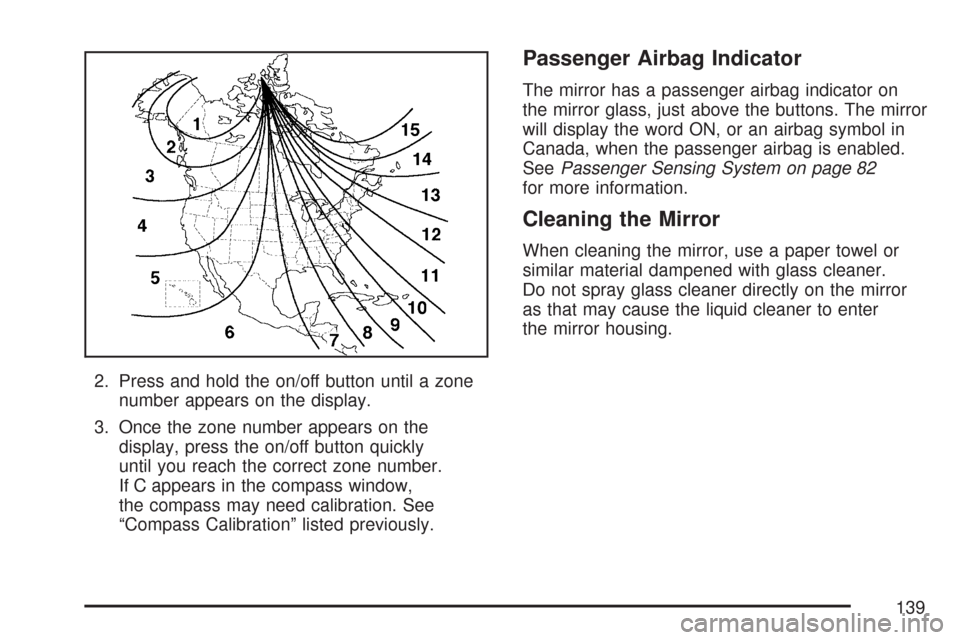
Page 139 of 518
2. Press and hold the on/off button until a zone
number appears on the display.
3. Once the zone number appears on the
display, press the on/off button quickly
until you reach the correct zone number.
If C appears in the compass window,
the compass may need calibration. See
“Compass Calibration” listed previously.
Passenger Airbag Indicator
The mirror has a passenger airbag indicator on
the mirror glass, just above the buttons. The mirror
will display the word ON, or an airbag symbol in
Canada, when the passenger airbag is enabled.
SeePassenger Sensing System on page 82
for more information.
Cleaning the Mirror
When cleaning the mirror, use a paper towel or
similar material dampened with glass cleaner.
Do not spray glass cleaner directly on the mirror
as that may cause the liquid cleaner to enter
the mirror housing.
139
Page 140 of 518

Outside Power Mirrors
The control on the
driver’s door armrest
operates both outside
rearview mirrors.
Press the left or right mirror symbol on the
selector switch to choose the driver’s side or
passenger’s side mirror. The center position turns
the control off so that the mirrors will not move
if the control pad is touched.Once a mirror is selected, use the arrows on the
control pad to move the mirror to the correct
direction. Adjust each mirror so you can see the
side of your vehicle and the area behind your
vehicle.
The mirrors can be manually folded inward to
prevent damage when going through an automatic
car wash. To fold, push the mirror toward the
vehicle. To return the mirror to its original position,
push outward. Be sure to return both mirrors to
their original unfolded position before driving.
If the vehicle has the memory package, the mirrors
can be programmed for personalization and
curb view assist. For more information, see
Memory Seat and Mirrors on page 11andDIC
Vehicle Personalization on page 242.
140
Page 141 of 518

Outside Curb View Assist Mirror
If the vehicle has the memory seat and mirrors,
the passenger’s mirror can be tilted to a
preselected position when the vehicle is shifted into
REVERSE (R). Use this outside curb view assist
feature to view the curb when parallel parking.
When the vehicle is shifted out of REVERSE (R)
and after a ve-second delay, the passenger’s
mirror will return to its original position.
If further adjustment is needed after the mirror is
in a tilted position, the mirror controls can be used.
SeeOutside Power Mirrors on page 140for more
information.
The outside curb view assist can be turned on or
off through the Driver Information Center (DIC).
SeeDIC Vehicle Personalization on page 242for
more information.
Outside Convex Mirror
{CAUTION:
A convex mirror can make things (like
other vehicles) look farther away than they
really are. If you cut too sharply into the
right lane, you could hit a vehicle on your
right. Check your inside mirror or glance
over your shoulder before changing lanes.
The passenger’s side mirror is convex. A convex
mirror’s surface is curved so that more can be
seen from the driver’s seat. The mirror does not
have a dimming feature.
Outside Heated Mirrors
When the rear window defogger is turned on,
it also warms both outside rearview mirrors to help
clear them of fog or ice. See “Rear Window
Defogger” underDual Climate Control System on
page 189for more information.
141
Page 144 of 518

OnStar®Hands-Free Calling
OnStar®Hands-Free Calling allows eligible
OnStar®subscribers to make and receive calls
using voice commands. Hands-Free Calling is fully
integrated into the vehicle, and can be used
with OnStar
®Pre-Paid Minute Packages.
Hands-Free Calling may also be linked to a
Verizon Wireless service plan in the U.S. or a
Bell Mobility service plan in Canada, depending
on eligibility. To nd out more, refer to the
OnStar
®Owners Guide in the vehicle’s glove box,
visit www.onstar.com or www.onstar.ca, or
speak with an OnStar
®advisor by pressing the
OnStar®button or calling 1-888-4-ONSTAR
(1-888-466-7827).
OnStar®Virtual Advisor
OnStar®Virtual Advisor is a feature of OnStar®
Hands-Free Calling that uses your minutes to
access location-based weather, local traffic reports,
and stock quotes. By pressing the phone button
and giving a few simple voice commands, you can
browse through the various topics. See the OnStar
®
Owners Guide for more information (Only available
in the continental U.S.).
OnStar®Steering Wheel Controls
Your vehicle may have a Talk/Mute button that can
be used to interact with OnStar®Hands-Free
Calling. SeeAudio Steering Wheel Controls (CTS)
on page 279orAudio Steering Wheel Controls
(CTS-V) on page 280for more information.
On some vehicles, you may have to hold the
button for a few seconds and give the command
“ONSTAR” in order to activate the OnStar
®
Hands-Free Calling feature.
On some vehicles, the mute button can be used to
dial numbers into voicemail systems, or to dial
phone extensions. See the OnStar
®Owner’s
Guide for more information.
How OnStar®Service Works
In order to provide you with OnStar®services,
your vehicle’s OnStar®system has the capability
of recording and transmitting vehicle information.
This information is automatically sent to an
OnStar
®Call Center at the time of an OnStar®
button press, Emergency button press or if
your airbags or AACN system deploys.
144