Page 159 of 496

The main components of your instrument panel are the following:
A. Air Outlets. SeeOutlet Adjustment on
page 192.
B. Driver Information Center (DIC) Buttons
(If Equipped). SeeDIC Controls and Displays
on page 212.
C. Turn Signal/Multifunction Lever. SeeTurn
Signal/Multifunction Lever on page 162.
D. Instrument Panel Cluster. SeeInstrument Panel
Cluster on page 194.
E. Hazard Warning Flashers. SeeHazard Warning
Flashers on page 160.
F. Audio System. SeeAudio System(s) on
page 241.
G. Exterior Lamp Buttons. SeeExterior Lamps on
page 170.
H. Instrument Panel Brightness Control. See
Instrument Panel Brightness on page 174.
I. Hood Release. SeeHood Release on
page 333.
J. Cruise Controls. SeeCruise Control on
page 167. Heated Steering Wheel Button
(If Equipped). SeeHeated Steering Wheel
on page 161.K. Parking Brake. SeeParking Brake on
page 122.
L. Audio Steering Wheel Controls. SeeAudio
Steering Wheel Controls on page 271.
M. Climate Controls. SeeClimate Control System
on page 182orDual Automatic Climate
Control System on page 186.
N. Traction Control/StabiliTrak
®Button. See
Traction Control System (TCS) on page 283
andStabiliTrak
®System on page 284.
O. Ashtray. SeeAshtray(s) and Cigarette Lighter
on page 182.
P. Shift Lever. SeeAutomatic Transaxle Operation
on page 119.
Q. Accessory Power Outlet. SeeAccessory Power
Outlet(s) on page 181.
R. Trunk Release. SeeTrunk on page 106.
S. Glove Box. SeeGlove Box on page 151.
159
Page 168 of 496

+ RES (Resume/Accelerate):Press this button
to make the vehicle accelerate or resume to
a previously set speed.
SET–:Press this button to set the speed or
make the vehicle decelerate.
[(Cancel):Press this button to cancel cruise
control.
Setting Cruise Control
Cruise control will not work if the parking brake is
set, or if the master cylinder brake uid level is low.
The cruise control light on the instrument panel
cluster will come on after the cruise control
has been set to the desired speed. See
Instrument Panel Cluster on page 194.
{CAUTION:
If you leave your cruise control on when
you are not using cruise, you might hit a
button and go into cruise when you do
not want to. You could be startled and
even lose control. Keep the cruise control
switch off until you want to use cruise
control.
1. Press the cruise control on/off button.
2. Get up to the speed you want.
3. Press and release the SET– button located on
the steering wheel.
4. Take your foot off the accelerator.
168
Page 170 of 496

Using Cruise Control on Hills
How well the cruise control will work on hills
depends upon the vehicle speed, load and the
steepness of the hills. When going up steep hills,
you may have to step on the accelerator pedal
to maintain your speed. When going downhill, you
may have to brake or shift to a lower gear to
keep your speed down. Of course, applying the
brake ends the cruise control. Many drivers
nd this to be too much trouble and do not use
cruise control on steep hills.
Ending Cruise Control
There are three ways to end cruise control:
Step lightly on the brake pedal.
Press the[(cancel) button on the steering
wheel.
Press theT(on/off) button on the steering
wheel.
Erasing Speed Memory
The cruise control set speed memory is erased by
turning off the cruise control or the ignition.
Exterior Lamps
The exterior lamps
control is located on
the instrument panel
to the left of the
steering wheel.
It controls the following systems:
Headlamps
Taillamps
Parking Lamps
License Plate Lamps
Instrument Panel Lights
Fog Lamps
170
Page 180 of 496
When the System Does Not Seem to
Work Properly
If the URPA system will not activate due to a
temporary condition, the message PARK ASSIST
OFF will be displayed on the DIC and a red light will
be shown on the rear URPA display when the shift
lever is moved into REVERSE (R). This occurs
under the following conditions:
The driver disables the system. SeeDIC
Controls and Displays on page 212.
The parking brake pedal is pressed.
A trailer was attached to your vehicle, or a
bicycle or an object was hanging out of your
trunk during your last drive when you turned off
the vehicle. If the attached objects are removed
from your vehicle before the start of your next
drive, the system will return to normal operation
unless an object is detected when the vehicle is
shifted into REVERSE (R). If this occurs, URPA
assumes the object is still attached, so you will
have to wait until the vehicle is driven forward
above 15 mph (25 km/h) before URPA will
return to normal operation.
The ultrasonic sensors are not kept clean. So,
be sure to keep your vehicle’s rear bumper free
of mud, dirt, snow, ice, and slush. For cleaning
instructions, seeWashing Your Vehicle on
page 422. If the DIC still displays the PARK
ASSIST OFF message after cleaning the
bumper and driving forward at a speed of at
least 15 mph (25 km/h), see your dealer.
Other conditions that may affect system
performance include vibrations from a
jackhammer or the compression of air brakes
on a very large truck or other mechanical
devices that interfere with URPA performance.
When URPA is disabled without driver action
and the driver attempts to turn URPA back on
using the Driver Information Center (DIC), the
PARK ASSIST ON option will not be selectable
if the necessary conditions stated above for
normal system operation are not met.
As always, drivers should use care when backing
up a vehicle. Always look behind you, being sure to
check for other vehicles, obstructions and blind
spots.
180
Page 201 of 496

Brake System Warning Light
Your vehicle’s hydraulic brake system is divided
into two parts. If one part is not working, the other
part can still work and stop you. For good braking,
though, you need both parts working well.
If the warning light comes on, there is a brake
problem. Have your brake system inspected
right away.
This light should come on briey when you turn the
ignition key to RUN. If it does not come on then,
have it xed so it will be ready to warn you if there’s
a problem.When the ignition is on, the brake system warning
light will also come on when you set your parking
brake. The light will stay on if your parking brake
does not release fully. If it stays on after your
parking brake is fully released, it means you
have a brake problem.
If the light comes on while you are driving, pull off
the road and stop carefully. You may notice that the
pedal is harder to push, or the pedal may go closer
to the oor. It may take longer to stop. If the light is
still on, have the vehicle towed for service. See
Towing Your Vehicle on page 313.
{CAUTION:
Your brake system may not be working
properly if the brake system warning light
is on. Driving with the brake system
warning light on can lead to an accident.
If the light is still on after you have pulled
off the road and stopped carefully, have
the vehicle towed for service.United StatesCanada
201
Page 227 of 496

SERVICE BRAKE ASSIST
This message displays if there is a problem with the
brake system. The brake system warning light and
the anti-lock brake system warning light may also
be displayed on the instrument panel cluster. See
Brake System Warning Light on page 201and
Anti-Lock Brake System Warning Light on page 202
for more information. If this happens, stop as soon
as possible and turn off the vehicle. Restart the
vehicle and check for the message on the DIC
display. If the message is displayed or appears
again when you begin driving, the brake system
needs service. See your dealer as soon as
possible. SeeBrakes on page 367for more
information.
SERVICE BRAKE SYSTEM
This message displays if the ignition is on to
inform the driver that the brake uid level is low.
Have the brake system serviced by your dealer as
soon as possible. The brake system warning
light also appears on the instrument panel cluster
when this message appears on the DIC. See
Brake System Warning Light on page 201.
SERVICE PARK ASSIST
If your vehicle has this feature, this message
displays if there is a problem with the Ultrasonic
Rear Parking Assist (URPA) system. Do not
use this system to help you park. SeeUltrasonic
Rear Parking Assist (URPA) on page 178for more
information. See your dealer for service.
SERVICE POWER STEERING
Your vehicle may have a speed variable assist
steering system. SeeSteering on page 285.
This message displays if a problem is detected with
the speed variable assist steering system. When
this message is displayed, you may notice that the
effort required to steer the vehicle decreases or
feels lighter, but you will still be able to steer the
vehicle.
227
Page 314 of 496
Dinghy Towing
Notice:If you tow your vehicle with all
four wheels on the ground, the drivetrain
components could be damaged. The repairs
would not be covered by your warranty.
Do not tow your vehicle with all four wheels
on the ground.
Your vehicle was not designed to be towed with
all four wheels on the ground. If your vehicle must
be towed, you should use a dolly. See “Dolly
Towing” that follows for more information.
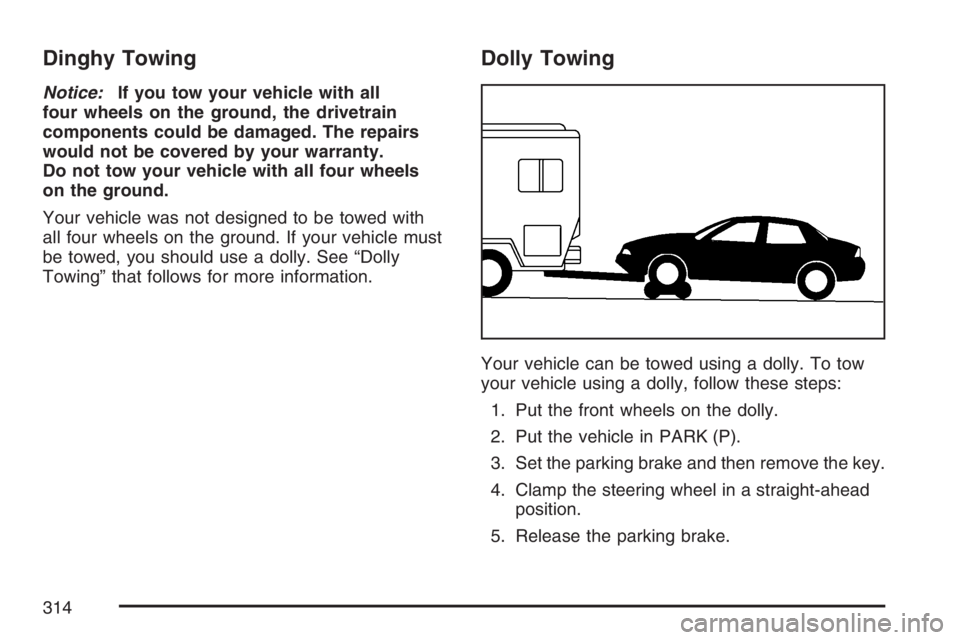
Dolly Towing
Your vehicle can be towed using a dolly. To tow
your vehicle using a dolly, follow these steps:
1. Put the front wheels on the dolly.
2. Put the vehicle in PARK (P).
3. Set the parking brake and then remove the key.
4. Clamp the steering wheel in a straight-ahead
position.
5. Release the parking brake.
314
Page 321 of 496

Driving On Grades
Reduce speed and shift to a lower gearbefore
you start down a long or steep downgrade. If you
do not shift down, you might have to use your
brakes so much that they would get hot and
no longer work well.
On a long uphill grade, shift down to THIRD (3)
and reduce your speed to around 45 mph
(70 km/h) to reduce the possibility of engine and
transaxle overheating.
Parking on Hills
{CAUTION:
You really should not park your
vehicle, with a trailer attached, on a hill.
If something goes wrong, your rig could
start to move. People can be injured, and
both your vehicle and the trailer can be
damaged.But if you ever have to park your rig on a hill, here
is how to do it:
1. Apply your regular brakes, but do not shift into
PARK (P) yet.
2. Have someone place chocks under the trailer
wheels.
3. When the wheel chocks are in place, release
the regular brakes until the chocks absorb
the load.
4. Reapply the regular brakes. Then apply your
parking brake, and then shift to PARK (P).
5. Release the regular brakes.
321