2007 BUICK LACROSSE service
[x] Cancel search: servicePage 223 of 512

SERVICE BRAKE SYSTEM
This message displays when a problem with the
brake system has been detected. Have your
vehicle serviced by your dealer as soon as
possible.
The brake system warning light also appears on
the instrument panel cluster when this message
appears on the DIC. SeeBrake System Warning
Light on page 186.
This message only displays while the ignition is in
RUN. Press any of the DIC buttons to acknowledge
this message and to clear it from the screen.
This message continues to display for two seconds
if it has not been acknowledged when the engine is
turned off. It also re-displays for two seconds if the
message has been acknowledged, but the
condition still exists when the engine is turned off.
If the condition still exists, the message re-appears
when the engine is turned on.
SERVICE PARK LAMPS
This message displays when there is a problem
with the park lamps. Check to see if the park lamp
fuse is blown and replace the fuse if necessary.
SeeFuses and Circuit Breakers on page 450and
Instrument Panel Fuse Block on page 450for
more information. If changing the fuse does not
correct the problem, see your dealer.
This message only displays while the ignition is in
RUN. Press any of the DIC buttons to acknowledge
this message and to clear it from the screen.
This message continues to display for two seconds
if it has not been acknowledged when the engine is
turned off. It also re-displays for two seconds if the
message has been acknowledged, but the
condition still exists when the engine is turned off.
If the condition still exists, the message re-appears
when the engine is turned on.
223
Page 224 of 512

SERVICE STABILITY SYSTEM
If your vehicle has StabiliTrak®, this message
displays if there has been a problem detected with
StabiliTrak
®. A warning light also appears on
the instrument panel cluster. SeeTraction Control
System (TCS) Warning Light on page 187. See
StabiliTrak
®System on page 296for more
information.
If this message turns on while you are driving, pull
off the road as soon as possible and stop carefully.
Try resetting the system by turning the ignition off
and then back on. If this message still stays on or
turns back on again while you are driving, your
vehicle needs service. Have the StabiliTrak
®
System inspected by your dealer as soon as
possible.
This message displays only while the ignition is in
RUN. Press any of the DIC buttons to acknowledge
this message and to clear it from the screen.
This message continues to display for two seconds
if it has not been acknowledged when the engine is
turned off. It also re-displays for two seconds if the
message has been acknowledged, but the
condition still exists when the engine is turned off.
If the condition still exists, the message re-appears
when the engine is turned on.
SERVICE THEFT SYSTEM
This message displays when there is a problem
with the theft-deterrent system programmed in the
key. A fault has been detected in the system
which means that the system is disabled and it is
not protecting the vehicle. The vehicle usually
restarts; however, you may want to take the
vehicle to your dealer before turning off the engine.
SeePASS-Key
®III Operation on page 107for
more information.
This message displays and a chime sounds only
while the ignition is in RUN. Press any of the
DIC buttons to acknowledge this message and to
clear it from the screen.
This message continues to display for two seconds
if it has not been acknowledged when the engine is
turned off. It also re-displays for two seconds if the
message has been acknowledged, but the
condition still exists when the engine is turned off.
If the condition still exists, the message re-appears
when the engine is turned on.
224
Page 225 of 512

SERVICE TIRE MONITOR SYSTEM
This message displays if a part on the Tire
Pressure Monitor (TPM) system is not working
properly. If you drive your vehicle while any of the
four sensors are missing or inoperable, the
warning comes on in about 10 minutes. A sensor
would be missing, for example, if you put
different wheels on your vehicle without
transferring the sensors. If the warning comes on
and stays on, there may be a problem with the
TPM. See your dealer.
This message displays while the ignition is in RUN.
Press any of the DIC buttons to acknowledge this
message and to clear it from the screen.
This message continues to display for two seconds
if it has not been acknowledged when the engine is
turned off. It also re-displays for two seconds if the
message has been acknowledged, but the
condition still exists when the engine is turned off.
If the condition still exists, the message re-appears
when the engine is turned on.
SERVICE TRACTION SYSTEM
If your vehicle has the Traction Control
System (TCS), this message displays when the
system is not functioning properly. A warning light
also appears on the instrument panel cluster.
SeeTraction Control System (TCS) Warning Light
on page 187. SeeTraction Control System
(TCS) on page 294for more information. Have the
TCS serviced by your dealer as soon as possible.
This message displays only while the ignition is in
RUN. Press any of the DIC buttons to acknowledge
this message and to clear it from the screen.
This message continues to display for two seconds
if it has not been acknowledged when the engine is
turned off. It also re-displays for two seconds if the
message has been acknowledged, but the
condition still exists when the engine is turned off.
If the condition still exists, the message re-appears
when the engine is turned on.
225
Page 226 of 512
SERVICE VARIABLE EFFORT
STEERING
If your vehicle has variable effort steering, this
message displays when if this system is not
functioning properly. SeeSteering on page 297for
more information. Have the system serviced by
your dealer as soon as possible.
This message displays only while the ignition is in
RUN. Press any of the DIC buttons to acknowledge
this message and to clear it from the screen.
This message continues to display for two seconds
if it has not been acknowledged when the engine is
turned off. It also re-displays for two seconds if the
message has been acknowledged, but the
condition still exists when the engine is turned off.
If the condition still exists, the message re-appears
when the engine is turned on.
SERVICE VEHICLE SOON
This message displays when a non-emissions
related malfunction occurs. Have the vehicle
serviced by your dealer as soon as possible.This message displays only while the ignition is in
RUN. Press any of the DIC buttons to acknowledge
this message and to clear it from the screen.
This message continues to display for two seconds
if it has not been acknowledged when the engine is
turned off. It also re-displays for two seconds if the
message has been acknowledged, but the
condition still exists when the engine is turned off.
If the condition still exists, the message re-appears
when the engine is turned on.
STABILITY CONTROL ACTIVE
If your vehicle has StabiliTrak®, this message
displays when StabiliTrak®is actively assisting you
with directional control of the vehicle. Slippery
road conditions may exist when this message is
displayed, so adjust your driving accordingly.
SeeStabiliTrak
®System on page 296.
This message displays only while the ignition is in
RUN. This message stays on until road conditions
change and StabiliTrak
®is not active.
This message cannot be acknowledged and
cleared from the screen.
226
Page 227 of 512
STABILITY CONTROL OFF
If your vehicle has StabiliTrak®, this message
displays any time the system turns off. When this
message has been displayed, StabiliTrak
®is
no longer available to assist you with directional
control of the vehicle. Adjust your driving
accordingly. SeeStabiliTrak
®System on page 296.
This message displays only while the ignition is
in RUN.
Any of the following conditions may cause the
StabiliTrak
®system to turn off:
The battery is low.
There is a StabiliTrak®system failure. See
your dealer for service.
STARTING DISABLED
This message displays if the starting of the engine
is disabled due to the electronic throttle control
system or vehicle theft-deterrent system. Have your
vehicle serviced by your dealer immediately.This message only appears while the ignition is in
RUN and will not disappear until the problem is
resolved.
This message cannot be acknowledged.
TRACTION CONTROL ACTIVE
If your vehicle has the Traction Control
System (TCS), this message displays when
the system is on. Slippery road conditions may
exist if this message is displayed, so adjust
your driving accordingly. SeeTraction Control
System (TCS) on page 294for more information.
This message only displays while the ignition
is in RUN and will not disappear until driving
conditions change and the TCS is no longer active.
This message cannot be acknowledged or
cleared from the screen.
227
Page 228 of 512
TRACTION CONTROL OFF
If your vehicle has the Traction Control
System (TCS), this message displays when the
TCS turns off. SeeTraction Control System (TCS)
on page 294for more information.
This message only displays while the ignition is in
RUN and disappears after two seconds.
Any of the following conditions may cause the
TCS to turn off:
The TCS is turned off by pressing the traction
control button located on the center of the
instrument panel. SeeTraction Control
System (TCS) on page 294.
The battery is low.
There is a TCS failure. See your dealer for
service.
TRUNK AJAR
This message displays when the trunk is not
closed completely. Make sure that the trunk is
closed completely. SeeTrunk on page 100.This message displays while the ignition is in
RUN. A chime sounds when the ignition is shifted
out of PARK (P). Press any of the DIC buttons
to acknowledge this message and to clear it from
the screen.
This message continues to display for two seconds
if it has not been acknowledged when the engine is
turned off. It also re-displays for two seconds if the
message has been acknowledged, but the
condition still exists when the engine is turned off.
If the condition still exists, the message re-appears
when the engine is turned on.
TURN SIGNAL ON
This message displays as a reminder to turn off
the turn signal if you drive your vehicle for
more than about 0.75 mile (1.2 km) with a turn
signal on. SeeTurn Signal/Multifunction Lever on
page 152.
This message displays and a chime sounds only
when the ignition is in RUN. This message
clears from the DIC if the turn signal is manually
turned off, a turn is completed, or the message
is acknowledged.
228
Page 242 of 512

Adjusting the Speakers (Balance/Fade)
e
(Balance/Fade):To adjust the balance
between the right and the left speakers, push and
release this knob until BAL appears on the
display. Turn the knob to move the sound toward
the right or the left speakers.
To adjust the fade between the front and the rear
speakers, push and release the speaker knob until
FAD appears on the display. Turn the knob to move
the sound toward the front or the rear speakers.
To adjust the balance and the fade to the middle
position, push the speaker knob, then push it again
and hold it until you hear one beep.
To adjust all tone and speaker controls to the
middle position, push and hold the speaker knob
when no tone or speaker control is displayed. CEN
will appear on the display and you will hear a beep.
Radio Messages
CAL (Calibration):The audio system has been
calibrated for your vehicle from the factory. If CAL
appears on the display it means that the radio has
not been congured properly for your vehicle and it
must be returned to your dealer for service.
LOC (Locked):This message is displayed when
the THEFTLOCK
®system has locked up the
radio. Take your vehicle to your dealer for service.
If any error occurs repeatedly or if an error
cannot be corrected, contact your dealer.
Playing a CD
Insert a CD partway into the slot, label side up. The
player will pull it in and the CD should begin playing.
If you want to insert a CD with the ignition off, rst
press the eject button or the DISP knob.
If the ignition or radio is turned off with a CD in
the player it will stay in the player. When the
ignition or radio is turned on, the CD will start to
play where it stopped, if it was the last selected
audio source.
242
Page 245 of 512
Radio with CD (Uplevel)
XM™ Satellite Radio Service
XM™ is a satellite radio service that is based in
the 48 contiguous United States and Canada.
XM™ offers a large variety of coast-to-coast
channels including music, news, sports, talk,
traffic/weather (U.S. subscribers), and children’s
programming. XM™ provides digital quality
audio and text information that includes
song title and artist name. A service fee is
required in order to receive the XM™ service.For more information, contact XM™; In the U.S. at
www.xmradio.com or call 1-800-852-XMXM (9696)
or in Canada at www.xmradio.ca or call
1-877-GET-XMSR (438-9677).
Playing the Radio
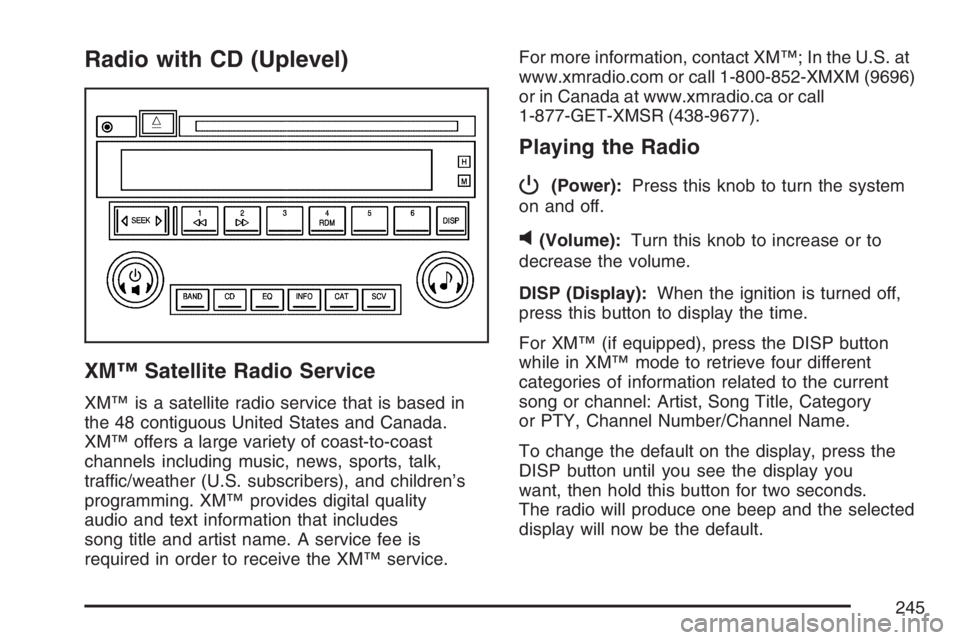
P
(Power):Press this knob to turn the system
on and off.
v(Volume):Turn this knob to increase or to
decrease the volume.
DISP (Display):When the ignition is turned off,
press this button to display the time.
For XM™ (if equipped), press the DISP button
while in XM™ mode to retrieve four different
categories of information related to the current
song or channel: Artist, Song Title, Category
or PTY, Channel Number/Channel Name.
To change the default on the display, press the
DISP button until you see the display you
want, then hold this button for two seconds.
The radio will produce one beep and the selected
display will now be the default.
245