2007 BUICK LACROSSE radio controls
[x] Cancel search: radio controlsPage 255 of 512
Setting Preset Stations
Up to 30 stations (six FM1, six FM2, and six AM,
six XM1 and six XM2 (if equipped)), can be
programmed on the six numbered pushbuttons, by
performing the following steps:
1. Turn the radio on.
2. Press BAND to select FM1, FM2, AM, or XM1
or XM2.
3. Tune in the desired station.
4. Press EQ to select the equalization.
5. Press and hold one of the six numbered
pushbuttons until you hear a beep.
Whenever that numbered pushbutton is
pressed, the station that was set will return
and the equalization that was selected will be
stored for that pushbutton.
6. Repeat the steps for each pushbutton.
Setting the Tone (Bass/Treble)
e
(Bass/Treble):Push and release this knob until
BASS or TREBLE appears on the display. Turn this
knob to increase or to decrease. The display will
show the bass or the treble level. If a station is
weak or noisy, decrease the treble.
To adjust the bass and the treble to the middle
position, push and hold the tone knob. The radio
will produce one beep.
To adjust all tone and speaker controls to the
middle position, push and hold the tone knob
when no tone or speaker control is displayed.
ALL CENTERED will appear on the display and
you will hear a beep.
EQ (Equalization):Press this button to select
customized equalization settings designed
for country/western, jazz, talk, pop, rock,
classical, and custom.
To return the bass and treble to the manual mode,
push and release the tone knob until BASS or
TREBLE appears on the display.
255
Page 256 of 512
Adjusting the Speakers (Balance/Fade)
e
(Balance/Fade):To adjust the balance
between the right and the left speakers, push and
release this knob until BAL appears on the
display. Turn the knob to move the sound toward
the right or the left speakers.
To adjust the fade between the front and the rear
speakers, push and release the speaker knob
until FAD (fade) appears on the display. Turn the
knob to move the sound toward the front or
the rear speakers.
To adjust the balance and the fade to the middle
position, push the speaker knob, then push it
again and hold it until you hear one beep.
To adjust all tone and speaker controls to the
middle position, push and hold the speaker knob
when no tone or speaker control is displayed.
ALL CENTERED will appear on the display and
you will hear a beep.
Finding a Category (CAT) Station
(XM™ Satellite Radio Service Only)
To select and nd a desired category perform the
following:
1. Press the CAT button to activate category
select mode. The current category will
appear on the display.
2. Turn the tune knob to select a category.
3. Once the desired category is displayed, press
either SEEK arrow to take you to the
categories rst station.
4. To go to another station within that category
and the category is displayed, press either
SEEK arrow again. If CAT times out and is no
longer on the display, go back to Step 1.
5. Press CAT to exit category select mode or
wait for CAT to time out.
If the radio cannot nd the desired category,
NOT FOUND will appear on the display and the
radio will return to the last station you were
listening to.
256
Page 263 of 512
Setting Preset Stations
Up to 30 stations (six FM1, six FM2, and six AM,
six XM1 and six XM2 (if equipped)), can be
programmed on the six numbered pushbuttons, by
performing the following steps:
1. Turn the radio on.
2. Press BAND to select FM1, FM2, AM, or XM1
or XM2.
3. Tune in the desired station.
4. Press EQ to select the equalization.
5. Press and hold one of the six numbered
pushbuttons until you hear a beep.
Whenever that numbered pushbutton is
pressed, the station that was set will return
and the equalization that was selected will be
stored for that pushbutton.
6. Repeat the steps for each pushbutton.
Setting the Tone (Bass/Treble)
e
(Bass/Treble):Push and release this knob until
BASS or TREB appears on the display. Turn this
knob to increase or to decrease. The display will
show the bass or the treble level. If a station is
weak or noisy, decrease the treble.
To adjust the bass and the treble to the middle
position, push and hold the tone knob. The radio
will produce one beep.
To adjust all tone and speaker controls to the
middle position, push and hold the tone knob when
no tone or speaker control is displayed. ALL
CENTERED will appear on the display and you will
hear a beep.
EQ (Equalization):Press this button to select
customized equalization settings designed
for country/western, jazz, talk, pop, rock, classical,
and custom.
To return the bass and treble to the manual mode,
push and release the tone knob until BASS or
TREBLE appears on the display.
263
Page 264 of 512
Adjusting the Speakers (Balance/Fade)
e
(Balance/Fade):To adjust the balance
between the right and the left speakers, push and
release this knob until BAL appears on the
display. Turn the knob to move the sound toward
the right or the left speakers.
To adjust the fade between the front and the rear
speakers, push and release the speaker knob
until FADE appears on the display. Turn the knob
to move the sound toward the front or the rear
speakers.
To adjust the balance and the fade to the middle
position, push the speaker knob, then push it
again and hold it until you hear one beep.
To adjust all tone and speaker controls to the
middle position, push and hold the speaker knob
when no tone or speaker control is displayed. CEN
will appear on the display and you will hear a beep.
Finding a Category (CAT) Station
(XM™ Satellite Radio Service Only)
To select and nd a desired category perform
the following:
1. Press the CAT button to activate category
select mode. The current category will
appear on the display.
2. Turn the tune knob to select a category.
3. Once the desired category is displayed, press
either SEEK arrow to take you to the
categories rst station.
4. To go to another station within that category
and the category is displayed, press either
SEEK arrow again. If CAT times out and is no
longer on the display, go back to Step 1.
5. Press CAT to exit category select mode or
wait for CAT to time out.
If the radio cannot nd the desired category,
NOT FOUND will appear on the display and the
radio will return to the last station you were
listening to.
264
Page 280 of 512
Theft-Deterrent Feature
THEFTLOCK®is designed to discourage theft of
your vehicle’s radio. The feature works
automatically by learning a portion of the Vehicle
Identication Number (VIN). If the radio is
moved to a different vehicle, it will not operate and
LOC or LOCKED will appear on the display.
With THEFTLOCK
®activated, the radio will not
operate if stolen.
Audio Steering Wheel Controls
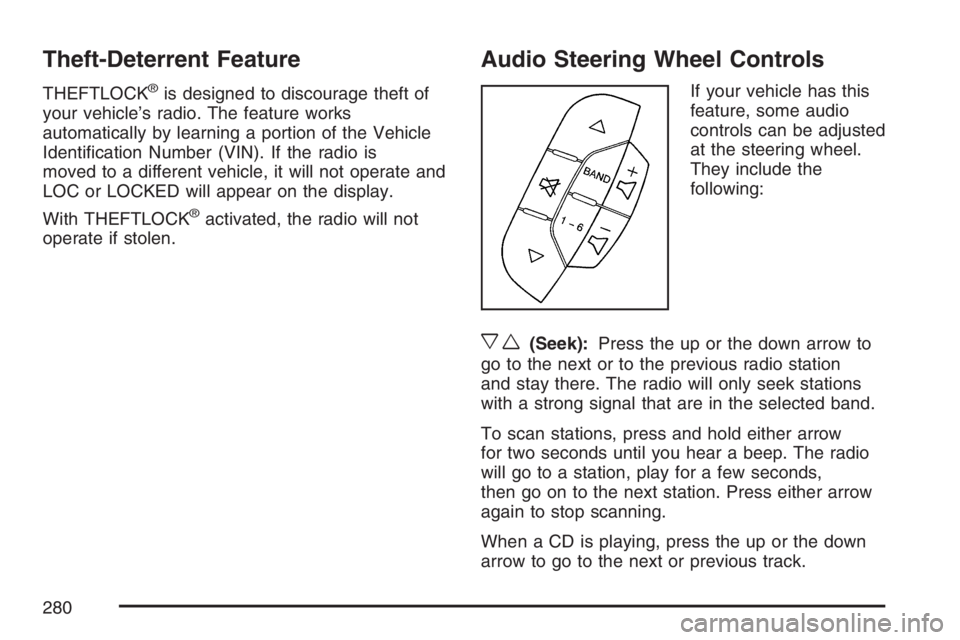
If your vehicle has this
feature, some audio
controls can be adjusted
at the steering wheel.
They include the
following:
xw(Seek):Press the up or the down arrow to
go to the next or to the previous radio station
and stay there. The radio will only seek stations
with a strong signal that are in the selected band.
To scan stations, press and hold either arrow
for two seconds until you hear a beep. The radio
will go to a station, play for a few seconds,
then go on to the next station. Press either arrow
again to stop scanning.
When a CD is playing, press the up or the down
arrow to go to the next or previous track.
280
Page 451 of 512

Fuses Usage
DR/LCK
TRUNKDoor Locks, Trunk
RFA/MOD Remote Keyless Entry
PRK/SWTCH Ignition Key Lock
CLSTR Cluster
STR/WHL/
ILLUMSteering Wheel Controls
Illumination
ONSTAR/ALDL OnStar
®, Data Link
Fuses Usage
INT/ILLUM Interior Lamps
PWR/SEAT Power Seat
S/ROOF Sunroof
CNSTR Canister Vent
HVAC Climate Control System
HAZRD Turn Signal, Hazard
PRK/LAMP Park Lamps
CHMSL/BKUPCenter-High-Mounted
Stoplamp/Back-up Lamps
PWR/MIR Power Mirrors
CRUISE Cruise Control
RDO/AMP Radio, Amplier
HTD/SEAT Heated Seats
HTD/MIR Heated Mirrors
PWR/WNDW Power Window
Relays Usage
RAP Retained Accessory Power
PRK/LAMP Park Lamp Relay
R/DEFOG Rear Defogger Relay
451
Page 498 of 512

Audio System(s).......................................... 238
Audio Steering Wheel Controls................. 280
Backglass Antenna................................... 283
Care of Your CD Player........................... 282
Care of Your CDs.................................... 282
Chime Level Adjustment........................... 284
Radio with CD........................240, 245, 252
Radio with Six-Disc CD............................ 260
Setting the Time...................................... 239
Theft-Deterrent Feature............................ 280
Understanding Radio Reception............... 281
XM™ Satellite Radio Antenna System...... 284
Automatic Door Lock..................................... 98
Automatic Transaxle
Fluid........................................................ 360
Operation................................................. 114
B
Backglass Antenna...................................... 283
Battery........................................................ 384
Electric Power Management..................... 163
Exterior Lighting Battery Saver................. 160
Run-Down Protection............................... 164
Before Leaving on a Long Trip.................... 310Brake
Anti-Lock Brake System (ABS)................. 291
Emergencies............................................ 293
Parking.................................................... 117
System Warning Light.............................. 186
Brakes........................................................ 381
Braking....................................................... 290
Braking in Emergencies............................... 293
Break-In, New Vehicle................................. 109
Bulb Replacement....................................... 394
Front Turn Signal and Parking Lamps...... 397
Halogen Bulbs......................................... 394
Headlamp Aiming..................................... 391
License Plate Lamps................................ 400
Replacement Bulbs.................................. 400
Taillamps, Turn Signal, Sidemarker,
Stoplamps, and Back-Up Lamps........... 398
Buying New Tires........................................ 418
498
Page 507 of 512
P
Paint, Damage............................................ 446
Park Aid...................................................... 164
Park (P)
Shifting Into............................................. 118
Shifting Out of......................................... 120
Parking
Assist....................................................... 164
Brake....................................................... 117
Over Things That Burn............................ 121
Passenger Airbag Status Indicator............... 183
Passenger Compartment Air Filter............... 178
Passenger Sensing System........................... 75
Passing....................................................... 300
PASS-Key
®III ............................................. 106
PASS-Key®III Operation............................. 107
Perimeter Lighting....................................... 163
Power
Accessory Outlet(s).................................. 167
Door Locks................................................ 97
Electrical System..................................... 450
Lumbar Controls........................................ 10
Reduced Engine Light.............................. 196Power (cont.)
Retained Accessory (RAP)....................... 110
Seat............................................................ 9
Steering Fluid.......................................... 378
Windows.................................................. 103
Pretensioners, Safety Belt............................. 38
Programmable Automatic Door Unlock........... 98
Q
Questions and Answers About Safety Belts ... 20
R
Radiator Pressure Cap................................ 367
Radios........................................................ 238
Care of Your CD Player........................... 282
Care of Your CDs.................................... 282
Radio with CD........................240, 245, 252
Radio with Six-Disc CD............................ 260
Setting the Time...................................... 239
Theft-Deterrent......................................... 280
Understanding Reception......................... 281
Rear Assist Handle Reading Lamps............ 163
507