2007 BUICK LACROSSE change time
[x] Cancel search: change timePage 170 of 512

You can also select modes by using the
following buttons:
h(Recirculate):Press this button to recirculate
cabin air through the vehicle. It can be used to
help reduce the outside air and odors that
enter your vehicle or to help heat or cool the air
inside your vehicle quicker. An indicator light below
the button will come on in this mode. Operation
in this mode during periods of high humidity
and cool outside temperatures may result in
increased window fogging. If window fogging is
experienced, select the defrost mode. To prevent
the air inside the vehicle from becoming stale,
after ve minutes recirculate will allow some
outside air into the vehicle.
#(Air Conditioning):Press this button to turn
the air conditioning system on or off. When
this button is pressed, an indicator light below the
button will come on to let you know the air
conditioning is activated. Air conditioning can be
selected in any mode as long as the fan switch is
on. The indicator light will change with each
button press even when conditions prevent
operation.On hot days during the vehicle’s initial start-up,
open the windows to let hot inside air escape; then
close them. This helps to reduce the time it
takes for the vehicle to cool down. It also helps
the system to operate more efficiently.
For quicker cool down on hot days, do the
following:
1. Select the vent air mode.
2. Select the recirculation mode.
3. Select the air conditioner.
4. Select the coolest temperature.
5. Select the highest fan speed.
The air conditioning system removes moisture
from the air, so you may sometimes notice a
small amount of water dripping underneath your
vehicle while idling or after turning off the
engine. This is normal.
Using these settings together for long periods
of time may cause the air inside the vehicle to
become too dry. To prevent this, after ve minutes
recirculate will allow some outside air into
the vehicle.
170
Page 173 of 512

Automatic Operation
AUTO (Automatic):Press the AUTO button for
automatic control of the inside temperature, the air
delivery mode, and the fan speed. There might
be a delay of two to three minutes before the fan
comes on when the automatic operation is
used in cold weather. For the automatic system to
function, the temperature must be set between
61°F (15°C) and 89°F (32°C).
1. Adjust the temperature to a comfortable
setting.
2. Press the PASS button or the up or down
arrows on the passenger side to turn the
passenger temperature set on and off. When
turned on, the passenger temperature will
be the same as the driver setting. Press the
up or down arrow on passenger side to adjust
the passenger temperature setting.
When the passenger’s temperature set is off,
the passenger display will be off and the
driver’s set temperature will be for the driver
and passenger.In cold weather, the system will start at
reduced fan speeds to avoid blowing cold air
into the vehicle until warmer air is available.
The system will start out blowing air at the oor
but may change modes automatically as the
vehicle warms up to maintain the chosen
temperature setting. The length of time needed
for warm up will depend on the outside
temperature and the length of time that has
elapsed since the vehicle was last driven.
3. Wait for the system to regulate. This may take
from 10 to 30 minutes. Then, adjust the
temperature, if necessary.
Do not cover the solar sensor located in the
center of the instrument panel, near the
windshield. For more information on the solar
sensor, see “Sensors” later in this section.
4. Press OFF to turn the climate control system
off. Only the rear defog and heated seats will
function. Press AUTO or any other button
except the heated seats or rear defog to turn
the climate control system back on.
173
Page 175 of 512

9y(Fan):Press this button to increase the fan
speed. Pressing the arrows cancels the automatic
operation and places the system in manual or
semi-automatic mode. Press the AUTO button to
return to automatic operation. If the airow
seems low when the fan is at the highest setting,
the passenger compartment air lter may need
to be replaced. For more information see
Passenger Compartment Air Filter on page 178
andScheduled Maintenance on page 462.
6(Floor):This mode directs most of the air to
the oor, with some air directed to the side window
outlets and a small amount to the windshield.
)(Bi-Level):This setting directs airow to the
instrument panel and oor outlets. A small amount
of air is also directed to the windshield and the
side window outlets.
Y(Vent):This mode directs air through the
instrument panel outlets.
h(Recirculation):Press this button to turn
recirculation mode on or off. This mode keeps
outside air from coming into the vehicle. It can be
used to help reduce the outside air and odors
that enter your vehicle or help cool the air inside
the vehicle quicker.
Recirculation is not available while in the oor,
defrost, or oor/defog modes. Using recirculation
for long periods of time may cause the air
inside your vehicle to become too dry.
Recirculation mode has a ve minute timer after
which the system allows for some fresh outside air
into the vehicle to maintain interior air quality.
#(Air Conditioning):Press this button to turn
the air conditioning compressor on and off.
The indicator light on the button will come on
when the air conditioning is on. The indicator light
will change with each button press even when
conditions prevent operation.
((Heated Seats):Press this button to turn the
driver or passenger heated seats on and off. See
Heated Seats on page 10for additional information.
175
Page 196 of 512

Reduced Engine Power Light
If the reduced engine
power light is on, a
chime will sound and a
noticeable reduction
in the vehicle’s
performance may occur.
If the reduced engine power light is on, but there
is no reduction in performance, proceed to
your destination. The performance may be reduced
the next time the vehicle is driven. The vehicle
may be driven at a reduced speed while the
reduced engine power light is on, but acceleration
and speed may be reduced.
Anytime the reduced engine power light stays on,
the vehicle should be taken to an authorized
GM dealer as soon as possible for service.
Highbeam On Light
This light comes on
when the high-beam
headlamps are in use.
SeeHeadlamp High/Low-Beam Changer on
page 153.
Headlamps Suggested Light
This light will come on
when the use of
headlamps is
suggested.
196
Page 203 of 512

Fuel Menu Items (Uplevel Only)
.
(Fuel):Press this button to scroll through the
following menu items:
Fuel Range
Press the fuel button until FUEL RANGE displays.
This mode shows the approximate number of
remaining miles or kilometers the vehicle can be
driven without refueling.
Fuel range is based on several factors, including
distance traveled, fuel used, fuel capacity, etc.
This estimate will change if driving conditions
change. For example, if driving in traffic and
making frequent stops, this mode may read
one number, but if the vehicle is driven on a
freeway, the number may change even though the
same amount of fuel is in the fuel tank. This is
because different driving conditions produce
different fuel economies. Generally, freeway
driving produces better fuel economy than city
driving. Fuel range cannot be reset.
If your vehicle is low on fuel, FUEL RANGE LOW
will display followed by the LOW FUEL message.
See “LOW FUEL” underDIC Warnings and
Messages on page 208for more information.
Average Fuel Economy
Press the fuel button until AVG ECONOMY
displays. This mode shows the approximate
average miles per gallon (mpg) or liters per
100 kilometers (L/100 km). This number is
calculated based on the number of mpg (L/100 km)
recorded since the last time this menu item was
reset. To reset AVG ECONOMY, press and hold
the set/reset button. The display will return to zero.
Gages Menu Items (Uplevel Only)
2
(Gages):Press this button to scroll through
the following menu items:
Battery
Press the gages button until BATTERY displays.
This mode shows the current battery voltage.
Your vehicle’s charging system regulates voltage
based on the state of the battery. The battery
voltage may uctuate when viewing this
information on the DIC. This is normal.
If there is a problem with the battery charging
system, a DIC message will display. See
DIC Warnings and Messages on page 208for
more information.
SeeElectric Power Management on page 163for
more information.
203
Page 204 of 512

Tire Pressure
Press the gages button until FRONT TIRE
PRESSURE displays. This mode shows the
pressure for the front tires. To view the pressure
for the rear tires, press the gages button again
until REAR TIRE PRESSURE displays. The
tire pressure will be shown in either pounds per
square inch (psi) or kilopascals (kPa).
If a low or high tire pressure condition is detected
by the system while driving, a message advising
you to check the pressure in a specic tire
will appear in the display. SeeInation - Tire
Pressure on page 409andDIC Warnings
and Messages on page 208for more information.
If the tire pressure display shows dashes
instead of a value, there may be a problem with
your vehicle. If this consistently occurs, see
your dealer for service.
Oil Life
Press the gages button until OIL LIFE displays.
This mode shows an estimate of the oil’s
remaining useful life. If you see OIL LIFE 99% on
the display, that means 99% of the current oil
life remains. The engine oil life system will alert
you to change your oil on a schedule consistent
with your driving conditions.
When the remaining oil life is low, the CHANGE OIL
SOON message will appear on the display. You
should change your oil as soon as possible. See
Engine Oil on page 353. In addition to the engine oil
life system monitoring the oil life, additional
maintenance is recommended in the Maintenance
Schedule in this manual. SeeScheduled
Maintenance on page 462for more information.
Remember, you must reset the OIL LIFE yourself
after each oil change. It will not reset itself.
Also, be careful not to reset the OIL LIFE
accidentally at any time other than when the oil
has just been changed. It cannot be reset
accurately until the next oil change. To reset the
engine oil life system, seeEngine Oil Life
System on page 356. The display will show 100%
when the system is reset.
204
Page 227 of 512
STABILITY CONTROL OFF
If your vehicle has StabiliTrak®, this message
displays any time the system turns off. When this
message has been displayed, StabiliTrak
®is
no longer available to assist you with directional
control of the vehicle. Adjust your driving
accordingly. SeeStabiliTrak
®System on page 296.
This message displays only while the ignition is
in RUN.
Any of the following conditions may cause the
StabiliTrak
®system to turn off:
The battery is low.
There is a StabiliTrak®system failure. See
your dealer for service.
STARTING DISABLED
This message displays if the starting of the engine
is disabled due to the electronic throttle control
system or vehicle theft-deterrent system. Have your
vehicle serviced by your dealer immediately.This message only appears while the ignition is in
RUN and will not disappear until the problem is
resolved.
This message cannot be acknowledged.
TRACTION CONTROL ACTIVE
If your vehicle has the Traction Control
System (TCS), this message displays when
the system is on. Slippery road conditions may
exist if this message is displayed, so adjust
your driving accordingly. SeeTraction Control
System (TCS) on page 294for more information.
This message only displays while the ignition
is in RUN and will not disappear until driving
conditions change and the TCS is no longer active.
This message cannot be acknowledged or
cleared from the screen.
227
Page 240 of 512
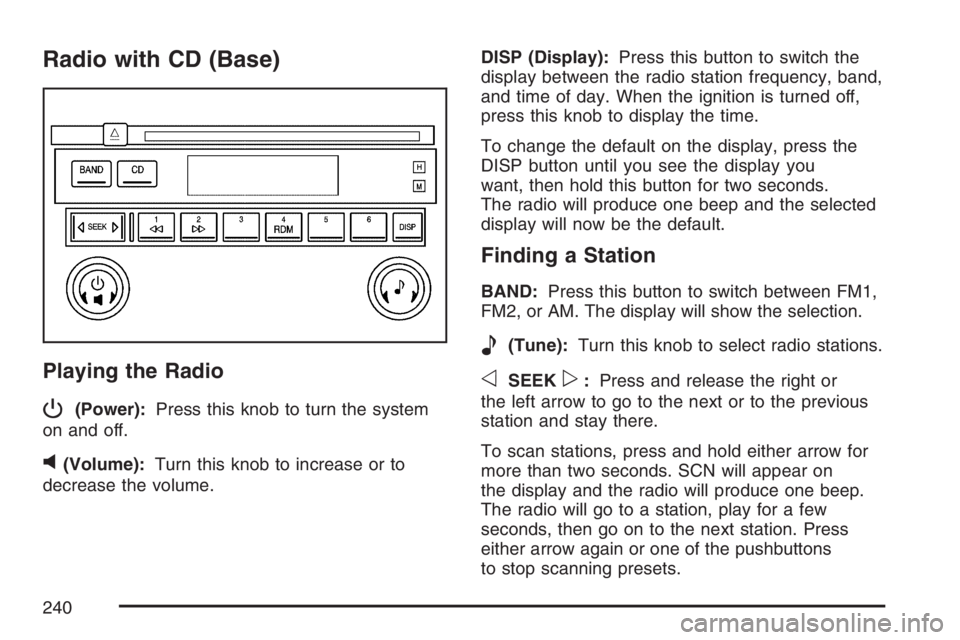
Radio with CD (Base)
Playing the Radio
P
(Power):Press this knob to turn the system
on and off.
v(Volume):Turn this knob to increase or to
decrease the volume.DISP (Display):Press this button to switch the
display between the radio station frequency, band,
and time of day. When the ignition is turned off,
press this knob to display the time.
To change the default on the display, press the
DISP button until you see the display you
want, then hold this button for two seconds.
The radio will produce one beep and the selected
display will now be the default.
Finding a Station
BAND:Press this button to switch between FM1,
FM2, or AM. The display will show the selection.
e(Tune):Turn this knob to select radio stations.
oSEEKp:Press and release the right or
the left arrow to go to the next or to the previous
station and stay there.
To scan stations, press and hold either arrow for
more than two seconds. SCN will appear on
the display and the radio will produce one beep.
The radio will go to a station, play for a few
seconds, then go on to the next station. Press
either arrow again or one of the pushbuttons
to stop scanning presets.
240