2007 BUICK LACROSSE ESP
[x] Cancel search: ESPPage 229 of 512
DIC Vehicle Personalization
Your vehicle may have customization capabilities
that allow you to program certain features to
one preferred setting. Customization features can
only be programmed to one setting on the
vehicle and cannot be programmed to a preferred
setting for two different drivers. The customization
features include the following:
Exterior lighting delay
Interior lighting delay
Delayed locking
Content theft
Remote keyless entry feedback
Remote start
Your vehicle may also have personalization
capabilities that allow you to program certain
features to a preferred setting for up to two drivers.The rst personalized key corresponds to
driver 1 and the second personalized key
corresponds to driver 2. The personalization
features include the following:
Radio station presets
Auto door unlock preferences
Remote keyless entry unlock preferences
All of the customization and personalization options
may not be available on your vehicle. Only the
options available will be displayed on your DIC.
The default settings for the customization and
personalization features were set when your
vehicle left the factory, but may have been
changed from their default state since then.
The customization preferences are
automatically recalled.
The driver’s personalization preferences are
recalled by using the key programmed for
driver 1 or 2.
To change customization and personalization
preferences, use the following procedure.
229
Page 235 of 512
Personalization Menu Items
The following are personalization features that
allow you to program setting for up to two drivers:
PERSONALIZE KEY
This feature allows you to personalize a key to be
recognized as key 1 or 2. A personalized key
allows you to program personalization features to
a preferred setting to correspond to key 1 or 2.
If you are using a key that has already been
personalized, this screen will not display.
Press the option button until PERSONALIZE KEY
appears on the DIC display. Press the set/reset
button to scroll through the following choices:
NO (default):The key will not be personalized.
YES:The key will be personalized.
Select one of the available choices and press the
option button while it is displayed on the DIC
to select it and move on to the next feature.
REPLACE KEY
This screen displays only if YES was selected for
the PERSONALIZE KEY feature, keys 1 and 2
have already been personalized, and the current
key being used is not key 1 or 2. This feature
allows you to program a key to be recognized as
key 1 or 2 in the event that the previously
programmed key needs to be replaced.
1:The key will be programmed to be recognized
as key 1.
2:The key will be programmed to be recognized
as key 2.
CANCEL (default):The key will not be
programmed.
RADIO STATIONS PERSONALIZED
This screen displays only if YES was selected for
the PERSONALIZE KEY feature. This feature
allows you to set the radio station presets to be
recognized for the key, 1 or 2, that is being
used. You may notice a change to the radio after
this message displays. After this message
displays, any change to the presets will be
recognized for key 1 or 2 and will be maintained
by the radio.
235
Page 267 of 512
LOAD:Press this button to load CDs into the CD
player. This CD player will hold up to six CDs.
To insert one CD, do the following:
1. Turn the ignition on.
2. Press and release the LOAD button.
3. Wait for the indicator light, located to the right
of the slot, to turn green.
4. Load a CD. Insert the CD partway into the
slot, label side up. The player will pull the
CD in.
To insert multiple CDs, do the following:
1. Turn the ignition on.
2. Press and hold the LOAD button for
two seconds.
You will hear a beep and the indicator light,
located to the right of the slot, will begin
to ash and MULTI LOAD # will appear on
the display.
3. Once the light stops ashing and turns green,
INSERT CD # will appear on the display, load
a CD. Insert the CD partway into the slot,
label side up. The player will pull the CD in.Once the CD is loaded, the indicator light will
begin ashing again. Once the light stops
ashing and turns green, you can load another
CD. The CD player takes up to six CDs. Do
not try to load more than six.
To load more than one CD but less than six,
complete Steps 1 through 3. When nished loading
CDs, press the LOAD button to cancel the loading
function. The radio will begin to play the last CD
loaded.
If more than one CD has been loaded, a number
for each CD will appear on the display.
Playing a Specic Loaded CD
For every CD loaded, a number will appear on
the display. To play a specic CD, press the
numbered pushbutton that corresponds to the CD.
A small bar will appear under the CD number
that is playing and the track number will appear on
the display.
If an error appears on the display, see “CD
Messages” later in this section.
Z(Eject):Press this button to eject CD(s).
To eject the CD that is currently playing, press and
release this button.
267
Page 281 of 512
>(Mute/OnStar®):Press this button to silence
the system. Press this button again, or any
other radio button, to turn the sound on.
If your vehicle has OnStar
®, press and hold this
button for more than two seconds to interact
with the OnStar
®system. See theOnStar®System
on page 126in this manual for more information.
BAND:Press this button to switch between
FM1, FM2, AM, or XM1 or XM2 (if equipped).
1–6 (Preset Pushbuttons):Press this button to
play stations that are programmed on the
radio preset pushbuttons. The radio will only seek
preset stations with a strong signal that are in
the selected band.
When a CD is playing in the six-disc CD changer,
press this button to go to the next available
CD, if multiple CDs are loaded.
+/−
x(Volume):Press the plus or minus button
to increase or to decrease the volume.
Radio Reception
You may experience frequency interference and
static during normal radio reception if items
such as cellphone chargers, vehicle convenience
accessories, and external electronic devices
are plugged into the accessory power outlet.
If there is interference or static, unplug the item
from the accessory power outlet.
AM
The range for most AM stations is greater than for
FM, especially at night. The longer range can
cause station frequencies to interfere with each
other. For better radio reception, most AM
radio stations will boost the power levels during
the day, and then reduce these levels during
the night. Static can also occur when things like
storms and power lines interfere with radio
reception. When this happens, try reducing the
treble on your radio.
281
Page 289 of 512
A driver with a BAC level of 0.06 percent has
doubled his or her chance of having a collision. At a
BAC level of 0.10 percent, the chance of this driver
having a collision is 12 times greater; at a level of
0.15 percent, the chance is 25 times greater!
The body takes about an hour to rid itself of the
alcohol in one drink. No amount of coffee or number
of cold showers will speed that up. “I will be careful”
is not the right answer. What if there is an
emergency, a need to take sudden action, as when
a child darts into the street? A person with even a
moderate BAC might not be able to react quickly
enough to avoid the collision.
There is something else about drinking and driving
that many people do not know. Medical research
shows that alcohol in a person’s system can make
crash injuries worse, especially injuries to the
brain, spinal cord, or heart. This means that when
anyone who has been drinking — driver or
passenger — is in a crash, that person’s chance
of being killed or permanently disabled is
higher than if the person had not been drinking.
{CAUTION:
Drinking and then driving is very
dangerous. Your reexes, perceptions,
attentiveness, and judgment can be
affected by even a small amount of
alcohol. You can have a serious — or even
fatal — collision if you drive after drinking.
Please do not drink and drive or ride with a
driver who has been drinking. Ride home in
a cab; or if you are with a group, designate
a driver who will not drink.
289
Page 293 of 512

Remember: ABS does not change the time you
need to get your foot up to the brake pedal
or always decrease stopping distance. If you get
too close to the vehicle in front of you, you will not
have time to apply your brakes if that vehicle
suddenly slows or stops. Always leave enough
room up ahead to stop, even though you
have ABS.
Using ABS
Do not pump the brakes. Just hold the brake
pedal down rmly and let anti-lock work for you.
You may feel a slight brake pedal pulsation
or notice some noise, but this is normal.
Braking in Emergencies
At some time, nearly every driver gets into a
situation that requires hard braking.
If you have ABS, you can steer and brake at the
same time. However, if you do not have ABS, your
rst reaction — to hit the brake pedal hard and
hold it down — may be the wrong thing to do.
Your wheels can stop rolling.Once they do, the vehicle cannot respond to your
steering. Momentum will carry it in whatever
direction it was headed when the wheels stopped
rolling. That could be off the road, into the very
thing you were trying to avoid, or into traffic.
If you do not have ABS, use a “squeeze” braking
technique. This will give you maximum braking
while maintaining steering control. You can do this
by pushing on the brake pedal with steadily
increasing pressure.
In an emergency, you will probably want to
squeeze the brakes hard without locking the
wheels. If you hear or feel the wheels sliding, ease
off the brake pedal. This will help you retain
steering control. If you do have ABS, it is different.
SeeAnti-Lock Brake System (ABS) on page 291.
In many emergencies, steering can help you
more than even the very best braking.
293
Page 294 of 512
Traction Control System (TCS)
Your vehicle may have a Traction Control System
(TCS) that limits wheel spin. This is especially
useful in slippery road conditions. The system
operates only if it senses that one or both of the
front wheels are spinning or beginning to lose
traction. When this happens, the system works the
front brakes and reduces engine power to limit
wheel spin. It may also upshift the transaxle to limit
wheel spin. You may feel or hear the system
working, but this is normal.
The TRACTION CONTROL ACTIVE message on
the Driver Information Center (DIC) will be
displayed when the system is limiting wheel spin.
If the vehicle is in cruise control when the TCS
begins to limit wheel spin, the cruise control will
automatically disengage. When road conditions
allow safe use of the cruise control, it can be used
again. SeeCruise Control on page 154.The TCS operates in all transaxle shift lever
positions. But the system can upshift the transaxle
only as high as the shift lever position that was
chosen, so use the lower gears only when
necessary. SeeAutomatic Transaxle Operation
on page 114.
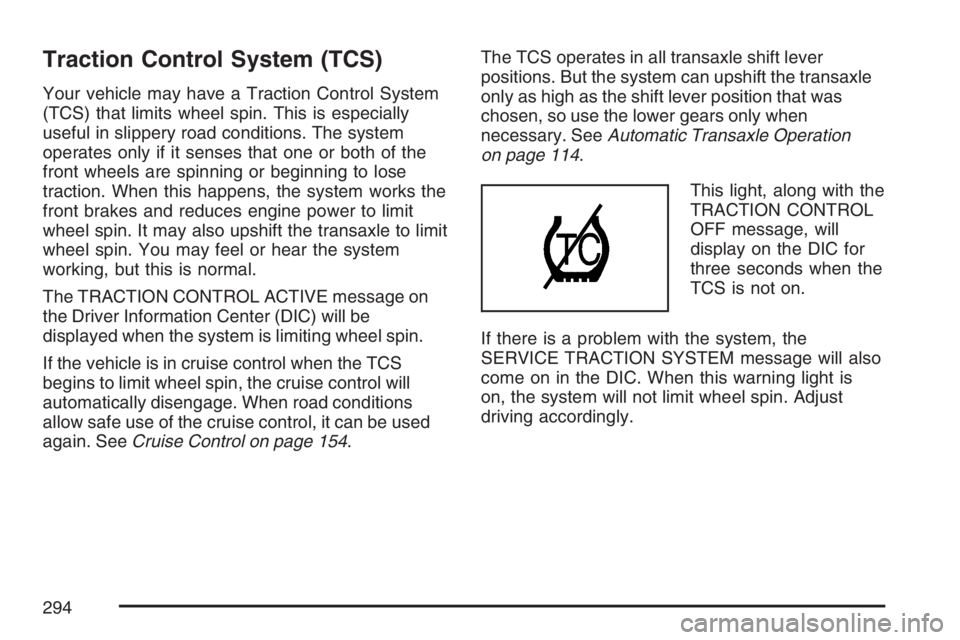
This light, along with the
TRACTION CONTROL
OFF message, will
display on the DIC for
three seconds when the
TCS is not on.
If there is a problem with the system, the
SERVICE TRACTION SYSTEM message will also
come on in the DIC. When this warning light is
on, the system will not limit wheel spin. Adjust
driving accordingly.
294
Page 295 of 512
To limit wheel spin, especially in slippery road
conditions, you should always leave the TCS on.
But you can turn the system off if you ever
need to. The TCS should be turned off if the
vehicle ever gets stuck in sand, mud or snow and
rocking the vehicle is required. SeeRocking
Your Vehicle to Get It Out on page 319andIf Your
Vehicle is Stuck in Sand, Mud, Ice, or Snow on
page 318.
To turn the TCS on or off, press the TCS button
located above the radio.
When the TCS is turned off, the TCS warning light
will come on along with the TRACTION CONTROL
OFF message on the DIC. It will disappear when
the TCS is turned back on. If the TCS is limiting
wheel spin when the TCS button is pressed, the
TCS warning light will come on and the TCS will
turn off right away.
Adding non-GM accessories can affect your
vehicle’s performance. SeeAccessories and
Modications on page 341for more information.Enhanced Traction System (ETS)
Your vehicle may have an Enhanced Traction
System (ETS) that limits wheel spin. This is
especially useful in slippery road conditions. The
system operates only if it senses that one or
both of the front wheels are spinning or beginning
to lose traction. When this happens, the system
reduces engine power and may also upshift
the transaxle to limit wheel spin. You may feel or
hear the system working, but this is normal.
The TRACTION CONTROL ACTIVE message on
the Driver Information Center (DIC) will be
displayed when the system is limiting wheel spin.
If the vehicle is in cruise control when ETS
begins to limit wheel spin, the cruise control will
automatically disengage. When road conditions
allow safe use of it, the cruise control can be used
again. SeeCruise Control on page 154.
295