2007 BMW M5 SEDAN height adjustment
[x] Cancel search: height adjustmentPage 44 of 256

Adjusting
42
Seats
Note before adjusting
Never attempt to adjust your seat while
the vehicle is moving. The seat could
respond with unexpected movement, and the
ensuing loss of vehicle control could lead to an
accident.
Also on the passenger side, do not incline the
backrest too far to the rear while the vehicle is
being driven, otherwise there is a danger in the
event of an accident of sliding under the safety
belt, eliminating the protection normally pro-
vided by the belt.<
Please observe the information on damage to
safety belts provided on page46 and the infor-
mation on the active front
head restraints* on
page45.
Adjusting seat
To ensure that the safety systems con-
tinue to provide optimized protection,
please observe the adjustment instructions on
page41.<
1Longitudinal direction
2Height
3Angle4Backrest width
5Backrest
6Head restraint height
7Shoulder support
*
8Thigh support
9Lumbar support
*
Shoulder support*
This also supports the back in the shoulder
area, This provides a relaxed driving position
and helps relieve stress on the shoulder mus-
cles.
Lumbar support*
You can also adjust the contour of the backrest
to obtain additional support in the lumbar
region.
The upper hips and spinal column receive sup-
plementary support to help you maintain a
relaxed, upright sitting position.
>Increase or decrease curvature: press front
or rear section of switch.
>Shift curvature up or down: press upper or
lowers section of switch.
ba8_m5us.book Seite 42 Montag, 5. Februar 2007 12:03 12
Page 47 of 256
Controls
45Reference
At a glance
Driving tips
Communications
Navigation
Entertainment
Mobility
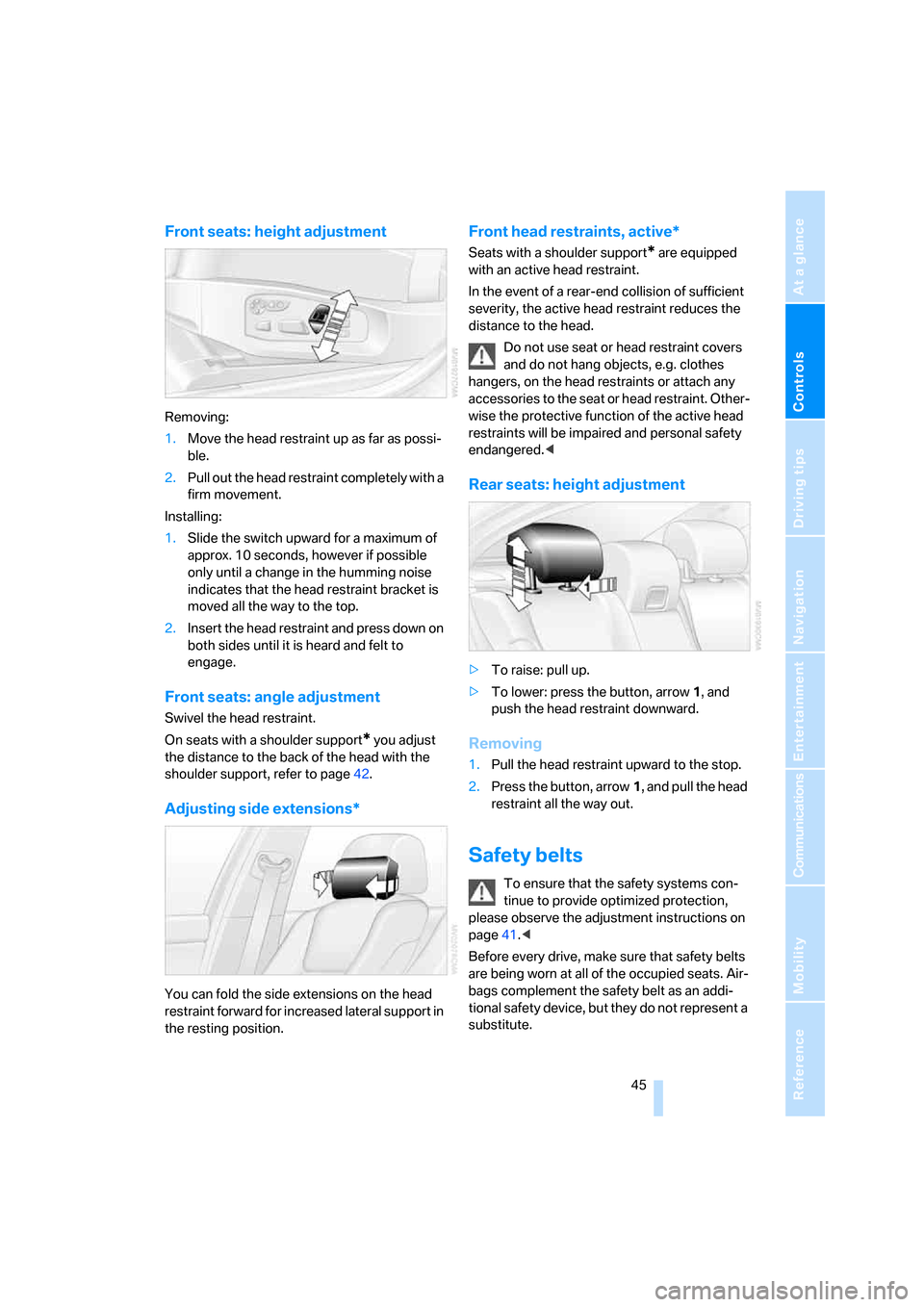
Front seats: height adjustment
Removing:
1.Move the head restraint up as far as possi-
ble.
2.Pull out the head restraint completely with a
firm movement.
Installing:
1.Slide the switch upward for a maximum of
approx. 10 seconds, however if possible
only until a change in the humming noise
indicates that the head restraint bracket is
moved all the way to the top.
2.Insert the head restraint and press down on
both sides until it is heard and felt to
engage.
Front seats: angle adjustment
Swivel the head restraint.
On seats with a shoulder support
* you adjust
the distance to the back of the head with the
shoulder support, refer to page42.
Adjusting side extensions*
You can fold the side extensions on the head
restraint forward for increased lateral support in
the resting position.
Front head restraints, active*
Seats with a shoulder support* are equipped
with an active head restraint.
In the event of a rear-end collision of sufficient
severity, the active head restraint reduces the
distance to the head.
Do not use seat or head restraint covers
and do not hang objects, e.g. clothes
hangers, on the head restraints or attach any
accessories to the seat or head restraint. Other-
wise the protective function of the active head
restraints will be impaired and personal safety
endangered.<
Rear seats: height adjustment
>To raise: pull up.
>To lower: press the button, arrow1, and
push the head restraint downward.
Removing
1.Pull the head restraint upward to the stop.
2.Press the button, arrow1, and pull the head
restraint all the way out.
Safety belts
To ensure that the safety systems con-
tinue to provide optimized protection,
please observe the adjustment instructions on
page41.<
Before every drive, make sure that safety belts
are being worn at all of the occupied seats. Air-
bags complement the safety belt as an addi-
tional safety device, but they do not represent a
substitute.
ba8_m5us.book Seite 45 Montag, 5. Februar 2007 12:03 12
Page 54 of 256

Transporting children safely
52
Transporting children safely
The right place for children
Do not leave children unattended in the
vehicle, otherwise they could endanger
themselves and other persons, e.g. by opening
the doors.<
Children always in the rear
Accident research shows that the safest place
for children is on the rear seat.
Children younger than 13 years of age or
with a height under 5 ft/150 cm may only
be transported in the rear in child restraint sys-
tems which correspond to the age, weight and
height of the child. Otherwise there is an
increased danger of injury in an accident.<
Children 13 years of age or older must wear a
safety belt as soon as a suitable child restraint
system can no longer be used due to their age,
size and weight.
Exception for front passenger seat
Should it be necessary to use a child
restraint system on the front passenger
seat, the front and side airbags on the passen-
ger side must be deactivated. Otherwise, there
is an increased risk of injury for the child if the
airbags are triggered, even with a child restraint
system.<
For more information on automatic deactivation
of the front passenger airbags, refer to page86.
Installing child restraint
systems
Observe the child restraint system manu-
facturer's instructions for selection,
installation and use of the child restraint sys-
tems. Otherwise the degree of protection may
be reduced.<
On front passenger seat
After mounting a child restraint system on
the front passenger seat, make sure that
the front and side airbags on the front passen-
ger side are deactivated, as otherwise there is
an increased risk of injury if the airbags are trig-
gered.<
Backrest width
Before mounting a child restraint system
on the front passenger seat, the backrest
width adjustment must be open completely.
After mounting the child's seat, no memory
position may be called up and the active back-
rest width adjustment must be deactivated,
otherwise the stability of the child's seat on the
front passenger seat is limited.<
1.After unlocking the vehicle, sit on the front
passenger seat and close the door to call up
the memory position.
2.Completely open the backrest width adjust-
ment, refer to page42.
3.Deactivate active backrest width adjust-
ment, refer to page43.
4.Install child's seat.
ba8_m5us.book Seite 52 Montag, 5. Februar 2007 12:03 12
Page 243 of 256

Reference 241
At a glance
Controls
Driving tips
Communications
Navigation
Entertainment
Mobility
Gear display, refer to Displays
in instrument cluster60
Gearshift lever59
– manual transmission57
Gearshift lever positions,
manual transmission57
General driving notes112
Glass sunroof, electric38
– comfort operation from
outside32
– comfort operation with
comfort access36
– moving manually39
– remote control31
Glove compartment103
– lighting103
– rechargeable flashlight104
GPS navigation, refer to
Navigation system120
Grills, refer to Ventilation99
Gross vehicle weight, refer to
Weights228
Ground clearance114
H
Handbrake57
– indicator lamp13,57
Hand lamp, refer to
Rechargeable flashlight104
Hands-free system, refer to
Microphone14
Hazard warning flashers15
"HD radio"154
HD radio, refer to High
Definition Radio154
Head airbags86
Headlamp control,
automatic91
Headlamp flasher61
Headlamps91
– care, refer to Caring for your
vehicle brochure
– cleaning, refer to Wiper
system62
– cleaning tank, refer to
Capacities228
– filler neck for washer
fluid204Head Light, refer to Adaptive
Head Light93
Head restraints44
– installing45
– removing45
– sitting safely41
"Head-Up Display"51,88
Head-Up Display88
– default view88
– M view88
– shift lights61
Heated
– mirrors48
– rear window97
– seats46
– steering wheel49
Heating95
– exterior mirrors48
– interior95
– rear window97
– residual heat98
– seats46
– steering wheel49
Heating with engine switched
off, refer to Residual heat98
Heavy cargo, refer to Securing
cargo116
Height, refer to
Dimensions227
Height adjustment
– seats42
– steering wheel49
High beams93
– headlamp flasher93
– indicator lamp13
High Definition Radio154
High water, refer to Driving
through water113
Hills114
Holder for cups105
"Home address" for
navigation system132
Homepage of BMW4
Hood203
Horn10
Hot exhaust system112
"Hour memo"74
"House number" for
destination entry125Hydraulic brake assistant,
refer to Brake assistant79
Hydroplaning113
I
IBOC, refer to High Definition
Radio154
Ice, refer to Outside
temperature warning66
ID3 tag, refer to Information on
track161
Identification mark
– recommended tire
brands202
– tire coding199
Idle59
iDrive16
– assistance window20
– automatic climate control
with expanded scope96
– changing date and time74
– changing language76
– changing menu page19
– changing settings73
– changing units of measure
and display type75
– confirming selection or
entry19
– controller16
– controls16
– displays, menus17
– operating principle17
– selecting menu item19
– setting brightness75
– start menu17
– status information20
– symbols18
Ignition55
– switched off56
– switched on55
Ignition key, refer to Keys/
remote control28
Ignition key position 1, refer to
Radio readiness55
Ignition key position 2, refer to
Ignition on55
ba8_m5us.book Seite 241 Montag, 5. Februar 2007 12:03 12
Page 249 of 256

Reference 247
At a glance
Controls
Driving tips
Communications
Navigation
Entertainment
Mobility
S
Safety5
Safety belts45
– damage46
– refer to Caring for your
vehicle brochure
– sitting safely41
– warning lamp46
Safety belt tensioners
– refer to Airbags86
– refer to Safety belts45
Safety systems
– ABS Antilock Brake
System78
– airbags86
– driving stability control
systems78
– safety belts45
Satellite radio156
– enabling channel156
– selecting channel157
– storing channel157
"SAT" with radio146,156
"Save current
destination"132
"Scan"
– music tracks on CD161
– stations with radio151
Scan
– CD changer161
– CD player161
– radio151
"Scan all" in audio mode161
"Scan directory" in audio
mode161
Screen, refer to iDrive16
Screw thread for tow
fitting221
SDARS, refer to Satellite
radio156
"Seat heater distribution"47Seats42
– active backrest width
adjustment43
– adjusting backrest width42
– adjusting height42
– adjusting shoulder
support42
– adjusting the seats42
– adjusting thigh support42
– easy entry/exit43
– heating46
– lumbar support42
– memory, refer to Seat, mirror
and steering wheel
memory43
– shoulder support42
– sitting safely41
– storing the setting43
– ventilation, refer to Active
seat ventilation47
Securing load
– refer to Securing cargo116
– with ski bag, refer to
Securing cargo109
"Select as
destination"128,191
"Select current speed"73
Selecting audio sources, refer
to Operation via iDrive146
Selecting frequency
manually151
Selecting menu items19
Selecting route132
Selection options with
navigation system132
Selector lever, Sequential
Manual Transmission59
Selector lever positions,
Sequential Manual
Transmission59Sequential Manual
Transmission with
Drivelogic58
– Drivelogic driving
programs60
– idle59
– initializing system, refer to
After changing wheels/
tires202
– reverse gear59
– Sequential mode59
– shift lights61
– shiftlock59
– towing222
– tow-starting223
Sequential mode59
"Service"69,189
Service, refer to Roadside
Assistance220
Service and Warranty
Information Booklet for
US models208
Service Interval Display
– refer to CBS Condition
Based Service208
– refer to Service
requirements68
"Service notification"189
"Service Request"182,189
"Service
requirements"69,189
Service requirements68
– refer to CBS Condition
Based Service208
"Service Status"193
"Set"
– in audio mode146
– on trip computer68
"Set date"75
"Set service date"70
"Set time"74
Setting button, refer to
Controls, controller16
"Settings"193
– for BMW Assist191
– for MDrive51
– for unlocking30
ba8_m5us.book Seite 247 Montag, 5. Februar 2007 12:03 12