2007 BMW M5 SEDAN CD player
[x] Cancel search: CD playerPage 170 of 256

USB/audio interface
168
Repeating a track
1.Select the current track and press the con-
troller.
2.Select "Repeat track" and press the con-
troller.
To stop repeating:
1.Press the controller.
2.Select "Repeat track" and press the con-
troller.
Random play sequence
You can play back the tracks of the selected list
in random order, e.g. all tracks of an artist.
1.Select the current track and press the con-
troller.
2.Select "Random" and press the controller.
End random playback:
1.Press the controller.
2.Select "Random" and press the controller.
Fast forward/reverse
Buttons next to CD player:
Press and hold the button for the corre-
sponding direction.
Notes
>The USB/audio interface supplies the con-
nected audio device with power, provided
the audio device supports this function.
Therefore, do not connect the audio device
to a socket in the vehicle during operation.
>Do not subject the audio devices to extreme
environmental conditions, e.g. extremely
high temperatures, refer to the operating
instructions of the audio device.
>Do not connect any devices, e.g. fans or
lamps, to the USB/audio interface.
>Do not connect USB hard disks.
>Depending on the configuration of the
audio files, e.g. bit rates greater than
256 Kbit/s, proper playback cannot always
be ensured.
ba8_m5us.book Seite 168 Montag, 5. Februar 2007 12:03 12
Page 233 of 256
Reference 231
At a glance
Controls
Driving tips
Communications
Navigation
Entertainment
Mobility
Entertainment
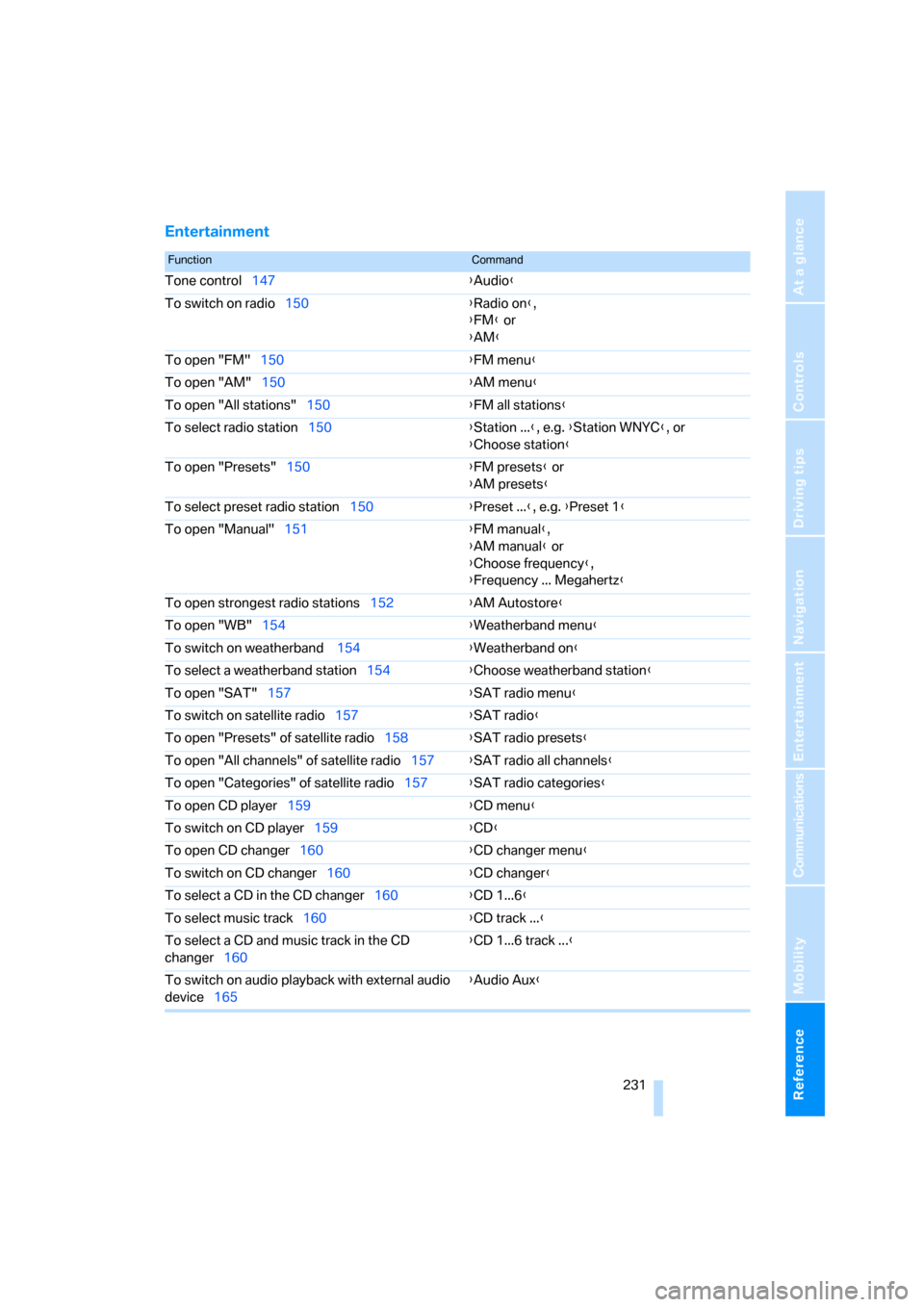
FunctionCommand
Tone control147{Audio}
To switch on radio150{Radio on},
{FM} or
{AM}
To open "FM"150{FM menu}
To open "AM"150{AM menu}
To open "All stations"150{FM all stations}
To select radio station150{Station ...}, e.g. {Station WNYC}, or
{Choose station}
To open "Presets"150{FM presets} or
{AM presets}
To select preset radio station150{Preset ...}, e.g. {Preset 1}
To open "Manual"151{FM manual},
{AM manual} or
{Choose frequency},
{Frequency ... Megahertz}
To open strongest radio stations152{AM Autostore}
To open "WB"154{Weatherband menu}
To switch on weatherband 154{Weatherband on}
To select a weatherband station154{Choose weatherband station}
To open "SAT"157{SAT radio menu}
To switch on satellite radio157{SAT radio}
To open "Presets" of satellite radio158{SAT radio presets}
To open "All channels" of satellite radio157{SAT radio all channels}
To open "Categories" of satellite radio157{SAT radio categories}
To open CD player159{CD menu}
To switch on CD player159{CD}
To open CD changer160{CD changer menu}
To switch on CD changer160{CD changer}
To select a CD in the CD changer160{CD 1...6}
To select music track160{CD track ...}
To select a CD and music track in the CD
changer160{CD 1...6 track ...}
To switch on audio playback with external audio
device165{Audio Aux}
ba8_m5us.book Seite 231 Montag, 5. Februar 2007 12:03 12
Page 238 of 256

Everything from A to Z
236 Brakes
– ABS Antilock Brake
System78
– brake assistant79
– brake force display85
– breaking-in112
– CBC Cornering Brake
Control78
– electronic brake-force
distribution78
– handbrake57
– refer to Braking safely113
– warning lamps13
Brake system112
– brake pads112
– breaking-in112
– disk brakes114
– warning lamp80
Braking safely113
Breakdown, M Mobility
System213
Breakdown assistance188
Breakdown services, refer to
Roadside Assistance220
Breaking-in brake pads112
Breaking-in the clutch112
Breaking-in the differential,
refer to Engine and
differential112
Break-in period112
"Brightness"75,89
Brightness of Control
Display75
Button for starting engine,
refer to Start/Stop button55
Buttons on steering wheel11
C
California Proposition 65
Warning6
"Call"180,191
Call
– accepting178
– displaying accepted181
– ending179
– in absence181
– rejecting179
– starting179Calling
– by entering phone
number179
– from phone book180
– from Top 8 list181
– redialing181
Can holder, refer to Cup
holders105
Capacities228
Car battery, refer to Vehicle
battery218
Car care, refer to Caring for
your vehicle brochure
Car-care products, refer to
Caring for your vehicle
brochure
"Car Data"67
Care209
– refer to Caring for your
vehicle brochure
Cargo
– refer to Cargo loading114
– securing116
– securing with ski bag109
Cargo bay
– capacity228
– emergency release34
– opening/closing, refer to
Luggage compartment
lid33
– opening from inside33
– opening from outside34
– opening with remote
control31
– socket107
Caring for artificial leather,
refer to Caring for your
vehicle brochure
Caring for leather, refer to
Caring for your vehicle
brochure
Caring for light-alloy wheels,
refer to Caring for your
vehicle brochure
Caring for plastic, refer to the
Caring for your vehicle
brochureCaring for the carpet, refer to
Caring for your vehicle
brochure
Caring for the vehicle finish,
refer to Caring for your
vehicle brochure
Car key, refer to Keys/remote
control28
Car phone172
– installation location, refer to
Center armrest104
– refer to Mobile phone172
– refer to separate operating
instructions
Car radio, refer to Radio150
Car wash114
– also refer to Caring for your
vehicle brochure
Catalytic converter, refer to
Hot exhaust system112
"Categories"157
CBC Cornering Brake
Control78
CBS Condition Based
Service208
"CD"146,159
CD changer159
– controls146
– fast forward/reverse163
– installation location163
– random sequence162
– repeating a track162
– sampling tracks161
– selecting a CD160
– selecting a track160
– switching on/off146
– tone control147
– volume147
CD player159
– controls146
– fast forward/reverse163
– random sequence162
– repeating a track162
– sampling a track161
– selecting a track160
– switching on/off146
– tone control147
– volume147
ba8_m5us.book Seite 236 Montag, 5. Februar 2007 12:03 12
Page 239 of 256

Reference 237
At a glance
Controls
Driving tips
Communications
Navigation
Entertainment
Mobility
Center armrest
– front104
– rear107
Center brake lamp212
Center console14
"Central locking"30
Central locking
– from inside32
– from outside30
Central locking system30
– comfort access36
Changes, technical
– refer to For your own
safety5
– refer to Parts and
accessories6
Changing language on
Control Display76
Changing scale for
navigation136
Changing units of measure on
Control Display75
Changing wheels201,215
CHECK button71
Check Control70
"Check Control
messages"72
Check Gas Cap196
Checking the air pressure,
refer to Tire inflation
pressure198
Child restraint fixing system
LATCH53
Child restraint systems52
Child-safety lock54
Child seats, refer to
Transporting children
safely52
Chime, refer to Check
Control70
Chock216
Chrome parts, refer to Caring
for your vehicle brochure
Cigarette lighter106
Cigarette lighter socket, refer
to Connecting electrical
devices107
Cleaning, refer to Caring for
your vehicle brochure"Climate"47,96
Clock66
– 12h/24h mode74
– hour signal74
– setting time and date74
Closing
– from inside32
– from outside30
Closing fuel filler cap196
Clothes hooks105
Cockpit
10
Cold start, refer to Starting
engine56
Comfort access36
– replacing battery, remote
control37
Comfort area, refer to Around
the center console14
Comfort operation
– glass sunroof31
– windows31
– windows with comfort
access36
– with comfort access36
"Comfort" with EDC81
"Communication"178,188
Compact Disc
– refer to CD changer159
– refer to CD player159
Compartment for remote
control, refer to Ignition
lock55
Compartments, refer to
Storage compartments105
Compressed audio files159
Computer66
– clock66
– displays on Control
Display67
– hour signal74
"Concert hall", refer to Tone
control149
"Concierge"190
Condensation, refer to When
vehicle is parked114
Condition Based Service
CBS208
"Confirmation"31Confirmation signals for
locking and unlocking31
Connecting car vacuum
cleaner, refer to Connecting
electrical devices107
Consumption, refer to
Average fuel
consumption67
Consumption statistics, refer
to Average fuel
consumption67
"Continue guidance to
destination?"135
Control Center, refer to
iDrive16
Control Display, refer to
iDrive16
– setting brightness75
– switching off/on21
Controller, refer to iDrive16
Controls, refer to Cockpit10
Coolant206
– checking level206
– temperature
65
Cooling, maximum98
Cooling fluid, refer to
Coolant206
Cooling function, automatic
climate control98
Cooling system, refer to
Coolant206
Copyright2
Cornering Brake Control
CBC78
Country of destination for
navigation123
Courtesy lamps94
Cradle for telephone or mobile
phone104
Cruise control63
Cruising range67
Cup holders105
Curb weight, refer to
Weights228
"Current position"142
Current position
– displaying142
– entering130
– storing130
ba8_m5us.book Seite 237 Montag, 5. Februar 2007 12:03 12
Page 241 of 256

Reference 239
At a glance
Controls
Driving tips
Communications
Navigation
Entertainment
Mobility
DOT Quality Grades200
Draft-free ventilation99
Drinks holder, refer to Cup
holders105
Drivelogic60
Drive mode59
"Driver's door only"31
Driving lamps, refer to Parking
lamps/low beams91
Driving programs, refer to
Drivelogic60
Driving route, refer to
Displaying route135
Driving stability control
systems78
Driving through water113
Driving tips, refer to General
driving notes112
Dry air, refer to Cooling
function98
Drying the air, refer to Cooling
function98
"DSC"51,79
DSC Dynamic Stability
Control79
– indicator lamp13,79
– malfunction80
DVD for navigation120
"Dynamic route" for
navigation133
Dynamic Stability Control
DSC79
– M Dynamic Mode MDM79
E
Easy entry/exit49
– backrest width43
"EDC"51
EDC Electronic Damping
Control81
– "Comfort"81
– "Normal"81
– "Sport"81
Eject button, refer to Buttons
in area of CD player146Electrical malfunction
– door lock32
– driver's door32
– fuel filler door196
– glass sunroof, electric39
– luggage compartment lid34
Electric steering wheel
adjustment49
Electronic brake-force
distribution78
Electronic Damping Control
EDC81
Emergency call219
Emergency operation, refer to
Manual operation
– door lock32
– driver's door32
– fuel filler door196
– luggage compartment lid34
Emergency operation of glass
sunroof, refer to Moving
manually39
Emergency release for
luggage compartment lid in
cargo bay34
Emergency services, refer to
Roadside Assistance220
"Enable services"193
"End call"180
Engaging driving position,
refer to Selector lever
positions59
Engaging forward position,
refer to Selector lever
positions59
Engine
– breaking-in112
– data226
– M Engine Dynamic
Control58
– overheated, refer to Coolant
temperature65
– speed226
– starting56
– starting, with comfort
access36
– switching off56Engine compartment204
Engine coolant206
Engine oil
– adding205
– additives, refer to Approved
engine oils206
– approved engine oil206
– checking oil level204
– exact measurement205
– fast measurement205
– interval between changes,
refer to Service
requirements68
– oil change206
– oil grades, refer to Approved
engine oils206
– possible displays205
– temperature66
– temperature gauge66
Engine output, refer to Engine
data226
Engine overheating, refer to
Coolant temperature65
Engine speed, refer to Engine
data226
Engine starting, refer to
Starting engine56
"Enter address"122,130
Entering destination via town/
city name123
Entering intersection,
navigation124
Entering the
address122,125
Entering town/city for
navigation123
Entering zip code for
navigation123
"Entertainment"146
Entertainment sound output
on/off147
Entry map for destination127
"Equalizer", refer to Tone
control149
Equalizer, refer to Tone
control149
"ESN"157
ba8_m5us.book Seite 239 Montag, 5. Februar 2007 12:03 12
Page 242 of 256

Everything from A to Z
240 ESP Electronic Stability
Program, refer to DSC
Dynamic Stability
Control79
Event Data Recorders209
Exhaust system, refer to Hot
exhaust system112
Exterior mirrors48
– adjusting48
– automatic dimming
feature49
– automatic heating48
– folding in and out48
– tilting down passenger-side
exterior mirror48
External audio device105
Eye for tow-starting and
towing, refer to Tow
fitting221
F
"Fader", refer to Tone
control148
Fader, refer to Tone
control148
Failure messages, refer to
Check Control70
False alarm
– refer to Avoiding
unintentional alarms35
– refer to Switching off
alarm35
Fastening safety belts, refer to
Safety belts45
– warning lamp46
Fastest route for
navigation132
"Fast route" for
navigation132
"Favorites", calling up with
radio154
Filler neck for washer fluid63
Filling bottle, refer to
M Mobility System213
Filling sealant into wheel214
Filter, refer to Microfilter/
activated-charcoal filter99Fine wood, refer to Caring for
your vehicle brochure
First aid, refer to First-aid
kit220
First-aid kit220
Flashing
– during locking/unlocking,
refer to Setting confirmation
signals31
– triple turn signal
activation62
Flashlight, refer to
Rechargeable flashlight104
Flat tire
– changing wheels215
– Flat Tire Monitor81,83
– M Mobility System83,213
– refer to Tire condition200
– spare wheel216
– TPM Tire Pressure
Monitor83
– warning lamp83,84
Flat Tire Monitor81
– false alarms82
– initializing system82
– snow chains202
– system limits82
– warning lamp83
Floor mat, refer to Caring for
your vehicle brochure
Floor mats/carpets, refer to
Caring for your vehicle
brochure
Fluid reservoir, refer to Filler
neck for washer fluid63
"FM", reception
range146,150
FM, waveband150
Folding rear backrest108
Fold-over rear backrest108
Footbrake, refer to Braking
safely113
Footwell lamps, refer to
Interior lamps94
Forward, fast
– CD changer163
– CD player163
For your own safety5Freeway, refer to Route
criteria132
Front airbags86
Front armrest, refer to Center
armrest, front104
Front passenger airbags
– deactivating86
– deactivating, refer to
Exception for front
passenger seat52
Front seat adjustment42
"FTM"82
FTM, refer to Flat Tire
Monitor81
Fuel197
– average consumption67
– display66
– high-quality brands197
– quality197
– specifications197
– tank contents, refer to
Capacities228
Fuel clock, refer to Fuel
gauge66
Fuel consumption display,
refer to Computer, average
fuel consumption67
Fuel display, refer to Fuel
gauge66
Fuel filler door196
– releasing in the event of
electrical malfunction196
Full mobile phone preparation
package172
Full screen display, refer to
Switching assistance
window off21
Fuses218
G
Garage door opener, refer to
Integrated universal remote
control102
Gasoline, refer to Required
fuel197
Gasoline display, refer to Fuel
gauge66
Gear changes60
ba8_m5us.book Seite 240 Montag, 5. Februar 2007 12:03 12
Page 248 of 256

Everything from A to Z
246 Rain sensor62
"Random", random play
sequence162
"Random all" in audio
mode163
"Random directory" in audio
mode163
"RDS"153
Reading lamps94
Rear armrest, refer to Center
armrest, rear107
Rear lamps, refer to Tail
lamps212
– replacing bulbs212
Rear seats
– adjusting head restraints45
– folding over backrest108
– heating47
– removing head restraints45
Rear socket107
Rear ventilation99
Rearview mirror48
Rear window
– heating97
– roller sun blind, refer to Sun
blinds103
Rear window safety switch38
"Received calls"180
Reception
– quality153
– radio stations153
– regional station152
Reception level of mobile
phone, refer to Status
information20
Rechargeable flashlight104
Recirculated-air mode98
– air recirculation98
– AUC Automatic
recirculated-air control98
Reclining seat, refer to
Seats42
Recording times, refer to
Stopwatch73
"Redial" for mobile phone180
Redialing with mobile
phone185Reflectors, refer to Tail
lamps212
Refueling196
Releasing, hood203
Releasing the locks, refer to
Unlocking36
"Relock door if not
opened"33
Remaining distance, refer to
Cruising range67
Remaining distance to
destination, refer to
Computer67
Remote control28
– comfort access
36
– garage door opener102
– luggage compartment lid31
– malfunction31,37
– replacing battery37
Removing condensation on
the windows97
"Repeat directory" in audio
mode162
"Repeat" in audio mode162
"Repeat track" in audio
mode162
Replacement fuses218
Replacement of tires, refer to
Changing wheels215
Replacement remote control,
refer to New remote
controls28
Replacing bulbs, refer to
Lamps and bulbs210
Replacing tires201
Replacing wheels/tires, refer
to New wheels and tires201
Reporting safety defects7
Reserve warning, refer to Fuel
gauge66
"Reset"82,84
– stopwatch73
– tone settings149
Reset, refer to Resetting tone
settings149
"resetting FTM …"83
"Reset to default" with
MDrive51Residual heat98
Restraint systems
– for children52
– refer to Safety belts45
Retreaded tires201
Reverse, fast
– CD changer163
– CD player163
Reverse gear59
– manual transmission57
Road map136
"Roadside
Assistance"182,188
Roadside Assistance220
Roadside parking lamps93
Roof load capacity228
Roof-mounted luggage
rack116
Rope, refer to Tow-starting
and towing221
Rotary/pushbutton, refer to
iDrive16
Route132
– bypassing sections138
– changing138
– changing criteria132
– displaying135
– displaying arrow display135
– displaying map view136
– displaying streets or towns/
cities137
– selecting132
Route information, refer to
Destination guidance with
voice instructions137
Route map, refer to Displaying
map view136
"Route preference",
changing132
Route selection132
Rubber parts, refer to Caring
for your vehicle brochure
ba8_m5us.book Seite 246 Montag, 5. Februar 2007 12:03 12
Page 249 of 256

Reference 247
At a glance
Controls
Driving tips
Communications
Navigation
Entertainment
Mobility
S
Safety5
Safety belts45
– damage46
– refer to Caring for your
vehicle brochure
– sitting safely41
– warning lamp46
Safety belt tensioners
– refer to Airbags86
– refer to Safety belts45
Safety systems
– ABS Antilock Brake
System78
– airbags86
– driving stability control
systems78
– safety belts45
Satellite radio156
– enabling channel156
– selecting channel157
– storing channel157
"SAT" with radio146,156
"Save current
destination"132
"Scan"
– music tracks on CD161
– stations with radio151
Scan
– CD changer161
– CD player161
– radio151
"Scan all" in audio mode161
"Scan directory" in audio
mode161
Screen, refer to iDrive16
Screw thread for tow
fitting221
SDARS, refer to Satellite
radio156
"Seat heater distribution"47Seats42
– active backrest width
adjustment43
– adjusting backrest width42
– adjusting height42
– adjusting shoulder
support42
– adjusting the seats42
– adjusting thigh support42
– easy entry/exit43
– heating46
– lumbar support42
– memory, refer to Seat, mirror
and steering wheel
memory43
– shoulder support42
– sitting safely41
– storing the setting43
– ventilation, refer to Active
seat ventilation47
Securing load
– refer to Securing cargo116
– with ski bag, refer to
Securing cargo109
"Select as
destination"128,191
"Select current speed"73
Selecting audio sources, refer
to Operation via iDrive146
Selecting frequency
manually151
Selecting menu items19
Selecting route132
Selection options with
navigation system132
Selector lever, Sequential
Manual Transmission59
Selector lever positions,
Sequential Manual
Transmission59Sequential Manual
Transmission with
Drivelogic58
– Drivelogic driving
programs60
– idle59
– initializing system, refer to
After changing wheels/
tires202
– reverse gear59
– Sequential mode59
– shift lights61
– shiftlock59
– towing222
– tow-starting223
Sequential mode59
"Service"69,189
Service, refer to Roadside
Assistance220
Service and Warranty
Information Booklet for
US models208
Service Interval Display
– refer to CBS Condition
Based Service208
– refer to Service
requirements68
"Service notification"189
"Service Request"182,189
"Service
requirements"69,189
Service requirements68
– refer to CBS Condition
Based Service208
"Service Status"193
"Set"
– in audio mode146
– on trip computer68
"Set date"75
"Set service date"70
"Set time"74
Setting button, refer to
Controls, controller16
"Settings"193
– for BMW Assist191
– for MDrive51
– for unlocking30
ba8_m5us.book Seite 247 Montag, 5. Februar 2007 12:03 12