2007 BMW 760LI SEDAN lumbar support
[x] Cancel search: lumbar supportPage 46 of 253
Adjusting
44
Seats
Note before adjusting
Never attempt to adjust your seat while
operating the vehicle. The seat could
respond with unexpected movement and the
ensuing loss of vehicle control could lead to an
accident.
Also on the passenger side, do not recline the
backrest too far to the rear while the vehicle is
being driven; otherwise, there is a danger in the
event of an accident of 'sliding under' the safety
belt, eliminating the protection normally pro-
vided by the belt.<
Please note the information on damage to
safety belts provided on page49 and the infor-
mation on the active head restraints on
page47.
The concept
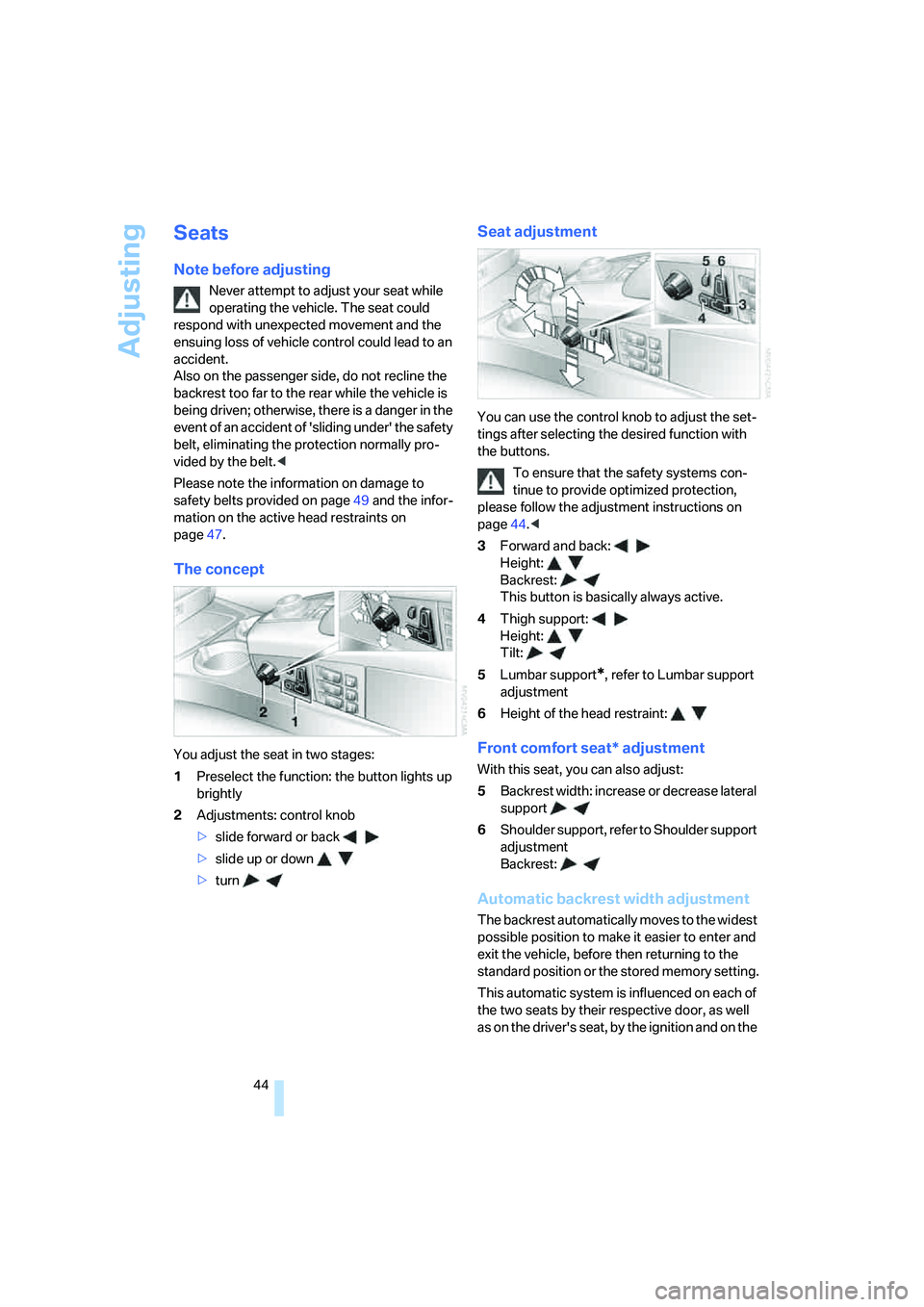
You adjust the seat in two stages:
1Preselect the function: the button lights up
brightly
2Adjustments: control knob
>slide forward or back
>slide up or down
>turn
Seat adjustment
You can use the control knob to adjust the set-
tings after selecting the desired function with
the buttons.
To ensure that the safety systems con-
tinue to provide optimized protection,
please follow the adjustment instructions on
page44.<
3Forward and back:
Height:
Backrest:
This button is basically always active.
4Thigh support:
Height:
Tilt:
5Lumbar support
*, refer to Lumbar support
adjustment
6Height of the head restraint:
Front comfort seat* adjustment
With this seat, you can also adjust:
5Backrest width: increase or decrease lateral
support
6Shoulder support, refer to Shoulder support
adjustment
Backrest:
Automatic backrest width adjustment
The backrest automatically moves to the widest
possible position to make it easier to enter and
exit the vehicle, before then returning to the
standard position or the stored memory setting.
This automatic system is influenced on each of
the two seats by their respective door, as well
as on the driver's seat, by the ignition and on the
Page 47 of 253
Controls
45Reference
At a glance
Driving tips
Communications
Navigation
Entertainment
Mobility
front passenger's seat, by the safety belt
buckle.
Lumbar support adjustment
5Lumbar support
You can also adjust the contour of the backrest
to obtain additional support in the lumbar
region.
The upper hips and spinal column receive sup-
plementary support to help you maintain a
relaxed, upright sitting position.
>Increase or decrease curvature
>Shift curvature up or down
Shoulder support adjustment
6Adjustment of the tilt angle of the shoulder
support:
The shoulder support provides support to your
back in the shoulder region as well. This pro-
vides a relaxed driving position and helps
relieve stress on the shoulder muscles.
Rear comfort seat* adjustment
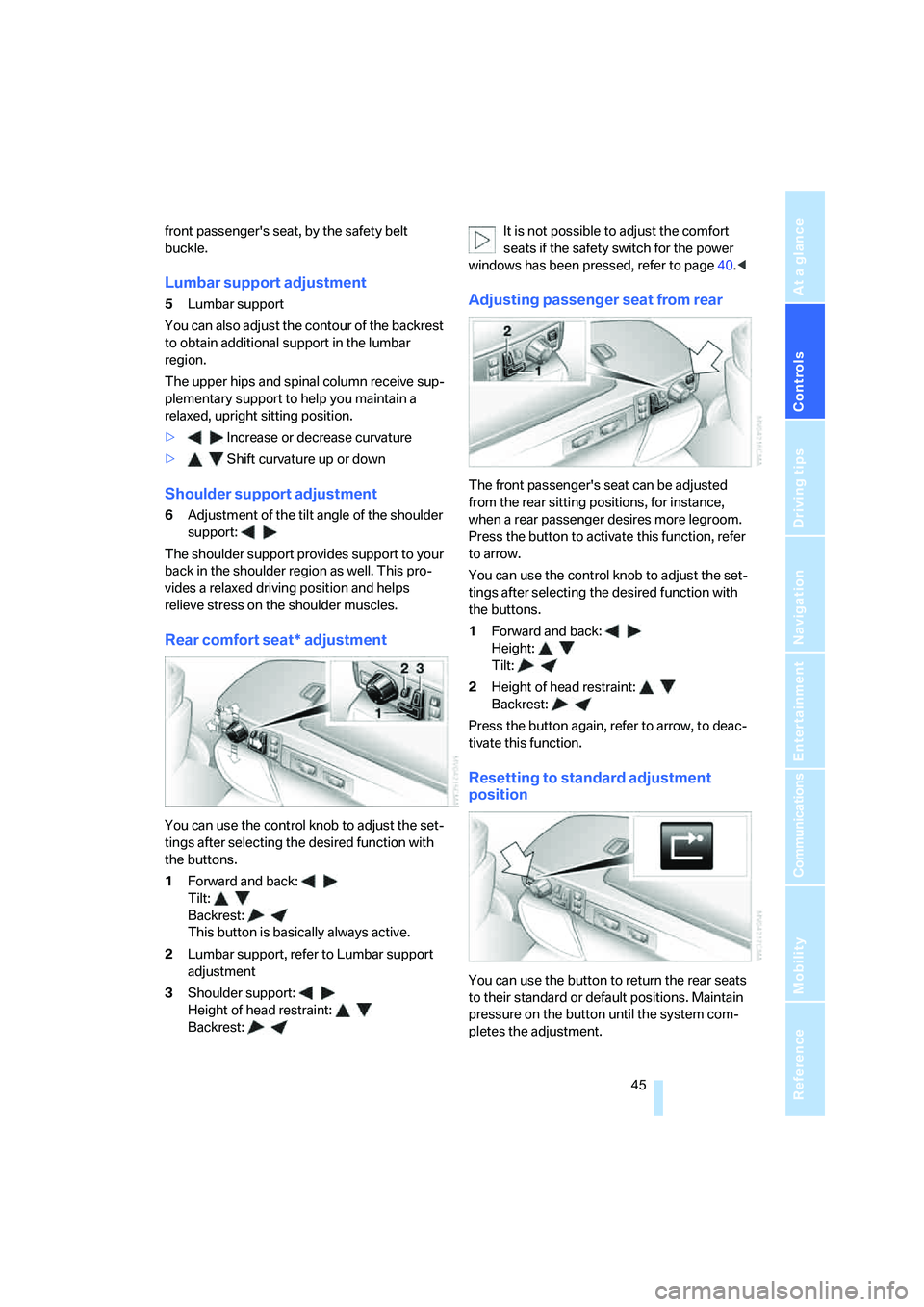
You can use the control knob to adjust the set-
tings after selecting the desired function with
the buttons.
1Forward and back:
Tilt:
Backrest:
This button is basically always active.
2Lumbar support, refer to Lumbar support
adjustment
3Shoulder support:
Height of head restraint:
Backrest:It is not possible to adjust the comfort
seats if the safety switch for the power
windows has been pressed, refer to page40.<
Adjusting passenger seat from rear
The front passenger's seat can be adjusted
from the rear sitting positions, for instance,
when a rear passenger desires more legroom.
Press the button to activate this function, refer
to arrow.
You can use the control knob to adjust the set-
tings after selecting the desired function with
the buttons.
1Forward and back:
Height:
Tilt:
2Height of head restraint:
Backrest:
Press the button again, refer to arrow, to deac-
tivate this function.
Resetting to standard adjustment
position
You can use the button to return the rear seats
to their standard or default positions. Maintain
pressure on the button until the system com-
pletes the adjustment.
Page 48 of 253
Adjusting
46 It will be necessary to return the rear seats
to their standard position before using a
child restraint system, for instance, refer to
page54.<
Seat, mirror and steering
wheel memory
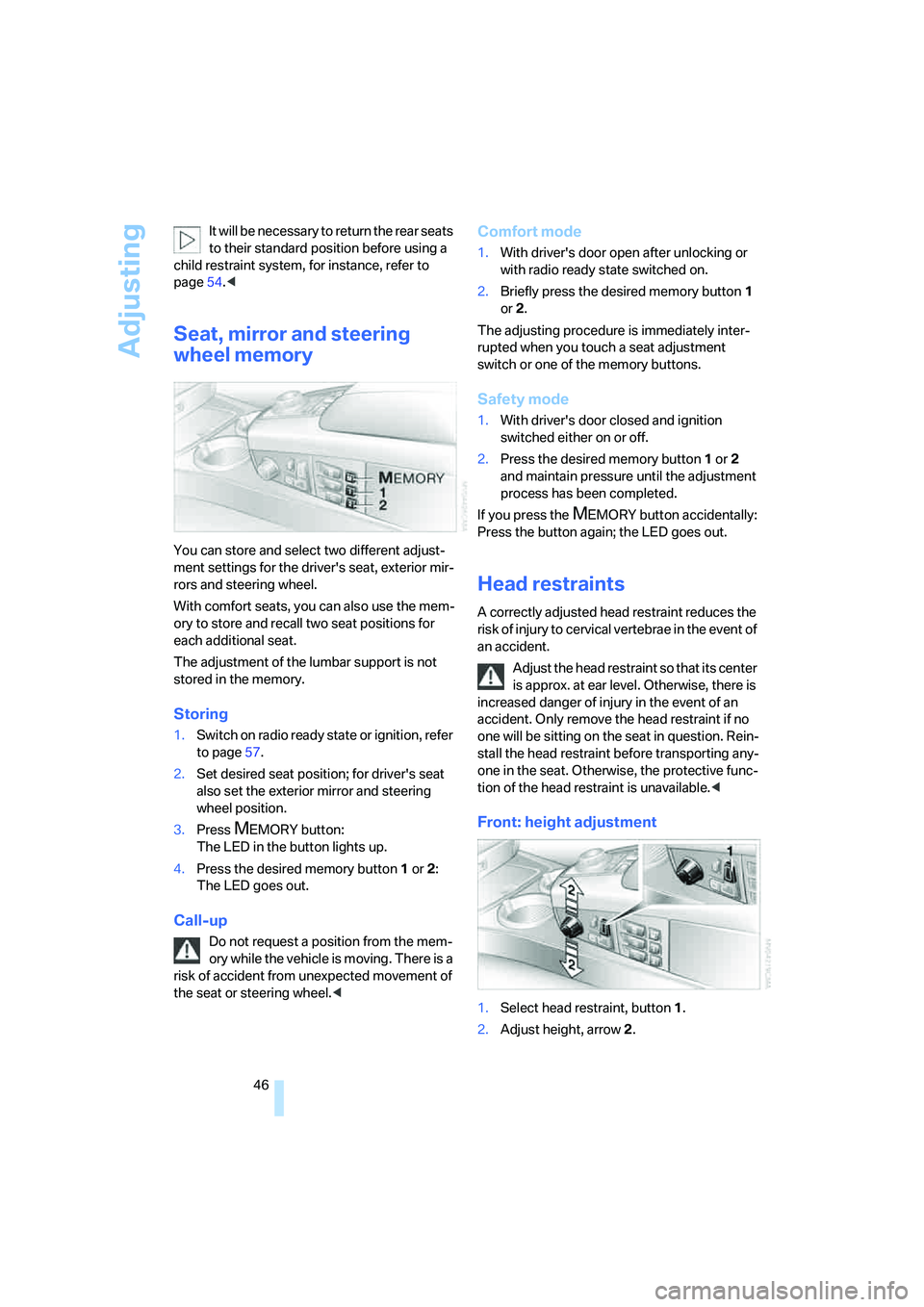
You can store and select two different adjust-
ment settings for the driver's seat, exterior mir-
rors and steering wheel.
With comfort seats, you can also use the mem-
ory to store and recall two seat positions for
each additional seat.
The adjustment of the lumbar support is not
stored in the memory.
Storing
1.Switch on radio ready state or ignition, refer
to page57.
2.Set desired seat position; for driver's seat
also set the exterior mirror and steering
wheel position.
3.Press
MEMORY button:
The LED in the button lights up.
4.Press the desired memory button1 or2:
The LED goes out.
Call-up
Do not request a position from the mem-
ory while the vehicle is moving. There is a
risk of accident from unexpected movement of
the seat or steering wheel.<
Comfort mode
1.With driver's door open after unlocking or
with radio ready state switched on.
2.Briefly press the desired memory button 1
or2.
The adjusting procedure is immediately inter-
rupted when you touch a seat adjustment
switch or one of the memory buttons.
Safety mode
1.With driver's door closed and ignition
switched either on or off.
2.Press the desired memory button 1or2
and maintain pressure until the adjustment
process has been completed.
If you press the
MEMORY button accidentally:
Press the button again; the LED goes out.
Head restraints
A correctly adjusted head restraint reduces the
risk of injury to cervical vertebrae in the event of
an accident.
Adjust the head restraint so that its center
is approx. at ear level. Otherwise, there is
increased danger of injury in the event of an
accident. Only remove the head restraint if no
one will be sitting on the seat in question. Rein-
stall the head restraint before transporting any-
one in the seat. Otherwise, the protective func-
tion of the head restraint is unavailable.<
Front: height adjustment
1.Select head restraint, button1.
2.Adjust height, arrow2.
Page 233 of 253
Reference 231
At a glance
Controls
Driving tips
Communications
Navigation
Entertainment
Mobility
Audio152
– controls152
– switching on/off153
– tone control153
– volume153
"AUDIO", DVD changer173
Audio device, external114
Audio mode152
Automatic
– air distribution104
– air volume104
– cruise control67,69
– headlamp control100
– luggage compartment lid
operation33
– service notification189
– station storage158
– steering wheel adjustment,
refer to Assistance getting in
and out52
– tailgate operation36
Automatic car wash, refer to
Caring for your vehicle
brochure
Automatic climate control
– adjusting temperature105
– AUTO program104
– defrosting windows and
removing condensation106
– maximum cooling106
– rear climate control108
– rear refrigerator117
– residual heat106
– settings on Control
Display104
– switching cooling function
on and off manually107
– switching on and off105
Automatic closing of doors
and luggage compartment
lid, refer to Automatic Soft
Close35
Automatic curb monitor51
Automatic garage door
opener111
Automatic Hold59
– activation/deactivation59
– parking60
– programmable buttons53Automatic lighting
– refer to Automatic headlamp
control100
– refer to Daytime running
lamps101
– refer to Interior lamps102
– refer to Pathway lighting100
Automatic recirculated-air
control AUC105
Automatic soft closing
– doors35
– luggage compartment lid
36
Automatic station search157
Automatic transmission with
Steptronic62
– buttons on steering
wheel63
– interlock62
– manually releasing
transmission lock64
– shiftlock62
– towing220
– tow-starting221
"AUTO P"
– activating/deactivating
Automatic Hold59
– programmable buttons53
AUTO program, automatic
climate control104
– adjusting intensity104
"Autostore list", radio156
"AUX", external audio
device169
AUX-In
– port114
– refer to External audio
device169
"AUX level", external audio
device169
Average fuel consumption77
– setting units84
Average speed77
– setting units84
"Avoid ferries",
navigation142
"Avoid highway",
navigation141
Avoiding unintentional
alarms38"Avoid route", navigation146
"Avoid sect.", navigation146
"Avoid tolls", navigation142
Avoid tolls, navigation142
Axle loads, refer to
Weights226
"A-Z", telephone185
B
Backrest contour, refer to
Lumbar support
adjustment45
Backrests, refer to Seat
adjustment44
Backrest width adjustment,
refer to Front comfort seat
adjustment44
Backup lamp, replacing
bulbs214
"Balance", balance and
fader154
Bar, refer to Tow bar220
Bass, refer to Tone
control154
"Bass", treble and bass154
Battery216
– jump starting219
– switch217
Battery change, remote
control in Comfort
Access39
"BC", computer77
Belts, refer to Safety belts48
Beverage holder, refer to Cup
holders115
Blower, refer to Air
volume106,108
"Bluetooth"183
Bluetooth link, activating/
deactivating183
BMW Assist188
– activating192
– "BMW Assist"192
– "BMW center"190
– "Concierge"191
– info service191
– "Roadside Assistance"189
– services offered188
Page 240 of 253
Everything from A to Z
238 Inflation pressure, refer to Tire
inflation pressure198
Inflation pressure monitoring
– refer to Flat Tire Monitor90
– refer to Tire Pressure
Monitor91
Info Display12
"Information", navigation135
Information, navigation
– "On country"135
– "On dest."135
– "On location"135
– "On town/city"135
Info service191
Infrared windshield, refer to
Entry/pass tags126
"INITIALIZE", BMW
Assist193
Inserting navigation CD/
DVD130
Installation location
– CD changer165
– DVD changer170
– mobile phone, refer to
Inserting mobile phone181
– navigation drive130
Instructions, navigation
system, refer to Route
guidance by voice
instructions145
Instrument cluster, refer to
Info Display12
Instrument lighting102
Instrument panel, refer to
Cockpit
– all around the steering
wheel10
– comfort features14
Integrated universal remote
control111
Interior lamps102
– switching on with remote
control32
Interior motion sensor38
– switching off38
Interior rearview mirror,
automatic dimming
feature51Interlock, refer to Switching
off engine58
"INTERM. TIME",
stopwatch83
Interval Display, refer to
Service requirements78
J
Joystick, refer to iDrive16
Jump starting219
K
Keyless-Go, refer to Comfort
Access38
Keyless opening and closing,
refer to Comfort Access38
Key Memory31
Keys30
– adapter for spare key30
– key-related settings, refer to
Key Memory31
Kick-down63
Knock control197
L
Lamps and bulbs212
"Language", settings84
Lashing eyes, refer to
Securing cargo125
"Last", phone186
"Last dest.", navigation137
Last destination driven to,
refer to Destination list137
Last numbers on mobile
phone, refer to Dialing
numbers stored in a list186
LATCH child restraint fixing
system55
Leather care, refer to Caring
for your vehicle brochure
LEDs light-emitting
diodes212
"Left", seat heating49
Length, refer to
Dimensions225Level control system89
Light, refer to Parking lamps/
low beams100
Light alloy wheels, care and
maintenance, refer to Caring
for your vehicle brochure
Light-emitting diodes
LEDs212
Lighter116
Lighter socket, refer to Power
socket116
Lighting
– of instruments102
– of vehicle100
Light switch100
"Limit"82
Limit, refer to Speed limit82
"Limited", rear seat screen22
Load, refer to Loading124
Loading
– securing cargo125
– vehicle124
"LOC.", navigation140
"Location",
navigation139,146,147
Lock buttons in the doors,
refer to Locking34
Locking
– from inside34
– from outside32
Locking without key, refer to
Comfort Access38
Locking without remote
control, refer to Comfort
Access38
"LOGIC7", tone control154
Longlife oils, approved
oils208
"low", automatic climate
control105
Low beams100
– automatic100
– changing bulb, refer to
Xenon light212
Lower back support, refer to
Lumbar support
adjustment45
Page 241 of 253
Reference 239
At a glance
Controls
Driving tips
Communications
Navigation
Entertainment
Mobility
Lug bolts
– refer to Preparing for a wheel
change215
– tightening torque, refer to
After mounting216
– wrench, refer to What you
will need214
Luggage compartment119
– capacity226
– convenient access39
– locking separately35
– net119
– opening/closing, refer to
Luggage compartment
lid35
– opening from inside36
– opening from outside35
– opening with remote
control33
– refer to Luggage
compartment lid35
Luggage compartment lid
– automatic operation33,36
– Comfort Access39
– emergency actuation, refer
to Manual operation36
– emergency release37
– locking separately35
– opening from inside36
– opening from outside35
– opening separately35
– opening with remote
control33
– remote control33
– unlocking manually, refer to
Opening separately35
Luggage rack, refer to Roof-
mounted luggage rack125
Lumbar support
adjustment45
M
M+S tires, refer to Winter
tires205
Maintenance210
– refer to Service required78
Maintenance System210Make-up mirror, refer to
Illuminated vanity mirror52
Malfunction
– door lock34
– fuel filler door196
– glass sunroof42
– luggage compartment lid37
Malfunction displays, refer to
Check Control80
"MANUAL",
radio157,159,162
Manually releasing
transmission lock64
Manual operation
– door lock34
– driver's door34
– fuel filler door196
– glass sunroof42
– luggage compartment lid36
– parking brake60
– transmission lock for
automatic transmission with
Steptronic64
Manual station scan157
Map CD, refer to Navigation
CD/DVD130
"Map dir. travel",
navigation144
"Map facing N.",
navigation144
Map for navigation
– changing scale25,144
– destination entry134
Map view facing north144
Master key, refer to Remote
control/key30
Maximum cooling106,108
"medium", automatic climate
control105
"Memo", hour signal85
Memory, refer to
– Key Memory31
– Seat, mirror and steering
wheel memory46
"MENU", DVD changer174
"menu", rear seat screen22
"Menu name"19
Menus, Control Display17Microfilter, automatic climate
control107
Microphone for voice
command179
Mirror dimming feature51
Mirrors50
– automatic curb monitor51
– folding in and out51
– heating51
– memory, refer to Seat, mirror
and steering wheel
memory46
"Missed", phone186
Missed calls, refer to Dialing
numbers stored in a list186
Mobile phone
– changing between mobile
phone and hands-free
system187
– changing from hands-free
system to mobile phone187
– changing from mobile phone
to hands-free system187
– dialing a number from Top 8
list186
– hands-free system179
– initiating an emergency
call218
– inserting181
– inserting phone cradle181
– logging off from vehicle183
– logging onto vehicle182
– missed calls186
– operating181
– operating via retracting
telephone keypad179
– operating with buttons on
steering wheel11
– overview178
– phone book185
– redialing185
– refer to Telephone
overview178
– removing182
– removing phone cradle181
– snap-in adapter178
– volume adjustment179
Page 245 of 253
Reference 243
At a glance
Controls
Driving tips
Communications
Navigation
Entertainment
Mobility
Reverse gear, automatic
transmission with
Steptronic63
"Right", seat heating49
"RND"
– CD changer167
– CD player164
Road map134
Roadside Assistance218
Roadside parking lamps101
Roadside service, refer to
Roadside Assistance189
Roaming display, refer to
Status lines20
Roller sun blind, refer to Sun
blinds112
Roof load capacity226
Roof-mounted luggage
rack125
Rope, refer to Towing
methods220
Rotary pushbutton, refer to
iDrive16
Route
– bypassing sections146
– changing criteria141
– changing route145
– displaying144
– displaying streets or towns/
cities145
– selecting141
– selecting arrow display144
– selecting map view144
"Route guid.", navigation143
Route guidance143
– changing route
specifications141
– continuing143
– displaying driving route130
– distance and arrival77
– selecting new route145
– starting143
– terminating143
– volume of voice
instructions145
Route guidance by voice
instructions145
"ROUTE GUIDE",
navigation134,139Route instructions, refer to
Route guidance by voice
instructions145
"Route preference",
navigation141
RSC Run-flat System
Component, refer to Run-
flat tires204
Run-flat tires204
– flat tire91,93
– tire inflation pressure198
– tire replacement204,205
– winter tires205
S
Sack for skis, refer to Ski
bag117
Safe braking123
Safety5
Safety belts48
– care, refer to Caring for your
vehicle brochure
– sitting safely43
– warning lamp49
Safety belt tensioners
– refer to Airbags95
– refer to Safety belts48
Safety systems, refer to
– Airbags95
– Driving stability control
systems87
– Safety belts48
Safety tires, refer to Run-flat
tires204
Sampling, Scan
– CD changer167
– CD player163
– radio157
Sampling a music track, Scan
– CD changer167
– CD player163
"SAT", radio160
SAT, waveband160
"SCAN"
– CD changer167
– CD player163
– radio157Scan, sampling
– CD changer167
– CD player163
– radio157
"Screen", setting
brightness85
Screw thread for tow
fitting220
Seats44
– adjusting44
– automatic backrest width
adjustment44
– comfort seat44
– heating49
– in rear45
– lumbar support45
– memory, refer to Seat, mirror
and steering wheel
memory46
– shoulder support45
– storing adjustments46
– thigh support44
– ventilation, refer to Active
seat ventilation50
"Seat temp.", seat heating49
Seat ventilation, refer to
Active seat ventilation50
Securing cargo125
Selecting
– menu items with iDrive19
– route for navigation141
Selecting audio source152
Selecting country132
Selecting functions, refer to
iDrive16
Selecting map view144
Selecting menu17
Selecting transmission
range62
Selector lever, automatic
transmission with
Steptronic62
Selector lever interlock, refer
to Selecting transmission
range62
Service, refer to Roadside
Assistance189,218