2007 BMW 650I COUPE&CONVERTIBLE phone
[x] Cancel search: phonePage 196 of 256
BMW Assist
194
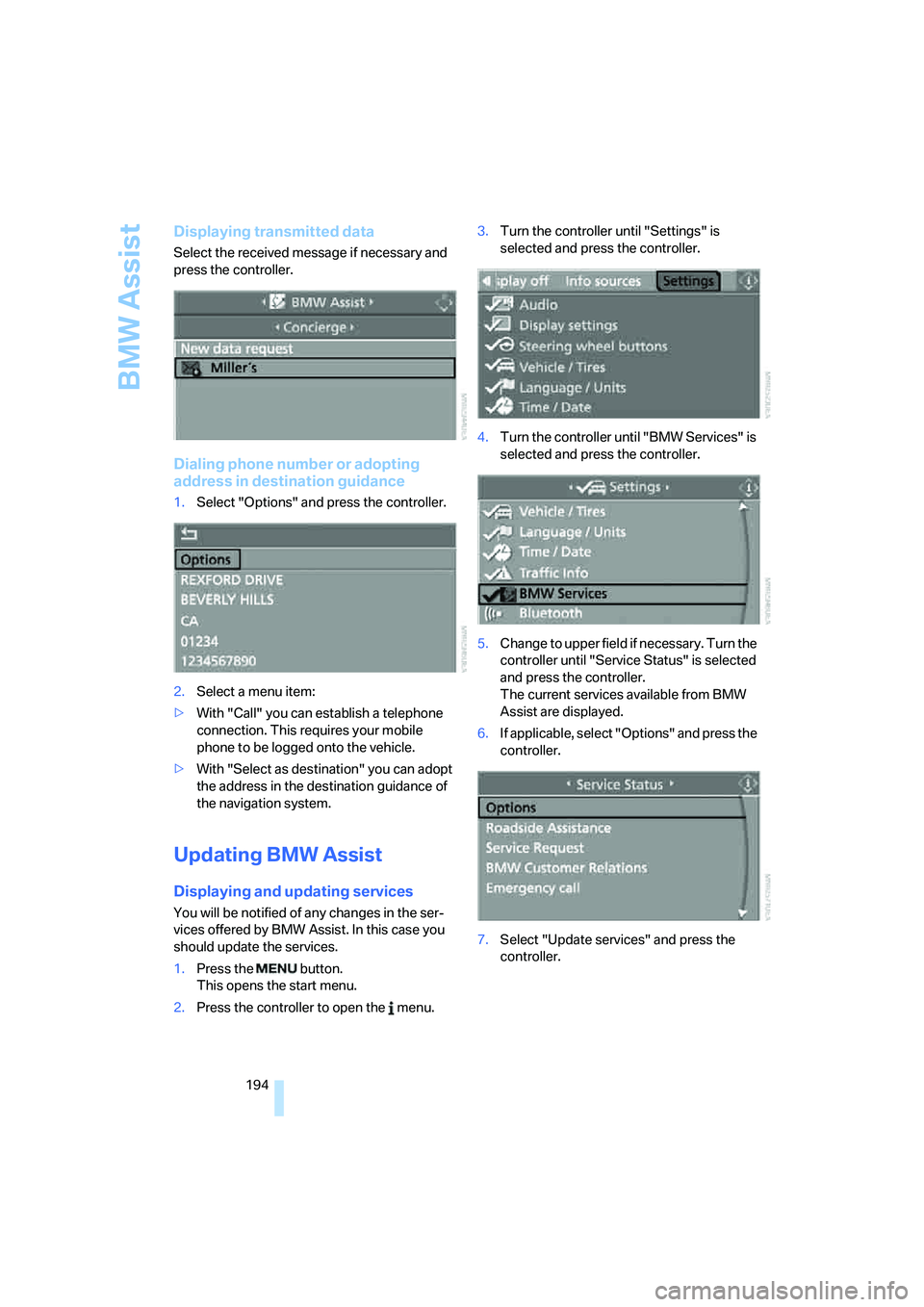
Displaying transmitted data
Select the received message if necessary and
press the controller.
Dialing phone number or adopting
address in destination guidance
1.Select "Options" and press the controller.
2.Select a menu item:
>With "Call" you can establish a telephone
connection. This requires your mobile
phone to be logged onto the vehicle.
>With "Select as destination" you can adopt
the address in the destination guidance of
the navigation system.
Updating BMW Assist
Displaying and updating services
You will be notified of any changes in the ser-
vices offered by BMW Assist. In this case you
should update the services.
1.Press the button.
This opens the start menu.
2.Press the controller to open the menu.3.Turn the controller until "Settings" is
selected and press the controller.
4.Turn the controller until "BMW Services" is
selected and press the controller.
5.Change to upper field if necessary. Turn the
controller until "Service Status" is selected
and press the controller.
The current services available from BMW
Assist are displayed.
6.If applicable, select "Options" and press the
controller.
7.Select "Update services" and press the
controller.
Page 221 of 256

Mobility
219Reference
At a glance
Controls
Driving tips
Communications
Navigation
Entertainment
Giving and receiving assistance
Emergency call
Conditions for an emergency call:
>Full preparation package mobile phone.
With this equipment, an emergency call is
still possible when no mobile phone is
logged on in the vehicle.
>BMW Assist is activated. Activating
BMW Assist, refer to page195.
>Radio readiness is activated.
>The BMW Assist system is logged on to a
mobile phone network.
>The emergency call system is operable.
Once your service contract for BMW Assist
expires, the BMW Assist system can be deacti-
vated by a BMW center without you having to
visit a workshop. Following deactivation of the
BMW Assist system, no emergency calls can be
made. The BMW Assist system can be reacti-
vated after concluding a new agreement at a
BMW center.
Initiating an emergency call
1.Briefly press protective cover to open.
With some vehicle equipment packages or
in the Convertible, the arrangement of the
switches and indicator lamps may differ
somewhat.
2.Press the button for at least 2 seconds.
The LED in the button lights up. As soon as the
voice connection to the BMW Assist Response
Center has been established, the LED flashes.When the emergency call is received at the
BMW Assist Response Center, the BMW Assist
Response Center contacts you and arranges
for additional steps to help you.
If conditions allow, remain in the vehicle until
the connection has been established. You will
then be able to provide a detailed description of
the situation.
If the current position of your vehicle can be
determined, it will be transmitted to the BMW
Assist Response Center.
If the LED is flashing but the BMW Assist
Response Center cannot be heard over the
hands-free system, it is possible that the
hands-free system is malfunctioning. You may
still be heard by the BMW Assist Response
Center, however.
Under certain conditions, an emergency call is
automatically initiated immediately after a
severe accident. The automatic emergency call
is not affected by the button being pressed.
For technical reasons, the emergency call
cannot be guaranteed under the most
unfavorable conditions.<
You can also use other services of
BMW Assist with this button, refer to
page190.<
Warning triangle*
The warning triangle is located on the left-hand
side in the luggage compartment.
Page 222 of 256
Giving and receiving assistance
220
First-aid kit*
The first-aid kit is located in the filler element of
the rear seat backrest.
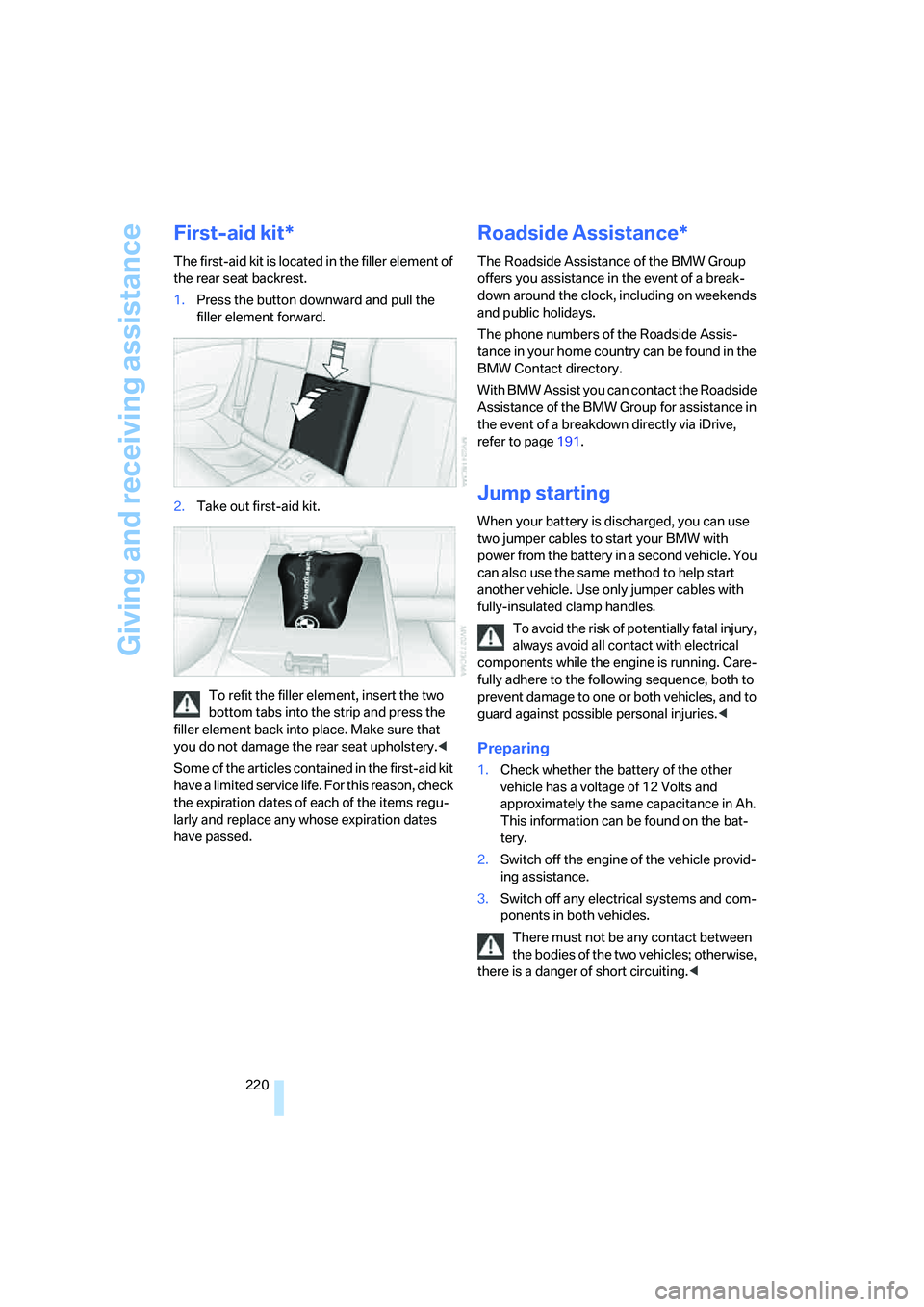
1.Press the button downward and pull the
filler element forward.
2.Take out first-aid kit.
To refit the filler element, insert the two
bottom tabs into the strip and press the
filler element back into place. Make sure that
you do not damage the rear seat upholstery.<
Some of the articles contained in the first-aid kit
have a limited service life. For this reason, check
the expiration dates of each of the items regu-
larly and replace any whose expiration dates
have passed.
Roadside Assistance*
The Roadside Assistance of the BMW Group
offers you assistance in the event of a break-
down around the clock, including on weekends
and public holidays.
The phone numbers of the Roadside Assis-
tance in your home country can be found in the
BMW Contact directory.
With BMW Assist you can contact the Roadside
Assistance of the BMW Group for assistance in
the event of a breakdown directly via iDrive,
refer to page191.
Jump starting
When your battery is discharged, you can use
two jumper cables to start your BMW with
power from the battery in a second vehicle. You
can also use the same method to help start
another vehicle. Use only jumper cables with
fully-insulated clamp handles.
To avoid the risk of potentially fatal injury,
always avoid all contact with electrical
components while the engine is running. Care-
fully adhere to the following sequence, both to
prevent damage to one or both vehicles, and to
guard against possible personal injuries.<
Preparing
1.Check whether the battery of the other
vehicle has a voltage of 12 Volts and
approximately the same capacitance in Ah.
This information can be found on the bat-
tery.
2.Switch off the engine of the vehicle provid-
ing assistance.
3.Switch off any electrical systems and com-
ponents in both vehicles.
There must not be any contact between
the bodies of the two vehicles; otherwise,
there is a danger of short circuiting.<
Page 232 of 256
Short commands of voice command system
230
Short commands of voice command
system
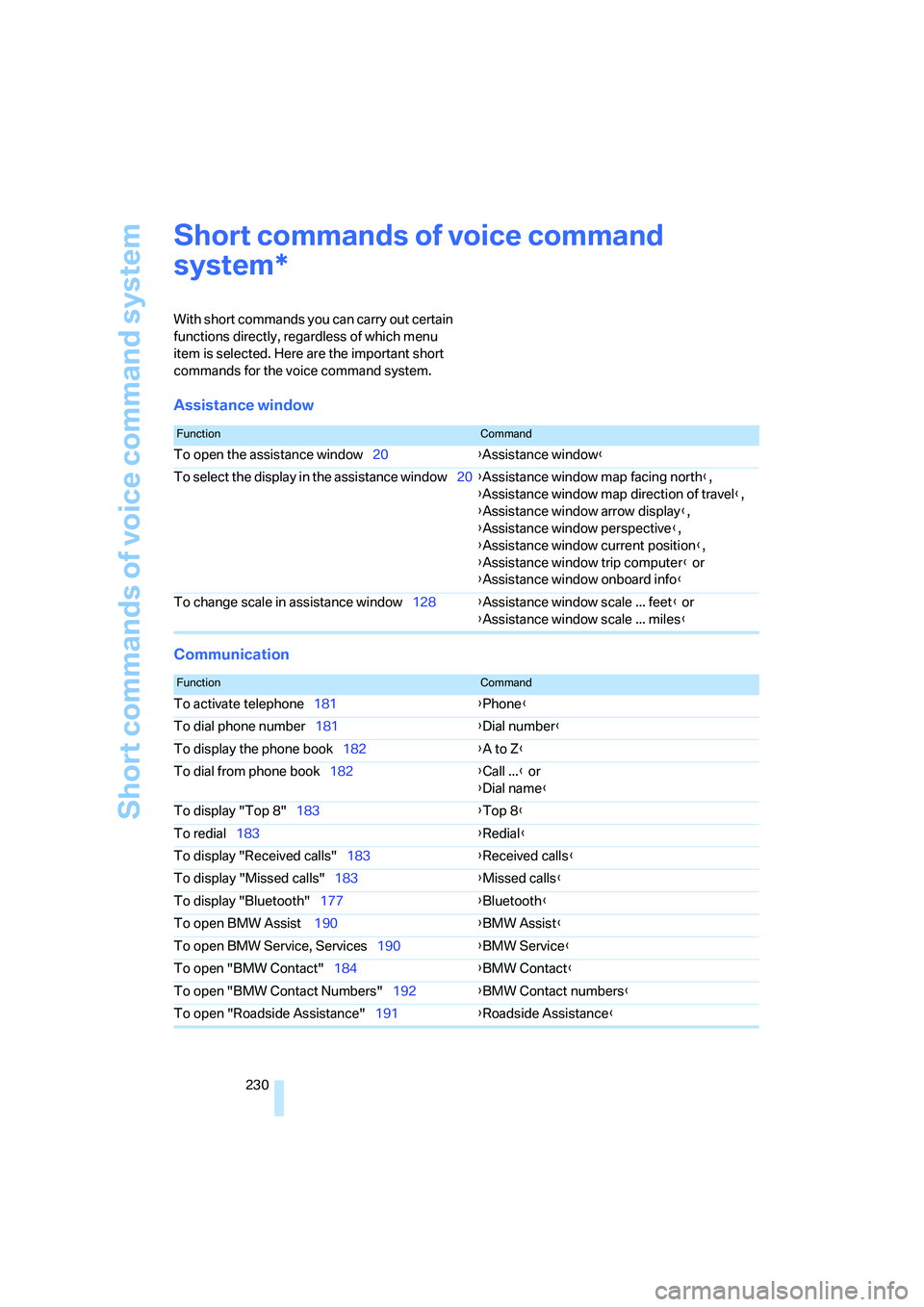
With short commands you can carry out certain
functions directly, regardless of which menu
item is selected. Here are the important short
commands for the voice command system.
Assistance window
Communication
*
FunctionCommand
To open the assistance window20{Assistance window}
To select the display in the assistance window20{Assistance window map facing north},
{Assistance window map direction of travel},
{Assistance window arrow display},
{Assistance window perspective},
{Assistance window current position},
{Assistance window trip computer} or
{Assistance window onboard info}
To change scale in assistance window128{Assistance window scale ... feet} or
{Assistance window scale ... miles}
FunctionCommand
To activate telephone181{Phone}
To dial phone number181{Dial number}
To display the phone book182{A to Z}
To dial from phone book182{Call ...} or
{Dial name}
To display "Top 8"183{Top 8}
To redial183{Redial}
To display "Received calls"183{Received calls}
To display "Missed calls"183{Missed calls}
To display "Bluetooth"177{Bluetooth}
To open BMW Assist 190{BMW Assist}
To open BMW Service, Services190{BMW Service}
To open "BMW Contact"184{BMW Contact}
To open "BMW Contact Numbers"192{BMW Contact numbers}
To open "Roadside Assistance"191{Roadside Assistance}
Page 236 of 256
Everything from A to Z
234
Everything from A to Z
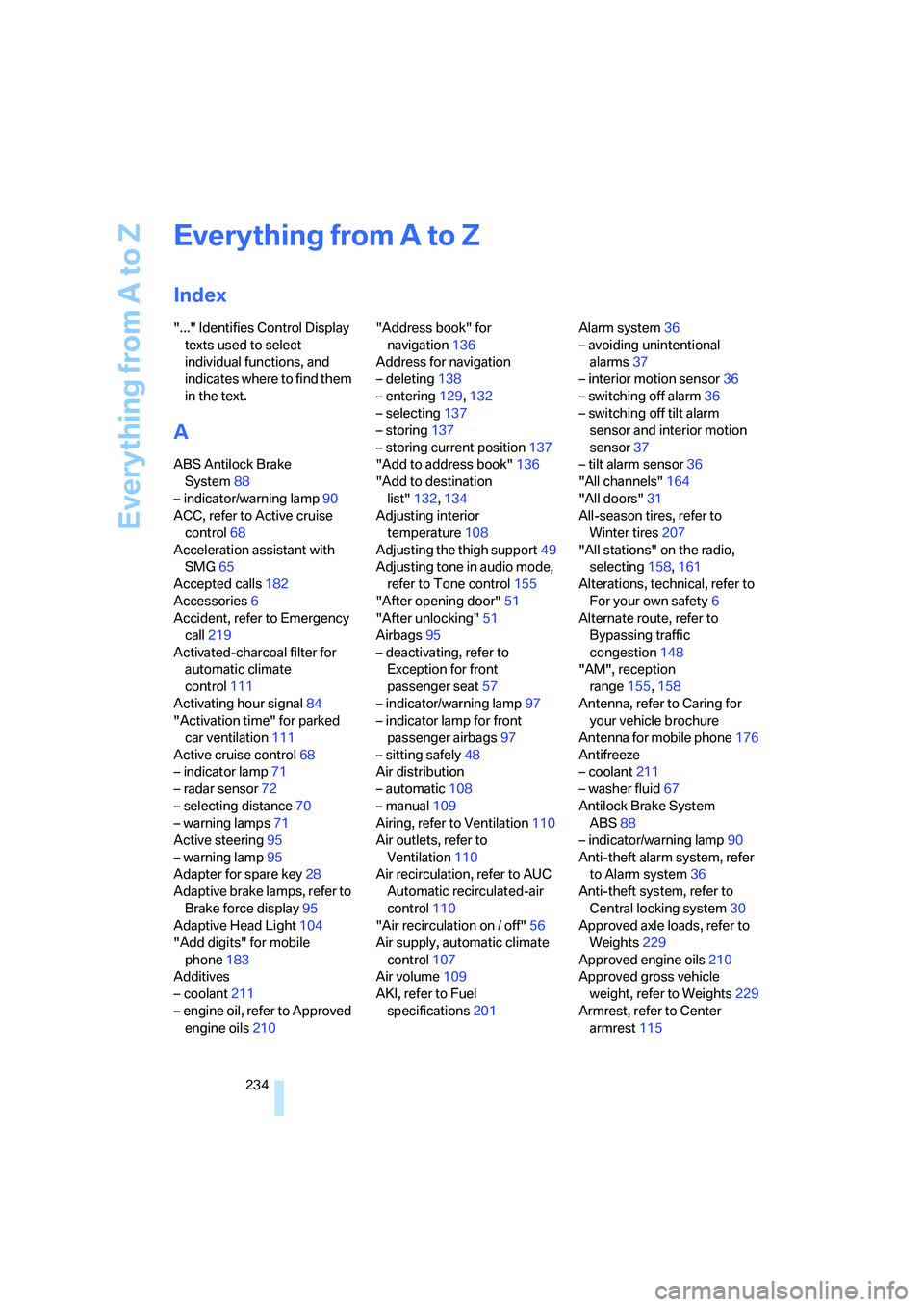
Index
"..." Identifies Control Display
texts used to select
individual functions, and
indicates where to find them
in the text.
A
ABS Antilock Brake
System88
– indicator/warning lamp90
ACC, refer to Active cruise
control68
Acceleration assistant with
SMG65
Accepted calls182
Accessories6
Accident, refer to Emergency
call219
Activated-charcoal filter for
automatic climate
control111
Activating hour signal84
"Activation time" for parked
car ventilation111
Active cruise control68
– indicator lamp71
– radar sensor72
– selecting distance70
– warning lamps71
Active steering95
– warning lamp95
Adapter for spare key28
Adaptive brake lamps, refer to
Brake force display95
Adaptive Head Light104
"Add digits" for mobile
phone183
Additives
– coolant211
– engine oil, refer to Approved
engine oils210"Address book" for
navigation136
Address for navigation
– deleting138
– entering129,132
– selecting137
– storing137
– storing current position137
"Add to address book"136
"Add to destination
list"132,134
Adjusting interior
temperature108
Adjusting the thigh support49
Adjusting tone in audio mode,
refer to Tone control155
"After opening door"51
"After unlocking"51
Airbags95
– deactivating, refer to
Exception for front
passenger seat57
– indicator/warning lamp97
– indicator lamp for front
passenger airbags97
– sitting safely48
Air distribution
– automatic108
– manual109
Airing, refer to Ventilation110
Air outlets, refer to
Ventilation110
Air recirculation, refer to AUC
Automatic recirculated-air
control110
"Air recirculation on / off"56
Air supply, automatic climate
control107
Air volume109
AKI, refer to Fuel
specifications201Alarm system36
– avoiding unintentional
alarms37
– interior motion sensor36
– switching off alarm36
– switching off tilt alarm
sensor and interior motion
sensor37
– tilt alarm sensor36
"All channels"164
"All doors"31
All-season tires, refer to
Winter tires207
"All stations" on the radio,
selecting158,161
Alterations, technical, refer to
For your own safety6
Alternate route, refer to
Bypassing traffic
congestion148
"AM", reception
range155,158
Antenna, refer to Caring for
your vehicle brochure
Antenna for mobile phone176
Antifreeze
– coolant211
– washer fluid67
Antilock Brake System
ABS88
– indicator/warning lamp90
Anti-theft alarm system, refer
to Alarm system36
Anti-theft system, refer to
Central locking system30
Approved axle loads, refer to
Weights229
Approved engine oils210
Approved gross vehicle
weight, refer to Weights229
Armrest, refer to Center
armrest115
Page 238 of 256
Everything from A to Z
236 BMW Assist190
– activating195
– breakdown assistance191
– contacting BMW
Hotline193
– displaying vehicle data196
– information service193
– services offered190
– TeleService192
– updating194
"BMW Contact"184
"BMW Contact
Numbers"184
BMW homepage4
BMW Maintenance
System212
BMW Night Vision100
– activating101
– cleaning camera102
– cleaning camera, refer to
Wiper system67
– deactivating102
– making settings102
"BMW Services"194
BMW website4
Bottle holder, refer to Cup
holders116
Bracket for telephone or
mobile phone
– refer to Snap-in adapter188
Brake Assistant, refer to DBC
Dynamic Brake Control88
Brake force display95
Brake lamps
– replacing bulbs, refer to Tail
lamps216
– two-stage95
Brake rotors
– breaking in122
– refer to Braking safely123
Brakes
– ABS Antilock Brake
System88
– brake force display95
– breaking-in122
– CBC Cornering Brake
Control88
– handbrake61Brake system122
– brake pads122
– brake rotors124
– breaking-in122
– warning lamp13,90
Braking
– electronic brake-force
distribution88
– refer to Braking safely123
Braking safely123
Breakdown assistance191
Breakdown services, refer to
Roadside Assistance220
Breaking-in122
Breaking in brake pads122
Breaking-in the clutch122
Breaking in the differential,
refer to Engine and
differential122
"Brightness"85,99
Brightness of Control
Display85
"Brightness" with BMW Night
Vision102
Button for starting engine,
refer to Start/Stop button59
Buttons on steering wheel11
Bypassing route sections145
C
California Proposition 65
Warning6
"Call"183,194
Call
– accepting181
– displaying accepted183
– ending182
– in absence183
– rejecting181
– starting181
Calling
– by entering phone
number181
– from phone book182
– from Top 8 list183
– redialing183
Can holder, refer to Cup
holders116Capacities229
Car battery, refer to Vehicle
battery217
Car care, refer to Caring for
your vehicle brochure
Car-care products, refer to
Caring for your vehicle
brochure
"Car data"77
Care213
– refer to Caring for your
vehicle brochure
Cargo loading
– securing cargo125
– stowing cargo125
– vehicle124
Caring for artificial leather,
refer to Caring for your
vehicle brochure
Caring for leather, refer to
Caring for your vehicle
brochure
Caring for light-alloy wheels,
refer to Caring for your
vehicle brochure
Caring for plastic, refer to
Caring for your vehicle
brochure
Caring for the carpet, refer to
Caring for your vehicle
brochure
Caring for the vehicle finish,
refer to Caring for your
vehicle brochure
Car key, refer to Keys/remote
control28
Car phone176
– installation location, refer to
Center armrest115
– refer to Mobile phone176
– refer to separate operating
instructions
Car radio, refer to Radio158
Car wash124
– refer to Before driving into a
car wash124
– refer to Caring for your
vehicle brochure
– with comfort access38
Page 240 of 256
Everything from A to Z
238 Convertible
– convertible program for
automatic climate
control108
– opening and closing
windows39
– rollover protection
system97
– top42
– wind deflector46
– window and convertible top
operation with comfort
access38
Convertible top
– care, refer to Caring for your
vehicle brochure
– closing manually44
– comfort operation32
– emergency closing44
– opening and closing43
Coolant211
– checking level211
– temperature75
Cooling, maximum110
Cooling function, automatic
climate control109
Cooling system, refer to
Coolant211
Copyright2
Cornering Brake Control
CBC88
Country of destination for
navigation130
Courtesy lamps, refer to
Interior lamps105
Cradle for telephone or mobile
phone115
Cruise control67,68
– active cruise control68
Cruising range76
Cup holders116
Curb weight, refer to
Weights229
"Current position"149
Current position
– displaying149
– entering137
– storing137"Curve mode" with
BMW Night Vision102
"Customer
Relations"184,193
Cylinders, refer to Engine
data226
D
Dashboard, refer to
Cockpit10
Data, technical226
– capacities229
– dimensions227
– engine226
– measurements227
– weights229
"Date"84
Date75
– display format84
Date, setting84
"Date format"84
"Daytime running lamps"104
Daytime running lamps104
DBC Dynamic Brake
Control88
– warning lamp90
"Deactivated"51
Deactivating selector lever
interlock64
Decommissioning the vehicle
– refer to Caring for your
vehicle brochure
Defect
– tires, refer to Flat Tire
Monitor90
– tires, refer to Tire Pressure
Monitor92
Defrosting windows109
Defrosting windows and
removing condensation109
Defrosting windshield, refer to
Defrosting windows109
Defrost position, refer to
Defrosting windows109
"Delete address book" for
navigation138"Delete all numbers" on the
mobile phone184
"Delete data" for
navigation138
"Delete" for mobile
phone184
Destination address
– deleting138
– entering129,132
Destination for navigation
– destination list136
– entering via voice132
– entry129
– home address138
– selecting from address
book137
– selecting using
information135
– storing137
Destination guidance141
– bypassing route
sections145
– canceling voice
instructions56
– changing specified
route139
– displaying route142
– distance and arrival141
– interrupting141
– starting141
– terminating/continuing141
– voice instructions144
– volume of voice
instructions145
Destination list for
navigation136
Destinations recently driven
to136
"Details" in audio mode169
"Detour" for navigation148
"Dial" for mobile phone181
"Dial number"182
"Diamond button"56
Digital clock75
Digital radio, refer to High
Definition Radio162
Page 241 of 256

Reference 239
At a glance
Controls
Driving tips
Communications
Navigation
Entertainment
Mobility
Dimensions
– Convertible228
– Coupe227
Directional indicators, refer to
Turn signals65
Direction announcements,
refer to Voice
instructions144
Direction instructions, refer to
Voice instructions144
Directory, refer to Phone
book182
Directory for navigation, refer
to Address book136
Displacement, refer to Engine
data226
"Display"85
Display, refer to iDrive
controls16
Display elements, refer to
Instrument cluster12
Displaying vehicle data196
Display lighting, refer to
Instrument lighting105
"Display off"21
Displays
– on Control Display, refer to
iDrive16
– refer to Instrument
cluster12
"Display settings"85,99
Displays on the windshield,
refer to Head-Up Display98
Disposal
– battery of remote control
with comfort access39
– coolant211
– vehicle battery217
Distance, refer to
Computer77
Distance control, refer to
Active cruise control68
"Distance to dest."77
Distance to destination, refer
to Computer77Distance warning, refer to
PDC Park Distance
Control87
Door entry lighting, refer to
Interior lamps105
Door key, refer to Keys/
remote control28
Door lock32
"Door locks"30,79
Doors
– manual operation32
– remote control31
DOT Quality Grades204
Draft-free ventilation111
"Driver's door only"31
Driving lamps, refer to Parking
lamps/low beams103
Driving route, refer to
Displaying route142
Driving stability control
systems88
Driving through water123
Driving tips, refer to General
driving notes122
Drying the air, refer to Cooling
function109
DSC Dynamic Stability
Control89
– indicator lamp13,89
– malfunction90
DTC Dynamic Traction
Control89
– activating89
– indicator lamp13,89
DVD for navigation128
Dynamic Brake Control
DBC88
Dynamic Drive90
Dynamic Driving Control65
"Dynamic route" for
navigation140
Dynamic Stability Control
DSC89
Dynamic Traction Control
DTC89
E
Easy entry, refer to Entering
rear52
Easy entry/exit55
Eject button, refer to Buttons
on CD player154
Electrical malfunction
– convertible top44
– door lock32
– driver's door32
– fuel filler door200
– glass sunroof42
– luggage compartment lid35
– storage compartment, hotel
function34
Electric convertible top42
Electric steering wheel
adjustment55
Electronic brake-force
distribution88
Electronic oil level check209
Emergency assistance, refer
to Roadside Assistance220
Emergency call219
Emergency operation, refer to
Manual operation
– convertible top44
– door lock32
– driver's door32
– fuel filler door200
– glass sunroof42
– hotel function34
– luggage compartment lid35
– selector lever interlock,
automatic transmission64
Emergency release for
luggage compartment lid in
luggage compartment35
Emergency services, refer to
Roadside Assistance220
"Enable services"196
"End call"182