2007 AUDI R8 brake
[x] Cancel search: brakePage 90 of 210
Driving 88Applies to vehicles: with cruise control systemSwitching off cruise control temporarily– Press the brake pedal, or
– Press the clutch pedal, or
– Press the lever ⇒page 87, fig. 75 to position (click
stop not engaged).The speed stored at this point remains in the memory if the system
is only temporarily deactivated.
To resume the programmed cruising speed, release the clutch or
brake pedal and pull the lever to position .
If no speed was stored when the system was temporarily deacti-
vated, a new speed can be set as follows: drive at the desired
cruising speed and briefly press button ⇒page 87, fig. 75 (SET).
WARNING
Do not resume the programmed cruising speed if this is too high
for the traffic conditions - this can cause accidents.Applies to vehicles: with cruise control systemSwitching off cruise control– Press the lever A ⇒page 87, fig. 75 to position (click
stop engaged).The stored speed will be deleted once the ignition is switched off.
Note
Always switch off the cruise control system completely after each
journey. When beginning a new journey, the speed must be reset
⇒page 87.
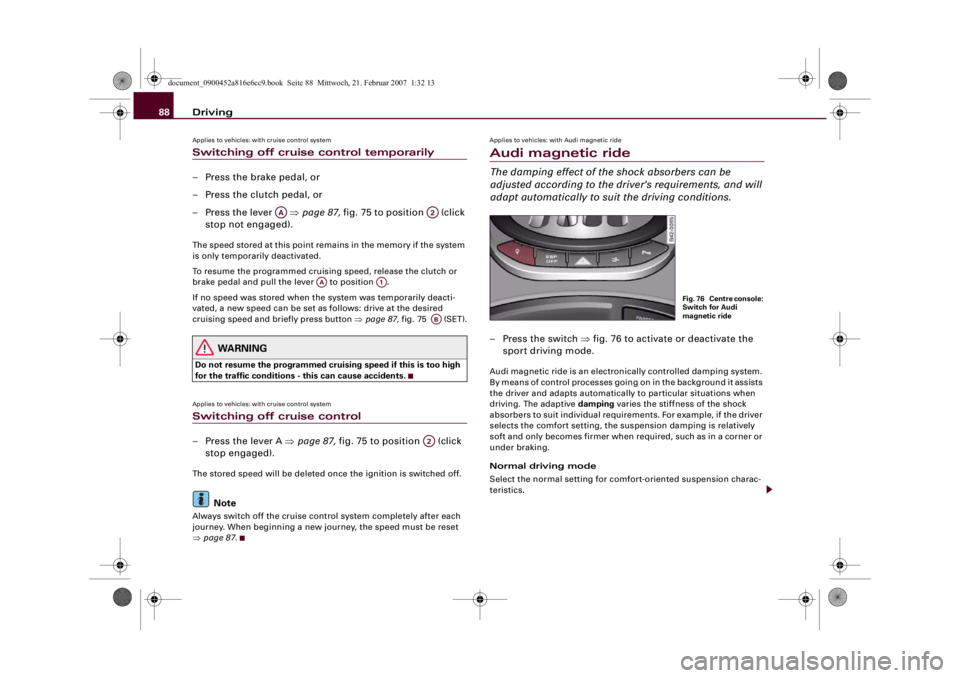
Applies to vehicles: with Audi magnetic rideAudi magnetic rideThe damping effect of the shock absorbers can be
adjusted according to the driver's requirements, and will
adapt automatically to suit the driving conditions.– Press the switch ⇒fig. 76 to activate or deactivate the
sport driving mode.Audi magnetic ride is an electronically controlled damping system.
By means of control processes going on in the background it assists
the driver and adapts automatically to particular situations when
driving. The adaptive damping varies the stiffness of the shock
absorbers to suit individual requirements. For example, if the driver
selects the comfort setting, the suspension damping is relatively
soft and only becomes firmer when required, such as in a corner or
under braking.
Normal driving mode
Select the normal setting for comfort-oriented suspension charac-
teristics.
AA
A2
AA
A1
ABA2
Fig. 76 Centre console:
Switch for Audi
magnetic ride
document_0900452a816e6cc9.book Seite 88 Mittwoch, 21. Februar 2007 1:32 13
Page 92 of 210

Automatic gearbox 90Automatic gearboxApplies to vehicles: with R tronicDescriptionR tronic is an automatic sequential-shift gearbox using shift-by-wire
technology to operate the clutch and change the gears.
The gears are engaged manually (the principle is similar to a manual
gearbox) but they can also be shifted automatically. The engine can
be started and stopped in any gear ⇒page 82.
The driver information system displays the selected mode, the
engaged gear and the sport function ⇒fig. 78.M - Manual mode
In this mode, you use the selector lever ⇒page 91 or the paddle
levers on the multi-function steering wheel ⇒page 93 to change
the forward gears up and down.
A - Automatic mode
In this mode the forward gears are shifted up and down automati-
cally according to the engine load and road speed ⇒page 92.
R - Reverse gear
Reverse gear must only be engaged when the vehicle is stationary
and the engine is idling ⇒.
To engage reverse gear press the brake pedal then move the
selector lever to the right before pulling it briefly towards the R
symbol. The reversing lights come on when reverse gear is engaged
with the ignition on.
N - Neutral
To engage neutral gear, the selector lever has to be moved to the
right or left. If reverse gear is engaged, move the selector lever to
the left. If a forward gear is engaged, move the selector lever to the
right.
Sport function
Press the button to activate the sport function. Upshifts are
then delayed to make use of the maximum engine power. The shift
time is reduced and the accelerator pedal has a lighter response. In
addition, the car does not automatically shift up a gear before the
maximum engine speed is reached when you are in manual mode.
The car will automatically shift up a gear in the normal way when
you are in automatic mode.
Fig. 77 Gear shift
patternFig. 78 Display:
Engaged gears
SPORT
document_0900452a816e6cc9.book Seite 90 Mittwoch, 21. Februar 2007 1:32 13
Page 93 of 210

Automatic gearbox91
Controls
Safety
Driving tips
General maintenance
Self-help
Technical data
WARNING
•
The accelerator pedal must on no account be pressed inadvert-
ently when a gear is engaged with the vehicle stationary. If this
were to happen, the vehicle would start to move immediately, and
even a firmly applied handbrake might not restrain it (accident
risk).
•
To avoid accidents, apply the handbrake firmly and select
neutral gear (N) before opening the engine lid and working on the
vehicle with the engine running. Please observe the important
safety warnings ⇒page 155, “Working on components in the
engine compartment”.Note
If you accidentally shift to N when driving, you can engage a gear in
the normal way using the selector lever or paddle levers.Applies to vehicles: with R tronicManual modeR tronic allows the driver to change gears manually.Driving away from a standstill
– Press and hold the brake pedal.
– Move the selector lever to the left.
– Briefly push the selector lever forwards .
– Release the brake and press the accelerator ⇒.
Changing gear
– Briefly push the selector lever forwards to change up
a gear.– Briefly pull the selector lever back to change down a
gear.
Stopping briefly
– Apply the foot brake to hold the vehicle when stationary
(for instance at traffic lights).
– Do not press the accelerator while waiting. Neutral gear
(N) will be engaged automatically and a warning tone will
sound after a certain period if the vehicle is at a standstill
and you do not press the brake pedal or accelerator.
Parking
– Press and hold the brake pedal ⇒.
– Apply the handbrake firmly.
– Engage a gear.
– Switch off the ignition.
Stopping on a slope
–Always apply the footbrake to hold the vehicle and
prevent it “rolling back” down the slope ⇒. Do not try
to stop the vehicle “rolling back” by increasing the
engine speed when a gear is engaged.
– Apply the handbrake firmly.
Driving away on a slope
– Once you have engaged a gear, release the footbrake,
press the accelerator and gradually release the hand-
brake.
When accelerating in 1st, 2nd, 3rd, 4th or 5th gear, the R tronic
gearbox automatically shifts up into the next gear shortly before the
A+A+
A-
document_0900452a816e6cc9.book Seite 91 Mittwoch, 21. Februar 2007 1:32 13
Page 94 of 210

Automatic gearbox 92maximum engine speed is reached, unless you have activated the
sport function ⇒page 90.
If you select a lower gear, the R tronic gearbox will not shift down
until there is no risk of overrevving the engine.
You can change over to automatic mode at any time ⇒page 92.
WARNING
•
The driver should never get out of the vehicle when the engine
is running and a gear is engaged. If you have to leave your vehicle
while the engine is running, you must apply the parking brake and
engage neutral gear (N).
•
If the engine is running and a gear is engaged, you will need to
hold the car with the footbrake.
•
Do not press the accelerator while selecting a gear with the
vehicle stationary and the engine running, as this could cause an
accident.
•
To avoid rolling back on gradients always hold the vehicle with
the footbrake if you have to stop. Never attempt to hold the vehicle
with the clutch when stopping on a gradient. The clutch is disen-
gaged automatically if it is overloaded and becomes too hot - acci-
dent risk! Before the clutch is disengaged, the vehicle will jolt and
the driver information system will display a warning that the
clutch is overloaded.
•
Before you drive down a steep gradient, reduce the speed and
use the R tronic to select a lower gear.
•
Never allow the brake to drag and do not use the brake pedal
too often or for long periods. Constant braking will cause the
brakes to overheat and will considerably reduce the effectiveness
of the brakes. It will increase the braking distance and could cause
the brake system to fail.
Applies to vehicles: with R tronicAutomatic modeThe gearbox changes the forward gears up and down
automatically.Driving away from a standstill
– Press and hold the brake pedal.
– Briefly push the selector lever towards position A.
– Release the brake and press the accelerator ⇒ in
“Manual mode” on page 91.In some situations (such as when driving on mountain roads) it can
be advantageous to switch temporarily to the manual shift
programme ⇒page 91, so that the gear ratios can be selected
manually to suit the driving conditions.Applies to vehicles: with R tronicKick-down featureWhen the accelerator pedal is pressed right down past the point of
resistance at full throttle, the R tronic gearbox will shift down to a
lower gear, depending on road speed and engine speed. The upshift
to the next higher gear is delayed until the engine reaches
maximum rpm. This does not apply if you have activated the sport
function.
WARNING
Please note that if the road surface is slippery or wet, the kick-
down feature could cause the driving wheels to spin, which could
result in skidding.
document_0900452a816e6cc9.book Seite 92 Mittwoch, 21. Februar 2007 1:32 13
Page 95 of 210

Automatic gearbox93
Controls
Safety
Driving tips
General maintenance
Self-help
Technical data
Applies to vehicles: with R tronicLaunch control programmeThe launch control programme enables maximum accel-
eration.– Press the ESP switch once while the engine is running.
The ESP warning lamp
will light up in the driver infor-
mation system display.
– Press and hold the brake pedal with your left foot.
– Engage a gear.
– Press the button.
– Press the accelerator all the way down with your right
foot until the engine reaches a constant rpm speed.
– Take your left foot off the brake ⇒.
WARNING
•
Always adapt your driving style to the traffic conditions.
•
Only use the launch control programme when road and traffic
conditions permit, and make sure your manner of driving and
accelerating the vehicle does not inconvenience or endanger other
road users.
•
Please note that, when the ESP is switched off, the driven
wheels may start to spin, causing the vehicle to lose grip, in partic-
ular on slippery or wet roads - danger of skidding!
•
When acceleration has been completed, the ESP should be
reactivated by pressing the ESP switch.
Note
Accelerating with the launch control programme places a heavy
load on all parts of the vehicle. This can result in increased wear and
tear.Applies to vehicles: with R tronicSteering wheel with paddle leversThe paddle levers behind the steering wheel allow you to
change gear manually without taking your hands off the
steering wheel.– Briefly pull the left-hand paddle lever to change down
to a lower gear.
– Briefly pull the right-hand paddle lever to change up
to a higher gear.The manual shift programme can, of course, still be operated using
the selector lever in the centre console.
SPORT
Fig. 79 Sports steering
wheel with Paddle
leversA-A+
document_0900452a816e6cc9.book Seite 93 Mittwoch, 21. Februar 2007 1:32 13
Page 106 of 210

Safe driving 104Correct sitting positionsCorrect sitting position for driver
The correct driving position is important for safe and
fatigue-free driving.For your own safety, and to reduce the risk of injury in the
event of an accident, we recommend the following driving
position.
– Adjust the steering wheel so there is a distance of at least
25 cm between the steering wheel and your breastbone
⇒fig. 82.– Move the driver's seat forwards or backwards so that you
can press the accelerator, brake and clutch pedals all the
way to the floor with your knees slightly bent ⇒.
– Make sure that you can comfortably reach the top of the
steering wheel.
– Adjust the head restraint so that the top of the head
restraint is level with the top of your head ⇒fig. 83.
– Adjust the backrest to an upright position so that your
back remains in contact with the upholstery.
– Fasten your seat belt correctly ⇒page 109.
– Keep both feet in the footwell so that you are in full
control of the vehicle at all times.
For detailed information on how to adjust the driver's seat, see
⇒page 67, “Seats and storage”.
WARNING
An incorrect driver sitting position can result in serious personal
injury.•
Adjust the driver's seat so there is a distance of at least 25 cm
between your breastbone and the centre of the steering wheel
⇒fig. 82. The airbag system will not be able to protect you prop-
erly if you sit closer than 25 cm.
•
If physical limitations prevent you from maintaining the
minimum distance of 25 cm, please consult a qualified workshop.
The workshop will be able to tell you whether your vehicle can be
suitably modified.
•
While driving, always hold the steering wheel with both hands
on the outside of the rim at about the 9 o'clock and 3 o'clock posi-
tion. This reduces the risk of injury if the driver's airbag inflates.
Fig. 82 Minimum
distance between
driver and steering
wheelFig. 83 Correct head
restraint position for
the driver
document_0900452a816e6cc9.book Seite 104 Mittwoch, 21. Februar 2007 1:32 13
Page 107 of 210

Safe driving105
Controls
Safety
Driving tips
General maintenance
Self-help
Technical data
•
Never hold the steering wheel at the 12 o'clock position, or
with your hands inside the rim or on the steering wheel hub. This
could result in serious injuries to the arms, hands and head if the
driver's airbag inflates.
•
To reduce any risk of injury to the driver during a sudden brake
application or in an accident, never drive with the backrest tilted
too far back. The airbag system and seat belts can only provide
proper protection when the backrest is in an upright position and
the driver is wearing the seat belt in the correct position. The
further the backrest is tilted back, the greater the risk of injury due
to incorrect positioning of the belt webbing or an incorrect sitting
position.
•
Adjust the head restraint properly so that it can give maximum
protection.
Correct sitting position for front passenger
The front seat passenger must sit at least 25 cm away
from the dash panel so that the airbag has enough room
to inflate and give maximum protection in an accident.For your own safety and to reduce the risk of injury in the
event of an accident, we recommend adjusting the front
passenger's seat as follows:
– Move the front passenger's seat as far back as possible
⇒.
– Adjust the backrest to an upright position so that your
back remains in contact with the upholstery.
– Adjust the head restraint so that the top of the head
restraint is level with the top of your head ⇒page 106.
– Keep both feet in the footwell in front of the seat.– Fasten your seat belt correctly ⇒page 112.
In exceptional cases you can disable the front passenger's airbag
⇒page 120.
For detailed information on how to adjust the front passenger's
seat, see ⇒page 67, “Seats and storage”.
WARNING
A passenger sitting out of position in the front seat can suffer
serious injuries.•
Adjust the front passenger's seat so there is a distance of at
least 25 cm between your breastbone and the dash panel. The
airbag system will not be able to protect you properly if you sit
closer than 25 cm.
•
If physical limitations prevent you from maintaining the
minimum distance of 25 cm, please consult a qualified workshop.
The workshop will be able to tell you whether your vehicle can be
suitably modified.
•
Always keep your feet on the floor when the vehicle is moving;
never rest them on the instrument panel, out of the window or on
the seat. If you sit in an incorrect position, you increase your risk
of injury in the event of sudden braking or an accident. If the airbag
is triggered, you could sustain potentially fatal injuries by sitting
out of position.
•
To reduce the risk of injury to the front passenger in the case of
sudden braking or an accident, the passenger should never travel
in a moving vehicle with the backrest reclined. The airbag system
and seat belt can only provide proper protection when the back-
rest is in an upright position and the passenger is wearing the seat
belt in the correct position. The further the backrest is tilted back,
the greater the risk of injury due to incorrect positioning of the belt
webbing or an incorrect sitting position.
•
Always adjust the head restraints properly for maximum
protection.
WARNING (continued)
document_0900452a816e6cc9.book Seite 105 Mittwoch, 21. Februar 2007 1:32 13
Page 109 of 210

Safe driving107
Controls
Safety
Driving tips
General maintenance
Self-help
Technical data
•
never stand on the seats,
•
never kneel on the seats,
•
never travel with the backrest reclined too far,
•
never lean against the dash panel,
•
never sit on the front edge of a seat,
•
never sit sideways,
•
never lean out of the window,
•
never put your feet out of the window,
•
never put your feet on the dash panel,
•
never put your feet on the seat cushion,
•
never ride in the footwell,
•
never travel on a seat without wearing the seat belt.
WARNING
Sitting out of position increases the risk of severe injuries.•
Sitting out of position exposes the occupants to potentially
fatal injuries: if the airbags inflate they can strike any occupant
who is not in one of the designed seat positions.
•
Before starting a trip, sit in the correct position and stay in this
position as long as the vehicle is moving. Before every trip, make
sure all passengers are sitting in the correct positions and remain
correctly seated at all times ⇒page 67, “Seats and storage”.
Pedal are aPedal s
The pedals must always be free to move and must never
be obstructed by floor mats or any objects in the footwell.– Make sure that the accelerator, brake and clutch pedals
are not obstructed and can be pressed all the way down
to the floor.
– Make sure that all pedals are able to return freely to their
original positions.Only use floor mats which leave the pedal area free and can be
securely fastened in the footwell.
If one of the brake circuits should fail, increased brake pedal travel
will be required to bring the vehicle safely to a stop.
WARNING
Any obstructions that restrict pedal travel can cause loss of
vehicle control and critical situations in traffic.•
Never place objects in the driver's footwell. Such objects could
move under the pedals and interfere with their proper function. In
the event of sudden braking or a change of direction, you would
not be able to use the pedals. This could result in a loss of control
and possibly cause an accident.
Floor mats on the driver's side
Use only floor mats which can be securely fastened in the
footwell and do not obstruct the pedals.– Make sure that floor mats are securely fastened and
cannot interfere with the pedals ⇒.
document_0900452a816e6cc9.book Seite 107 Mittwoch, 21. Februar 2007 1:32 13