Page 59 of 357
GETTING TO KNOW YOUR CAR57
INSTRUMENT CLUSTERfig. 81 - T.SPARK versions
A.Speedometer (mileage recorder) - B. Odometer with double counter (total and partial) display -C. Check panel - D.Rev counter - E.
Fuel level gauge with reserve warning light - F.Clock - G.Engine coolant temperature gauge with maximum temperature warning light - H.
Warning lights.
A0B0584m
´
- Warning light fitted
for versions/markets
where applicable
Page 60 of 357
GETTING TO KNOW YOUR CAR58
A0B0695m
fig. 81a - JTS and T.SPARK (equipped with VDC system)
A.Speedometer (mileage recorder) - B. Odometer with double counter (total and partial) display -C. Check panel - D.Rev counter - E.
Fuel level gauge with reserve warning light - F.Clock - G.Engine coolant temperature gauge with maximum temperature warning light - H.
Warning lights - L. Selespeed gearbox display (where fitted).
t
Warning light fitted
only on Selespeed
gearbox versions
´
Warning light fitted
for versions/markets
where applicable
Page 61 of 357
GETTING TO KNOW YOUR CAR59
A.Speedometer (mileage recorder) - B. Odometer with double counter (total and partial) display -C. Check panel - D.Rev counter -
E.Fuel level gauge with reserve warning light - F.Clock - G.Engine coolant temperature gauge with maximum temperature warning light -
H.Warning lights - L.Q-System gearbox display (where fitted).fig. 82 - 2.5 V6 24V versions
A0B0696m
t
Warning light fitted
only on Q-System
gearbox versions
Page 62 of 357
GETTING TO KNOW YOUR CAR60
A.Speedometer (mileage recorder) - B. Odometer with double counter (total and partial) display -C. Check panel - D.Rev counter - E.
Fuel level gauge with reserve warning light - F.Clock - G.Engine coolant temperature gauge with maximum temperature warning light - H.
Warning lights.fig. 83 - JTD versions (equipped with VDC system)
A0B0586m
´
- Warning light fitted
for versions/markets
where applicable
Page 63 of 357
GETTING TO KNOW YOUR CAR61
A0B0597m
fig. 83a - JTD versions
A.Speedometer (mileage recorder) - B. Odometer with double counter (total and partial) display -C. Check panel - D.Rev counter - E.
Fuel level gauge with reserve warning light - F.Clock - G.Engine coolant temperature gauge with maximum temperature warning light - H.
Warning lights.
´
- Warning light fitted
for versions/markets
where applicable
Page 65 of 357
GETTING TO KNOW YOUR CAR63
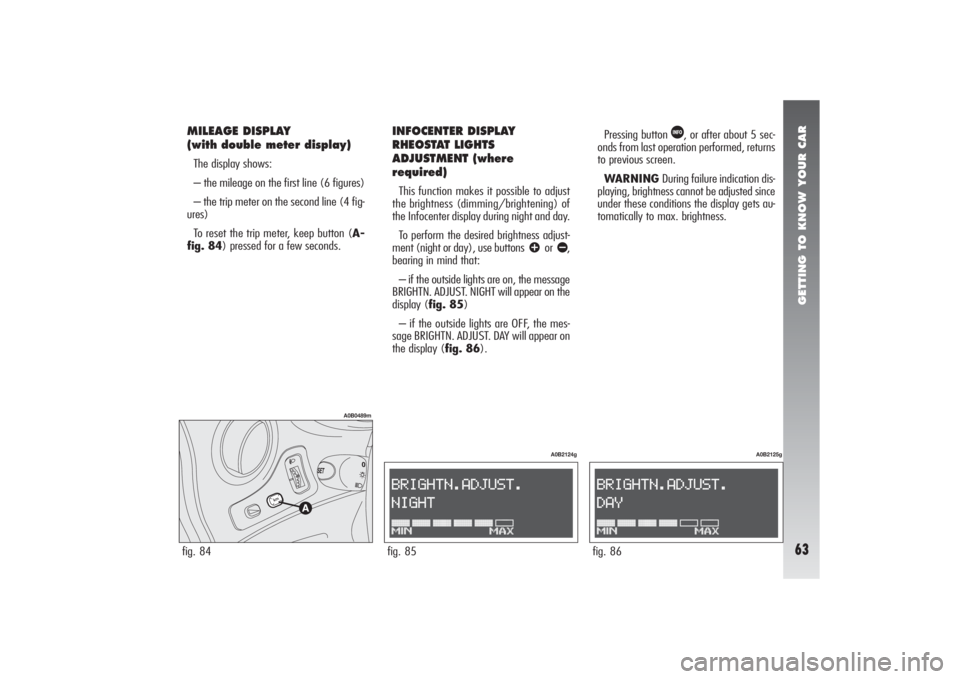
MILEAGE DISPLAY
(with double meter display)The display shows:
– the mileage on the first line (6 figures)
– the trip meter on the second line (4 fig-
ures)
To reset the trip meter, keep button (A-
fig. 84) pressed for a few seconds.fig. 84
A0B0489m
INFOCENTER DISPLAY
RHEOSTAT LIGHTS
ADJUSTMENT (where
required)This function makes it possible to adjust
the brightness (dimming/brightening) of
the Infocenter display during night and day.
To perform the desired brightness adjust-
ment (night or day), use buttons
â
or ã
,
bearing in mind that:
– if the outside lights are on, the message
BRIGHTN. ADJUST. NIGHT will appear on the
display (fig. 85)
– if the outside lights are OFF, the mes-
sage BRIGHTN. ADJUST. DAY will appear on
the display (fig. 86).Pressing button
â
, or after about 5 sec-
onds from last operation performed, returns
to previous screen.
WARNING During failure indication dis-
playing, brightness cannot be adjusted since
under these conditions the display gets au-
tomatically to max. brightness.
fig. 85
A0B2124g
fig. 86
A0B2125g
Page 66 of 357

GETTING TO KNOW YOUR CAR64
INFOCENTER DISPLAY(where required)The Infocenter display is able to display all
the useful and necessary information during
driving, in particular:
INFORMATION AVAILABLE ON STANDARD
SCREEN
– Date (A-fig. 87)
– Outside temperature (B)
– Failure and warning symbol (e.g.: pos-
sible presence of ice on the road C).The standard screen will remain on until
a function is activated which requires be-
ing shown on the display (e.g. “Infocenter
display rheostat lights adjustment”).
INFORMATION ABOUT VEHICLE
CONDITION (for each event)
– Scheduled maintenance programme ex-
piry
– Trip computer information
– Rheostat brightness adjustment
– Engine oil level (only JTD versions).
Moreover, a menu is available which al-
lows the driver to perform, by operating the
control buttons (see “Control buttons” in the
next pages) the following controls and set-
tings:Set-up menu
SPEED LIMIT
– Switching on/off the relevant signal
(ON/OFF)
– Speed limit setting
TRIP B ON/OFF
– Switching on/off the relevant function
(ON/OFF)
DATE SETTING/TIME SETTING
– Day setting
– Month setting
– Year setting
– Hour setting
– Minute setting
LANGUAGE SELECTION
– Setting the language for the messages
shown on the displayfig. 87
A0B2126g
Page 70 of 357
GETTING TO KNOW YOUR CAR68
If the display shows an anomaly message, see paragraph
“Warning lights and indications” in this chapter.
INITIAL CHECK
By turning the ignition key to the MARposition, the Infocenter display will show the message CHECK ACTIVE: this indicates the start of the
diagnosis phase for all the electronic systems available on the vehicle; this phase lasts a few seconds (in diesel versions only, the Infocenter
display is able to provide the engine oil level indication too, see following paragraph “Engine oil level check”). If, during this phase, no anom-
aly is found and after the engine has been started, the display will show the message CHECK OK.
Standard screen display
JTD versions only
If no
failures
are
present
Is the
engine
started?
YES
NO
or
continues on next page


