2006 VOLVO C70 trunk
[x] Cancel search: trunkPage 81 of 182

USA -FCC ID: LTQWFS 125VO
This device complies with part 15 of the FCC rules. Operation is subject to the following condition: (1) This device
may not cause harmful interference, and (2) this device must accept any interference received, including interference
that may cause undesired operation.
Canada-IC: 3659A-WFS125VO
Operation is subject to the following conditions: (1) this device may not cause interference, and (2) this device must
accept any interference, including interference that may cause undesired operation of the device.
CAUTION!
Never use force on the narrow section of the remote control - this is where the transponder is located. The car cannot
be started if the transponder is damaged.
pg. 87 Locks and alarm
Remote control and key blade
Remote control functions
1. Lock - Press the Lock button on the remote once to lock both doors, the trunk, the cabin storage compartments
(compartment in the doors, the rear side panels, and the ski hatch in the center of the rear seat backrest). The turn
signals will flash twice to confirm locking.
NOTE: The remote control will not lock or unlock the glove compartment.
2. Unlock - Press the Unlock button on the remote once to unlock the driver's door. The turn signals will flash twice to
confirm unlocking.
After a short pause, press the Unlock button a second time within 10 seconds to unlock the other doors, storage
compartments, and the trunk.
A long press (at least two seconds) opens all side windows.
NOTE:
The turn signals flash to confirm that the vehicle has been correctly locked/ unlocked with the remote control. When
locking the vehicle, the turn signals will flash a confirmation only if all the doors are securely closed and locked.
Flashing confirmation for locking and unlocking may be customized in the vehicle's Personal settings menu. See page
51 for more information.
The two-step unlocking function can be changed so that one press of the Unlock button unlocks all of the doors and
ProCarManuals.com
Page 82 of 182

the trunk. See Personal settings on page 61 for more information.
Automatic relocking: If the doors are unlocked, the locks will automatically reengage (re-lock) and the alarm will
rearm after 2 minutes unless a door or the trunk has been opened.
Automatic locking : When the car starts to move, the doors and trunk can be locked automatically. This feature can
be turned on or off, see Personal settings on page 61
for more information.
Airbag deployment will automatically attempt to unlock the doors.
3. Approach lighting - As you approach the car:
Press the yellow button on the remote control to light the interior lighting, position/parking lamps, license plate
lighting and the lights in the door mirrors. These lights will switch off automatically after 30, 60 or 90 seconds. See the
Personal settings on page 51
for information about adjusting the time setting.
4. Unlock trunk - Press the button once to disarm the alarm system and unlock only the trunk. After closing, the trunk
will not automatically relock. Press Lock to relock it and rearm the alarm.
5. Panic alarm : - This button can be used to attract attention during emergency situations. To activate the panic alarm,
press and hold the red button for at least 3 seconds or press it twice within 3 seconds. The turn signals and horn will be
activated. The panic alarm will stop automatically after 30 seconds. To deactivate, wait approximately 5 seconds and
press the red button again.
NOTE: This button will NOT unlock the car.
pg. 88 Locks and alarm
Remote control and key blade
Key blade
The key blade can be removed from the remote control. When removed, the key blade can be used as follows:
To lock/unlock the driver's door
To lock/unlock the glove compartment (see page 90)
To lock/unlock the trunk
For valet locking (see the explanation below)
Removing the key blade
Slide the spring loaded catch (1 in the illustration above) to the side and pull the key blade (2) out of the remote
control.
Reinserting the key blade in the remote control
ProCarManuals.com
Page 83 of 182

Hold the remote control with the pointed end down.
Carefully slide the key blade into its groove.
Gently press the key blade in the groove until it clicks into place.
Unlocking the doors with the detached key blade
Insert the key blade as far as possible in the driver's door lock. Turn the key blade clockwise approximately one -
quarter turn to unlock the driver's door only.
NOTE:
After unlocking the driver's door with the key blade, opening the door will trigger the alarm.
To disable the alarm:
Press the Unlock button on the remote control, or insert the key in the ignition switch.
Locking the doors with the detached key blade
Lock the front passenger's door by pressing the lock button on the door.
Turn the key blade one -quarter turn counter-clockwise to lock the driver's door.
NOTE: This does not arm the alarm or lock the trunk.
pg. 89 Locks and alarm
Valet locking
Valet or service locking
By utilizing the remote control with the key blade removed, the valet locking feature enables you to block access to the
trunk, glove compartment and other storage compartments in the cabin for e.g. valet parking or when the car is brought
to the retailer for service.
Locking points
A. Doors
B. Steering wheel lock
C. Glove compartment
D. Compartments in door panels
E. Compartments in rear side panels
F. Ski hatch
G. Trunk
With the valet locking function activated:
ProCarManuals.com
Page 84 of 182

The vehicle's doors can be locked or unlocked
The engine can be started
Locking points C, D, E, F, and G cannot be unlocked with the remote control.
Activating the valet locking function
Remove the key blade from the remote control.
Turn the key blade 180° clockwise in the glove compartment lock to lock points C, D, E, F, and G and disconnect
these points from the central locking system (a message appears in the information display).
Give the parking attendant or service personnel only the remote control (with the key blade removed).
Deactivating the valet locking function
Turn the key blade 180° counterclockwise in the glove compartment lock to deactivate valet locking.
pg. 90 Locks and alarm
Glove compartment and trunk
Locking the glove compartment
The glove compartment can only be locked and unlocked using the detachable key blade on the remote control.
Unlock the glove compartment by turning the key a quarter of a turn (90°) counterclockwise. The key slot is vertical
when the glove compartment is unlocked.
Lock the glove compartment by turning the key a quarter of a turn (90°) clockwise. The key slot is horizontal when the
glove compartment is locked.
ProCarManuals.com
Page 85 of 182
Mechanically opening the trunk
If necessary, the trunk can be opened mechanically using the key blade.
Open the cover on the center console storage compartment.
Insert the key blade in the key hole and turn it 90 degrees clockwise.
pg. 91 Locks and alarm
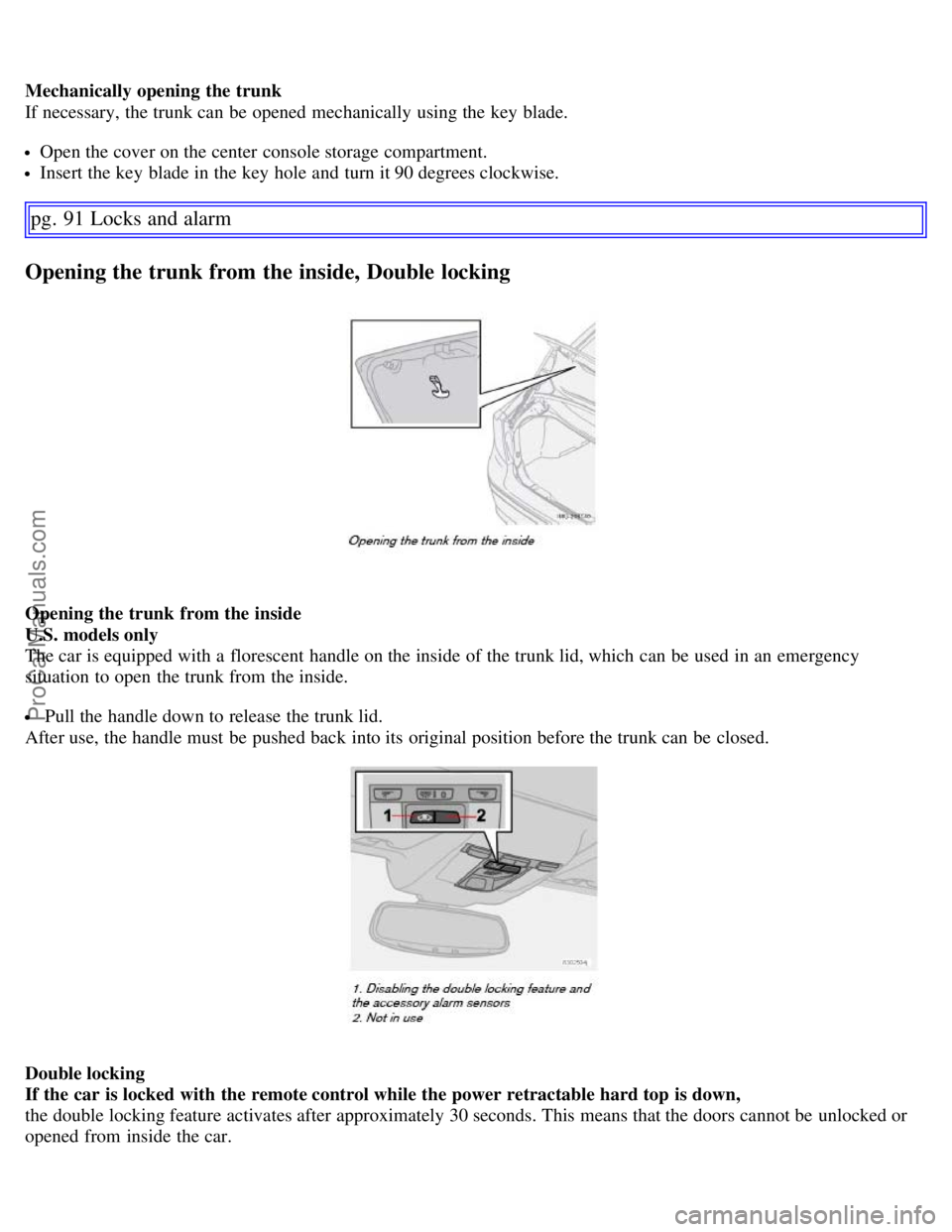
Opening the trunk from the inside, Double locking
Opening the trunk from the inside
U.S. models only
The car is equipped with a florescent handle on the inside of the trunk lid, which can be used in an emergency
situation to open the trunk from the inside.
Pull the handle down to release the trunk lid.
After use, the handle must be pushed back into its original position before the trunk can be closed.
Double locking
If the car is locked with the remote control while the power retractable hard top is down,
the double locking feature activates after approximately 30 seconds. This means that the doors cannot be unlocked or
opened from inside the car.
ProCarManuals.com
Page 87 of 182

Reinsert the key blade in the remote control.
The old battery should be disposed of properly at a recycling center or by a trained and qualified Volvo service
technician.
pg. 93 Locks and alarm
Locking and unlocking
Locking/unlocking the car from the inside
The switches near the door opening handles on the driver's and passenger's doors can be used to lock or unlock all
doors and the trunk, and to set the alarm.
Unlocking: Press in the upper section in the lock button. A long press (at least two seconds) also opens all the side
windows.
Locking: Press in the lower section of the lock button.
Lock indicator lights
An indicator light in each door will illuminate for approximately 5 minutes after the car has been locked using the
remote control.
If the car is locked from the inside while the ignition is on, the light will remain on until the car is unlocked or the
ignition is switched off.
NOTE:
ProCarManuals.com
Page 88 of 182

The doors cannot be opened by pulling up the lock button.
If both doors are closed when a lock button is pressed, the alarm will not be armed.
Each door can also be locked manually using the lock button on that particular door. This applies only if the car has
not been locked from the outside.
The doors can also be unlocked (and the door opened) by pulling the handle in the door twice.
Locking the doors when leaving the vehicle
The lock switches in the doors can also be used for locking all doors when leaving the vehicle. However, please be
aware of the following:
If one or more of the doors is open and the key is not in the ignition when the button is pressed, the doors will lock
automatically when they are closed. This will also arm the alarm.
If the key is in the ignition and one of the doors is open, the vehicle cannot be locked using the buttons on the
doors.
pg. 94 Locks and alarm
Alarm
The alarm system
The alarm is automatically armed whenever the car is locked with the remote control, or if a front lock button is
depressed.
When armed, the alarm continuously monitors a number of points on the car. The following conditions will trigger the
alarm:
The hood, trunk, or a door is forced open.
The ignition switch is tampered with
An attempt is made to start the car with a non-approved key (a key not coded to the car's ignition).
If there is movement in the passenger compartment (if the car is equipped with the optional movement sensor).
The car is lifted or towed (if the car is equipped with the optional inclination sensor)
The battery is disconnected (while the alarm is armed).
The siren is disconnected when the alarm is disarmed.
NOTE: The alarm system functions in the same way, regardless of whether the power retractable hard top is raised or
lowered.
The alarm indicator light
The status of the alarm system is indicated by the indicator light on at the top of the dashboard (see illustration):
ProCarManuals.com
Page 92 of 182

At highway driving speeds, fuel consumption will be lower with the air conditioning on and the windows closed
than with the air conditioning off and the windows open.
Using the onboard trip computer's fuel consumption modes can help you learn how to drive more economically.
Other factors that decrease gas mileage are:
Dirty air cleaner
Dirty engine oil and clogged oil filter
Dragging brakes
Incorrect front end alignment
Some of the above mentioned items and others are checked at the standard maintenance intervals.
Weight distribution affects handling
At the specified curb weight your vehicle has a tendency to understeer, which means that the steering wheel has to be
turned more than might seem appropriate for the curvature of a bend. This ensures good stability and reduces the risk
of rear wheel skid. Remember that these properties can alter with the vehicle load. The heavier the load in the cargo
area, the less the tendency to understeer.
WARNING!
Driving with the trunk open : Driving with the trunk open could lead to poisonous exhaust gases entering the
passenger compartment. If the trunk must be kept open for any reason,
Close the windows
Set the ventilation system control to air flow to floor, windshield and side windows and the blower control to its
highest setting.
CAUTION!
Drive slowly and carefully if going through standing water (i.e. flooded roadways, etc.). Damage to the engine could
result if excess water is drawn in through the air intake system. Never drive the vehicle in water deeper than 18
inches (48 cm).
Handling, roadholding
Vehicle load, tire design and inflation pressure all affect vehicle handling. Therefore, check that the tires are inflated to
pg. 99 Starting and driving
General information
the recommended pressure according to the vehicle load. See the "Tire pressure" section. Loads should be distributed
so that capacity weight or maximum permissible axle loads are not exceeded.
Cold weather precautions
If you wish to check your vehicle before the approach of cold weather, the following advice is worth noting:
Make sure that the engine coolant contains 50 percent antifreeze. Any other mixture will reduce freeze protection.
This gives protection against freezing down to -31°F (-35°C). See section "Coolant". The use of "recycled" antifreeze
is not approved by Volvo. Different types of antifreeze must not be mixed.
Volvo recommends using only genuine Volvo antifreeze in your vehicle's radiator.
Try to keep the fuel tank well filled - this prevents the formation of condensation in the tank. In addition, in
extremely cold weather conditions it is worthwhile to add fuel line de -icer before refueling.
The viscosity of the engine oil is important. Oil with low viscosity (thinner oil) improves cold-weather starting as
ProCarManuals.com