Page 128 of 428
’06 Rav4_U (L/O 0601)
11 6
2005 RAV4 from Jan. ’06 Prod. (OM42620U)
NOTICE
To prevent the battery from being dis-
charged, do not leave the switch on
longer than necessary when the en-
gine is not running.
To adjust the brightness of the instru-
ment panel lights, turn the dial.
With the dial turned fully up, the intensity
of the instrument panel lights will not be
reduced even when the tail lights/head-
lights are turned on.To turn on the front fog lights, twist
the band of the headlight and turn sig-
nal switch lever. They will come on
only when the headlights are on low
beam.
Front fog light indicator light on the instru-
ment panel will tell you that the front fog
lights are on.
Instrument panel light control Front fog lights
Page 129 of 428
’06 Rav4_U (L/O 0601)
11 7
2005 RAV4 from Jan. ’06 Prod. (OM42620U)
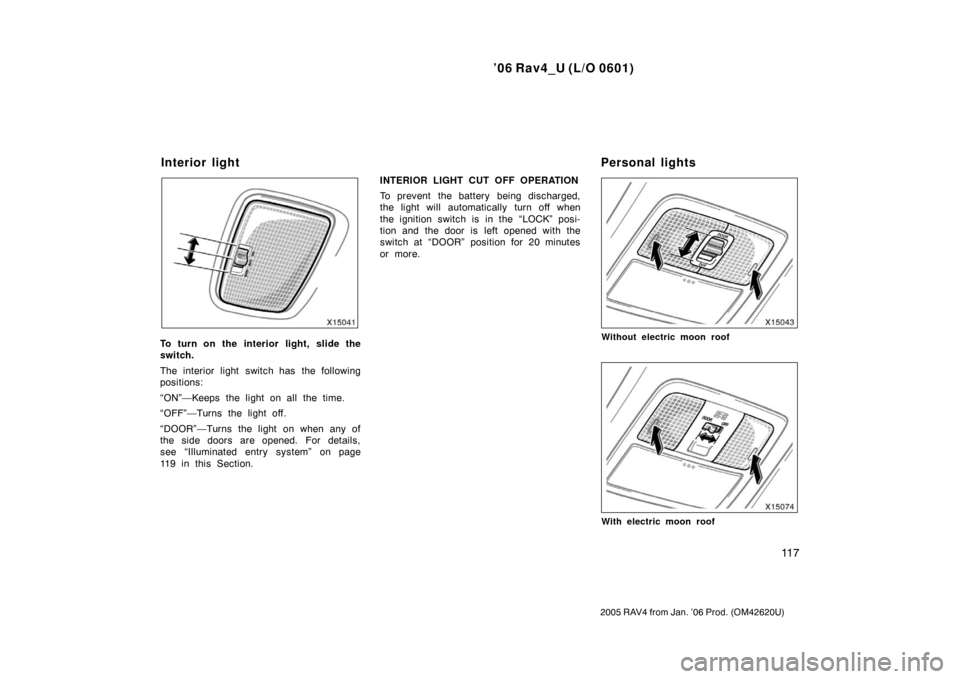
To turn on the interior light, slide the
switch.
The interior light switch has the following
positions:
“ON”—Keeps the light on all the time.
“OFF”—Turns the light off.
“DOOR”—Turns the light on when any of
the side doors are opened. For details,
see “Illuminated entry system” on page
119 in this Section.INTERIOR LIGHT CUT OFF OPERATION
To prevent the battery being discharged,
the light will automatically turn off when
the ignition switch is in the “LOCK” posi-
tion and the door is left opened with the
switch at “DOOR” position for 20 minutes
or more.Without electric moon roof
With electric moon roof
Interior light
Personal lights
Page 130 of 428
’06 Rav4_U (L/O 0601)
11 8
2005 RAV4 from Jan. ’06 Prod. (OM42620U)
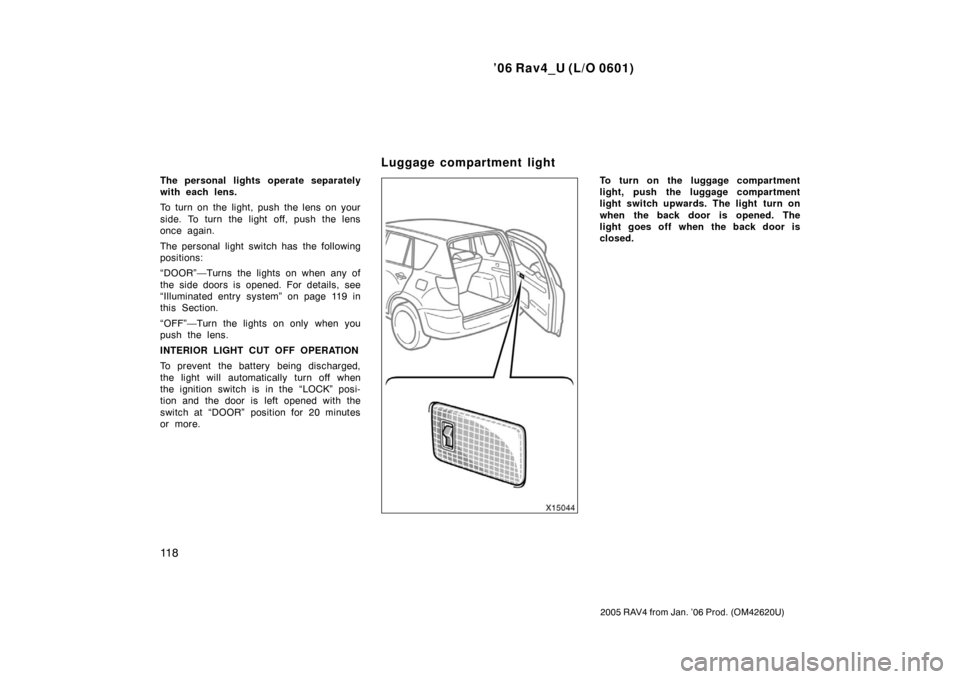
The personal lights operate separately
with each lens.
To turn on the light, push the lens on your
side. To turn the light off, push the lens
once again.
The personal light switch has the following
positions:
“DOOR”—Turns the lights on when any of
the side doors is opened. For details, see
“Illuminated entry system” on page 119 in
this Section.
“OFF”—Turn the lights on only when you
push the lens.
INTERIOR LIGHT CUT OFF OPERATION
To prevent the battery being discharged,
the light will automatically turn off when
the ignition switch is in the “LOCK” posi-
tion and the door is left opened with the
switch at “DOOR” position for 20 minutes
or more.To turn on the luggage compartment
light, push the luggage compartment
light switch upwards. The light turn on
when the back door is opened. The
light goes off when the back door is
closed.
Luggage compartment light
Page 131 of 428
’06 Rav4_U (L/O 0601)
11 9
2005 RAV4 from Jan. ’06 Prod. (OM42620U)
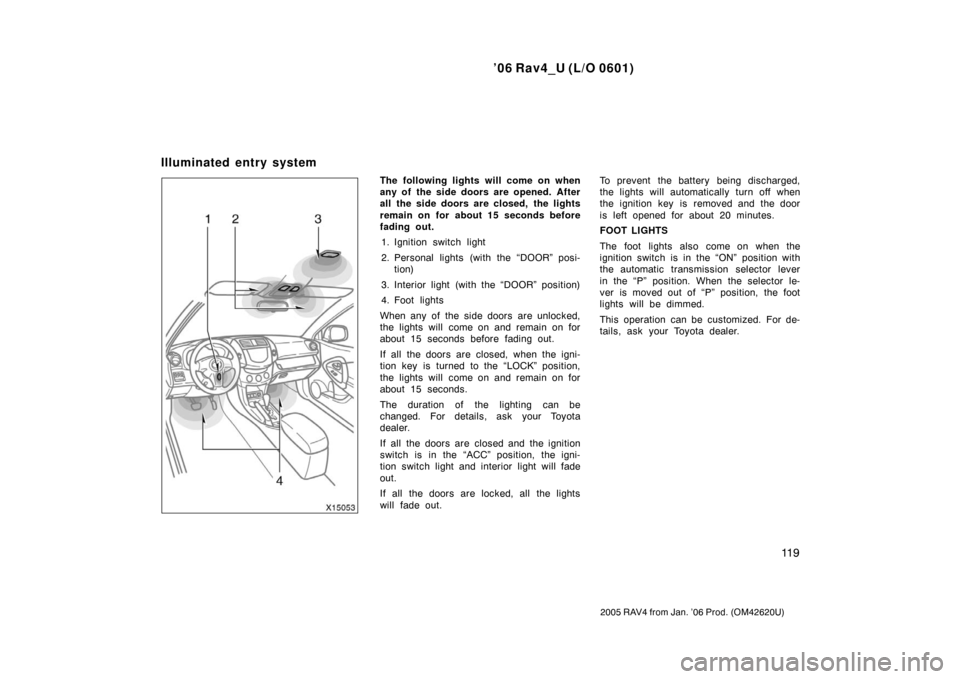
The following lights will come on when
any of the side doors are opened. After
all the side doors are closed, the lights
remain on for about 15 seconds before
fading out.1. Ignition switch light
2. Personal lights (with the “DOOR” posi- tion)
3. Interior light (with the “DOOR” position)
4. Foot lights
When any of the side doors are unlocked,
the lights will come on and remain on for
about 15 seconds before fading out.
If all the doors are closed, when the igni-
tion key is turned to the “LOCK” position,
the lights will come on and remain on for
about 15 seconds.
The duration of the lighting can be
changed. For details, ask your Toyota
dealer.
If all the doors are closed and the ignition
switch is in the “ACC” position, the igni-
tion switch light and interior light will fade
out.
If all the doors are locked, all the lights
will fade out. To prevent the battery being discharged,
the lights will automatically turn off when
the ignition key is removed and the door
is left opened for about 20 minutes.
FOOT LIGHTS
The foot lights also come on when the
ignition switch is in the “ON” position with
the automatic transmission selector lever
in the “P” position. When the selector le-
ver is moved out of “P” position, the foot
lights will be dimmed.
This operation can be customized. For de-
tails, ask your Toyota dealer.
Illuminated entry system
Page 133 of 428
’06 Rav4_U (L/O 0601)
121
2005 RAV4 from Jan. ’06 Prod. (OM42620U)
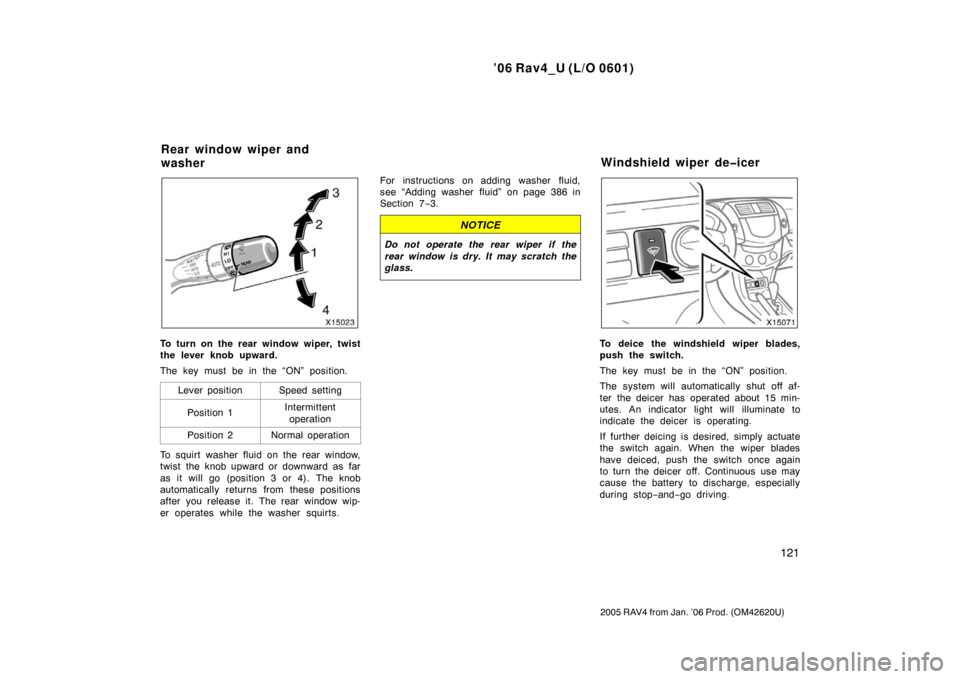
To turn on the rear window wiper, twist
the lever knob upward.
The key must be in the “ON” position.Lever position
Speed setting
Position 1Intermittentoperation
Position 2Normal operation
To squirt washer fluid on the rear window,
twist the knob upward or downward as far
as it will go (position 3 or 4). The knob
automatically returns from these positions
after you release it. The rear window wip-
er operates while the washer squirts. For instructions on adding washer fluid,
see “Adding washer fluid” on page 386 in
Section 7
−3.
NOTICE
Do not operate the rear wiper if the
rear window is dry. It may scratch the
glass.
To deice the windshield wiper blades,
push the switch.
The key must be in the “ON” position.
The system will automatically shut off af-
ter the deicer has operated about 15 min-
utes. An indicator light will illuminate to
indicate the deicer is operating.
If further deicing is desired, simply actuate
the switch again. When the wiper blades
have deiced, push the switch once again
to turn the deicer off. Continuous use may
cause the battery to discharge, especially
during stop− and−go driving.
Rear window wiper and
washer Windshield wiper deicer
Page 134 of 428

’06 Rav4_U (L/O 0601)
122
2005 RAV4 from Jan. ’06 Prod. (OM42620U)
Manual air conditioning system
Automatic air conditioning system
To defog or defrost the rear window,
push the switch.
The key must be in the “ON” position.
The thin heater wires on the inside of the
rear window will quickly clear the window
surface. An indicator light will illuminate to
indicate the defogger is operating.
On some models, the heater panels in the
outside rear view mirrors will also quickly
clear the surfaces.
Push the switch once again to turn the
defoggers off.
The system will automatically shut off af-
ter the defoggers have operated about 15
minutes.
CAUTION
On some models: Since the mirror
surfaces can get hot, do not touch
them when the switch is on.
Make sure you turn the defoggers off
when the surfaces are clear. Leaving the
defoggers on for a long time could cause
the battery to discharge, especially during
stop−and− go driving. The defoggers are
not designed for drying rain water or for
melting snow.
If the outside rear view mirrors are heavi-
ly coated with ice, use a spray de −icer
before operating the switch.
NOTICE
When cleaning the inside of the rear
window, be careful not to scratch or
damage the heater wires or connec-
tors.
Rear window and outside rear
view mirror defoggers
Page 152 of 428

’06 Rav4_U (L/O 0601)
140
2005 RAV4 from Jan. ’06 Prod. (OM42620U)
“START”—Starter motor on. The key
will return to the “ON” position when
released.
For starting tips, see page 305 in Section
3.
“ON”—Engine on and all accessories
on.
This is the normal driving position.
“ACC”—Accessories such as the radio
operate, but the engine is off.
If you leave the key in the “ACC” or
“LOCK” position and open the driver’s
door, a buzzer will remind you to remove
the key.“LOCK”—Engine is off and the steering
wheel is locked. The key can be re-
moved only at this position.
You must push in the key to turn it from
“ACC” to the “LOCK” position. The selec-
tor lever must be in the “P” position be-
fore pushing the key.
Vehicles with engine immobilizer sys-
tem—Once you remove the key, the en-
gine immobilizer system is automatically
set. (See “Engine immobilizer system” on
page 15 in Section 1
−2.)
When starting the engine, the key may
seem stuck at the “LOCK” position. To
free it, first be sure the key is pushed all
the way in, and then rotate the steering
wheel slightly while turning the key gently.
Approximately five hours after the engine
is turned off, you may hear sound coming
from under the floor around the driver ’s
seat for several minutes. This is normal
operation and does not indicate a malfunc-
tion. (See “Leak detection pump” on page
ix.)
It is not a malfunction if the needle on all
meters and gauges move slightly when the
key is turned to the “ON” or “START”
position.
NOTICE
Do not leave the key in the “ON”
position if the engine is not running.
The battery will discharge and the
ignition could be damaged.
Ignition switch
Page 205 of 428
’06 Rav4_U (L/O 0601)
193
2005 RAV4 from Jan. ’06 Prod. (OM42620U)
Pull the display down to an easily view-
able angle (between 90� and 125 �)
NOTICE
The screen should be cleaned with a
dry soft cloth. If the screen is pushed
by hand or wiped with a hard cloth,
the surface of the screen may be
scratched.
To close, push the display up until you
hear a click.
The illumination of the screen is automati-
cally turned off when the display is
closed. However, the rear seat entertain-
ment system is not turned off.
CAUTION
To reduce the chance of injury in
case of an accident or sudden stop
while driving, close the display when
it is not in use.
NOTICE
� Benzene or alkaline solutions may
damage the coated surface of the
screen .
� To prevent the battery from being
discharged, do not turn on the rear
seat entertainment system longer
than necessary when the engine is
not running.