Page 97 of 364
87
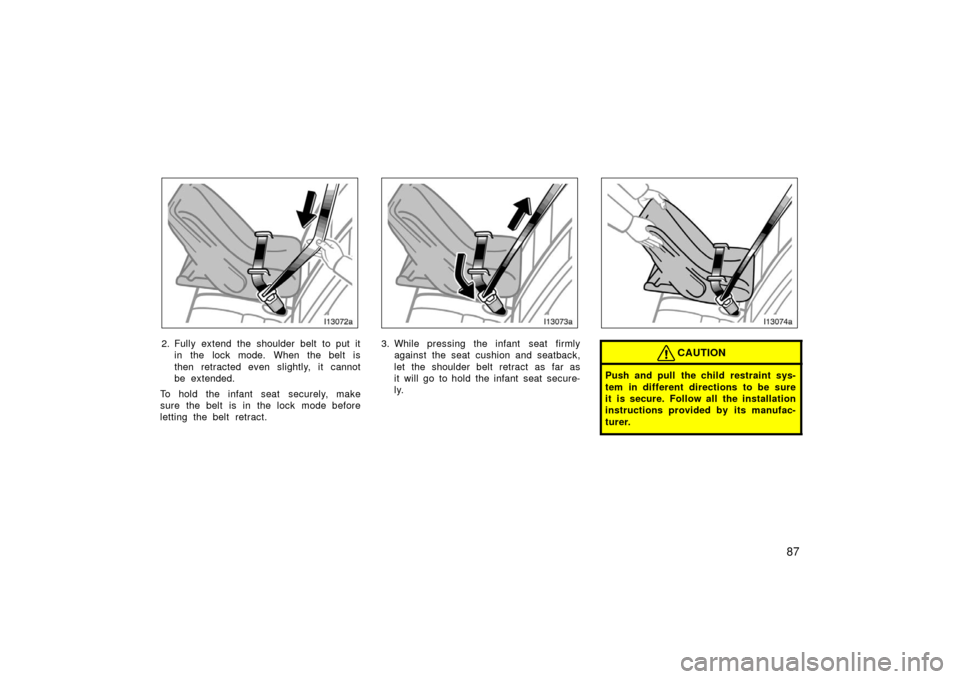
2. Fully extend the shoulder belt to put itin the lock mode. When the belt is
then retracted even slightly, it cannot
be extended.
To hold the infant seat securely, make
sure the belt is in the lock mode before
letting the belt retract.3. While pressing the infant seat firmly against the seat cushion and seatback,
let the shoulder belt retract as far as
it will go to hold the infant seat secure-
ly.CAUTION
Push and pull the child restraint sys-
tem in different directions to be sure
it is secure. Follow all the installation
instructions provided by its manufac-
turer.
Page 101 of 364
91
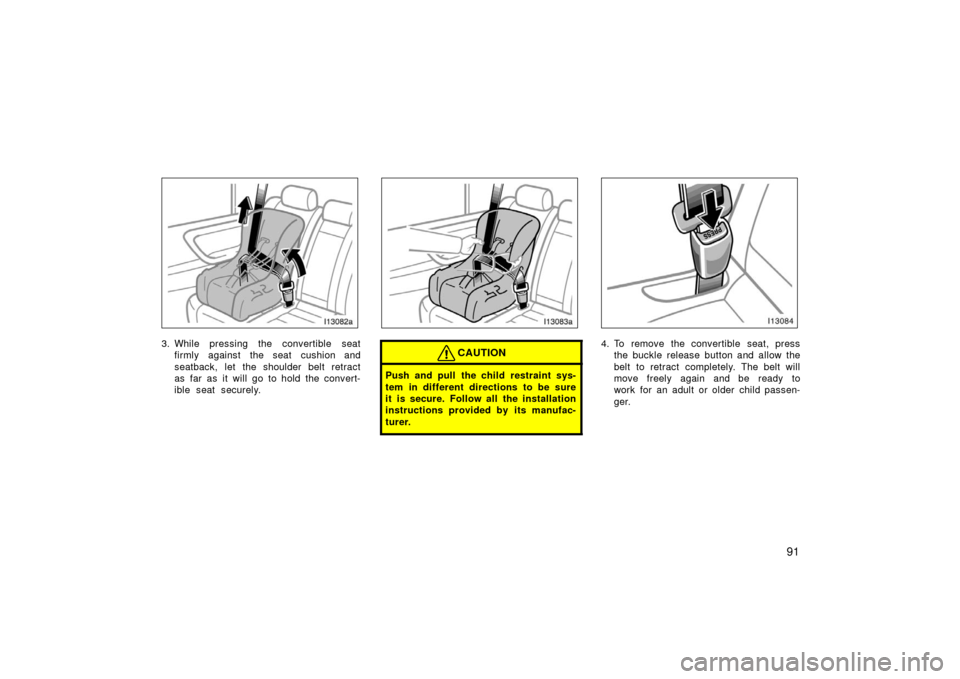
3. While pressing the convertible seatfirmly against the seat cushion and
seatback, let the shoulder belt retract
as far as it will go to hold the convert-
ible seat securely.CAUTION
Push and pull the child restraint sys-
tem in different directions to be sure
it is secure. Follow all the installation
instructions provided by its manufac-
turer.
4. To remove the convertible seat, pressthe buckle release button and allow the
belt to retract completely. The belt will
move freely again and be ready to
work for an adult or older child passen-
ger.
Page 105 of 364
95
13C003
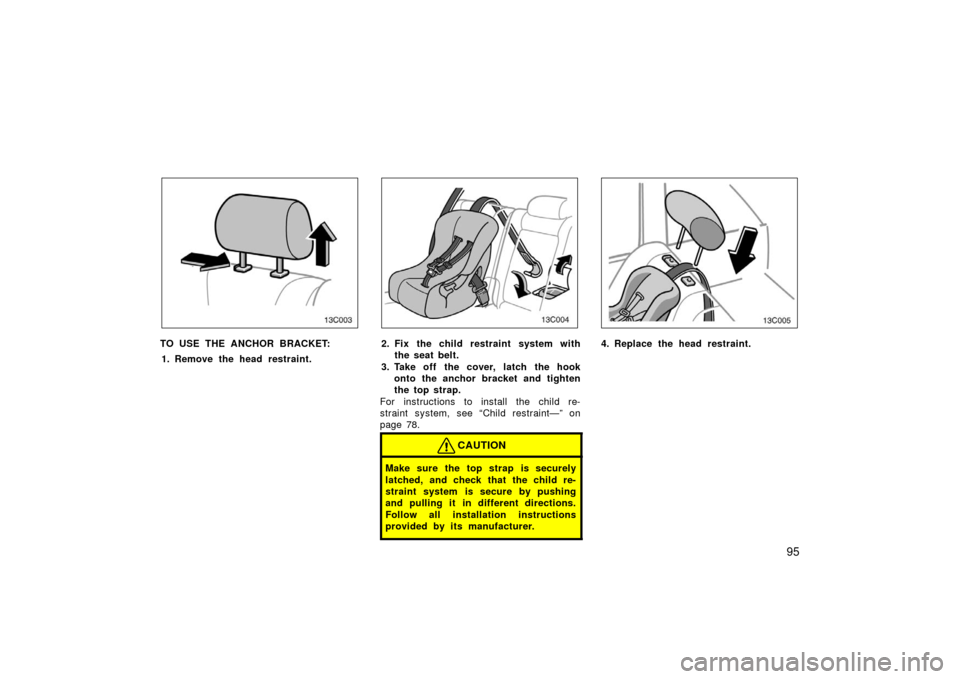
TO USE THE ANCHOR BRACKET:1. Remove the head restraint.
13C004
2. Fix the child restraint system with the seat belt.
3. Take off the cover, latch the hook onto the anchor bracket and tighten
the top strap.
For instructions to install the child re-
straint system, see “Child restraint—” on
page 78.
CAUTION
Make sure the top strap is securely
latched, and check that the child re-
straint system is secure by pushing
and pulling it in different directions.
Follow all installation instructions
provided by its manufacturer.
13C005
4. Replace the head restraint.
Page 107 of 364
97
13C009b
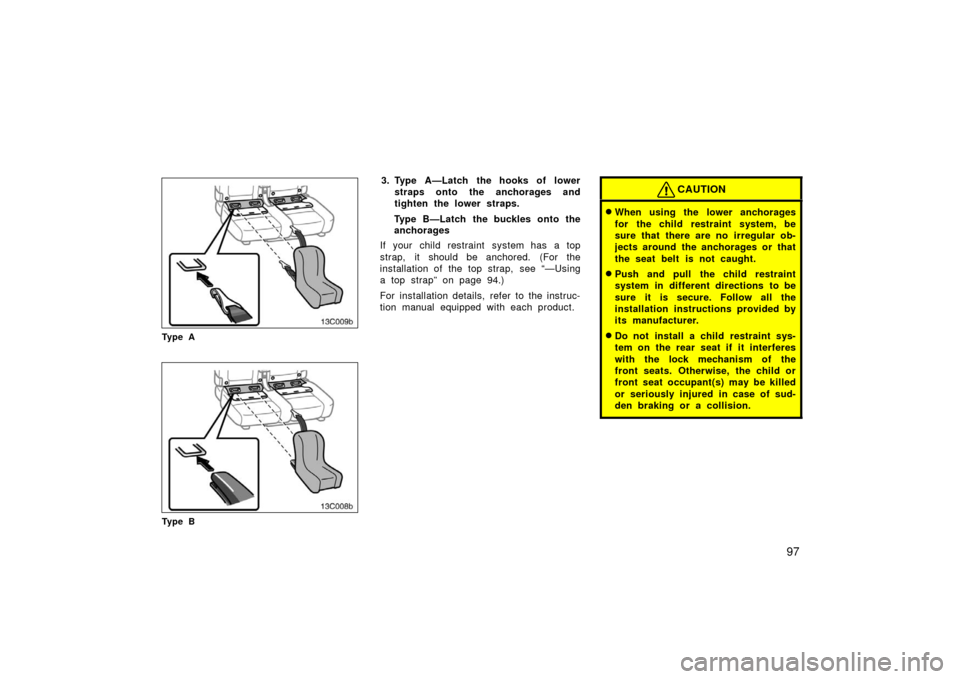
Ty p e A
13C008b
Ty p e B
3. Type A—Latch the hooks of lowerstraps onto the anchorages and
tighten the lower straps.
Type B—Latch the buckles onto the
anchorages
If your child restraint system has a top
strap, it should be anchored. (For the
installation of the top strap, see “—Using
a top strap” on page 94.)
For installation details, refer to the instruc-
tion manual equipped with each product.CAUTION
�When using the lower anchorages
for the child restraint system, be
sure that there are no irregular ob-
jects around the anchorages or that
the seat belt is not caught.
�Push and pull the child restraint
system in different directions to be
sure it is secure. Follow all the
installation instructions provided by
its manufacturer.
�Do not install a child restraint sys-
tem on the rear seat if it interferes
with the lock mechanism of the
front seats. Otherwise, the child or
front seat occupant(s) may be killed
or seriously injured in case of sud-
den braking or a collision.
Page 133 of 364
123
Odometer and two trip meters
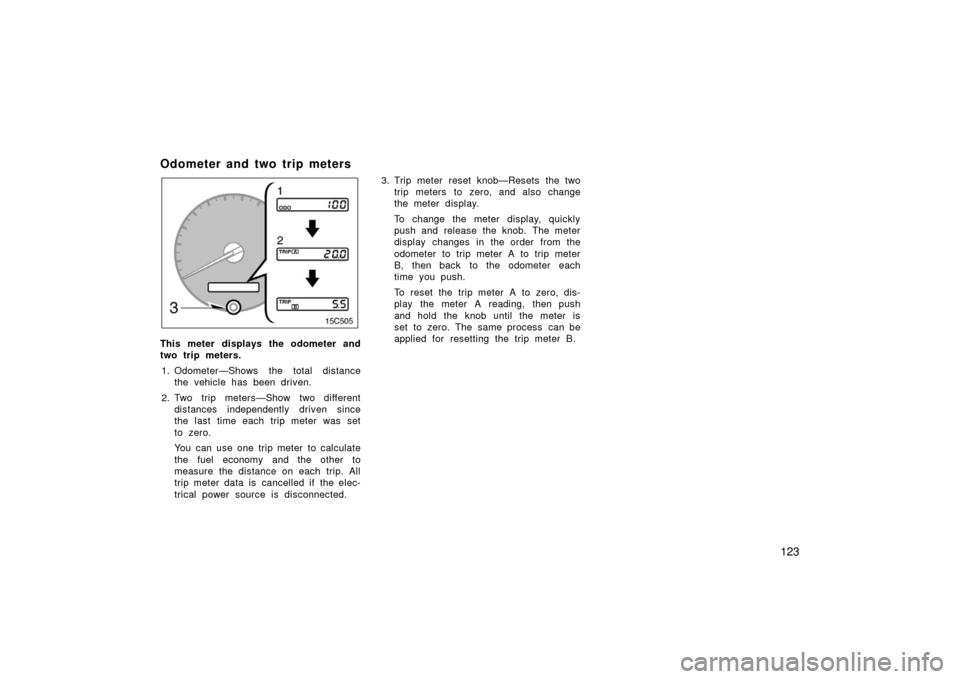
This meter displays the odometer and
two trip meters.1. Odometer—Shows the total distance the vehicle has been driven.
2. Two trip meters—Show two different distances independently driven since
the last time each trip meter was set
to zero.
You can use one trip meter to calculate
the fuel economy and the other to
measure the distance on each trip. All
trip meter data is cancelled if the elec-
trical power source is disconnected. 3. Trip meter reset knob—Resets the two
trip meters to zero, and also change
the meter display.
To change the meter display, quickly
push and release the knob. The meter
display changes in the order from the
odometer to trip meter A to trip meter
B, then back to the odometer each
time you push.
To reset the trip meter A to zero, dis-
play the meter A reading, then push
and hold the knob until the meter is
set to zero. The same process can be
applied for resetting the trip meter B.
Page 151 of 364
141
(i) If you cannot shift the selector le-ver out of “P” position
If you cannot shift the selector lever from
the “P” position even though the brake
pedal is depressed, use the shift lock
override button. For instructions, see “If
you cannot shift automatic transmission
selector lever” on page 290.
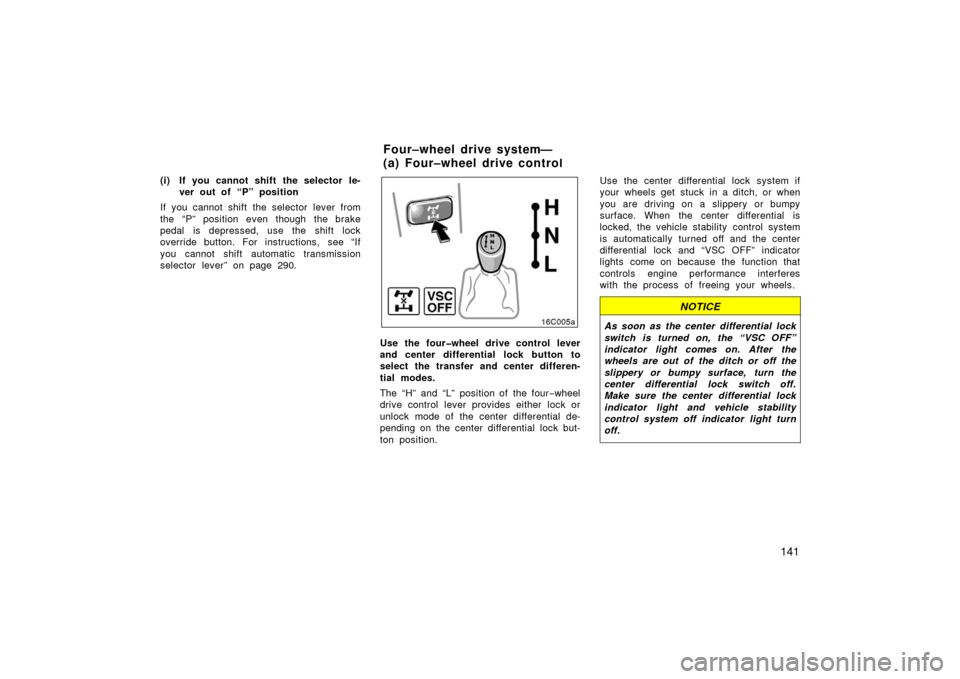
Use the fourwheel drive control lever
and center differential lock button to
select the transfer and center differen-
tial modes.
The “H” and “L” position of the four −wheel
drive control lever provides either lock or
unlock mode of the center differential de-
pending on the center differential lock but-
ton position. Use the center differential lock system if
your wheels get stuck in a ditch, or when
you are driving on a slippery or bumpy
surface. When the center differential is
locked, the vehicle stability control system
is automatically turned off and the center
differential lock and “VSC OFF” indicator
lights come on because the function that
controls engine performance interferes
with the process of freeing your wheels.
NOTICE
As soon as the center differential lock
switch is turned on, the “VSC OFF”
indicator light comes on. After the
wheels are out of the ditch or off the
slippery or bumpy surface, turn the
center differential lock switch off.
Make sure the center differential lock
indicator light and vehicle stability
control system off indicator light turn
off.
Four–wheel drive system—
(a) Four–wheel drive contro
l
Page 152 of 364

142
“H” (high speed position, center differ-
ential unlocked): Lever at “H”, center dif-
ferential lock button left out
Use this for normal driving on all types of
roads, from dry hard −surfaced roads to
wet, icy or snow −covered roads. This
position gives greater economy, quietest
ride, least wear and better vehicle control.
“H” (high speed position, center differ-
ential locked): Lever at “H”, center differ-
ential lock button pushed in
Use this for greater traction when you
experience a loss of power, such as
wheel slipping, in the center differential
unlock mode.
“N” (neutral position): Lever at “N”
No power is delivered to the wheels. The
vehicle must be stopped.
“L” (low speed position, center differen-
tial unlocked): Lever at “L”, center differ-
ential lock button left out
Use this for maximum power and traction.
Use this for climbing or descending steep
hills, off −road driving, and hard pulling in
sand or mud. In this mode, the braking feeling that oc-
curs when the wheels are negotiating a
sharp corner is further reduced than in the
“L” (low position, center differential locked)
mode.
“L” (low speed position, center differen-
tial locked):
Lever at “L”, center differen-
tial lock button pushed in.
Use this for maximum power and traction.
Use this for hard pulling in situations the
vehicle cannot negotiate even in the “L”
(low speed position, center differential un −
locked) mode. Also, using this mode when
driving down steep off −road inclines will
help contribute to increased vehicle stabil-
ity.
The indicator light tells when the differen-
tial lock is engaged. Note that the differ-
ential is not still locked as long as the
indicator light remains off.
When the operation is not completed, the
indicator blinks. If the indicator light does
not go off when you push out the center
differential lock switch, drive straight
ahead while accelerating or decelerating,
or drive in reverse. The center differential lock system opera-
tion is not completed within 5 seconds
while the cruise control system is set,
cancel the cruise control system. To can-
cel the cruise control system, see “Cruise
control” on page 155.
If the indicator light does not go off when
you push out the center differential lock
button, drive straight ahead while acceler-
ating or decelerating, or drive in reverse.
See “(b) Shifting procedure” for further in-
structions.
Advice for driving on slippery roads in
“L” (low speed position) mode
If you shift the four
−wheel drive control
lever to “L” and the automatic transmis-
sion lever to “2” when you drive in steep
off −road areas, the output of the brake
can be controlled effectively by the active
traction control system, which assists the
driver to control the driving power of 4
wheels.
Page 153 of 364
143
Use the “L” position of the automatic
transmission lever for maximum power
and traction when your wheels get stuck
or when you drive down a steep incline.
In the following cases, the output of the
brake can be controlled by the active trac-
tion control system if the engine speed is
under 3,000 rpm (normally engine speed
is under 3,000 rpm when the wheels get
unstuck).
�The four−wheel drive control lever in
the “L” position and the automatic
transmission lever in the “L” position or
the automatic transmission lever in the
“D”, “4”, “3” or “2” with the transmis-
sion downshifting to the first gear
�The four −wheel drive control lever in
the “L” position and the automatic
transmission lever in the “R” position
(As for the automatic transmission lever
positions, see “Automatic transmission” on
page 137.)
(b) Shifting procedure
SHIFTING BETWEEN “H” (UNLOCKED)
AND “H” (LOCKED)
To shift between unlock and lock
modes in “H”, push the center differential
lock button.
SHIFTING BETWEEN “L” (UNLOCKED)
AND “L” (LOCKED)
To shift between unlock and lock
modes in “L”, push the center differential
lock button.
SHIFTING BETWEEN “H” AND “L”
Stop the vehicle, put the transmission into
“N” and move the four −wheel drive control
lever.
CAUTION
Never move the four–wheel drive con-
trol lever if wheels are slipping. Wait
until the wheels have stopped slip-
ping or spinning before shifting.
NOTICE
For normal driving on dry and hard
surface roads, unlock the center dif-
ferential. To prevent damage to the
center differential lock system, do not
push the center differential lock but-
ton when the vehicle is cornering or
when its wheels are spinning freely
off the ground. If the indicator light
does not go off when unlocking the
center differential, drive straight
ahead while accelerating or decelerat-
ing, or drive in reverse.