Page 13 of 364
3
1. Headlight, turn signal and front foglight switches
2. Cruise control switch
3. Ignition switch
4. Wiper and washer switches
5. Emergency flasher switch
6. Navigation system including air condi- tioning controls (See the separate
“Navigation System Owner ’s Manual”.)
7. Clock and outside temperature display
8. Front passenger ’s seat belt reminder light
9. Audio system
10. Outside rear view mirror heater switch 11. Rear air conditioning switch
12. Rear window defogger switch
13. Center differential lock switch
14. Power antenna switch
15. Power tilt and telescopic steering switch
16. Instrument panel light control dial
17. Power rear view mirror control switches
18. Tire pressure warning system reset switch
19. Power quarter window switch (left− hand side)
20. Power quarter window switch (right −hand side)
21. Roll sensing of curtain shield airbags off switch
�
View B
(Vehicles with navigation system)
11C515b
Page 14 of 364
4
1. Headlight, turn signal and front foglight switches
2. Cruise control switch
3. Ignition switch
4. Wiper and washer switches
5. Emergency flasher switch
6. Clock, outside temperature and trip in- formation display
7. Audio system
8. Front passenger ’s seat belt reminder light
9. Air conditioning controls
10. Outside rear view mirror heater switch 11. Rear air conditioning switch
12. Rear window defogger switch
13. Center differential lock switch
14. Power antenna switch
15. Power tilt and telescopic steering switch
16. Instrument panel light control dial
17. Power rear view mirror control switches
18. Tire pressure warning system reset switch
19. Power quarter window switch (left− hand side)
20. Power quarter window switch (right −hand side)
21. Roll sensing of curtain shield airbags off switch
�
View B
(Vehicles without navigation system)
11C029d
Page 163 of 364
153
16C523
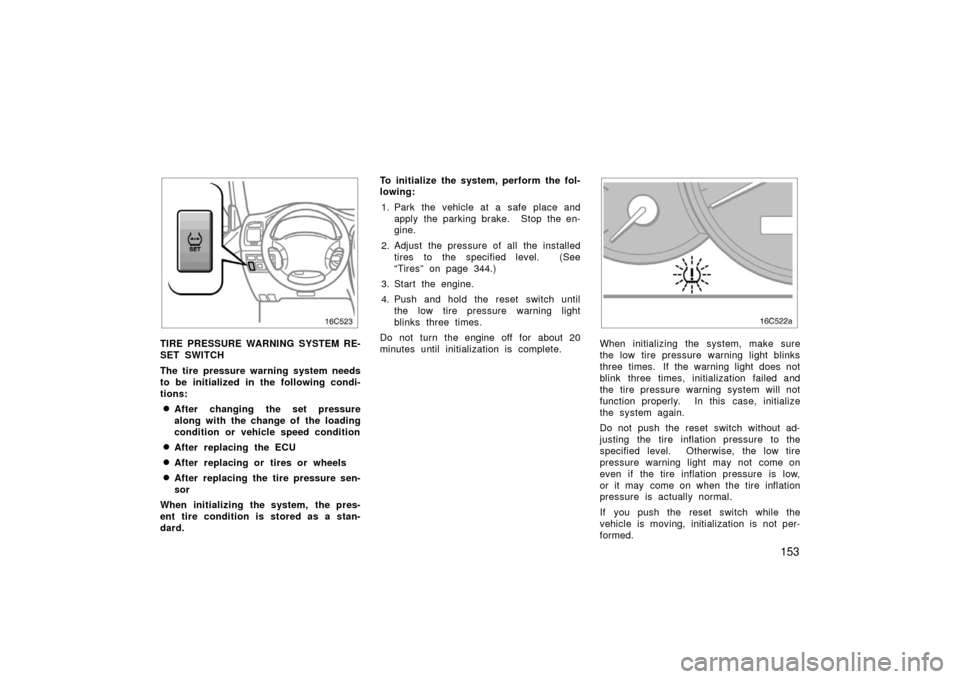
TIRE PRESSURE WARNING SYSTEM RE-
SET SWITCH
The tire pressure warning system needs
to be initialized in the following condi-
tions:
�After changing the set pressure
along with the change of the loading
condition or vehicle speed condition
�After replacing the ECU
�After replacing or tires or wheels
�After replacing the tire pressure sen-
sor
When initializing the system, the pres-
ent tire condition is stored as a stan-
dard. To initialize the system, perform the fol-
lowing:
1. Park the vehicle at a safe place and apply the parking brake. Stop the en-
gine.
2. Adjust the pressure of all the installed tires to the specified level. (See
“Tires” on page 344.)
3. Start the engine.
4. Push and hold the reset switch until the low tire pressure warning light
blinks three times.
Do not turn the engine off for about 20
minutes until initialization is complete.
16C522a
When initializing the system, make sure
the low tire pressure warning light blinks
three times. If the warning light does not
blink three times, initialization failed and
the tire pressure warning system will not
function properly. In this case, initialize
the system again.
Do not push the reset switch without ad-
justing the tire inflation pressure to the
specified level. Otherwise, the low tire
pressure warning light may not come on
even if the tire inflation pressure is low,
or it may come on when the tire inflation
pressure is actually normal.
If you push the reset switch while the
vehicle is moving, initialization is not per-
formed.
Page 164 of 364
154
If the low tire pressure warning light does
not blink when you push and hold the
reset switch, have the tire pressure warn-
ing system checked at your Toyota dealer.
NOTICE
�Do not turn the engine switch off
during initialization, or the system
may not function properly due to
incomplete initialization.
� Check which tires are being used
before initialization of the system,
and also check the selector switch
position. (See the following “Selec-
tor switch”.)
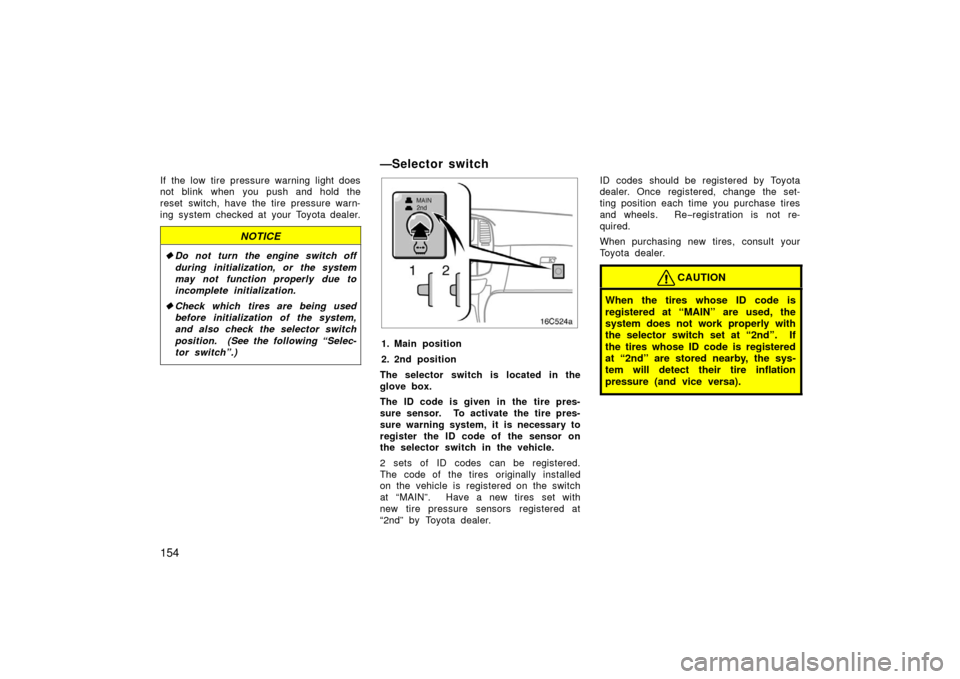
—Selector switch
16C524a
1. Main position
2. 2nd position
The selector switch is located in the
glove box.
The ID code is given in the tire pres-
sure sensor. To activate the tire pres-
sure warning system, it is necessary to
register the ID code of the sensor on
the selector switch in the vehicle.
2 sets of ID codes can be registered.
The code of the tires originally installed
on the vehicle is registered on the switch
at “MAIN”. Have a new tires set with
new tire pressure sensors registered at
“2nd” by Toyota dealer. ID codes should be registered by Toyota
dealer. Once registered, change the set-
ting position each time you purchase tires
and wheels. Re
−registration is not re-
quired.
When purchasing new tires, consult your
Toyota dealer.
CAUTION
When the tires whose ID code is
registered at “MAIN” are used, the
system does not work properly with
the selector switch set at “2nd”. If
the tires whose ID code is registered
at “2nd” are stored nearby, the sys-
tem will detect their tire inflation
pressure (and vice versa).

