Page 196 of 428

’06 HIGHLANDER_U (L/O 0508)
186
Compact disc player
Use this switch to skip up or down to a
different track in either direction.
Quickly push and release the “ �” or “ �”
side of the switch until the track you want
to listen to is set. If you want to return
to the beginning of the current track, push
the “ �” side of the switch once, quickly.
With compact disc changer only—
Push and hold the “� ” or “�” side of the
switch until the disc you want to listen to
is set.
Vehicles with rear seat entertainment sys-
tem—
While the DVD player is in operation, the
chapter or track can be changed by push-
ing the “ �” or “ �” side of the switch.
3. “MODE” switch
Push “MODE” switch to select an audio
mode. Each push changes the mode se-
quentially if the desired mode is ready to
use. The DVD player will be selectable if
a rear seat entertainment system is
installed in your vehicle.
To turn the audio system on, push the
“MODE” switch. To turn the audio system off, push and
hold the “MODE” switch until the system
turns off.
Page 197 of 428
’06 HIGHLANDER_U (L/O 0508)
187
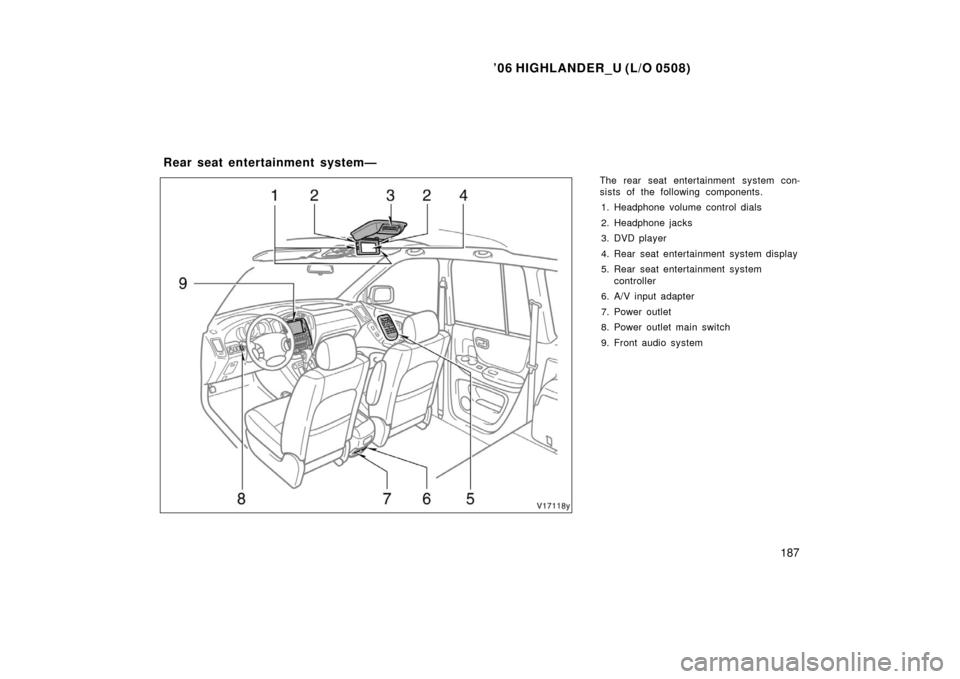
The rear seat entertainment system con-
sists of the following components.
1. Headphone volume control dials
2. Headphone jacks
3. DVD player
4. Rear seat entertainment system display
5. Rear seat entertainment system controller
6. A/V input adapter
7. Power outlet
8. Power outlet main switch
9. Front audio system
Rear seat entertainment system—
Page 198 of 428
’06 HIGHLANDER_U (L/O 0508)
188
The rear seat entertainment system is de-
signed for the rear passengers to enjoy
audio and DVD video separately from the
front audio system.
The rear seat entertainment system can
be operated when the ignition key is in
the “ACC” or “ON” position.
The rear passengers can enjoy all modes
(AM and FM radio, cassette tape player,
compact disc player with changer and
DVD player) on the rear seat entertain-
ment system only if a cassette tape and
a compact disc are loaded in the front
audio system.
The rear seat entertainment system can
play DVD video, audio CD, video CD, CD
text, dts−CD or DVD audio only when a
disc is loaded in the DVD player.
You can enjoy videos and sound when
your personal audio system is connected
to the input terminal adapter on the rear
console box. For details, refer to the
manufacturer ’s instructions. You can enjoy the rear seat entertainment
system with commercial hea
dphone. See
“—Headphone ja cks” on page 237 in this
Section for details.
You can also enjoy the rear seat enter-
tainment system with a wireless head-
phone. The wireless headphone can be
used within rear seat. If the signal be-
comes weak, the headphone will mute.
For details, refer to the manufacturer’s
instructions.
With some wireless headphone generally
available in the market, it may be difficult
to catch sound properly. Toyota recom-
mends the use of Toyota genuine wireless
headphone.
You can purchase a wireless headphone
at a Toyota dealer.CAUTION
�Do not operate a motor vehicle
while using headphones. Doing so
may cause an accident, resulting in
death or serious injury.
�Conversational speech on some
DVDs is recorded at a low volume
to emphasize the impact of sound
effects. If you adjust the volume
assuming that the conversations
represent the maximum volume lev-
el that the DVD will play, you may
be startled by louder sound effects
or when you change to a different
audio source. Be sure to adjust the
volume with this in mind.
Make sure the volume is not in-
creased, before you turn on the
headphone.
Page 200 of 428

’06 HIGHLANDER_U (L/O 0508)
190
NOTICE
�Benzene or alkaline solutions may
damage the coated surface of the
screen .
� To prevent the battery from being
discharged, do not turn on the rear
seat entertainment system longer
than necessary when the engine is
not running.
The rear seat entertainment system can
be operated with the rear seat entertain-
ment system controller and buttons on the
DVD player unit. The system cannot be
operated by touching the switches on the
screen directly.
CAUTION
Do not disassemble or modify the
controller. It may cause an accident,
fire or electric shock.
NOTICE
Keep the controller away from direct
sunlight, high heat and high humidity.
These conditions could cause the
case to deform or the battery to ex-
plode or leak.
BEFORE USING THE CONTROLLER
(for new vehicle owners)
A battery is already set in the control-
ler with an insulating sheet, which pre-
vents the battery from being dis-
charged. Before using the controller,
remove the insulating sheet according
to the following procedure.
—Rear seat entertainment
system controller
Page 203 of 428
’06 HIGHLANDER_U (L/O 0508)
193
LOCATING THE CONTROLLER
If you lose sight of the controller, push
and hold the “CURSOR (REMOTE)” button
on the DVD player unit until you hear a
beep. A buzzer sounds from the controller
to let you know where it is.
To stop the buzzer, push any button of the
controller.
If the controller is located close to some-
thing that blocks the signal, such as some
kind of metal, the controller may not re-
ceive the signal and the buzzer may not
sound.FCC Information
Caution: Any changes or modifica-
tions in construction of this device
which are not expressly approved by
the party responsible for compliance
could void the user’s authority to op-
erate the equipment.
FCC Label Information This device complies with part 15 of
the FCC Rules. Operation is subject
to the following two conditions: (1)
This device may not cause harmful
interference, and (2) this device must
accept any interference received, In-
cluding interference that may cause
undesired operation.
Page 204 of 428
’06 HIGHLANDER_U (L/O 0508)
194
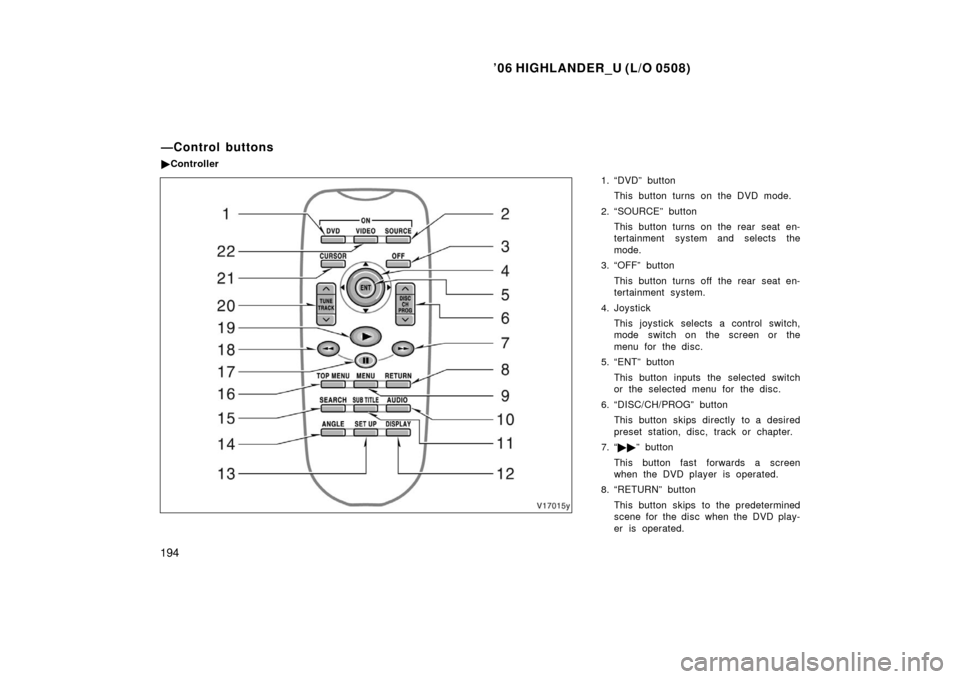
1. “DVD” button
This button turns on the DVD mode.
2. “SOURCE” button This button turns on the rear seat en-
tertainment system and selects the
mode.
3. “OFF” button
This button turns off the rear seat en-
tertainment system.
4. Joystick This joystick selects a control switch,
mode switch on the screen or the
menu for the disc.
5. “ENT” button
This button inputs the selected switch
or the selected menu for the disc.
6. “DISC/CH/PROG” button This button skips directly to a desired
preset station, disc, track or chapter.
7. “ �� ” button
This button fast forwards a screen
when the DVD player is operated.
8. “RETURN” button
This button skips to the predetermined
scene for the disc when the DVD play-
er is operated.
—Control buttons
�Controller
Page 205 of 428

’06 HIGHLANDER_U (L/O 0508)
195
9. “MENU” button
This button indicates the menu screen
for DVD video when the DVD player is
operated.
10. “AUDIO” button
This button indicates the changing au-
dio screen when the DVD player is
operated.
11. “SUB TITLE” button This button indicates the changing sub-
title screen when the DVD player is
operated.
12. “DISPLAY” button This button adjusts the color, tone,
contrast and brightness of the screen.
13. “SET UP” button
This button indicates the initial set up
screen when the DVD player is oper-
ated.
14. “ANGLE” button This button selects the angle of the
screen when the DVD player is oper-
ated.
15. “SEARCH” button
This button indicates the title search
screen when the DVD player is oper-
ated. 16. “TOP MENU” button
This button indicates the title selection
screen for DVD video when the DVD
player is operated.
17. “
” button
This button pauses a screen when the
DVD player is operated.
18. “ ��” button
This button reverses a screen when
the DVD player is operated.
19. “ �” button
This button plays a screen when the
DVD player is operated.
20. “TUNE/TRACK” button
This button seeks a radio station or
selects track/chapter.
21. “CURSOR” button
This button indicates the control
switches on the screen when the DVD
player is operated.
22. “VIDEO” button
This button causes the display to use
the video signal from an external video
device.
Page 206 of 428
’06 HIGHLANDER_U (L/O 0508)
196
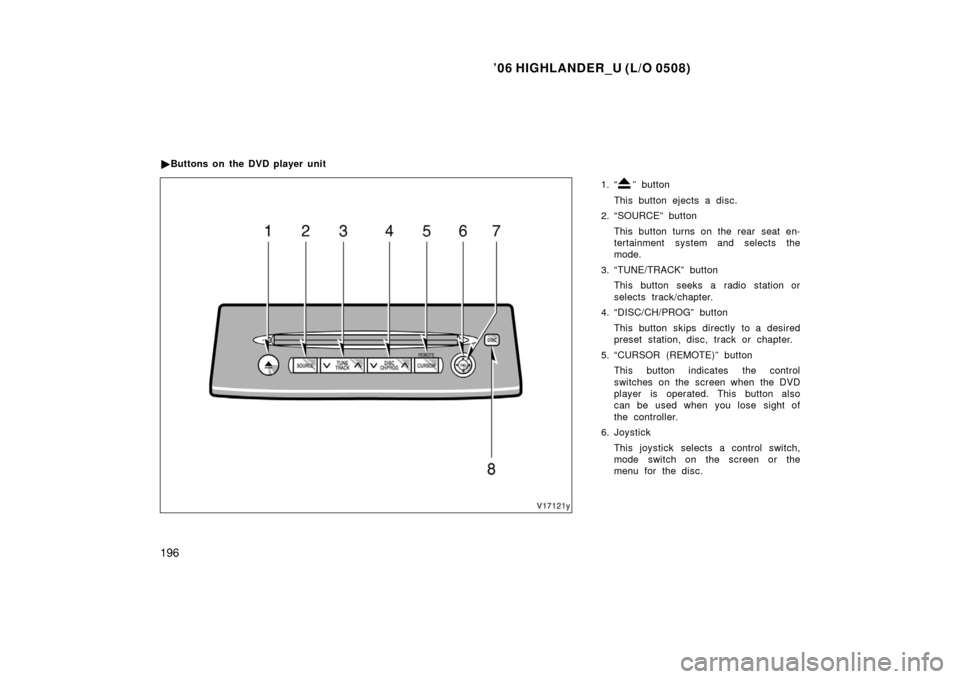
1. “” button
This button ejects a disc.
2. “SOURCE” button
This button turns on the rear seat en-
tertainment system and selects the
mode.
3. “TUNE/TRACK” button This button seeks a radio station or
selects track/chapter.
4. “DISC/CH/PROG” button
This button skips directly to a desired
preset station, disc, track or chapter.
5. “CURSOR (REMOTE)” button This button indicates the control
switches on the screen when the DVD
player is operated. This button also
can be used when you lose sight of
the controller.
6. Joystick
This joystick selects a control switch,
mode switch on the screen or the
menu for the disc.
�
Buttons on the DVD player unit