Page 108 of 357
’06Camry_U (L/O 0507)
100
2006 CAMRY from July ‘05 Prod. (OM33708U)
When the inside air temperature is low, it
may take a little longer for the mirror to
darken in response to the detection of
headlights.
CAUTION
Do not adjust the mirror while the
vehicle is moving. Doing so may
cause the driver to mishandle the ve-
hicle and an accident may occur re-
sulting in death or serious injuries.
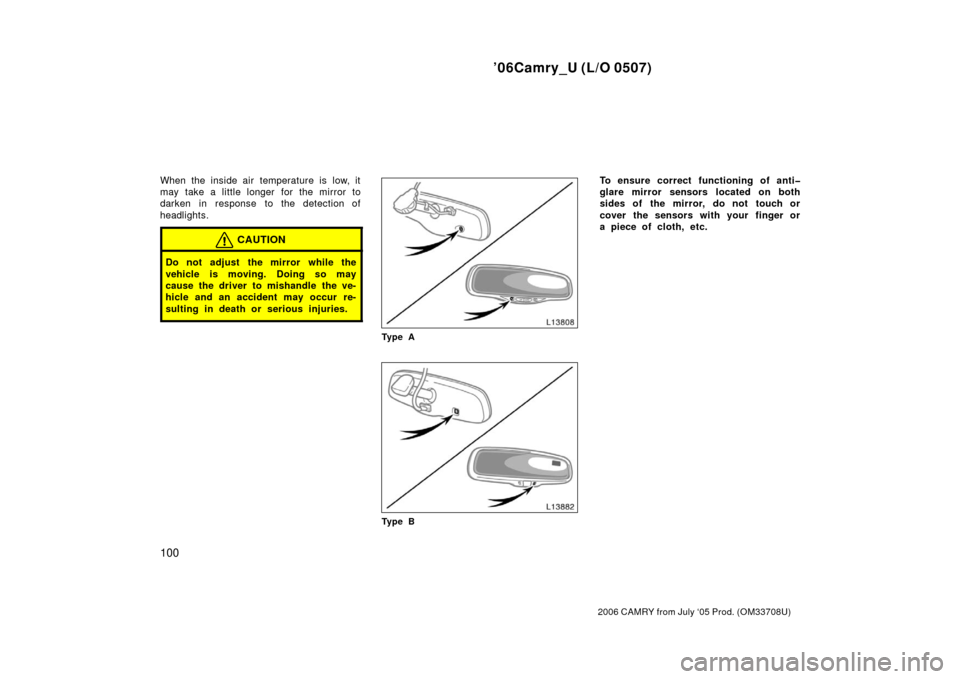
Ty p e A
Ty p e B
To ensure correct functioning of anti
glare mirror sensors located on both
sides of the mirror, do not touch or
cover the sensors with your finger or
a piece of cloth, etc.
Page 109 of 357
’06Camry_U (L/O 0507)
101
2006 CAMRY from July ‘05 Prod. (OM33708U)
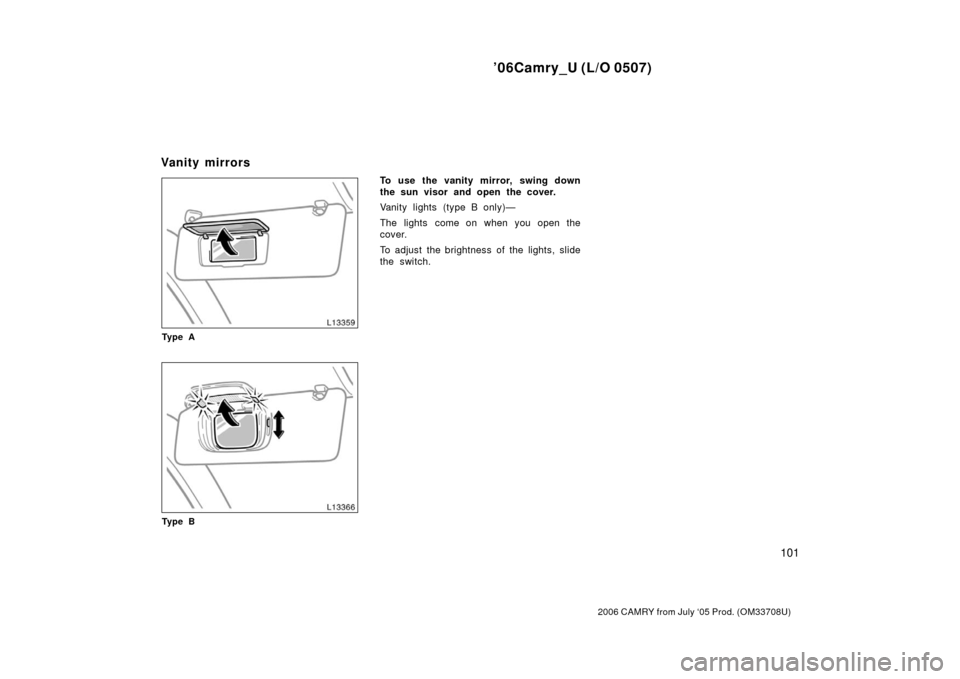
Ty p e A
Ty p e B
To use the vanity mirror, swing down
the sun visor and open the cover.
Vanity lights (type B only)—
The lights come on when you open the
cover.
To adjust the brightness of the lights, slide
the switch.
Vanity mirrors
Page 111 of 357

’06Camry_U (L/O 0507)
103
2006 CAMRY from July ‘05 Prod. (OM33708U)
OPERATION OF INSTRUMENTS AND
CONTROLS
Lights, Wipers and Defogger
Headlights and turn signals104
. . . . . . . . . . . . . . . . . . . . . . . . . . . . . . . . . .
Emergency flashers 109
. . . . . . . . . . . . . . . . . . . . . . . . . . . . . . . . . . . . \
. . . . .
Instrument panel light control 11 0
. . . . . . . . . . . . . . . . . . . . . . . . . . . . . . . .
Front fog lights 11 0
. . . . . . . . . . . . . . . . . . . . . . . . . . . . . . . . . . . . \
. . . . . . . . .
Interior light 11 0
. . . . . . . . . . . . . . . . . . . . . . . . . . . . . . . . . . . . \
. . . . . . . . . . . .
Ignition switch light 111
. . . . . . . . . . . . . . . . . . . . . . . . . . . . . . . . . . . . \
. . . . .
Personal lights 11 2
. . . . . . . . . . . . . . . . . . . . . . . . . . . . . . . . . . . . \
. . . . . . . . .
Windshield wipers and washer 11 2
. . . . . . . . . . . . . . . . . . . . . . . . . . . . . . .
Rear window and outside rear view mirror defoggers 11 3
. . . . . . . . . . .
SECTION 1 5
Page 121 of 357

’06Camry_U (L/O 0507)
11 3
2006 CAMRY from July ‘05 Prod. (OM33708U)
When waxing your vehicle, make sure that
the washer nozzles do not become
blocked. If a nozzle becomes blocked,
contact your Toyota dealer to have the
vehicle serviced.
NOTICE
If a nozzle becomes blocked, do not
try to clear it with a pin or other
object. The nozzle will be damaged.
With manual air conditioning controls
With automatic air conditioning controls
To defog or defrost the rear window,
push the switch.
The key must be in the “ON” position.
The thin heater wires on the inside of the
rear window will quickly clear the sur-
faces. An indicator light will illuminate to
indicate the defogger is operating.
On some models, heater panels in the
outside rear view mirrors will also quickly
clear the surfaces.
Push the switch once again to turn the
defogger off.
The system will automatically shut off af-
ter the defogger has operated about 15
minutes.
CAUTION
Since the mirror surfaces can get hot
do not touch them when the defogger
switch is on.
Make sure you turn the defoggers off
when the surfaces are clear. Leaving the
defoggers on for a long time could cause
the battery to discharge, especially during
stop−and− go driving. The defoggers are
not designed for drying rain water or for
melting snow.
Rear window and outside rear
view mirror defoggers
Page 122 of 357
’06Camry_U (L/O 0507)
11 4
2006 CAMRY from July ‘05 Prod. (OM33708U)
If the outside rear view mirrors are heavi-
ly coated with ice, use a spray de−icer
before operating the switch.
NOTICE
When cleaning the inside of the rear
window, be careful not to scratch or
damage the heater wires or connec-
tors.
Page 208 of 357

’06Camry_U (L/O 0507)
200
2006 CAMRY from July ‘05 Prod. (OM33708U)
The direction is indicated on the inside
rear view mirror.
If the ignition switch was turned off with
the system on, the system will automati-
cally turn back on when the ignition switch
is turned on.
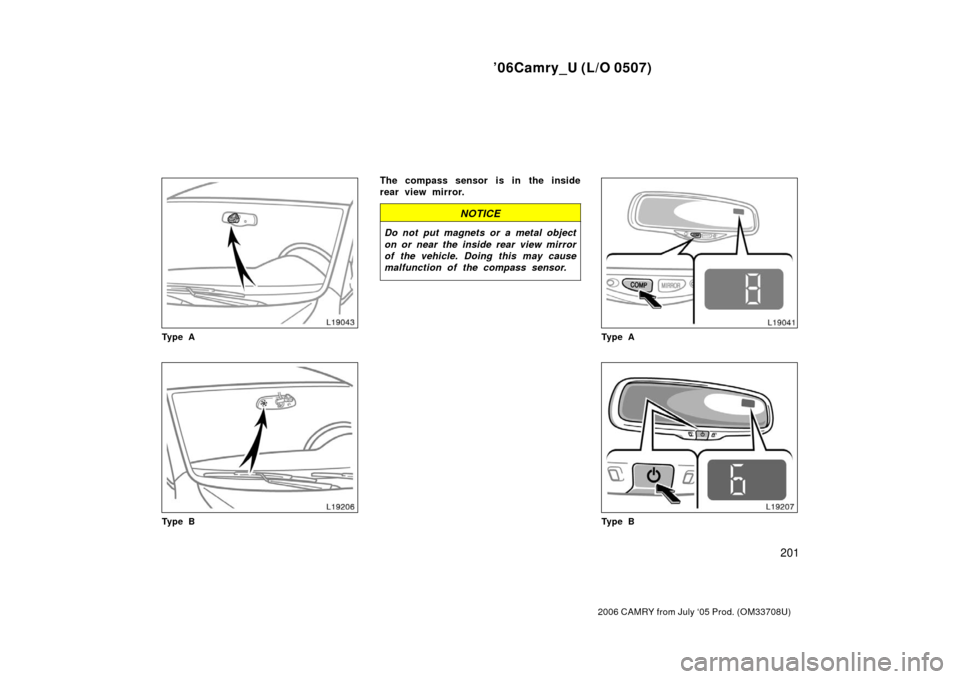
Type A—Push the “COMP” switch to turn
the compass system on and off.
Type B—Push the switch for longer than
3 seconds to turn the compass system on
and off.
The compass indicates the direction
that the vehicle is heading. In the
above case, it shows that the vehicle is
heading north.Displays
Directions
N
NE E
SE
S
SW W
NWNorth
Northeast East
Southeast
South
Southwest West
Northwest
The compass may not show the correct
direction in the following conditions:
�The vehicle is stopped immediately af-
ter turning.
�The compass does not adjust while the
vehicle is stopped.
�The ignition switch is turned off imme-
diately after turning.
�The vehicle is on an inclined surface.
�The vehicle is in a place where the
earth’s magnetic field is subject to in-
terference by artificial magnetic fields
(underground parking, under a steel
tower, between buildings, roof parking,
near a crossing, near a large vehicle,
etc.).
�The vehicle is magnetized. (There is a
magnet or a metal object on or near
the inside rear view mirror.)
�The battery has been disconnected.
If your vehicle is out of the set zone,
refer to “CALIBRATING THE COMPASS”
below to set the zone number.
If the deviation is small, the compass
works to calibrate the direction automati-
cally while the vehicle is in motion. For additional precision or for complete
calibrating, see “CALIBRATING THE
COMPASS” below.
Page 209 of 357
’06Camry_U (L/O 0507)
201
2006 CAMRY from July ‘05 Prod. (OM33708U)
Ty p e A
Ty p e B
The compass sensor is in the inside
rear view mirror.
NOTICE
Do not put magnets or a metal object
on or near the inside rear view mirror
of the vehicle. Doing this may cause
malfunction of the compass sensor.
Ty p e A
Ty p e B
Page 257 of 357

’06Camry_U (L/O 0507)
249
2006 CAMRY from July ‘05 Prod. (OM33708U)
1. Check the area around the vehicle be-fore entering it.
2. Adjust seat position, seatback angle, seat cushion height, head restraint
height and steering wheel angle.
3. Vehicles with the power adjustable ped- als—Adjust the position of the acceler-
ator and brake pedals.
4. Adjust the inside and outside rear view mirrors.
5. Lock all doors.
6. Fasten seat belts. 1. Apply the parking brake firmly.
2. Turn off unnecessary lights and acces-
sories.
3. Manual transmission: Press the clutch
pedal to the floor and shift the trans-
mission into neutral. Hold the clutch
pedal to the floor until the engine is
started. A starter safety device will pre-
vent the starter from operating if the
clutch pedal is not fully depressed.
Automatic transmission: Put the se-
lector lever in “P”. If you need to re-
start the engine while the vehicle is
moving, put the selector lever in “N”.
A starter safety device will prevent the
starter from operating if the selector
lever is in any drive position.
4. Automatic transmission only: De-
press the brake pedal and hold it to
the floor until driving off. Before starting the engine, be sure to fol-
low the instructions in “(a) Before crank-
ing”.
Normal starting procedure
The multiport fuel injection system/sequen-
tial multiport fuel injection system in your
engine automatically controls the proper
air
−fuel mixture for starting. You can start
a cold or hot engine as follows:
With your foot off the accelerator pedal,
crank the engine by turning the key to
“START”. Release it when the engine
starts.
Engine should be warmed up by driving,
not in idle. For warming up, drive with
smoothly turning engine until engine cool-
ant temperature is within normal range.
If the engine stalls...
Simply restart it, using the correct proce-
dure given in normal starting.
If the engine will not start...
See “If your vehicle will not start” on page
263 in Section 4.
Before starting the engine H o w to st art th e en g in e—
(a) Before cranking
(b) Starting the engine