Page 46 of 398

’06 AVALON_U (L/O 0508)
38
To select the locking linked with the
vehicle speed:1. Close all doors and turn the ignition switch to the ON.
2. Shift the selector lever from “P” to the “N” position.
3. Within 10 seconds of turning the igni- tion switch to the ON, press and hold
the driver’s side power door lock
switch in the lock position for 5 sec-
onds and then release.
The doors will be locked and unlocked
to indicate that the function is set.
To cancel the function, do the above op-
eration again. AUTOMATIC DOOR UNLOCKING
You can select the following functions:
�Unlocking linked with the ignition
switch
All doors are automatically unlocked
when the driver ’s door is opened within
10 seconds after the ignition switch is
set from ON to ACC or OFF.
�Unlocking linked with the shift posi-
tion
All doors are automatically unlocked
when the selector lever is moved to
“P” position.
You can set or cancel the automatic
door unlocking functions:
Be sure to apply the parking brake when
performing the following operations. To select the unlocking linked with the
ignition switch:
1. Close all doors and turn the ignition switch to the ON.
2. Shift the selector lever from “P” to the “N” position.
3. Within 10 seconds of turning the igni- tion switch to the ON, press and hold
the driver’s side power door lock
switch in the unlock position for 5 sec-
onds and then release.
The doors will be locked and unlocked
to indicate that the function is set.
To cancel the function, do the above op-
eration again.
Page 47 of 398
’06 AVALON_U (L/O 0508)
39
To select the unlocking linked with the
shift position:1. Close all doors and turn the ignition switch to the ON.
2. Shift the selector lever to the “P” posi- tion.
3. Within 10 seconds of turning the igni- tion switch to the ON, press and hold
the driver’s side power door lock
switch in the unlock position for 5 sec-
onds and then release.
The doors will be locked and unlocked
to indicate that the function is set.
To cancel the function, do the above op-
eration again.
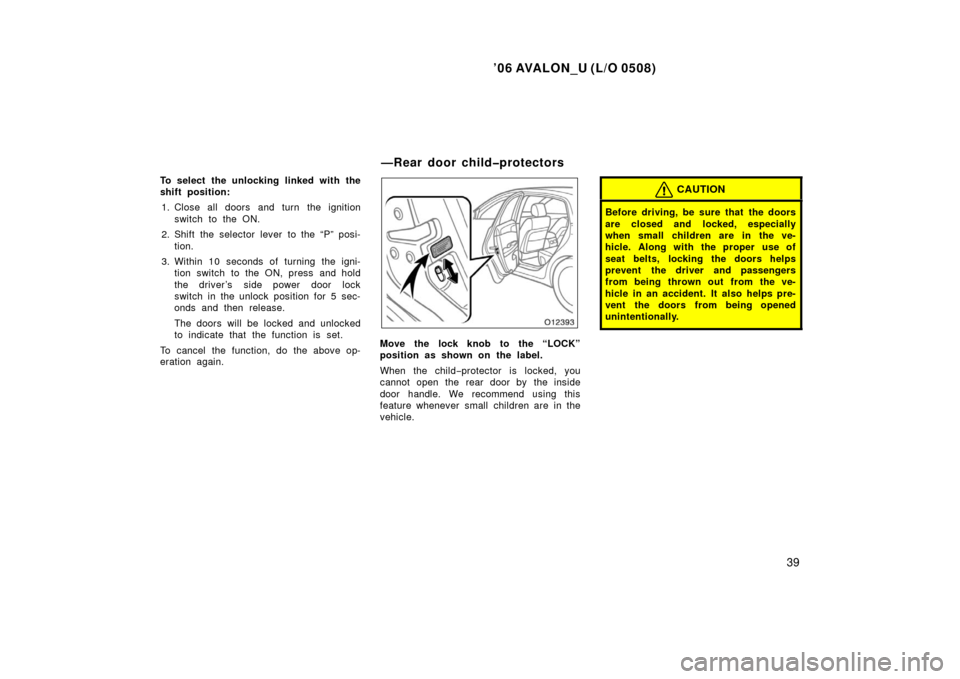
Move the lock knob to the “LOCK”
position as shown on the label.
When the child −protector is locked, you
cannot open the rear door by the inside
door handle. We recommend using this
feature whenever small children are in the
vehicle.
CAUTION
Before driving, be sure that the doors
are closed and locked, especially
when small children are in the ve-
hicle. Along with the proper use of
seat belts, locking the doors helps
prevent the driver and passengers
from being thrown out from the ve-
hicle in an accident. It also helps pre-
vent the doors from being opened
unintentionally.
—Rear door childprotectors
Page 48 of 398
’06 AVALON_U (L/O 0508)
40
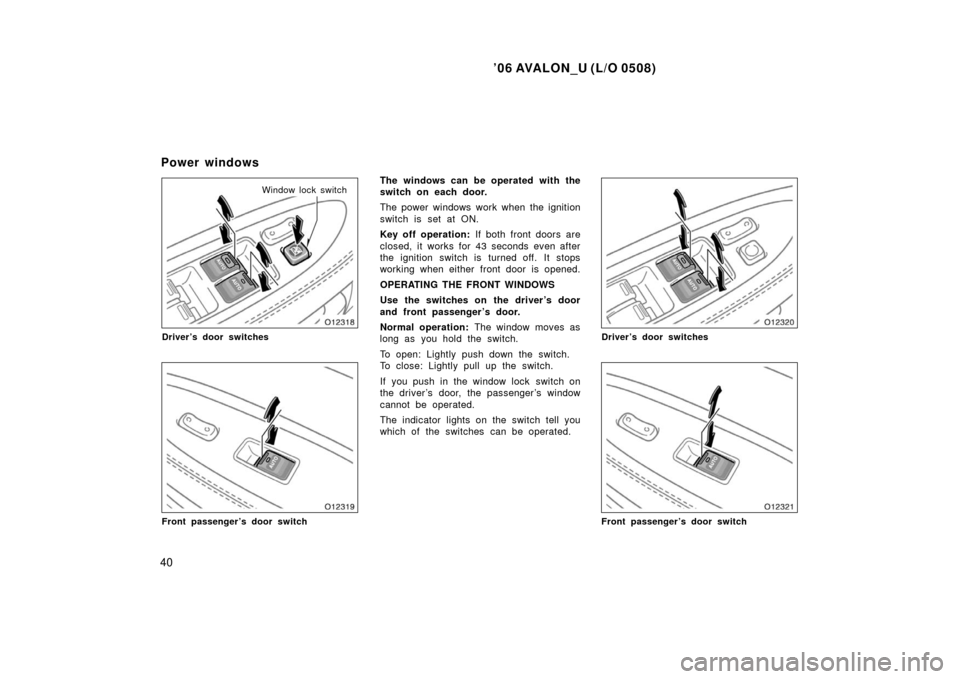
Window lock switch
Driver’s door switches
Front passenger’s door switch
The windows can be operated with the
switch on each door.
The power windows work when the ignition
switch is set at ON.
Key off operation: If both front doors are
closed, it works for 43 seconds even after
the ignition switch is turned off. It stops
working when either front door is opened.
OPERATING THE FRONT WINDOWS
Use the switches on the driver’s door
and front passenger ’s door.
Normal operation: The window moves as
long as you hold the switch.
To open: Lightly push down the switch.
To close: Lightly pull up the switch.
If you push in the window lock switch on
the driver ’s door, the passenger ’s window
cannot be operated.
The indicator lights on the switch tell you
which of the switches can be operated.
Driver’s door switches
Front passenger’s door switch
Power windows
Page 49 of 398
’06 AVALON_U (L/O 0508)
41
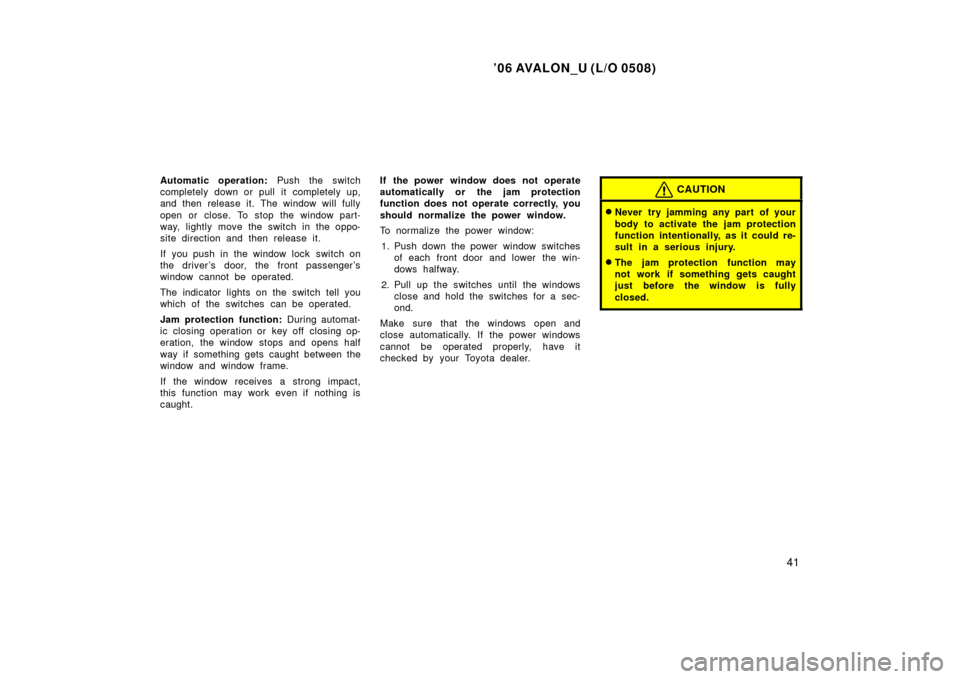
Automatic operation: Push the switch
completely down or pull it completely up,
and then release it. The window will fully
open or close. To stop the window part-
way, lightly move the switch in the oppo-
site direction and then release it.
If you push in the window lock switch on
the driver ’s door, the front passenger ’s
window cannot be operated.
The indicator lights on the switch tell you
which of the switches can be operated.
Jam protection function: During automat-
ic closing operation or key off closing op-
eration, the window stops and opens half
way if something gets caught between the
window and window frame.
If the window receives a strong impact,
this function may work even if nothing is
caught. If the power window does not operate
automatically or the jam protection
function does not operate correctly, you
should normalize the power window.
To normalize the power window:
1. Push down the power window switches of each front door and lower the win-
dows halfway.
2. Pull up the switches until the windows close and hold the switches for a sec-
ond.
Make sure that the windows open and
close automatically. If the power windows
cannot be operated properly, have it
checked by your Toyota dealer.CAUTION
�Never try jamming any part of your
body to activate the jam protection
function intentionally, as it could re-
sult in a serious injury.
�The jam protection function may
not work if something gets caught
just before the window is fully
closed.
Page 50 of 398
’06 AVALON_U (L/O 0508)
42
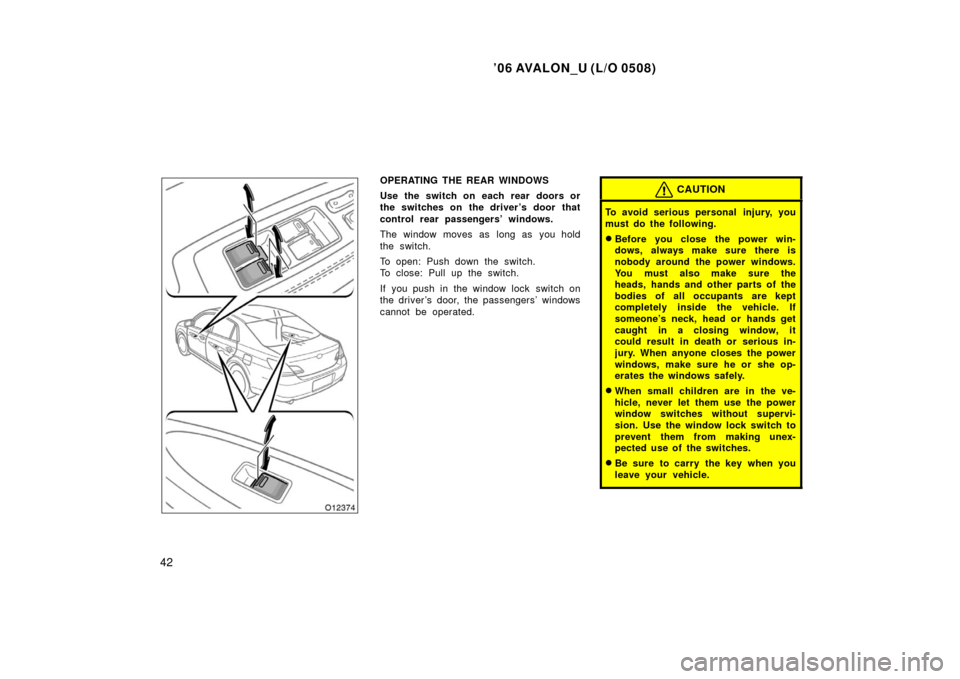
OPERATING THE REAR WINDOWS
Use the switch on each rear doors or
the switches on the driver’s door that
control rear passengers’ windows.
The window moves as long as you hold
the switch.
To open: Push down the switch.
To close: Pull up the switch.
If you push in the window lock switch on
the driver ’s door, the passengers’ windows
cannot be operated.CAUTION
To avoid serious personal injury, you
must do the following.
�Before you close the power win-
dows, always make sure there is
nobody around the power windows.
You must also make sure the
heads, hands and other parts of the
bodies of all occupants are kept
completely inside the vehicle. If
someone’s neck, head or hands get
caught in a closing window, it
could result in death or serious in-
jury. When anyone closes the power
windows, make sure he or she op-
erates the windows safely.
�When small children are in the ve-
hicle, never let them use the power
window switches without supervi-
sion. Use the window lock switch to
prevent them from making unex-
pected use of the switches.
�Be sure to carry the key when you
leave your vehicle.
Page 51 of 398
’06 AVALON_U (L/O 0508)
43
�Never leave anyone (particularly a
small child) alone in your vehicle,
with the key left in the vehicle.
Otherwise, he/she could use the
power window switches and get
trapped in a window. Unattended
person (particularly a small child)
can be involved in a serious acci-
dent.
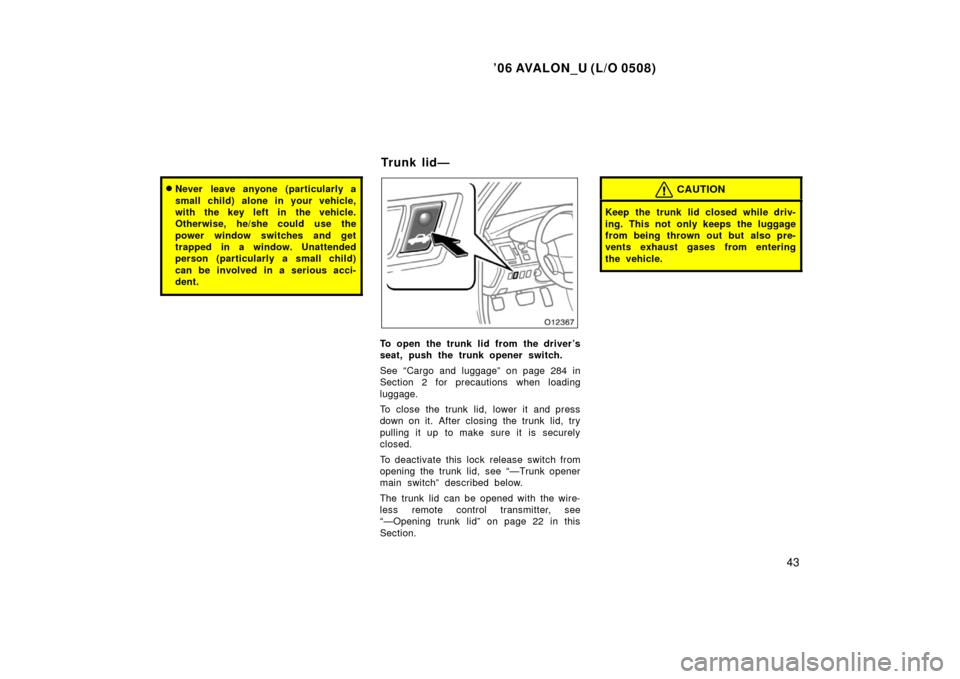
To open the trunk lid from the driver’s
seat, push the trunk opener switch.
See “Cargo and luggage” on page 284 in
Section 2 for precautions when loading
luggage.
To close the trunk lid, lower it and press
down on it. After closing the trunk lid, try
pulling it up to make sure it is securely
closed.
To deactivate this lock release switch from
opening the trunk lid, see “—Trunk opener
main switch” described below.
The trunk lid can be opened with the wire-
less remote control transmitter, see
“—Opening trunk lid” on page 22 in this
Section.
CAUTION
Keep the trunk lid closed while driv-
ing. This not only keeps the luggage
from being thrown out but also pre-
vents exhaust gases from entering
the vehicle.
Trunk lid—
Page 52 of 398
’06 AVALON_U (L/O 0508)
44
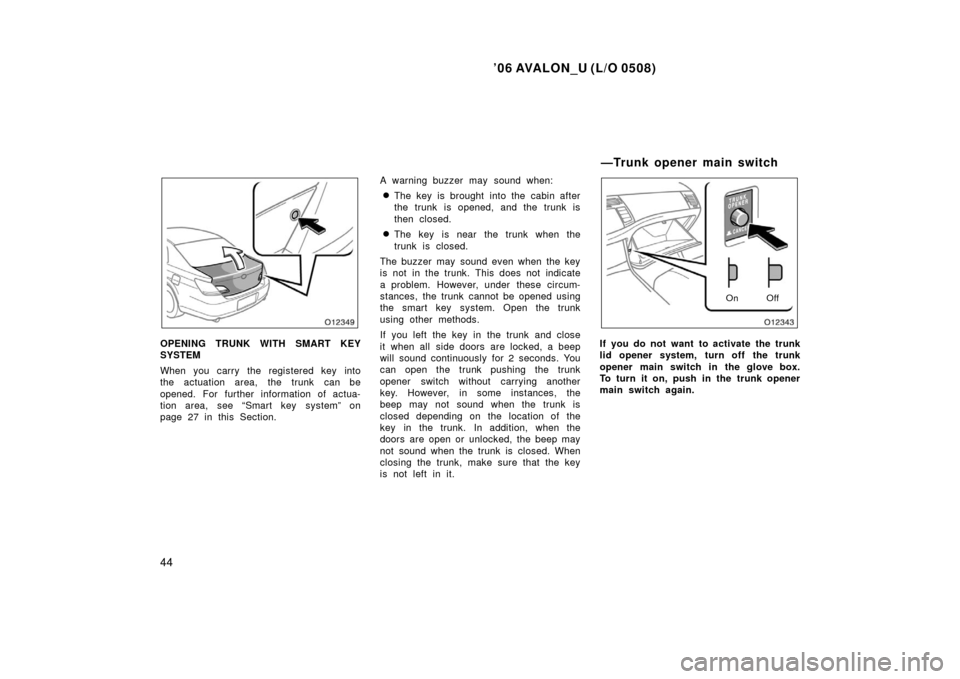
OPENING TRUNK WITH SMART KEY
SYSTEM
When you carry the registered key into
the actuation area, the trunk can be
opened. For further information of actua-
tion area, see “Smart key system” on
page 27 in this Section.A warning buzzer may sound when:
�The key is brought into the cabin after
the trunk is opened, and the trunk is
then closed.
�The key is near the trunk when the
trunk is closed.
The buzzer may sound even when the key
is not in the trunk. This does not indicate
a problem. However, under these circum-
stances, the trunk cannot be opened using
the smart key system. Open the trunk
using other methods.
If you left the key in the trunk and close
it when all side doors are locked, a beep
will sound continuously for 2 seconds. You
can open the trunk pushing the trunk
opener switch without carrying another
key. However, in some instances, the
beep may not sound when the trunk is
closed depending on the location of the
key in the trunk. In addition, when the
doors are open or unlocked, the beep may
not sound when the trunk is closed. When
closing the trunk, make sure that the key
is not left in it.
On Off
If you do not want to activate the trunk
lid opener system, turn off the trunk
opener main switch in the glove box.
To turn it on, push in the trunk opener
main switch again.
—Trunk opener main switch
Page 53 of 398
’06 AVALON_U (L/O 0508)
45
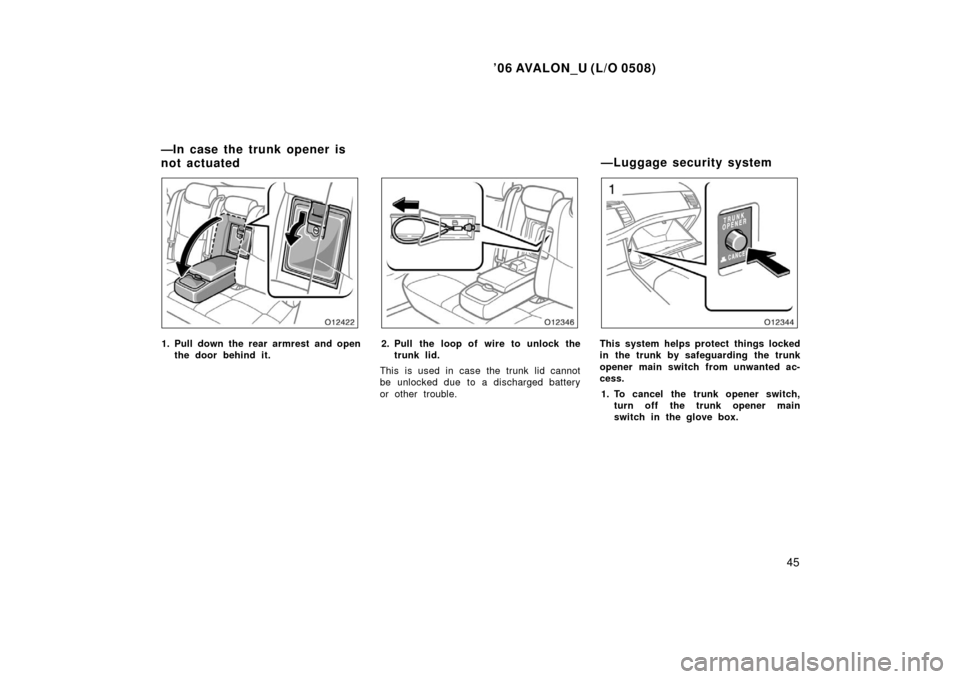
1. Pull down the rear armrest and openthe door behind it.2. Pull the loop of wire to unlock thetrunk lid.
This is used in case the trunk lid cannot
be unlocked due to a discharged battery
or other trouble.This system helps protect things locked
in the trunk by safeguarding the trunk
opener main switch from unwanted ac-
cess. 1. To cancel the trunk opener switch, turn off the trunk opener main
switch in the glove box.
—In case the trunk opener is
not actuated —Luggage security system