Page 240 of 470
’06 4Runner_U (L/O 0508)
230
To select a desired disc:
Push and hold the “� ” or “�” side of the
switch until the disc you want to listen to
is set.
Vehicles with rear seat entertainment sys-
tem—
While the DVD player is in operation, the
chapter or track can be changed by push-
ing the “ �” or “ �” side of the switch.
3. “MODE” switch
Push the “MODE” switch to select an au-
dio mode. Each push changes the mode
sequentially if the desired mode is ready
to use.
To turn the audio system on, push the
“MODE” switch.
To turn the audio system off, push and
hold the “MODE” switch until the system
turns off.
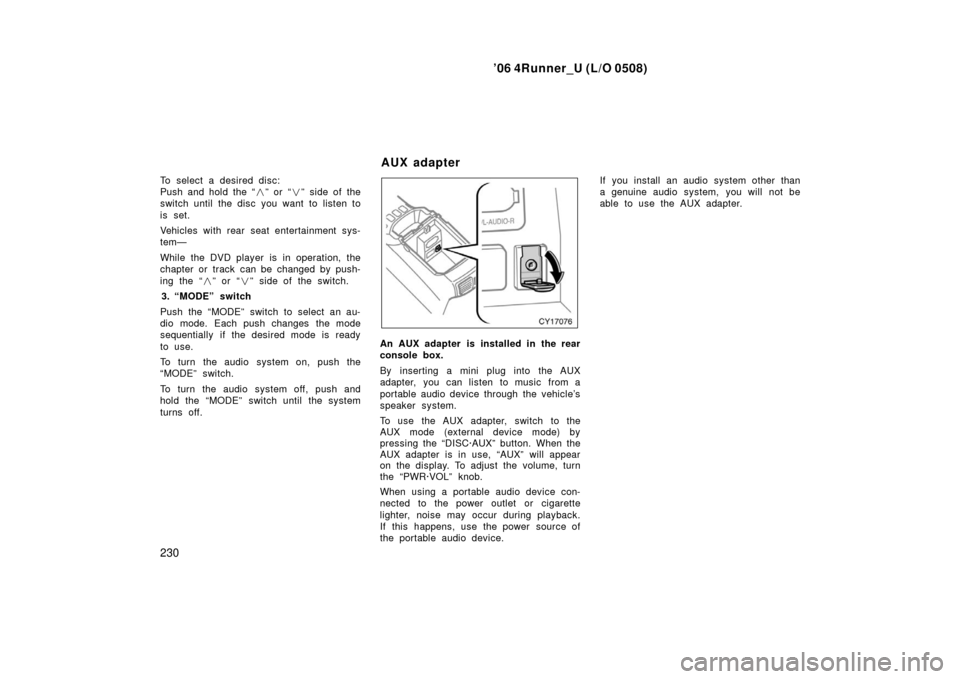
An AUX adapter is installed in the rear
console box.
By inserting a mini plug into the AUX
adapter, you can listen to music from a
portable audio device through the vehicle’s
speaker system.
To use the AUX adapter, switch to the
AUX mode (external device mode) by
pressing the “DISC·AUX” button. When the
AUX adapter is in use, “AUX” will appear
on the display. To adjust the volume, turn
the “PWR·VOL” knob.
When using a portable audio device con-
nected to the power outlet or cigarette
lighter, noise may occur during playback.
If this happens, use the power source of
the portable audio device. If you install an audio system other than
a genuine audio system, you will not be
able to use the AUX adapter.
AUX adapter
Page 241 of 470
’06 4Runner_U (L/O 0508)
231
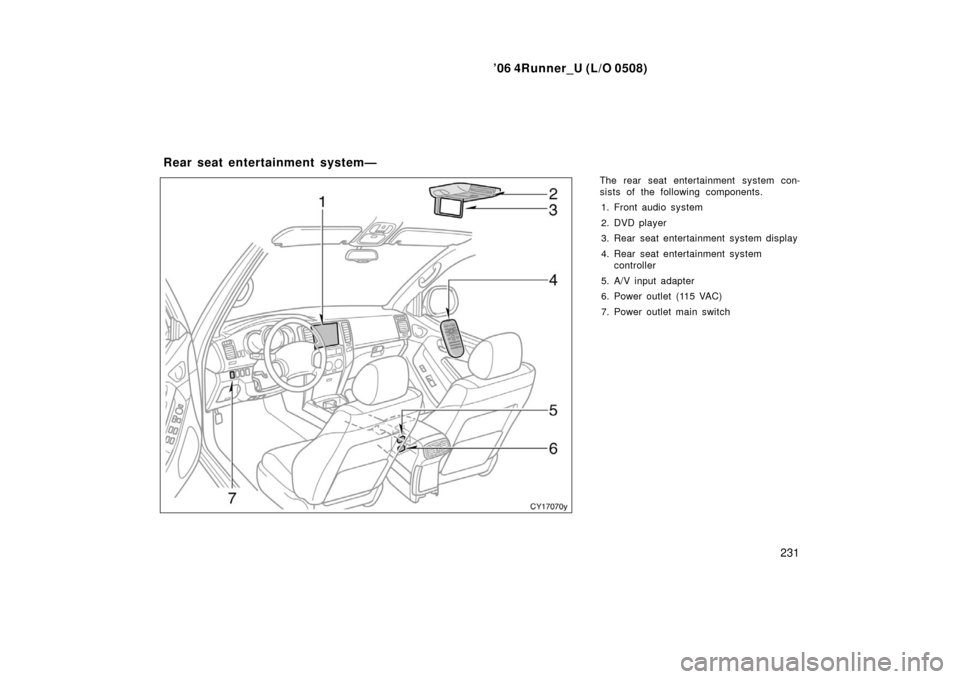
The rear seat entertainment system con-
sists of the following components.
1. Front audio system
2. DVD player
3. Rear seat entertainment system display
4. Rear seat entertainment system controller
5. A/V input adapter
6. Power outlet (115 VAC)
7. Power outlet main switch
Rear seat entertainment system—
Page 242 of 470
’06 4Runner_U (L/O 0508)
232
The rear seat entertainment system is de-
signed for the rear passengers to enjoy
audio and DVD video separately from the
front audio system.
The rear seat entertainment system can
be operated when the ignition key is in
the “ACC” or “ON” position.
The rear passengers can enjoy DVD vid-
eo, audio CD, video CD, CD text, dts −CD
and MP3.
The rear seat entertainment system can
play DVD video, audio CD, video CD, CD
text, dts −CD or MP3 only when a disc is
loaded in the DVD player.
You can enjoy videos and sound when
your personal audio system is connected
to the A/V input adapter. For details, refer
to the manufacturer ’s instructions.
You can enjoy the rear seat entertainment
system with a wireless h eadphone. The
wireless headphone can be used within
rear seat. If the signal becomes weak, the
headphone will mute. For details, refer to
the manufacturer ’s instructions.
With some wireless headphone generally
available in the market, it may be difficult
to catch sound properly. Toyota recom-
mends the use of Toyota genuine wireless
headphone. You can purchase a wireless headphone
at a Toyota dealer.
CAUTION
�Do not operate a motor vehicle
while using headphones. Doing so
may cause an accident, resulting in
death or serious injury.
�With DVD player:
Conversational speech on some
DVDs is recorded at a low volume
to emphasize the impact of sound
effects. If you adjust the volume
assuming that the conversations
represent the maximum volume lev-
el that the DVD will play, you may
be startled by louder sound effects
or when you change to a different
audio source. Be sure to adjust the
volume with this in mind.
Make sure the volume is not in-
creased, before you turn on the
headphone.
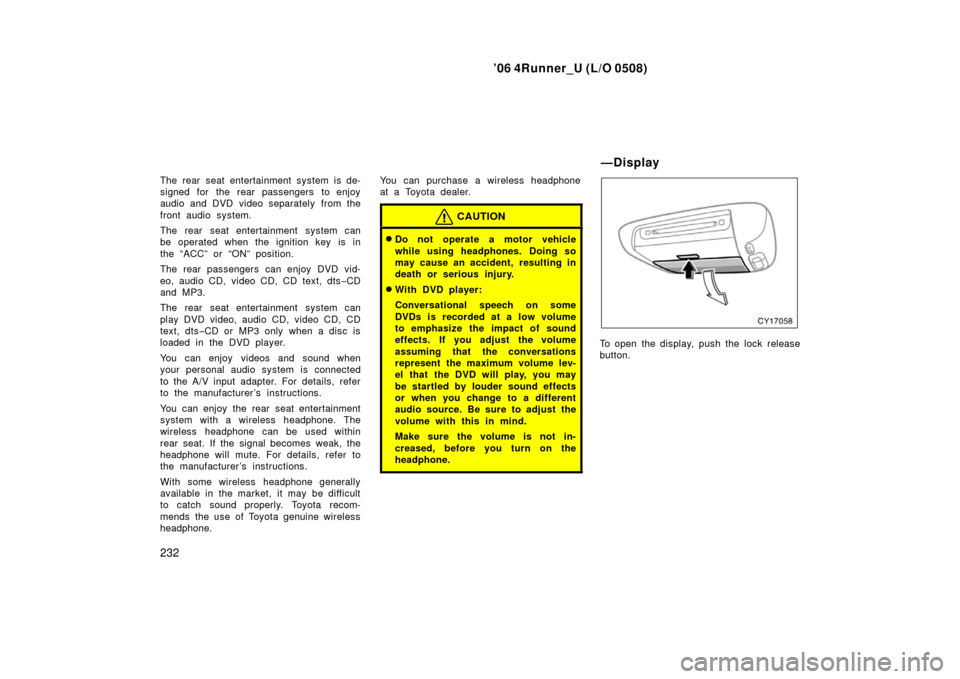
To open the display, push the lock release
button.
—Display
Page 244 of 470
’06 4Runner_U (L/O 0508)
234
The rear seat entertainment system can
be operated with the rear seat entertain-
ment system controller and buttons on the
DVD player unit. The system cannot be
operated by touching the switches on the
screen directly.
CAUTION
Do not disassemble or modify the
controller. It may cause an accident,
fire or electric shock.
NOTICE
Keep the controller away from direct
sunlight, high heat and high humidity.
These conditions could cause the
case to deform or the battery to ex-
plode or leak.
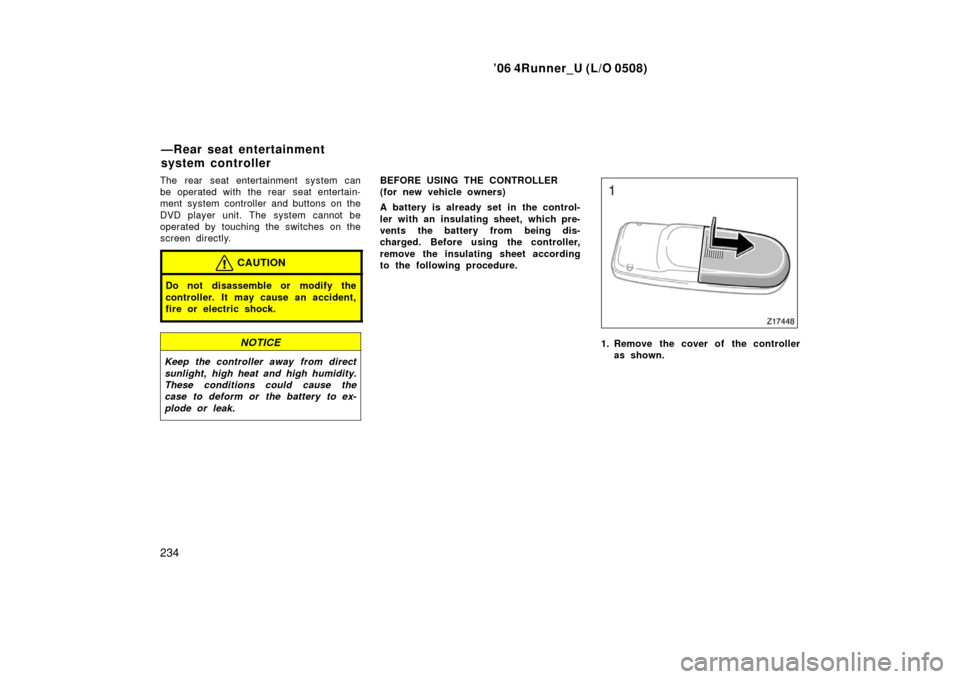
BEFORE USING THE CONTROLLER
(for new vehicle owners)
A battery is already set in the control-
ler with an insulating sheet, which pre-
vents the battery from being dis-
charged. Before using the controller,
remove the insulating sheet according
to the following procedure.
1. Remove the cover of the controller
as shown.
—Rear seat entertainment
system controller
Page 247 of 470
’06 4Runner_U (L/O 0508)
237
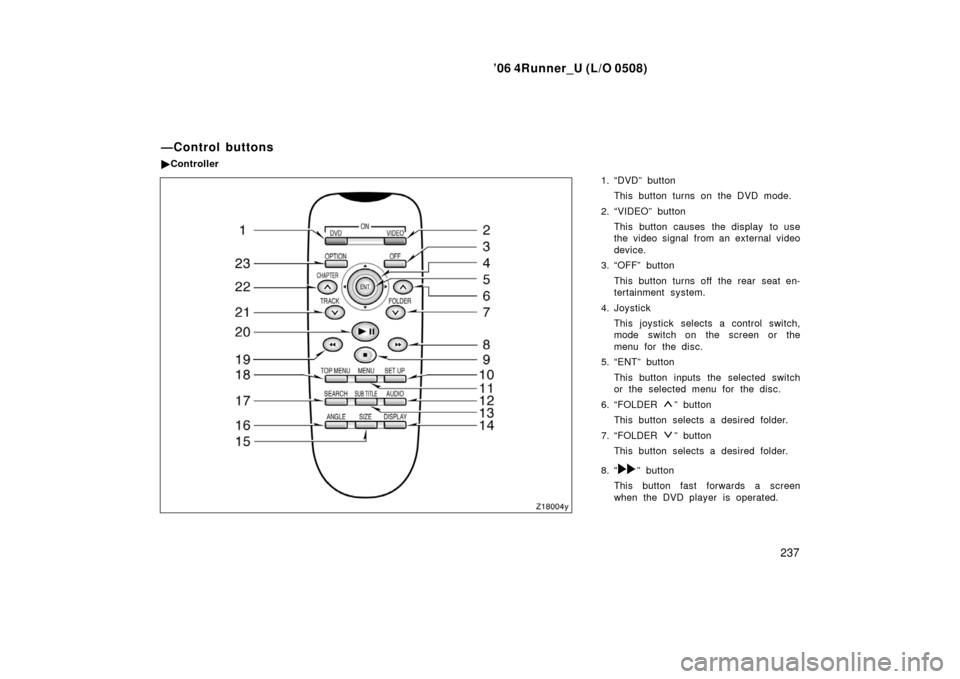
1. “DVD” button
This button turns on the DVD mode.
2. “VIDEO” button This button causes the display to use
the video signal from an external video
device.
3. “OFF” button
This button turns off the rear seat en-
tertainment system.
4. Joystick This joystick selects a control switch,
mode switch on the screen or the
menu for the disc.
5. “ENT” button
This button inputs the selected switch
or the selected menu for the disc.
6. “FOLDER
” button
This button selects a desired folder.
7. “FOLDER
” button
This button selects a desired folder.
8. “
” button
This button fast forwards a screen
when the DVD player is operated.
—Control buttons
� Controller
Page 248 of 470
’06 4Runner_U (L/O 0508)
238
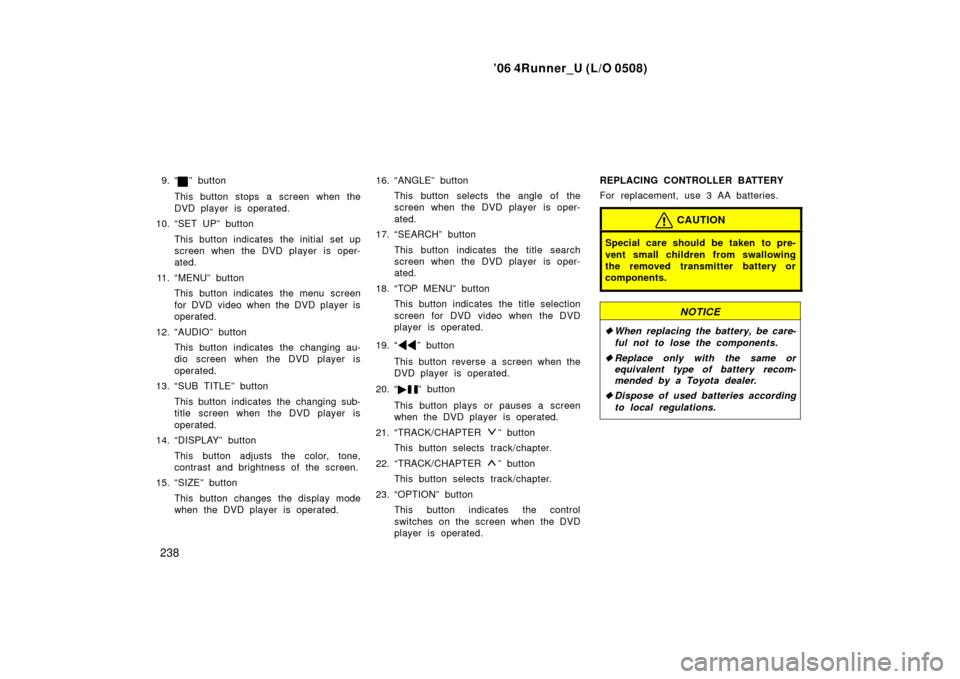
9. “” button
This button stops a screen when the
DVD player is operated.
10. “SET UP” button
This button indicates the initial set up
screen when the DVD player is oper-
ated.
11. “MENU” button This button indicates the menu screen
for DVD video when the DVD player is
operated.
12. “AUDIO” button This button indicates the changing au-
dio screen when the DVD player is
operated.
13. “SUB TITLE” button
This button indicates the changing sub-
title screen when the DVD player is
operated.
14. “DISPLAY” button
This button adjusts the color, tone,
contrast and brightness of the screen.
15. “SIZE” button
This button changes the display mode
when the DVD player is operated. 16. “ANGLE” button
This button selects the angle of the
screen when the DVD player is oper-
ated.
17. “SEARCH” button
This button indicates the title search
screen when the DVD player is oper-
ated.
18. “TOP MENU” button This button indicates the title selection
screen for DVD video when the DVD
player is operated.
19. “
” button
This button reverse a screen when the
DVD player is operated.
20. “ �
” button
This button plays or pauses a screen
when the DVD player is operated.
21. “TRACK/CHAPTER
” button
This button selects track/chapter.
22. “TRACK/CHAPTER
” button
This button selects track/chapter.
23. “OPTION” button This button indicates the control
switches on the screen when the DVD
player is operated. REPLACING CONTROLLER BATTERY
For replacement, use 3 AA batteries.
CAUTION
Special care should be taken to pre-
vent small children from swallowing
the removed transmitter battery or
components.
NOTICE
�
When replacing the battery, be care-
ful not to lose the components.
� Replace only with the same or
equivalent type of battery recom-
mended by a Toyota dealer.
� Dispose of used batteries according
to local regulations.
Page 250 of 470
’06 4Runner_U (L/O 0508)
240
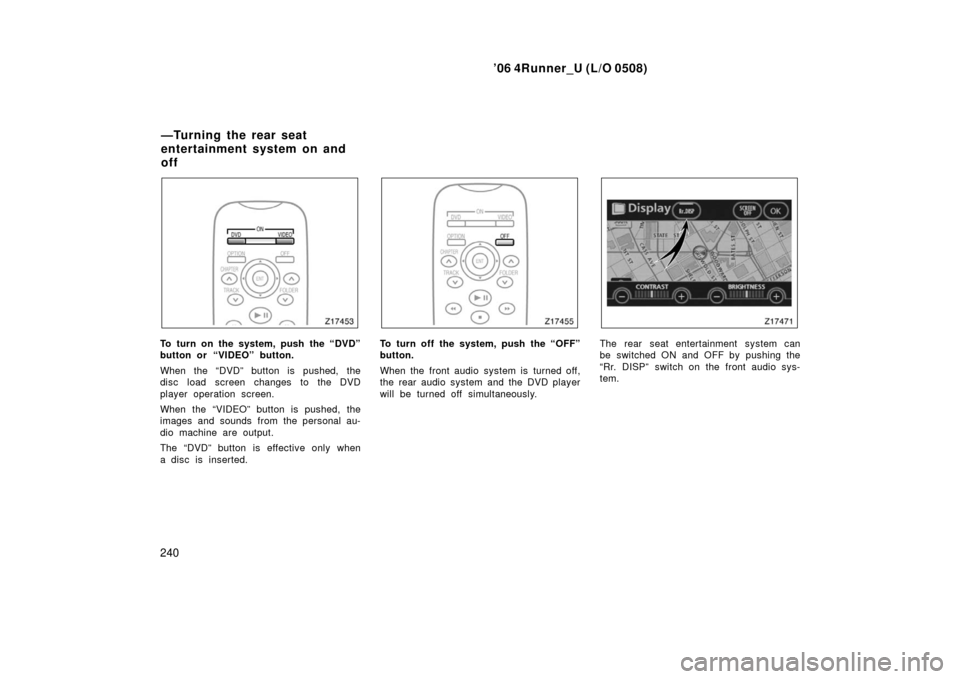
To turn on the system, push the “DVD”
button or “VIDEO” button.
When the “DVD” button is pushed, the
disc load screen changes to the DVD
player operation screen.
When the “VIDEO” button is pushed, the
images and sounds from the personal au-
dio machine are output.
The “DVD” button is effective only when
a disc is inserted.To turn off the system, push the “OFF”
button.
When the front audio system is turned off,
the rear audio system and the DVD player
will be turned off simultaneously.The rear seat entertainment system can
be switched ON and OFF by pushing the
“Rr. DISP” switch on the front audio sys-
tem.
—Turning the rear seat
entertainment system on and
off
Page 251 of 470
’06 4Runner_U (L/O 0508)
241
The rear DVD player can be operated
through the front audio system. The audio system controls in the instru-
ment panel allow the operation of the rear
seat entertainment system by rear seat
passengers to be disabled.
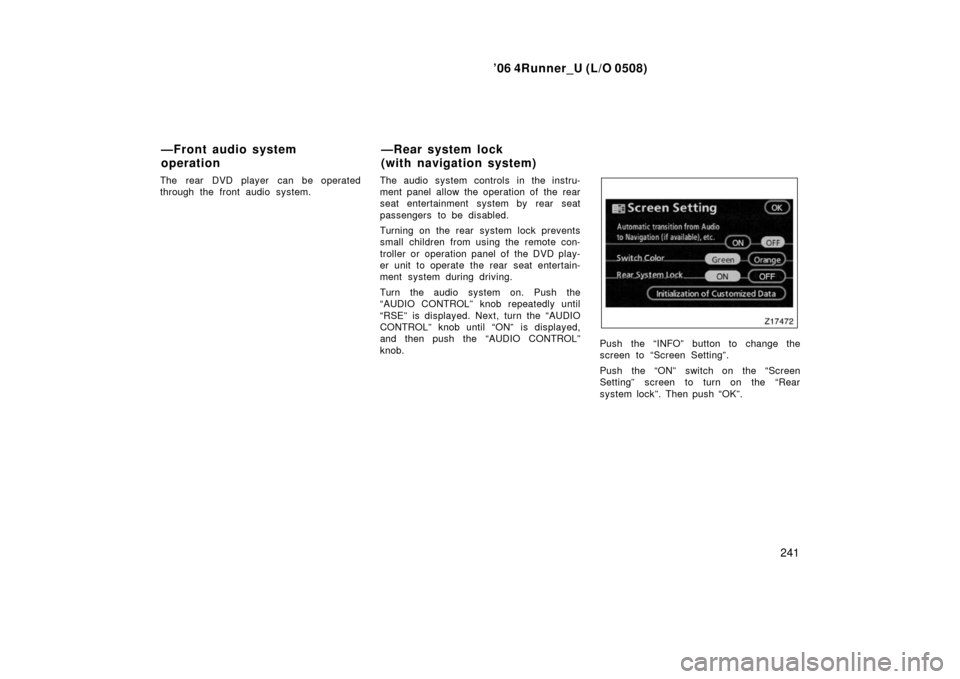
Turning on the rear system lock prevents
small children from using the remote con-
troller or operation panel of the DVD play-
er unit to operate the rear seat entertain-
ment system during driving.
Turn the audio system on. Push the
“AUDIO CONTROL” knob repeatedly until
“RSE” is displayed. Next, turn the “AUDIO
CONTROL” knob until “ON” is displayed,
and then push the “AUDIO CONTROL”
knob.
Push the “INFO” button to change the
screen to “Screen Setting”.
Push the “ON” switch on the “Screen
Setting” screen to turn on the “Rear
system lock”. Then push “OK”.
—Front audio system
operation
—Rear system lock
(with navigation system)