Page 206 of 425

Audio 5-33
– CONTINUED –
button to start playback. V
Loading all the magazine (Full disc
loading mode)
0
1. If you continue to press the “LOAD”
button for more than 1.5 seconds, the
player will produce beep sound and will
enter the full disc loading mode.
2. When the disc number indicator and
“ALL LOAD” indicator start flashing, insert a disc within 15 seconds. If a disc is suc-
cessfully loaded during this period, the
disc number indicator will stop blinking
and will steadily light.
3. When the loading of a disc is complete,
the next disc number indicator will blink.
Then repeat Step 2.
4. When the magazine is filled with discs
by repeating Steps 2 and 3, the player will start playback of the discs, beginning with
the one inserted first.
If you fail to insert any disc during each 15
seconds interval, the full disc loading
mode will be canceled, and the player will
start playback of the disc inserted first. T
How to play back a CD or make a
pause
V When there is no CD inserted:
Insert a CD by referring to “How to insert a
CD(s)”.
When a CD is loaded, the player will start
playback of the CD, beginning with thefirst track. V When there are CDs loaded:
Press a desired one of the “Disc select” buttons the disc number indicator of which
steadily lights up. The player will then start
playback of the selected CD, beginning
with the first track.
If a disc that the player cannot read has
been loaded, the player will eject that disc
and proceed to the next disc. T
To select a song from its beginning
V Forward direction
Briefly press the “ ” side of the TUNE/
TRACK button to skip to the beginning of the next track/file (track). Each time the
button is pressed, t he indicated track/file
(track) number will increase.
NOTE
In an MP3 folder, skipping past the last
track/file (track) will take you back to
LOAD
500239
123 456
500233
TUNE
TRACK
500056
Page 207 of 425

5-34 Audio
the first track/file (t rack) in the folder.
V Backward direction
Briefly press the “ ” side of the TUNE/
TRACK button to skip to the beginning of
the current track/file (track). Each time the
button is pressed, t he indicated track/file
(track) number will decrease.
NOTE
In an MP3 folder, skipping past the first
track/file (track) will take you to the last
track/file (track ) in the folder. T
Fast-forwarding and fast-reversing
V Fast-forwarding
Press the “ ” side of the TUNE/TRACK
button continuously to fast-forward the
disc/folder.
Release the button to stop fast-forward-
ing.NOTE If you fast-forward to the end of the last
track/file (track), fast-forwarding will
stop and the player will start playback
beginning with the first track/file(track). V
Fast-reversing
Press the “ ” side of the TUNE/TRACK
button continuously to fast-reverse the
disc/folder.
Release the button to stop fast-reversing.
NOTE
If you fast-reverse to the beginning of
the first track/file (track), fast-reversing
will stop and the player will start play-
back.
TUNE
TRACK
500057
TUNE
TRACK
500056
TUNE
TRACK
500057
Page 211 of 425
5-38 Audio
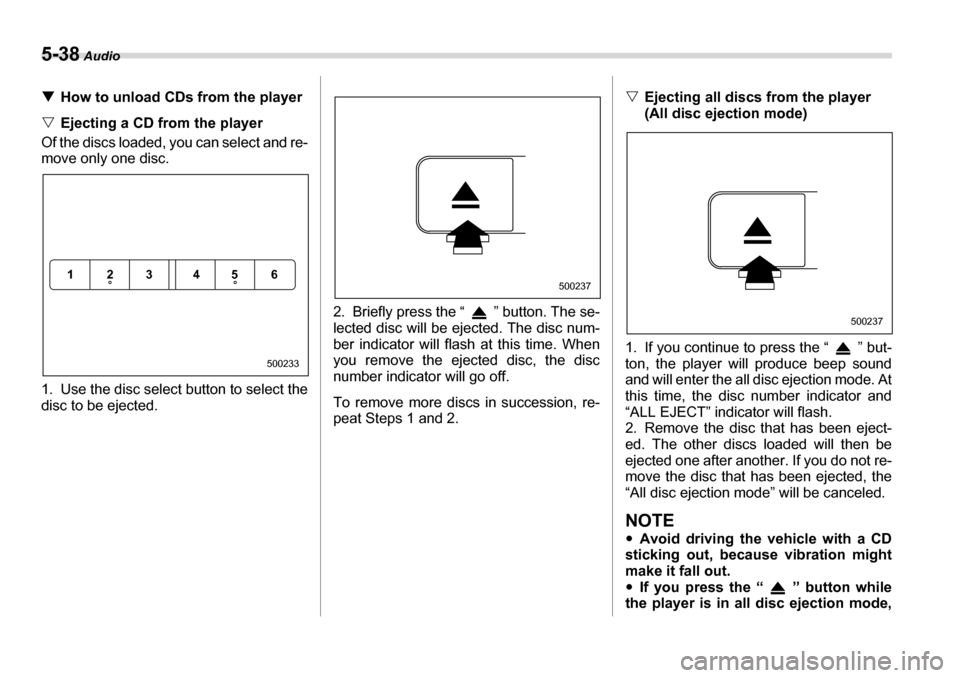
THow to unload CDs from the player
V Ejecting a CD from the player
Of the discs loaded, you can select and re-
move only one disc.
0
1. Use the disc select button to select the
disc to be ejected. 2. Briefly press the “ ” button. The se-
lected disc will be ejected. The disc num-
ber indicator will flash at this time. When
you remove the ejected disc, the disc
number indicator will go off.
To remove more discs in succession, re-
peat Steps 1 and 2. V
Ejecting all discs from the player
(All disc ejection mode)
0
1. If you continue to press the “ ” but-
ton, the player will produce beep sound
and will enter the all disc ejection mode. At
this time, the disc number indicator and
“ALL EJECT” indicator will flash.
2. Remove the disc that has been eject-
ed. The other discs loaded will then be
ejected one after another. If you do not re-
move the disc that has been ejected, the
“All disc ejection mode” will be canceled.
NOTE yAvoid driving the vehicle with a CD
sticking out, because vibration might
make it fall out.y If you press the “ ” button while
the player is in all disc ejection mode,
123 456
500233
500237
500237
Page 212 of 425

Audio 5-39
– CONTINUED –
the mode will be cancelled following
ejection of the disc that is currently be-
ing ejected.y
If you press the “CD” button while
the player is in all disc ejection mode,
the player will draw in the discs that
have been ejected and play them. Audio control buttons (if
equipped)
These buttons are lo
cated on the spokes
of the steering wheel. They allow the driv-
er to control audio functions without taking
his/her hands off the steering wheel. T MODE button
This button is used to select the desired
audio mode. Each time it is pressed, the
mode changes to the next one in the fol-
lowing sequence:
*: The frequency last received in the selected
waveband will be displayed. T
“ ” and “ ” buttons
V With radio mode selected
Press the “ ” button or “ ” button.
The radio will seek the next receivable
station and stop on it.
That station’s frequency will be shown on
the audio display. V With CD mode selected
Press the “ ” button to skip forward in
the track/file (track) order. Press the “ ”
button to skip backward in the track/file (track) order.
The track/file (track) number will be shown
on the audio display.
400216
FM* AM* CD
400217
Page 214 of 425

Audio 5-41
– CONTINUED –
y
You cannot use a DualDisc in the CD
player. If you insert a DualDisc into the
player, the disc may not come out again,
possibly causing the player to malfunc- tion. y In cold and/or rainy weather, dew can
form inside the CD player, preventing nor-
mal operation. If this happens, eject the
CD and wait for the player to dry out.y Skipping may occur when the CD player
is subjected to severe vibration (for exam-
ple, when the vehicle is driven on a roughsurface). y To remove a disc from the case, press
the center of the case and hold both edg-
es of the disc. If the disc surface is
touched directly, contamination could
cause poor tone quality. Do not touch thedisc surface. y
Use a clean disc whenever possible. If
there are deposits, wipe the disc surface
from the center outwa rd with a dry, soft
cloth. Be sure not to use a hard cloth, thin-
ner, benzene, alcohol, etc. y Do not use any disc that is scratched,
deformed, or cracked. Also, do not use
any disc that has a non-standard shape
(for example, a heart shape). Malfunctions
or problems might result. y A disc is vulnerable to heat. Never keep
it either in places exposed to direct sun-
light, near heaters or in vehicles parked in
the sun or on hot days.
500090
500253
TM
DualDisc
Page 216 of 425

Audio 5-43
the writing software and CD recorder. yRecording must be performed using a
file system supported by the audio sys- tem. Otherwise, the audio system may not
play the MP3 files and may not display
folder titles and file titles. „ Supported file systems
The audio system supports the following
file systems: y ISO 9660 Level 1/Level 2
y Apple Extension to ISO 9660
y Joliet
y Romeo
NOTE
The audio system does not support the
following file systems: yApple HFS
y UDF 1.50
y Mix CD (CD Extra)
„ Compression format
y MPEG 1 audio layer 3 (MP3)
Bit rate: 32 kbps – 320 kbps
Sampling frequency: 32, 44.1, 48 kHzy MPEG 2 audio layer 3 (MP3)
Bit rate: 8 kbps – 160 kbps
Sampling frequency: 16, 22.05, 24 kHz „
Numbers of folders and files
y Maximum number of folders: 255 (in-
cluding root folder) y Maximum number of files: 999 (maxi-
mum number in one folder: 255) y Maximum number of layers: 8
NOTE yNot all of the discs stored in MP3
files may be able to be played back. y Even if a folder contains no MP3
files, it is counted as a folder.y Writing software can rearrange fold-
ers and files such that the playback or-
der is different from the desired one. y The playback order for a given disc
can be different with different players. „ Copyright issues
Except with respect to copies made for
personal use, duplication, distribution, and
transmission of music and other copy-
righted material on a disc without permis-
sion from the copyright holder is illegal.
Page:
< prev 1-8 9-16 17-24