2006 SKODA OCTAVIA interior lights
[x] Cancel search: interior lightsPage 41 of 218

Lights and visibility
Lights
ä
Introduction
This chapter contains information on the following subjects:
Switching lights on and off 40
DAY LIGHT function (Daylight driving light) 40
Automatic driving lamp control 40
Cornering lights 41
Parking light 41
COMING HOME/LEAVING HOME function 41
Tourist light 42
Fog lights 42
Fog lights with the function CORNER 42
Rear fog light 43
Instrument lighting 43
Headlight beam adjustment 44
Switches for the hazard warning light system 44
Turn signal and main beam lever 45
On models fitted with right-hand steering the position of certain switches differs
from that shown in » Fig. 22
on page 40. The symbols which mark the switch
positions are identical, however.
The low beam continues to shine while the ignition is switched on and the light
switch is in the position or . After switching off the ignition, the low beam
is switched off automatically and only the side lights come on. The side lights also
go out after the ignition key is removed. WARNING
■ Never drive with only the side lights on! The side lights are not bright
enough to light up the road sufficiently in front of you or to be seen by other
oncoming traffic. Therefore always switch on the low beam when it is dark or
if visibility is poor.
■ The automatic driving lamp control
only operates as a support and does
not release the driver from his responsibility to check the light and, if necessa-
ry, to switch on the light depending on the light conditions. The light sensor
cannot, for example, detect rain or snow. Under these conditions we recom-
mend switching on the low beam or fog lights! CAUTION
■ The activation of the lights should only be undertaken in accordance with na-
tional legal requirements.
■ The driver is always responsible for the correct settings and use of the lights. Note
■ If the light switch is in the position , the ignition key is removed and the driv-
er's door is open, an audible warning signal will sound. The audible warning signal
is switched off by means of the door contact when the driver's door is closed (ig-
nition off), however, the side lights remain on to illuminate the parked vehicle if
necessary. ■ If there is a fault in the light switch, the low beam comes on automatically.
■ In the event of cool or humid weather conditions, the headlights can be misted
up from inside. The temperature difference between interior and external area of
the headlight lenses is decisive. When the driving lights are switched on, the light
outlet surfaces are free from mist after a short period, although the headlight
lenses may still be misted up in the peripheral areas. It also concerns reverse light
and turn signal lights. This mist has no influence on the life of the lighting system. Ð
39
Lights and visibility
Page 44 of 218

›
Unlock the vehicle with the radio remote control and the light is switched on.
Depending on the equipment fitted the COMING HOME/LEAVING HOME function
switches on the following lights:
› Parking lights;
› Low beam;
› Entry lighting in the exterior mirrors;
› Licence plate light.
The COMING HOME/LEAVING HOME function is controlled with the light sensor in
the mount of the interior rear mirror. If the light intensity is higher than the set
value of the light sensor, the light is not switched on after opening the driver's
door or unlocking the vehicle with the radio remote control.
Switching off the COMING HOME function
The light goes out 10 seconds after closing all of the doors and the boot lid.
If a door or the boot lid remains open, the light goes out after 60 seconds.
Switching off the LEAVING HOME function
The light goes out 10 seconds after unlocking the vehicle with the radio remote
control, switching on the ignition or locking the vehicle.
If no door is opened, the vehicle is locked automatically after 30 seconds.Note
■ If the
COMING HOME/LEAVING HOME function is switched on constantly, the
battery will be heavily discharged particularly over short distances. ■ The illumination period for the COMING HOME/LEAVING HOME function can be
changed by means of the information display. ÐTourist light
First read and observe the introductory information and safety warn-
ings on page 39.
This mode makes it possible to drive in countries with opposing traffic system,
driving on the left/right, without dazzling the oncoming vehicles. When the mode
tourist light is active, the side to side swivel of the headlights is deactivated. ä The mode tourist light is activated/deactivated via the information display in the
menu:
■ Settings
■ Lights & Vision
■ Travel mode
■ Off
■ Switched on Ð Fog lights
Fig. 24
Dash panel: Light switch
First read and observe the introductory information and safety warn-
ings on page 39.
Switching on
› First of all, turn the light switch to position
or » Fig. 24.
› Pull the light switch to position 1
.
The warning light lights up in the instrument cluster when the fog lights are
switched on » page 18. Ð Fog lights with the function CORNER
First read and observe the introductory information and safety warn-
ings on page 39.
The fog lights with the function CORNER are designed to improve the illumination
of the surrounding area near the vehicle when turning, parking, etc. £
ä
ä
42 Using the system
Page 47 of 218

Turn signal and main beam lever
Fig. 28
Turn signal and main beam lever
First read and observe the introductory information and safety warn-
ings on page 39.
The parking light and headlight flasher are also operated with the turn signal and
main beam lever.
Right and left turn signal light
› Push the lever upwards A
» Fig. 28
or downwards B
.
› If you only wish to flash three times (the "convenience turn signal"), briefly
push the lever to the upper or lower pressure point and release again. This fea-
ture can be activated/deactivated via the information display » page 15.
› Turn signal for changing lanes - to only flash briefly, move the lever up or down
to the pressure point and hold it in this position.
Main beam
› Switch on the low beam.
› Push the lever away from the steering wheel in the direction of arrow C
(spring-tensioned position).
› The main beam is switched off by pulling the lever towards the steering wheel
(spring-tensioned position) in the direction of arrow D
.
Headlight flasher
› Pull the lever towards the steering wheel (spring-tensioned position) in the di-
rection of arrow D
- the main beam and warning light
in the instrument clus-
ter come on.
Parking light
Description of the operation » page 41
ä CAUTION
Only use the main beam or the headlight flasher if other road users will not be
dazzled. Note
■ The turn signal system only operates when the ignition is switched on. The cor-
responding warning light or in the instrument cluster also flashes.
■ The turn signal is automatically cancelled after negotiating a curve.
■ The warning light flashes at twice its normal rate if a bulb for the turn signal
light fails. Ð Interior light
Interior lighting - version 1
Fig. 29
Interior lighting - version 1
Switching on › Press switch A
» Fig. 29 towards the edge of the light, the symbol
appears.
Switching off
› Press the switch A
»
Fig. 29
in the middle position O.
Operating with the door contact switch
› Press switch A
» Fig. 29 towards the middle of the light, the symbol
ap-
pears.
Reading lights
› Press switch B
» Fig. 29 to switch the reading lights on or off.
£
45
Lights and visibility
Page 48 of 218

If operating lights with the door contact switch is enabled (switch A
is in position
), the light will come on when:
› the vehicle is unlocked;
› one of the doors is opened;
› or the ignition key is removed.
If operating lights with the door contact switch is enabled (switch A
is in position
), the light will turn off when:
› the vehicle is locked;
› the ignition is switched on;
› about 30 seconds after all the doors have been closed.
If a door remains open, or if the switch A
is in the position
, the interior light
goes out after 10
minutes to prevent the battery from discharging. Note
We recommend having these bulbs replaced by a ŠKODA specialist garage. ÐInterior lighting - version 2
Fig. 30
Interior lighting - version 2
Switching on
› Press the switch into position
» Fig. 30.
Switching off
› Press the switch into position
O » Fig. 30.
Operating with the door contact switch
› Press the switch into position
» Fig. 30.
The same principles apply for interior lighting version 2 as for » page 45, Interior
lighting - version 1 . Ð Illuminated storage compartment on front passenger side
› When opening the flap of the storage compartment on the front passenger
side the lighting in the storage compartment comes on.
› The light switches on automatically when the parking light is switched on and
goes out when the flap is closed. Ð Front door warning light
Fig. 31
Front door: Warning light
The warning light is located in the lower door trim panel » Fig. 31.
The warning light goes on every time the door is opened. The light goes out
about 10 minutes after opening the door in order to avoid discharging the battery
of the vehicle.
There is a reflector installed on some vehicles instead of the warning light. Ð Entry lighting
The lighting is positioned on the bottom edge of the exterior mirror.
The light beam is directed towards the entry area of the front door.
The light comes on after the doors have been locked or on opening the boot lid.
The light goes out after switching on the ignition or within 30
seconds of closing
all of the doors and the boot lid.
If a door or the boot lid remains open, the light goes out within 2 minutes if the
ignition is switched off. £
46 Using the system
Page 53 of 218
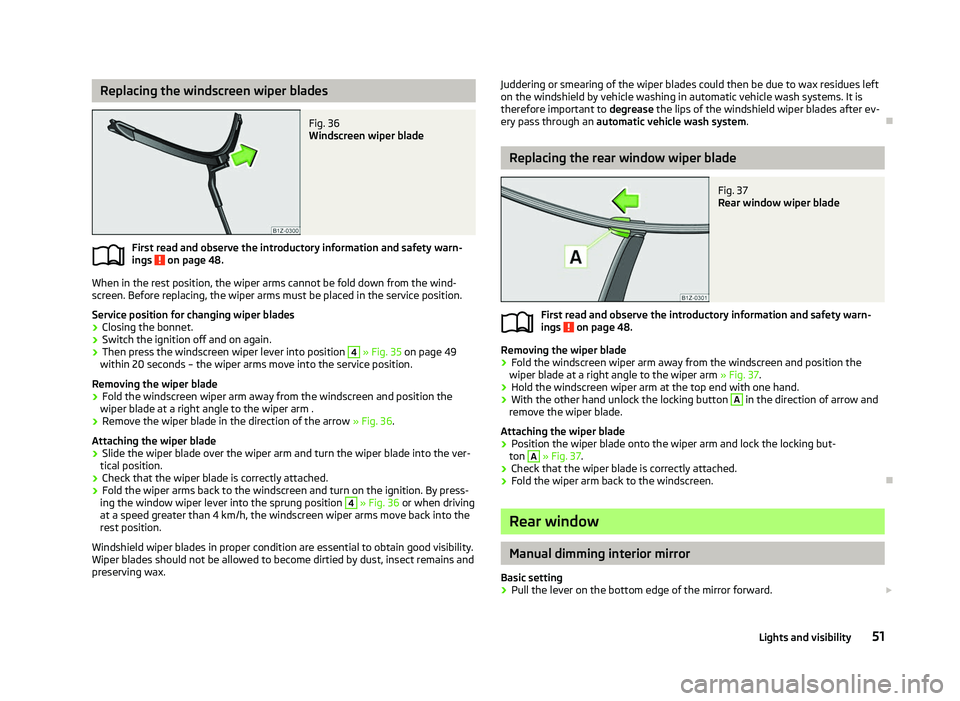
Replacing the windscreen wiper blades
Fig. 36
Windscreen wiper blade
First read and observe the introductory information and safety warn-
ings on page 48.
When in the rest position, the wiper arms cannot be fold down from the wind-
screen. Before replacing, the wiper arms must be placed in the service position.
Service position for changing wiper blades
› Closing the bonnet.
› Switch the ignition off and on again.
› Then press the windscreen wiper lever into position 4
» Fig. 35 on page
49
within 20 seconds – the wiper arms move into the service position.
Removing the wiper blade
› Fold the windscreen wiper arm away from the windscreen and position the
wiper blade at a right angle to the wiper arm .
› Remove the wiper blade in the direction of the arrow
» Fig. 36.
Attaching the wiper blade
› Slide the wiper blade over the wiper arm and turn the wiper blade into the ver-
tical position.
› Check that the wiper blade is correctly attached.
› Fold the wiper arms back to the windscreen and turn on the ignition. By press-
ing the window wiper lever into the sprung position 4
» Fig. 36 or when driving
at a speed greater than 4
km/h, the windscreen wiper arms move back into the
rest position.
Windshield wiper blades in proper condition are essential to obtain good visibility.
Wiper blades should not be allowed to become dirtied by dust, insect remains and
preserving wax.
ä
Juddering or smearing of the wiper blades could then be due to wax residues left
on the windshield by vehicle washing in automatic vehicle wash systems. It is
therefore important to degrease the lips of the windshield wiper blades after ev-
ery pass through an automatic vehicle wash system .Ð Replacing the rear window wiper blade
Fig. 37
Rear window wiper blade
First read and observe the introductory information and safety warn-
ings on page 48.
Removing the wiper blade
›
Fold the windscreen wiper arm away from the windscreen and position the
wiper blade at a right angle to the wiper arm » Fig. 37.
› Hold the windscreen wiper arm at the top end with one hand.
› With the other hand unlock the locking button A
in the direction of arrow and
remove the wiper blade.
Attaching the wiper blade
› Position the wiper blade onto the wiper arm and lock the locking but-
ton A
» Fig. 37
.
› Check that the wiper blade is correctly attached.
› Fold the wiper arm back to the windscreen. Ð Rear window
Manual dimming interior mirror
Basic setting
› Pull the lever on the bottom edge of the mirror forward.
£
ä
51
Lights and visibility
Page 54 of 218

Dimming mirror
›
Push the lever on the bottom edge of the mirror backwards. ÐAutomatic dimming interior mirror
Fig. 38
Automatic dimming interior mir-
ror
Switching on automatic dimming › Press the button B
» Fig. 38, the warning light A
lights up.
Switching off automatic dimming
› Press the button B
» Fig. 38 again, the warning light A
goes out.
If the automatic dimming is switched on, the mirror dims automatically depend-
ing on the light striking the mirror from the rear. The mirror has no lever on the
bottom edge of the mirror. After the reverse gear is engaged, the mirror always
moves back into the normal position. WARNING
The display lighting on the external navigation device may cause the automat-
ic dimming interior mirror to malfunction – risk of accident. For this reason, do
not fix any external navigation systems in the proximity of the automatic dim-
ming interior mirror. Note
■ Automatic mirror dimming operates only properly if the sun screen for the rear
window is not in use or the light striking the rear of the interior rear-view mirror is
not affected by other objects. ■ Do not affix any stickers in front of the light sensor, so that they do not impair
the automatic dimming function or put it out of operation. ■ If the automatic interior mirror dimming is switched off, the exterior mirror dim-
ming is also switched off. Ð Exterior mirror
Fig. 39
Inner part of door: Rotary knob
Adjust the rear mirror before commencing to drive so that there is a clear view to
the rear.
Heating of the external mirror
› Place the rotary knob into the position
» Fig. 39.
The exterior mirror heater only operates when the engine is running and up to an
outside temperature of +20 °C.
Adjusting left and right exterior mirrors simultaneously
› Place the rotary knob into the position
. The movement of the mirror surface is
identical to the movement of the rotary knob.
The adjustment of both mirrors simultaneously or each individual mirror is possi-
ble in the Information display » page 16 in the menu point Mirror adjust. .
Adjusting the right-hand exterior mirror
› Place the rotary knob into the position
. The movement of the mirror surface is
identical to the movement of the rotary knob. £
52 Using the system
Page 55 of 218

Switching off operating control
›
Place the rotary knob into the position
.
Folding-in both of the exterior mirrors with the rotary knob
› Place the rotary knob into the position
.
The mirrors are folded back into the driving position after the rotary knob is
turned from the position to a different one.
It is only possible to fold in both exterior mirrors when the ignition is switched on
and at a speed of up to 15
km/h.
Folding-in both of the exterior mirrors using the remote control key
› If all of the windows are closed, press and hold the lock button 3
» Fig. 13 on
page 30 on the radio remote control for approx. 2
seconds.
The exterior mirrors are folded back into the driving position after opening the
door or switching on the ignition.
Tilting surface of front passenger exterior mirror
On vehicles fitted with the memory function for the driver seat, the surface of the
mirror tilts down slightly when the reverse gear is engaged and the rotary knob is
in the position » Fig. 39. This provides an aid in seeing the kerb of the pavement
when parking the car.
The mirror returns into its initial position, after the rotary knob is moved out of
the position and put into another position or if the speed is more than 15 km/h.
Memory function for exterior mirrors
On vehicles fitted with a memory function for the driver seat, the relevant setting
for the exterior mirrors is also stored automatically when the seat position is stor-
ed » page 55. WARNING
■ Convex (curved outward) exterior mirrors increase the field of vision. They
do, however, make objects appear smaller in the mirror. These mirrors are
therefore only of limited use for estimating distances to the following vehi-
cles.
■ Whenever possible use the interior mirror for estimating the distances to
the following vehicles. CAUTION
Never mechanically fold in or fold back the exterior mirrors with the fold-in func-
tion by hand as this will damage the electric drive. Note
■ If the exterior mirrors were folded in using the rotary knob, they can only be fol-
ded back into the driving position using the rotary knob. ■ If the exterior mirrors were folded in using the remote control key and if the ro-
tary knob was in the fold-in position before the ignition was switched on, the mir-
rors will remain in the fold-in position the next time the ignition is switched on.
The mirrors are folded back into the driving position after the rotary knob is
turned from the position to a different one.
■ Do not touch the surface of the exterior mirrors if the exterior mirror heater is
switched on. ■ If the power setting function fails at any time, the exterior mirrors can be set by
hand by pressing on the edge of the mirror surface. ■ Contact your ŠKODA specialist garage if there is a fault with the power setting
of the exterior mirrors. Ð Automatic dimming exterior mirror on the driver's side
The exterior mirror on the driver's side is dimmed together with the interior mir-
ror. If the automatic dimming is switched on, the mirror dims automatically de-
pending on the light striking the mirror from the rear.
After the reverse gear is engaged, the mirror always moves back into the normal
(not dimmed) position. Note
■ Automatic mirror dimming operates only properly if the sun screen for the rear
window is not in use or the light striking the rear of the interior rear-view mirror is
not affected by other objects. ■ Do not affix any stickers in front of the light sensor, so that they do not impair
the automatic dimming function or put it out of operation. ■ If the automatic interior mirror dimming is switched off, the exterior mirror dim-
ming is also switched off. Ð 53
Lights and visibility
Page 88 of 218

Note
Below the top row of buttons is located the interior temperature sensor. Do not
stick anything on or cover the sensor, otherwise it could have an unfavourable ef-
fect on the Climatronic. ÐAutomatic mode
The automatic mode is used in order to maintain a constant temperature and to
demist the windows in the interior of the car.
Switching on
› Set a temperature between +18 °C and +26
℃.
› Move the air outlet vents
3 » Fig. 86 on page 80 and 4 so that the air flow is
directed slightly upwards.
› Press the button
AUTO 8
» Fig. 90
on page
85. The warning light in the top
right or left corner lights up, depending on which mode was last selected.
If the warning light in the top right corner of the button AUTO 8
» Fig. 90
on
page 85
lights up, the Climatronic operates in “HIGH” mode. The “HIGH” mode is
the standard setting of the Climatronic.
When pressing again the button AUTO , the Climatronic changes into the “LOW”
mode and the warning light in the top left corner lights up. The Climatronic uses
only in this mode the lower blower speed. However taking into account the noise
level, this is more comfortable, yet be aware that the effectiveness of the air con-
ditioning system is reduced particularly if the vehicle is fully occupied.
By pressing the button AUTO again, it is changed to “HIGH” mode.
Automatic mode is switched off by pressing one of the buttons for the air distri-
bution or by increasing/decreasing the blower speed. The temperature is never-
theless regulated. ÐSwitching the cooling system on and off
Switching the cooling system on and off › Press the button
AC 13
» Fig. 90 on page 85. The warning light in the button
lights up.
› When you again press the button
AC 13
, the air conditioning system is switch-
ed off. The warning light in the button goes out. Only the function of the venti-
lation remains active when no lower temperature than the outside temperature
can be reached. Ð Setting temperature
The interior temperature for the left and right side can be set separately.
› The temperature for both sides can be set with the control dial 7
» Fig. 90 on
page 85
after switching on the ignition.
› If you wish to set the temperature for the right side, turn the control dial 14
» Fig. 90
on page
85. The warning light in the button DUAL 12
» Fig. 90
on
page 85
lights up, this indicates that differing temperatures for the left and
right side can be set.
If the warning light in the button DUAL 12
»
Fig. 90
on page 85 is illuminated, the
temperature for both sides cannot be set with the control dial 7
» Fig. 90
on
page 85. You can reactivate this function by pressing the button DUAL 12
. The
warning light in the button goes out.
The interior temperature can be set between +18 °C and +26 ℃. The interior tem-
perature is regulated automatically within this range. If a temperature lower than
+18 °C is selected, a blue symbol lights up at the start of the numerical scale. If a
temperature higher than +26 °C is selected, a red symbol lights up at the start of
the numerical scale. In both limit positions the Climatronic operates at maximum
cooling or heating capacity, respectively. The temperature is not controlled in this
case.
Lengthy and uneven distribution of the air flow out of the vents (especially
around the feet) and large differences in temperature, for example, when getting
out of the vehicle, can cause susceptible individuals to catch a cold. Ð Recirculated air mode
Recirculated air mode largely prevents polluted air from outside the vehicle get-
ting into the vehicle, for example, when driving through a tunnel or when stand-
ing in a traffic jam. If a considerable increase in concentration of pollutants is rec-
ognized by the air quality sensor, when the automatic air distribution control is
switched on, the air distribution control will temporarily be switched off. If the
concentration of pollutants decreases to the normal level, the air distribution con-
trol is automatically switched off so that fresh air can be guided into the vehicle
interior. In recirculated air mode air is sucked out of the interior of the vehicle and
then fed back into the interior. When the automatic air distribution control is
switched on, an air quality sensor measures the concentration of pollutants in the
drawn in air. £
86 Using the system