2006 SKODA FABIA light
[x] Cancel search: lightPage 114 of 258
Automatic gearbox113
Using the systemSafetyDriving TipsGeneral MaintenanceBreakdown assistanceTechnical Data
WARNING
•Do not depress the accelerator when changing the position of the selector lever if the car is stationary and the engine is running - risk of accident!
•Never move the selector lever into position R or P when driving - risk of an accident!
•When the engine is running and the vehicle is stationary, it is neces- sary to hold the car with the brake pedal in all the positions of the selector lever (except P and N) since the power transmission is never completely interrupted, also not when the engine is idling - the vehicle "creeps".
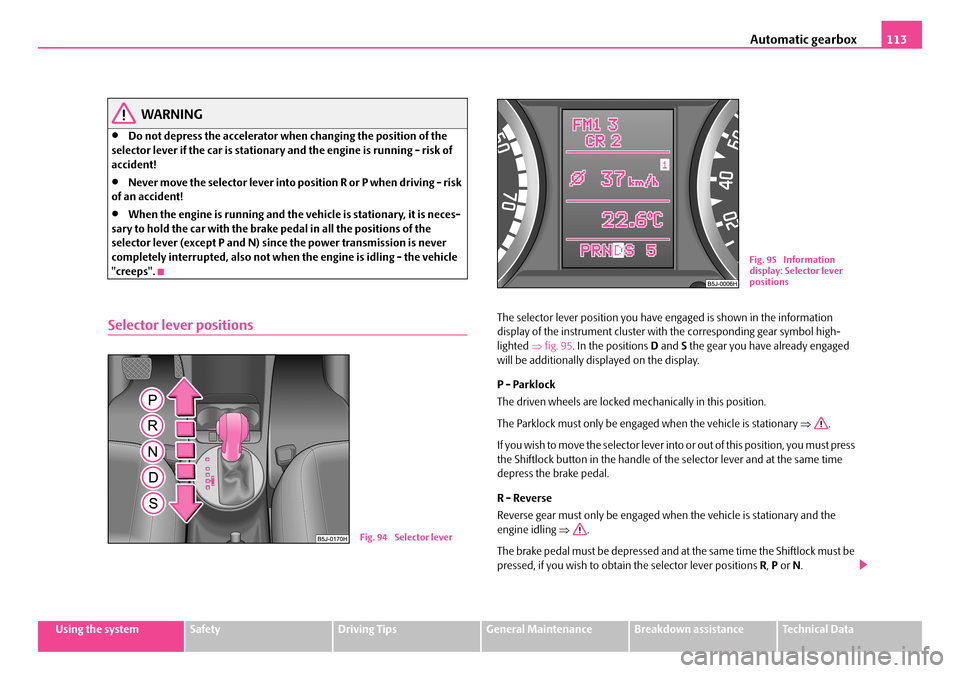
Selector lever positionsThe selector lever position you have engaged is shown in the information display of the instrument cluster with the corresponding gear symbol high- lighted ⇒fig. 95. In the positions D and S the gear you have already engaged will be additionally displayed on the display.
P - Parklock
The driven wheels are locked me chanically in this position.
The Parklock must only be engaged when the vehicle is stationary ⇒.
If you wish to move the sele ctor lever into or out of this position, you must press the Shiftlock button in the handle of the selector lever and at the same time depress the brake pedal.
R - Reverse
Reverse gear must only be engaged when the vehicle is stationary and the engine idling ⇒.
The brake pedal must be depressed and at the same time the Shiftlock must be pressed, if you wish to obtain the selector lever positions R, P or N.
Fig. 94 Selector lever
Fig. 95 Information display: Selector lever positions
NKO A05Fabia 20.book Page 113 Tuesday, September 26, 2006 8:38 AM
Page 115 of 258

Automatic gearbox114
When the ignition is switched on and the selector lever is in position R, the reverse lights will come on.
N - Neutral
The transmission is in Neutral in this position.
The brake pedal must be depressed (if the lever is in its position for longer than 2 seconds) in order to move the se lector lever out of the position N into the position D, with the ignition switched on, on a vehicle travelling at less than 5 km/hour or on a stationary vehicle.
The brake pedal must be depressed (if the lever is in its position for longer than 2 seconds) in order to move the se lector lever out of the position N into the position R, with the ignition switched on, on a vehicle travelling at less than 5 km/hour or on a stationary vehicle.
D - Drive, position for driving forward
When the selector lever is in this position, the forward gears are shifted up and down automatically in line with engi ne load, vehicle speed and the dynamic shift programme.
You must depress the brake pedal ⇒ if you wish to move the selector lever into position D from N when the vehicle is travelling at less than 5 km/hour or is stationary.
In certain circumstances (e.g. when driving in mountainous regions or when towing a trailer) it may be beneficial to select the manual shift programme ⇒ page 116 for a short time in order to adapt the gearbox ratios manually to the driving situations.
S - Position for sporty style of driving
Shifting up later into a higher gear make s it possible to fully exploit the power potential of the engine. The gearbox also then shifts down at higher engine speeds as in the position D.
The gearbox does not shift into the 6th gear in the position S, because the maximum speed is achieved with the 5th gear.
The Shiftlock on the selector lever grip must be pressed when moving the selector lever out of the position D into the position S.
WARNING
•Never move the selector lever into position R or P when driving - risk of an accident!
•When the engine is running and the vehicle is stationary, it is neces- sary to hold the car with the brak e pedal in all the positions of the selector lever (except P and N) since the power transmission is never completely interrupted, also not when the engine is idling - the vehicle "creeps".
•You must on no account unintentionally operate the throttle (e.g. by hand from the engine compartment) if a drive position is engaged when the car is stationary. The vehicle wo uld otherwise immediately start off - also when the handbrake is firmly applied - risk of an accident!
•You must move the selector lever into position P and firmly apply the handbrake first before you or any other person opens the bonnet and starts working on the engine when it is running - risk of accident! It is also essential to observe all warnings ⇒page 198, “Working in the engine compartment”.
Selector lever lock
Automatic selector lever lock
With the ignition on, the selector lever is locked when it is in the positions P and N . You must first of all depress the brake pedal in order to move the selector lever out of this position. The warning light ⇒page 33 lights up in the instru- ment cluster as a reminder for the driver when the selector lever is in position P and N:
A time delay element ensures that the selector lever is not blocked when rapidly switching over the position N (e.g. from R to D). This does, for example, allow
NKO A05Fabia 20.book Page 114 Tuesday, September 26, 2006 8:38 AM
Page 117 of 258

Automatic gearbox116
Tiptronic
The Tiptronic allows the driver to also shift gears manually.
Switching over to manual shifting
– Push the selector lever to the right out of position D. As soon as the
gearbox has switched over, 6 5 4 3 2 1 appears in the display, with
the gear engaged being highlighted.
Shifting up gears
– One-touch forward of the selector lever (in the Tiptronic position)
⇒ fig. 96 .
Shifting down gears
– One-touch back of the selector lever (in the Tiptronic position) .
It is possible to switch over to manual both when the car is stationary and also when driving.
When you accelerate, the gearbox shifts up automatically in gears 1, 2, 3, 4 and 5 into the next higher gear just before the maximum permissible engine speed is reached.
If you select a lower gear, the automatic gearbox does not shift down until there is no risk of the engine overrevving.
If you operate the kickdown function, the ge arbox shifts into a lower gear in line with the vehicle speed and engine speed.
Emergency programme
An emergency programme exists in the event of a fault in the
system.
The gearbox operates in a corresponding emergency programme if there are functional faults in the gearbox electronics. This is indicated by all of the segments in the display lighting up or going out.
Fig. 96 Selector lever: Manual shifting of gears
Fig. 97 Information display: Manual shifting of gears
A+
A-
NKO A05Fabia 20.book Page 116 Tuesday, September 26, 2006 8:38 AM
Page 122 of 258

Communication121
Using the systemSafetyDriving TipsGeneral MaintenanceBreakdown assistanceTechnical Data
•It is recommended to speak louder at higher speeds, so that the tone of your voice is louder than the increased surrounding noise.
•During the dialogue avoid additional noise in the vehicle, e.g. simultane- ously talking occupants.
•Do not speak, if the system makes an announcement.
•The microphone for voice control is directed to the driver and front passenger. Therefore the driver and the front passenger can operate the equip- ment.
WARNING
Pay attention primarily to the traffic situation! As the driver you are fully responsible for the traffic safety. Use the telephone system only to such an extent, so that you are in full control of your vehicle at any time.
Caution
Taking the mobile phone out of the adapte r during the call can lead to interrup- tion of the connection. When taking ou t the mobile phone, the connection to the factory-fitted antenna is interrupted, this reduces the quality of the trans- mitting and receiving signal. This might result additionally in harmful radiation from the mobile phone in the interior of the vehicle and the charging of the tele-phone battery is interrupted.
Note
•Please also refer to the additional instructions ⇒page 129, “Mobile phones and two-way radio systems”.
•Please contact your Škoda Service Part ner if there are any points which are not clear.
•The voice control of the telephone is only possible for adapters with PTT button. Suitable adapters are available at a Škoda Service Partner.
Inserting the mobile phone and adapter
A telephone mount is factory-fitted. The mount is attached to the
centre console. The adapter “Paragon - Fidelity” is offered as Škoda
Original Accessory.
Inserting the mobile phone and adapter
– First of all push the adapter in the direction of arrow ⇒fig. 101 up
to the stop into the mount. Press the adapter slightly downwards,
until it locks securely into position.
– Insert the mobile phone into the adapter (as specified in manufac-
turer's instructions).
Removing the mobile phone and adapter
– Press simultaneouly the side locks of the mount and remove the
mobile phone and adapter ⇒fig. 101.
Fig. 101 Universal prep- aration for the mobile phone
NKO A05Fabia 20.book Page 121 Tuesday, September 26, 2006 8:38 AM
Page 124 of 258

Communication123
Using the systemSafetyDriving TipsGeneral MaintenanceBreakdown assistanceTechnical Data
You can operate the mobile phone via the voice control ⇒page 120 or via the buttons of the multi-functional module* ⇒page 119.
Note
It a yellow or red warning symbol lights up in the information display, the menu phonebook cannot be selected.
Voice commands
Voice commands for mobile phone operation
Voice commands for operating the phone phone book
Other possible commands
Voice commandActivity
ENTER PIN/PIN CODEAfter this command the PIN code of the mobile phone can be entered ⇒page 124.
DIAL NUMBERAfter this command a telephone number can be entered which establishe s a connection to the requested partner ⇒page 124.
REDIALAfter this command the last selected telephone number is selected again ⇒page 125.
Voice commandActivity
SAVE/STORE NAMES/NAME/NUMB ER
After this command a name with its telephone number can be stored in the phone phone book ⇒ page 125.
SELECT NAMES/NAMEAfter this command a telephone number which was stored under its given name in the phone phone book can be selected ⇒page 126.
DELETE NAMES/NAMEAfter this command a name in the phone phone book can be erased ⇒page 127.
LISTEN TO/PLAY PHONEBOOKAfter this command you can listen-in to the phone phone book ⇒page 126.
DELETE PHONEBOOKAfter this command the complete phone book or a name can be erased ⇒page 127.
Voice commandActivity
DIALThe telephone number is selected.
STOREThe name and the telephone number are stored in the phone phonebook or the entered PIN code is stored.
REPEATThe entered name or the digits are repeated. Then the system requests with voice response “ please proceed ” the entry of further digits or commands.
NKO A05Fabia 20.book Page 123 Tuesday, September 26, 2006 8:38 AM
Page 132 of 258

Communication131
Using the systemSafetyDriving TipsGeneral MaintenanceBreakdown assistanceTechnical Data
CD changer*
Operating the CD changer*
Loading a CD
– Touch the button and guide the CD (compact disc) into the CD-
case . The CD is automatically loaded onto the next free position
in the CD-changer. The LED in the corresponding button stops
flashing.
Loading all CDs
– Hold the button pressed and guide all CDs one after the other
into the CD-case . The LEDs in the buttons are no longer
flashing.
Loading a CD to one definite position
– Touch button . The LEDs in the buttons light up at the
memory spaces, which are already assigned and flash in the case
of free memory spaces.
– Touch the desired button and guide the CD into the CD-case
.
Ejecting a CD
– Touch the button , in order to eject a CD. For assigned memory
spaces, now the LEDs light up in the buttons .
– Touch the corresponding button . The CD is ejected.
Ejecting all CDs
– Hold the button pressed for more than 2 seconds, in order to
eject the CDs. All CDs in the CD-c hanger are ejected consecutively.
Note
•Always guide the CD into the CD-cas e with the printed side pointing upwards.
•Never push the CD with force into the CD-case as the insertion is performed automatically.
•After loading a CD into the CD-changer , you must wait until the LED of the corresponding button lights up. Then the CD-case is free to load the next CD.
•If you have selected a position, on whic h a CD is already located, this CD will be ejected. Take out the ejected CD and load the desired CD.
•The magazine can take up to six standard CDs (diameter 12 cm). Please do not use 8 cm “single CDs”!
Fig. 103 The CD changer
AC
AB
AD
AC
ABAD
ACAD
AD
AB
AA
AD
AD
AA
AB
ADAB
NKO A05Fabia 20.book Page 131 Tuesday, September 26, 2006 8:38 AM
Page 135 of 258

Passive Safety134
For this reason you will be provided with information on why this equipment is very important, how it protects you and the occupants, what should be observed when using the equipment and how you and the people travelling with you can make full use of the exis ting safety equipment. This Owner's Manual contains important warning notes, which you and those travelling with you should pay attention to in order to reduce a risk of injury.
Safety concerns everybody!
Before setting off
The driver is always fully responsible for his occupants and for
the operating safety of the vehicle.
For your own safety and the safety of the people travelling with you, please pay attention to the following points before setting off.
•Ensure that the lighting and the turn signal system are functioning properly.
•Inspect the tyre inflation pressure.
•Ensure that all the windows offer a good visibility to the outside.
•Safely attach the items of luggage ⇒page 75, “Loading the luggage compartment”.
•Ensure that no objects can obstruct the pedal.
•Adjust the mirror, the front seat and the head restraint to match your body size.
•Point out to your occupants that the head restraints must be adjusted to match their body size.
•Protect the children in suitable child se ats with correctly fastened seat belts ⇒ page 155, “Transporting children safely”.
•Adopt the correct seated position. Also inform your occupants to adopt the correct seated position.
•Fasten the seat belt correctly. Also inform your occupants to properly fasten the seat belts ⇒page 141, “How are seat belts correctly fastened?”.
What influences the driving safety?
The driving safety is primaril y determined by the style of
driving and the personal behaviour of all the occupants.
The driver is fully responsible for hims elf and his occupants. If your driving safety is effected, you place yourself an d the oncoming traffic at risk. Please refer to the following guidelines.
•Do not get distracted from concentrating on the traffic situation, e.g. by your occupants or mobile phone calls.
•Never drive when your driving ability is impaired, e.g. through medication, alcohol, drugs.
•Keep to the traffic regulations and the permissible speed limit.
•Adjust the driving speed at all times to the road condition as well as to the traffic and weather conditions.
•Take regular breaks on long journe ys - at the latest every two hours.
NKO A05Fabia 20.book Page 134 Tuesday, September 26, 2006 8:38 AM
Page 136 of 258

Passive Safety135
Using the systemSafetyDriving TipsGeneral MaintenanceBreakdown assistanceTechnical Data
Correct seated position
Correct seated position for the driver
Correct seated position for the driver is important for safe and
relaxed driving.
For your own safety and to reduce the risk of injury in the event of an accident, we recommend the following setting.
•Adjust the steering wheel so that th e distance between the steering wheel and your chest is at least 25 cm ⇒fig. 104.
•Position the driver seat in the forward/back direction so that you are able to press the pedals with your legs at a slight angle .
•Adjust the backrest so that you are ab le to reach the highest point of the steering wheel with your arms at a slight angle.
•Adjust the head restraint so that the top edge of the head restraint is at the same level as the upper part of your head ⇒fig. 105.
•Fasten the seat belt correctly ⇒page 141, “How are seat belts correctly fastened?”.
Driver seat adjustment ⇒page 70, “Adjusting the front seats”.
WARNING
•The front seats and the head restraints must always be adjusted to match the body size of the seat occupant as well as the seat belts must
Fig. 104 The correct distance of the driver from the steering wheel
Fig. 105 The correct head restraint adjust-ment for the driver
NKO A05Fabia 20.book Page 135 Tuesday, September 26, 2006 8:38 AM