Page 103 of 288

103 Saab 9-5 Audio System
Selecting/changing MP3
folder Press the left pushbutton under the Folder
symbol to play the first MP3 file in the pre-
ceding MP3 folder on the disc.
Press the right pushbutton under the
Folder symbol to play the first MP3 file of
the next MP3 folder on the disc.Rapid playing an MP3 fileTo rapid play the current MP3 file, hold REV
or FWD depressed. Release the button to
stop rapid play and return to normal play-
back.Random playback of MP3 filesYou can allow the MP3 player to randomly
select MP3 files, i.e. not to play the files in
numerical order.
For random playback of MP3 files, press
the pushbutton under the menu option ���
.
To resume playing MP3 files in numerical
order, press the pushbutton under the
menu option
���
again
.
Random playback of MP3 files
Playback orderFiles on a CD-R disc will be played in the fol-
lowing order:
The first MP3 file in the first playlist will be
played, followed by all files in each playl-
ist. When the last MP3 file in the last play-
list has been played, playback starts from
the beginning with the first MP3 file in the
first playlist.
The first MP3 file in the first MP3 folder will
be played, followed by all files in each
folder. When the last MP3 file in the last
folder has been played, playback starts
from the beginning with the first MP3 file
in the first folder.
Sorting musicTo play MP3 files sorted by artist or album,
press the pushbutton under the magnifying
glass in the display.
The CD player searches through the disc
and sorts files by artist and album. This
could take several minutes depending on
the number of MP3 files on the disc.
Once the sort is complete, select sort order
by pressing the pushbutton under the menu
option
����
.
To sort and play MP3 files by artist, press
the pushbutton under the menu option
������
.
To sort and play MP3 files by album, press
the pushbutton under the menu option
�����
.
95usM06.book Page 103 Thursday, November 17, 2005 8:59 AM
ProCarManuals.com
Page 104 of 288

104 Saab 9-5 Audio SystemSong title, artist name, etc.If a disc has been recorded with ID3 data
(version 1 & 2), the song title, artist name,
album title and MP3 folder name can be
shown in the display.
1 Press the i button.
2 Press the pushbutton under the desired
menu option. The song title, artist name,
album title or MP3 folder name appears
in the display.
3 Press the pushbutton under the arrow
symbol to return to the previous menu.
File names with more than 32 characters or
four pages will be shortened.
Information menu
Portable playerAUX input�
�� �The AUX input is located at the bottom right
of the audio system. It can be used to con-
nect a portable unit, such as an MP3 player,
to the audio system.
Adjust the sound settings using the control
panel or the steering wheel controls. To
change tracks, fast forward, etc., use the
controls on the portable player.AUX input at the bottom right of the audio
system
Connecting and activating a
portable player1 Connect the unit to the audio system via
the AUX input.
2 Press the CD AUX button to activate the
portable player.
WARNING
Place the portable player where it cannot
be thrown around and cause personal
injury in the event of a collision.
95usM06.book Page 104 Thursday, November 17, 2005 8:59 AM
ProCarManuals.com
Page 105 of 288
105 Saab 9-5 Audio System
General functionsSetting time and dateCars without CD changer
1 Press the Clock button.
2 Press the pushbutton under the menu
option you wish to change.
3 Press the pushbutton again to increase
time or date one increment at a time. You
can also adjust time and date by press-
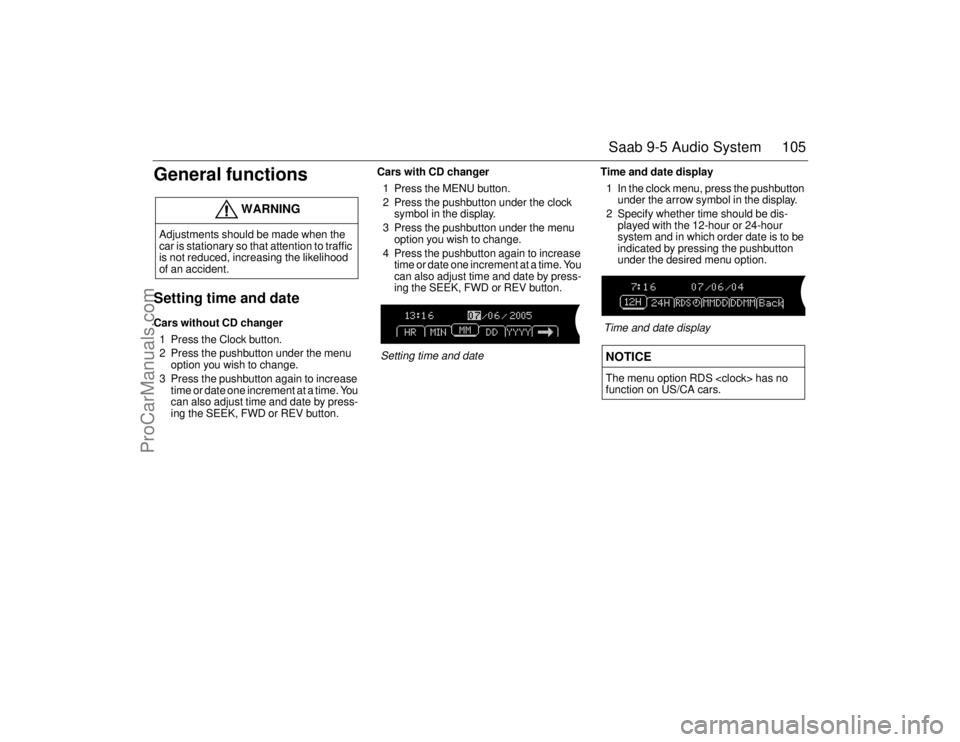
ing the SEEK, FWD or REV button.Cars with CD changer
1 Press the MENU button.
2 Press the pushbutton under the clock
symbol in the display.
3 Press the pushbutton under the menu
option you wish to change.
4 Press the pushbutton again to increase
time or date one increment at a time. You
can also adjust time and date by press-
ing the SEEK, FWD or REV button.
Setting time and dateTime and date display
1 In the clock menu, press the pushbutton
under the arrow symbol in the display.
2 Specify whether time should be dis-
played with the 12-hour or 24-hour
system and in which order date is to be
indicated by pressing the pushbutton
under the desired menu option.
Time and date display
WARNING
Adjustments should be made when the
car is stationary so that attention to traffic
is not reduced, increasing the likelihood
of an accident.
NOTICEThe menu option RDS has no
function on US/CA cars.
95usM06.book Page 105 Thursday, November 17, 2005 8:59 AM
ProCarManuals.com
Page 106 of 288
106 Saab 9-5 Audio SystemSpeed dependent volume
compensationAs vehicle speed increases, ambient noise
also increases. If you do not wish to contin-
ually adjust the volume, the audio system
can automatically adjust volume based on
an increase or decrease in vehicle speed.
Select one of four settings:
�
(no compensation)
!�"
(low compensation)
���
(medium compensation)
#�$%
(maximum compensation)
1 Press the MENU button.
2 Press the pushbutton under the menu
option �&��� �!&��
.
3 Press the pushbutton under the desired
speed compensation.
Speed dependent volume compensation
95usM06.book Page 106 Thursday, November 17, 2005 8:59 AM
ProCarManuals.com
Page 107 of 288
107 Saab 9-5 Audio System
Sound systemThe sound system is called Prestige. Loud-
ness is controlled automatically by the audio
system, boosting the highest and lowest fre-
quency ranges to enhance the sound image
when the volume is set to a low level. Sound
reproduction is therefore excellent what-
ever the volume setting.
The 9-5 SportCombi has 8 speakers as
there is only one subwoofer in the luggage
compartment.
PrestigeThe Prestige system has 9 speakers: three
mounted in the instrument panel fascia (the
centre speaker further enhances the sound
image), one in each door and two subwoof-
ers in the parcel shaft. The subwoofers
enhance reproduction of the lowest bass
notes.
95usM06.book Page 107 Thursday, November 17, 2005 8:59 AM
ProCarManuals.com
Page 108 of 288
108 Saab 9-5 Audio SystemTechnical data
Specifications in accordance with EIA Interim Standard.
THD = Total Harmonic Distortion
Tone controls
Bass _____________ ±8 dB at 100 Hz
Treble ____________ ±8 dB at 16 kHz
Power output
Prestige ________ 200 W
150 W at 1% THD
and 13.5 V
Radio module
Radio system ______ PLL frequency syn-
thesizer tuner.
Number of presets
FM/AM/XM
��
�__ 6 x 6
Frequency range
FM ____________ 87.7 - 107,9 MHz
AM ____________ 530 - 1710 kHzTuning steps
Automatic tuning __ FM 200 kHz
AM 10 kHz
Manual tuning ____ FM 200 kHz
AM 10 kHz
Frequency range (FM) 40 – 11000 Hz
±1 dB
Distortion (FM) _____ < 0.5%
CD player and
CD changer
1-bit system and 8 x
oversampling
Frequency range ___ 20 – 20000 Hz
±1 dB
Distortion _________ <0.005%
Dynamics _________ >85 dB
CD changer capacity: 6 discs
95usM06.book Page 108 Thursday, November 17, 2005 8:59 AM
ProCarManuals.com
Page 109 of 288

109 Saab 9-5 Audio System
AntennasThe audio system has two antennas incor-
porated in either the rear window or the
windscreen: one for FM and one for AM.
The XM
��
Satellite Radio antenna� is
located on the roof of the vehicle. Keep this
antenna clear of snow and ice build up for
clear radio reception.
Roof loads can negatively affect telecom-
munication, GPS reception and the per-
formance of the XM
��
system�.
If sun film is fitted to the rear window, it
must be a pure-plastic variety to maintain
good radio reception. Ensure that the film
does not contain any metal.
Multipath propagationMultipath propagation occurs when radio
waves from an FM transmitter are reflected
by a large building, or the like, causing them
to arrive slightly later than the direct waves.
This can create interference to radio recep-
tion. See also "Diversity antenna".
Diversity antenna�
�� �To improve radio reception when the topog-
raphy is a problem, a second FM antenna,
known as a diversity antenna, can be fitted
in the rear window. Consult a Saab dealer
for further information.
NOTICERefrain from placing hard or sharp
objects on the rear parcel shelf, to avoid
damaging the antenna leads.
IB389
IB386
95usM06.book Page 109 Thursday, November 17, 2005 8:59 AM
ProCarManuals.com
Page 110 of 288
110 Saab 9-5 Audio SystemShadow effectBecause FM radio waves travel in straight
lines from the transmitter, a shadow effect
can occur when tall buildings or hills
obstruct the propagation path from the
transmitter to the car.
Cross modulationIf the radio is tuned to a weak transmitter in
the vicinity of a stronger one, the car’s
antennas will receive signals from both.
Such interference is apparent when the
unwanted broadcast can be heard faintly in
the background.
Radio waves, FM/AMFM radio waves radiate in straight lines from
the transmitter. Because such waves do not
follow the curvature of the Earth, their
strength becomes weaker the further they
travel. That is why a large number of trans-
mitters is needed to provide good reception.
AM waves, on the other hand, are reflected
off the ionosphere, thus greatly extending
their range.
IB387
IB390
IB388
AM
FM
95usM06.book Page 110 Thursday, November 17, 2005 8:59 AM
ProCarManuals.com


