Page 56 of 318

56 SecurityChanging the key batteryWhen the voltage of the remote control bat-
tery drops below a certain level, the Saab
Information Display (SID) will display:
Change the battery as soon as possible to
avoid malfunctioning.Battery type: For optimum performance in
all temperatures and good service life, Saab
recommends the use of a Sony or Pana-
sonic CR2032, 3V lithium battery.
The battery should last for about 4 years of
normal use.
The battery type is marked on the inside of
the remote control. Avoid leaving finger-
prints on the faces of the battery.
1 Press the emblem on the reverse of the
remote control to remove the traditional
key.
2 Insert the tip of the key into the small slot
and turn the key to split the remote
control.
WARNING
Keep the battery and other small compo-
nents of the remote control out of reach of
children.NOTICEThe electronics of the remote control are
sensitive to electrostatic discharge. Incor-
rect handling when changing the battery
can damage the remote control. Avoid
touching electronic components of the
remote control with your hands.
Remote control battery
low. Replace battery.
Press the emblem to remove
the traditional key
93U S M 06.book Page 56 Friday, February 18, 2005 1:15 PM
ProCarManuals.com
Page 57 of 318

57 Security
3 Change the battery. Fit the new battery
so that it is positioned in the same way
as the old battery, with the positive (+)
side facing down.
4 Fit the two halves of the remote control
together and press them together until
you hear several clicks. Avoid pressing
the buttons. Reinsert the traditional key
into the remote control.5 After changing the battery in the remote
control, it is only possible to use the
remote control a limited number of times
before synchronization with the car is
lost. Therefore, do not press the buttons
on the remote control repeatedly directly
after changing the battery.
Unlock the car and insert the remote
control into the ignition switch to
synchronize the remote control and car.
If the central locking system does not work
after changing the battery and the car is
locked, proceed as follows:
1 Unlock the front left door with the tradi-
tional key. If the car has a car alarm, this
will be tripped.
2 Open the door and insert the remote
control into the ignition switch. If the car
has a car alarm, this will be silenced.
The remote control and receiver unit are
now synchronized.
ImmobilizerThe remote control contains an electronic
code that is unique to your car. When the
remote control is inserted into the ignition
switch, this code is checked and the LED on
the dashboard double-flashes for
3 seconds. If the code is correct, the car can
be started.
Each time you remove the remote control
from the ignition, the electronic starting
interlock is activated, the LED double-
flashes for 3 seconds and the car becomes
immobilized. If an incorrect remote control is
now inserted into the ignition switch (e.g.
the remote control of another car), the
immobilizer will remain operative (the LED
will not flash for 3 s) and it will not be possi-
ble to start the car.
If the immobilizer system malfunctions, the
Saab Information Display (SID) displays:
Immobilizer failure.
Try starting again.
Contact Saab dealer.
Change the battery and fit together
the two halves of the remote control93U S M 06.book Page 57 Friday, February 18, 2005 1:15 PM
ProCarManuals.com
Page 61 of 318
61 Security
Overview of functionsLocking/arming Direction indicators flash once.
Unlocking/
disarmingDirection indicators flash twice.
Unlocking/
disarming trunk
lidDirection indicators flash three times.
Alarm triggered Direction indicators flash for 5 min.
The horn sounds for 30-second intervals with
10-second breaks (max. 10 cycles) or until you
press one of the remote control buttons or turn
the remote control ON in the ignition switch.
Remote control Normal range: 5–16 yds. (5–15 metres).
In favorable conditions the range can be signifi-
cantly greater.
Remote control
batteryNormal life: approx. 4 years.
Change the battery when the SID displays:
Remote control battery
low. Replace battery.
See Changing the key battery, page 56.
Some car alarm functions and indications can be reprogrammed.
Contact a Saab dealer for details of the possibilities and refer to
page 309.93U S M 06.book Page 61 Friday, February 18, 2005 1:15 PM
ProCarManuals.com
Page 62 of 318

62 SecurityQuick guide, LED and Saab Information Display
(SID) messagesActivity LED signal
Arming (delay period) Illuminates for 11 s.
Alarm armed Flashes once every 3 s.
Disarming Extinguishes.
Alarm not armed Off.
A door, the hood or the tailgate is
open or opened during the delay
period.Flashes for 11 s then flashes
once every 3 s.
Car immobilized but not locked. Off.
Change of status of immobilizer
system, valid remote control
inserted or removed from ignition
switch.Double-flashes for 3 s.
SID message Reason/action
Key not accepted.
Contact Saab dealer.Error when remote control
inserted into ignition switch.
Remote control battery
low. Replace battery.Battery needs replacing.
See page 56.
2: standard key
Key No: 1Check of the number of remote
controls programmed for your
car. See page 55.
Alarm has been triggered
since being armed.The alarm has been tripped
since the car was last locked.
Immobilizer failure.
Try starting again.
Contact Saab dealer.Error when immobilizer code
checked.
93U S M 06.book Page 62 Friday, February 18, 2005 1:15 PM
ProCarManuals.com
Page 66 of 318

66 9-3 ConvertibleOpeningThe following conditions must be fulfilled for
the soft top to be folded:
Vehicle speed must not exceed 20 mph
(30 km/h).
Battery voltage must exceed 10 V.
Outside temperature must exceed 23°F
(–5°C).
The trunk lid must be locked.
There must be sufficient space in the
trunk for the soft top.
1 Star t the engine and let it idle. Clearance
for soft top operation: height, min. 7.2 ft
(2.2 m); behind car, min. 2" (5 cm).
2 Press and hold the soft top button until
the soft top is fully folded and the soft top
cover raised. Completed folding is indi-
cated by a chime. If there is a malfunc-
tion a text message will be shown on the
SID. Refer to page 73.
Do not press any of the buttons on the
same section of the instrument panel as
the soft top switch while folding the soft
top. This will cause the soft top to stop
and then sink after about 20 seconds.
If you continue to hold the button after the
chime, all the windows will open after a brief
delay.Remote opening3
You can fold the soft top when outside the
car by pressing and holding the
(unlock) button on the remote control. See
also page 129.
Folding
93U S M 06.book Page 66 Friday, February 18, 2005 1:15 PM
ProCarManuals.com
Page 68 of 318

68 9-3 ConvertibleRaisingThe following conditions must be fulfilled for
raising the soft top:
Vehicle speed must not exceed
20 mph (30 km/h).
Battery voltage must exceed 10 V.
The trunk lid must be locked.
1 Star t the engine and let it idle. Clearance
for soft top operation: height, min. 7.2 ft
(2.2 m); behind car, min. 2" (5 cm).
2 Press and hold the soft top button until
the soft top is fully raised and the soft top
cover closed. Completed raising is indi-
cated by a chime. If there is a malfunc-
tion a text message will be shown on the
SID. Refer to page 73.
Do not press any of the buttons on the
same section of the instrument panel as
the soft top switch while raising the soft
top. This will cause the soft top to stop
and then sink after about 20 seconds.
All side windows are opened slightly to pro-
tect the seals when the soft top is raised.
Check that the hooks in the soft top hold it securely to the upper edge of the wind-
shield.
If you hold the button pressed up after the
chime, all the windows will be closed after a
short delay.
Raising
93U S M 06.book Page 68 Friday, February 18, 2005 1:15 PM
ProCarManuals.com
Page 74 of 318
74 9-3 Convertible
Battery low. The voltage of the car battery is too low to allow
soft top operation.
Soft top obstructed.
Clear obstacles and
try again.
Open/close soft top
completely to open trunk.Complete soft top operation.
Open/close soft top
completely before drivingComplete soft top operation.
Close trunk. Close the trunk lid.
Driver seat unlocked. The backrest is not locked. Raise the backrest fully to locked position, see
page 75.
Passenger front seat
unlocked.The backrest is not locked. Raise the backrest fully to locked position, see
page 75.
93U S M 06.book Page 74 Friday, February 18, 2005 1:15 PM
ProCarManuals.com
Page 80 of 318
80 9-3 ConvertibleCalibrating front electric
windows with pinch protection3The window lifts should be calibrated if auto-
matic closing does not work or if the battery
has been disconnected. The pinch protec-
tion will not work if the windows are not
calibrated.
Perform calibration as follows:
1 Make sure the soft top is raised.
2 Make sure the doors are closed.
3 Let the engine idle.
4 Press and hold the soft top button up
until a chime sounds.
During calibration, the four windows will
be raised and lowered several times.
If calibration fails twice in a row, have the car
checked and rectified. We recommend that
you contact a Saab dealer.
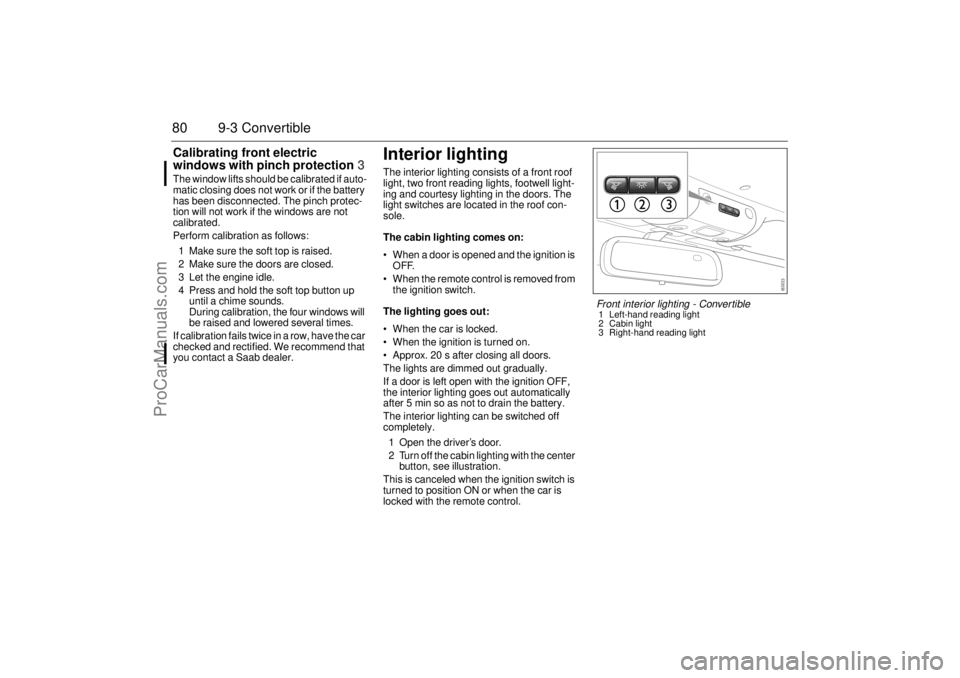
Interior lightingThe interior lighting consists of a front roof
light, two front reading lights, footwell light-
ing and courtesy lighting in the doors. The
light switches are located in the roof con-
sole.
The cabin lighting comes on:
When a door is opened and the ignition is
OFF.
When the remote control is removed from
the ignition switch.
The lighting goes out:
When the car is locked.
When the ignition is turned on.
Approx. 20 s after closing all doors.
The lights are dimmed out gradually.
If a door is left open with the ignition OFF,
the interior lighting goes out automatically
after 5 min so as not to drain the battery.
The interior lighting can be switched off
completely.
1 Open the driver’s door.
2 Turn off the cabin lighting with the center
button, see illustration.
This is canceled when the ignition switch is
turned to position ON or when the car is
locked with the remote control.
Front interior lighting - Convertible1 Left-hand reading light
2 Cabin light
3 Right-hand reading light
93U S M 06.book Page 80 Friday, February 18, 2005 1:15 PM
ProCarManuals.com

