2006 PORSCHE CAYMAN change wheel
[x] Cancel search: change wheelPage 109 of 280

Controls, Instruments
109
No monitoringIn the event of faults the tire pressure monitoring
cannot monitor the tire pressure.
The warning light on the instrument panel lights up
and a corresponding message appears on the
on-board computer.
Monitoring is not active when:
– the tire pressure monitoring is faulty,
– wheel transmitters for the tire pressure
monitoring are missing,
– temporarily after changing a wheel (learning
phase),
– more than four wheel transmitters are
detected,
– there is external interference by other radio
sources, e.g. wireless headphones,
– tire temperatures are too high.
fPlease observe the chapter “WARNINGS ON
THE INSTRUMENT PANEL AND THE ON-
BOARD COMPUTER” on Page 114.
Pressure increase as the result of
temperature increaseA Tire pressure
B Tire temperature
C Tire pressures for cold tires
D Tire pressure for hot tires
E Pressure increase as the result of temperature
increase
F Pressure drop in faulty/leaking tires
1. Required-pressure line
2. Warning stage 1 (from –3 to –6 psi
(–0.2 bar to –0.4 bar))
3. Warning stage 2 (from –6 psi (–0.4 bar))In accordance with physical principles, the air
pressure changes as the temperature changes.
The tire pressure increases or decreases by
around 1.5 psi (0.1 bar) for every 50°F (10°C)
change in temperature.
The tire pressure monitoring takes this relation-
ship between tire pressure and temperature into
account.
Tire pressure specificationsInformation on tire pressure for public roads can
be found in this Owner's Manual or on the tire-pres-
sure plate in the left door aperture.
These values apply to cold tires at 68°F (20°C).
Page 113 of 280

Controls, Instruments
113
Navigation
– Integrated in the BC
(Navigation instructions can be recalled on the
on-board computer display)
– When turning off
(Navigation instructions are only shown before
changing direction)
Basic setting
– Restore the basic setting of the on-board com-
puter
Language
– Select language version
12/24h mode
– Select time mode:
12h (small squares on the right side of the time
display for AM/PM),
24h
General information regarding the
on-board computer functionsRange on remaining fuel
The range on remaining fuel is continuously recal-
culated during the journey based on the fuel level,
current consumption and average consumption.
The more the fuel level falls, the more spontan-
eously the display reacts. For this reason, the
range on remaining fuel is not displayed if less
than 9 miles (15 kilometers).
If the vehicle's inclination changes while driving or
refueling, incorrect range information may tempo-
rarily be given.
Note
If the tank is nearly empty and you top up with only
a small quantity of fuel, an accurate range on re-
maining fuel is impossible.Average consumption and average speed
The values displayed are based on the distance
travelled since the last reset to “zero”.
You can set the starting time for a measurement
before or during the trip.
Switching the ignition off does not reset the meas-
urements. It is therefore possible to collect values
over long periods.
Disconnecting the car battery will cause these
memories to be erased.
Tire pressure
The Tire pressure function of the on-board com-
puter displays the tire pressures dependent on
temperature in the four wheels. You can watch the
tire pressure rise and fall while driving.
The display is only for information. To correct the
tire pressures, always use the displayed values
from the “Info pressure” display in the Tire pres-
sure menu.
Page 120 of 280

120
Controls, Instruments
Acknowledging warning messagesWarning messages can be deleted from the on-board computer display.
fPush the on-board computer operating lever forward.
You can recall erased warning messages in the
“INFO” menu.
TPC inactive
Brief disturbance
TPC inactive
Too many wheel transmittersThe tire pressure monitoring system is tempo-
rarily deactivated by excessive tire tempera-
tures (approx. 120 °C (248°F)) or external
interference (e.g. from other wheel transmitters
inside the car). Once the source of the interfer-
ence is removed, the system is automatically re-
activated.
Wheel change?
Input new
TPC settingsUpdate the settings in the TPC menu of the on-
board computer at the next opportunity. Wrong
entries will affect the correct pressure informa-
tion in the menu. The safety of your vehicle is at
risk.
TPC
Indicator faultyThe display of the tire pressure monitoring sys-
tem is faulty.
Consult your authorized Porsche dealer.*
Instrument
panelOn-board
computerText display on on-board
computerMeaning/measure
Page 124 of 280

124
Controls, Instruments
Turn Signal/ Headlight Dimmer/
Parking light / Flasher Lever Turn signals, low beam and high beam are ready
for operation when the ignition is on.
1– Turn signal left
2– Turn signal right
3–High beam
4– Headlight flasher
Lever in center position–Low beam
When high beam and headlight flasher are select-
ed, the blue indicator light in the tachometer is lit.
The turn signal lever turns off automatically when
the steering wheel is straightened out after com-
pleting a turn.
Lane changer fTo indicate your intention when changing lanes
on the freeway, slightly lift or depress the lever
to the resistance point.
The lever will return to the OFF position when
released.
fIf the frequency of the display becomes notice-
ably faster, check the operation of the turn sig-
nal bulbs. Headlight flasher (With ignition on or off)
fTo flash the headlights to oncoming motorists,
slightly pull the lever toward the steering wheel
and then release it.
The blue indicator light in the tachometer will
go on/off as you pull/release the lever. Parking lightThe parking light can only be switched on when
the ignition is switched off.
fMove the lever up or down to switch on the
right or left parking light.
Page 149 of 280
Controls, Instruments
149
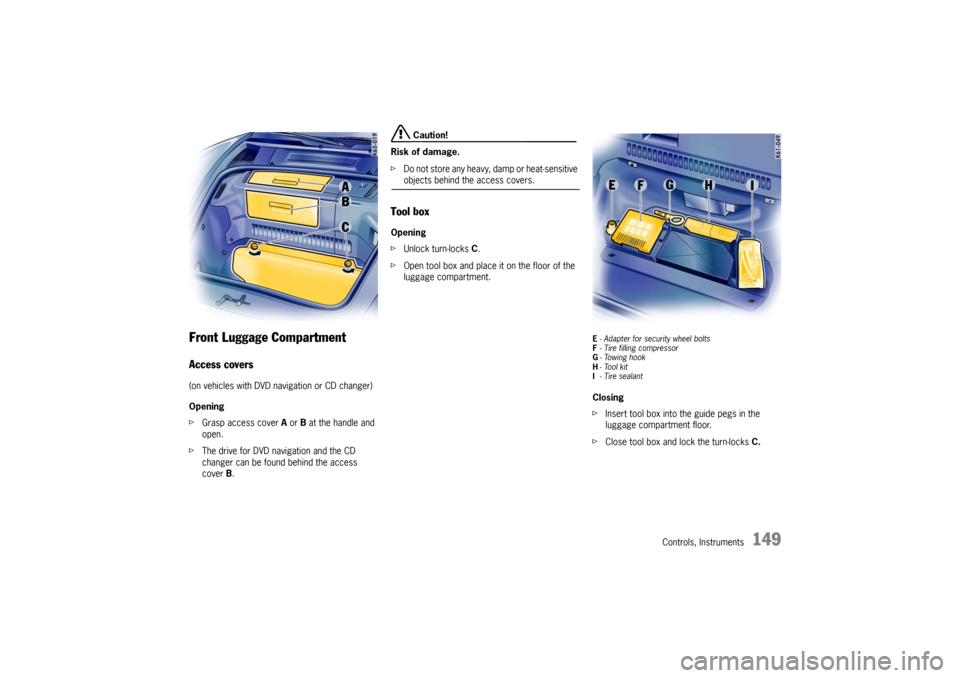
Front Luggage Compartment Access covers(on vehicles with DVD navigation or CD changer)
Opening
fGrasp access cover A or B at the handle and
open.
fThe drive for DVD navigation and the CD
changer can be found behind the access
cover B.
Caution!
Risk of damage.
fDo not store any heavy, damp or heat-sensitive objects behind the access covers.
Tool boxOpening
fUnlock turn-locks C.
fOpen tool box and place it on the floor of the
luggage compartment.
E- Adapter for security wheel bolts
F- Tire filling compressor
G-Towing hook
H-Tool kit
I-Tire sealantClosing
fInsert tool box into the guide pegs in the
luggage compartment floor.
fClose tool box and lock the turn-locks C.
Page 155 of 280

Controls, Instruments
155
Porsche Communication
Management (PCM) fRefer to the separate operating instructions
before putting the PCM into operation.
fPlease observe the chapter “LOAD SWITCH-
OFF AFTER 2 HOURS OR 7 DAYS” on Page
232.
Warning!
There is a danger of accident if you set or
operate the on-board computer, radio, navi-
gation system, telephone or other equipment
when driving.
This could distract you from the traffic and
cause you to lose control of the vehicle resul-
ting in serious personal injury or death.
fOperate the components while driving only if
the traffic situation allows you to do safely.
fCarry out any complicated operating or setting procedures only with the vehicle stationary.The reception conditions for the radio module inte-
grated in the PCM change continuously as you
drive. Interference from buildings, terrain and the
weather is unavoidable.
FM stereo reception is particularly susceptible to
varying reception conditions.
Accessories which have not been tested and
approved by Porsche may impair radio function
and reception.
NavigationWhen put into operation for the first time, a
distance of approx. 31 miles (50 km) must be dri-
ven in order for the navigation system to complete
the process of fine calibration.
The same applies when the tires are changed (e.g.
summer/snow tires) or new tires fitted.
Full location accuracy is not yet achieved during
the fine-calibration process.
If the vehicle has been transported (e.g. ferry, car
train), the system may take a few minutes after
being switched on before it determines the current
location.
Serious tire slip (e.g. spinning wheels on snow)
may result in temporarily inaccurate navigation.
When the battery has been disconnected, it may
take up to 15 minutes before the navigation
system becomes operational again.
Page 165 of 280

Shifting Gear
165
Tiptronic SThe Porsche Tiptronic is a five-speed transmission
with an “automatic” and a “manual” selection
mode.
In automatic selection mode (selector lever po-
sition D), gear changing is automatic.
You can change temporarily from automatic to
manual mode using the rocker switches on the
steering wheel.
In manual selection mode (selector lever posi-
tion M), you change gear using the rocker switch-
es on the steering wheel.
You can change between selector lever position D
and M as you wish while driving.
Note
Take care not to operate the rocker switches on
the steering wheel inadvertently in either auto mat-
ic or manual mode, thereby triggering undesired
gear changes.Keylock positionThe ignition key can be withdrawn only in selec-
tor lever position P.
Changing the selector lever positionThe selector lever is locked with the ignition key
withdrawn.
The selector lever can be moved from position P
or N only with:
– the ignition switched on,
– the brake pedal pressed and
– the release button pressed.Release button
The release button (arrow) in the selector lever
prevents unintentional gear changes.
The release button must be pressed when shifting
to position R or P.
StartingThe engine can be started only if the brake pedal
is depressed and the selector lever is in position
P or N.Moving offfOnly select the desired position for moving off
(D, M or R) when the engine is idling and the
brake pedal is depressed.
fSince the vehicle creeps when in gear, do not
release the brake until you want to move off.
fAfter selecting a gear, do not accelerate until
you can feel that the gear is engaged.
Page 168 of 280

168
Shifting Gear Shifting gear on the steering wheel
With the toggle switches on the steering wheel,
you can change temporarily from automatic
selection mode D to manual mode M.
Advantages:
– Shifting down before bends and on entering
built-up areas.
– Shifting down on downward slopes (engine
braking).
– Shifting down for brief spurts of acceleration.
– Selecting 1st gear for moving off.
The manual selection mode remains engaged:
– for cornering (depending on the lateral
acceleration) and overrunning,
– when the vehicle is stationary
(e.g. at a junction).
The system leaves manual selection mode:
– automatically after approx. 8 seconds
(unless cornering or overrunning),
– if you depress the accelerator to kickdown,
– after moving off. Temporary change-down
Conditions:
Speed is higher than approx. 33 mph (54 km/h).
fDepress accelerator quickly.
The Tiptronic changes temporarily to the sport-
iest gear-changing map, i.e. to the highest pos-
sible gear-changing points. Correspondingly,
the transmission shifts down immediately by
one or two gears.
Ending the function:
fRelease the accelerator markedly. Kickdown
The kickdown function is active in selector lever
position D, even if you temporarily change to man-
ual mode M using the toggle switches on the
steering wheel.
fFor optimum acceleration, e.g. when overtak-
ing, depress the accelerator pedal beyond the
full-throttle point (kickdown).
The transmission shifts down depending on the
speed of travel and engine speed.
Upward shifts occur at the highest possible engine
speeds.
These gear-changing speeds remain active until
the accelerator is released to approx. 80% of the
wide open throttle position.