2006 PONTIAC SOLSTICE lock
[x] Cancel search: lockPage 93 of 328
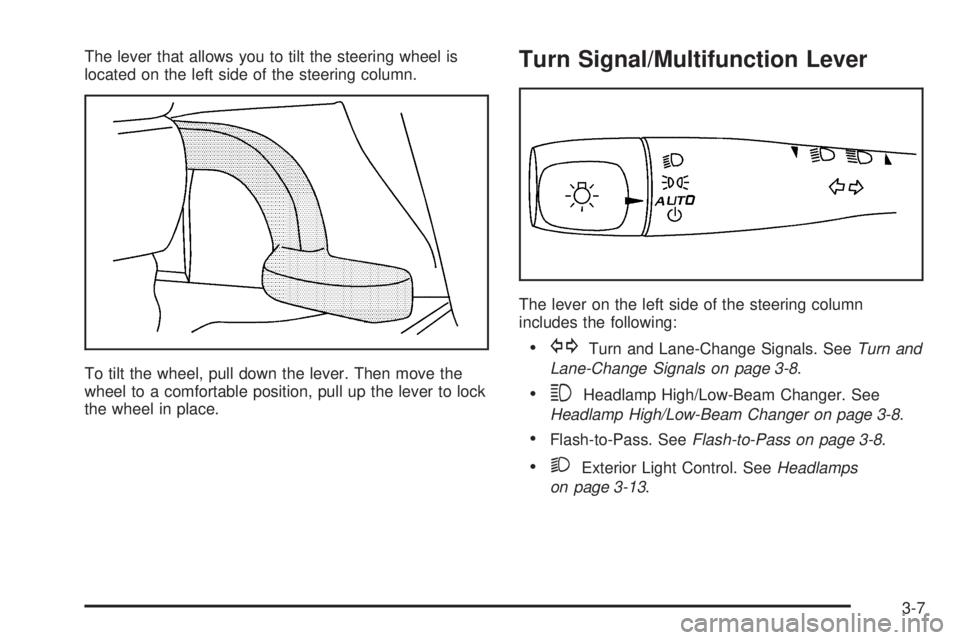
The lever that allows you to tilt the steering wheel is
located on the left side of the steering column.
To tilt the wheel, pull down the lever. Then move the
wheel to a comfortable position, pull up the lever to lock
the wheel in place.Turn Signal/Multifunction Lever
The lever on the left side of the steering column
includes the following:
GTurn and Lane-Change Signals. SeeTurn and
Lane-Change Signals on page 3-8.
3Headlamp High/Low-Beam Changer. See
Headlamp High/Low-Beam Changer on page 3-8.
Flash-to-Pass. SeeFlash-to-Pass on page 3-8.
2Exterior Light Control. SeeHeadlamps
on page 3-13.
3-7
Page 96 of 328

Heavy snow or ice can overload your wiper motor.
A circuit breaker will stop the motor until it cools.
Clear away snow or ice to prevent an overload. If the
motor gets stuck, turn the wipers off, clear away
the snow or ice, and then turn the wipers back on.
As an added safety feature, if the wipers are on for more
than 15 seconds, the vehicle’s headlamps will turn on
automatically. They will turn off 15 seconds after
the wipers are turned off.
Windshield Washer
To wash your windshield, press the button at the end of
the lever until the washers begin.
{CAUTION:
In freezing weather, do not use your washer
until the windshield is warmed. Otherwise the
washer uid can form ice on the windshield,
blocking your vision.
When you release the button, the washers will stop, but
the wipers will continue to wipe for about three times
or will resume the speed you were using before.
Cruise Control
If equipped with cruise control, your vehicle can maintain
a speed of about 25 mph (40 km/h) or more without
keeping your foot on the accelerator. This can really help
on long trips. Cruise control does not work at speeds
below 25 mph (40 km/h).
{CAUTION:
Cruise control can be dangerous where you
cannot drive safely at a steady speed. So, do
not use your cruise control on winding roads
or in heavy traffic.
Cruise control can be dangerous on slippery
roads. On such roads, fast changes in tire
traction can cause needless wheel spinning,
and you could lose control. Do not use cruise
control on slippery roads.
3-10
Page 101 of 328

The fog lamps will turn off while the high-beam
headlamps are turned on.
Some localities have laws that require the headlamps to
be on along with the fog lamps.
Instrument Panel Brightness
DInstrument Panel Brightness:The control for this
feature is located on the instrument panel to the right
of the steering wheel.
Turn the knob clockwise to brighten the lights or
counterclockwise to dim them.
Entry/Exit Lighting
The lamps inside your vehicle will go on when you open
any door. These lamps will fade out after about
20 seconds after all of the doors have been closed or
when the ignition is turned on. These lamps will also go
on when you press the trunk release, unlock symbol
button or the horn symbol on the keyless entry system
transmitter.
The lamps inside your vehicle will stay on for about
20 seconds after your key is removed from the ignition
to provide an illuminated exit.
Mirror Reading Lamps
Your vehicle has reading lamps on the rearview mirror.
Push the button to turn the reading lamps on and off.
Battery Run-Down Protection
Your vehicle is equipped with a battery saver feature
designed to protect your vehicle’s battery.
When any interior lamp is left on and the ignition is
turned off, the battery rundown protection system will
automatically turn the lamp off after 20 minutes. This will
avoid draining the battery.
Accessory Power Outlet(s)
The accessory power outlet can be used to connect
electrical equipment such as a cellular phone or
CB radio. The outlet can accept electrical equipment
rated at a maximum of 20 amps.
The accessory power outlet is located on the instrument
panel, under the radio.
To use the outlet, remove the cover. When not in use,
always cover the outlet with the protective cap.
Notice:Leaving electrical equipment on for
extended periods will drain the battery. Always turn
off electrical equipment when not in use and do not
plug in equipment that exceeds the maximum
amperage rating.
3-15
Page 103 of 328

Climate Controls
Climate Control System
With this system you can control the heating and
ventilation of your vehicle. You may also be able to
control the cooling of your vehicle, if equipped. The
in-between mode will be a combination of the two modes
that the control is selected between.
Temperature:Turn the left knob on the control panel to
adjust the temperature of the air in the vehicle. Turn
the knob clockwise or counterclockwise to increase or
decrease the temperature.
#(Air Conditioning) (If Equipped):Press the left
knob on the control panel to turn the air conditioning
system on or off. An indicator light on the button
will come on to let you know the air conditioning is
activated. When the system is on, this setting cools and
dehumidies the air entering your vehicle.
The air conditioning will not function if the fan is turned
off. If air conditioning is selected with fan off, the
LED light will ash three times and then turn off.
You may notice a slight change in engine performance
when the air conditioning compressor turns off and
turns on again. This is normal. The system is designed
to make adjustments to help with fuel economy while
still maintaining the selected temperature.
Air conditioning does not operate at temperature below
40°F (4°C). In temperatures above 40°F (4°C), the
air conditioning cannot be turned off in defrost
and oor/defog modes because it helps to remove
moisture from the vehicle. It also helps to keep
the windows clear.
On hot days, open the windows to let the hot inside air
escape; then close them. This helps reduce the time
it takes for your vehicle to cool down. It also helps the
system to operate more efficiently. Climate Control System with Air Conditioning
shown, Climate Control System without
Air Conditioning similar
3-17
Page 104 of 328

For quick cool down on hot days, do the following:
1. Select the vent mode.
2. Select recirculation mode.
3. Select the air conditioning to on.
4. Select the coolest temperature.
5. Select the highest fan speed.
Using these settings together for long periods of time
may cause the air inside of your vehicle to become too
dry. To prevent this from happening, after the air in
your vehicle has cooled, turn the recirculation mode off.
9(Fan):Turn the center knob on the control panel
to control the fan speed. Turn the knob clockwise
or counterclockwise to increase or decrease the fan
speed.
9(Off):Turn the center knob to this position to turn
the fan off.
?(Recirculation):Press the center knob on the
control panel to recirculate air inside the vehicle
and prevent outside air from coming in. It can be used
to prevent outside odors from entering your vehicle
and cool the air inside your vehicle more quickly. Press
this button to turn the recirculation mode on or off.
An indicator light on the button will come on to let you
know the recirculation mode is activated.Recirculation is available in the bi-level and vent modes.
If recirculation is selected in either oor/heat, oor/defog,
or defrost mode, the LED light will ash three times
indicating it is not available in that mode.
The right knob on the control panel is used to direct the
airow inside your vehicle. Turn the knob to select
one of the following modes:
H(Vent):Turn the right knob on the control panel to
this mode to direct air to the instrument panel outlets.
\(Bi-Level):Turn the right knob on the control panel
to this mode to direct air to the instrument panel
outlets, and the remaining air to the oor outlets and the
defroster and side window outlets. Cooler air is
directed to the upper outlets and warmer air to the oor
outlets.
[(Floor):Turn the right knob on the control panel to
this mode to direct most of the air to the oor outlets.
The remaining air is directed to the side window
and defroster outlets. Recirculation is not available in
this mode. If low or no airow is on the passenger side,
ensure that the carpet covering is tucked under oor
outlets.
3-18
Page 106 of 328

Outlet Adjustment
Use the air outlets located in the center and on the side
of your instrument panel to direct the airow.
Your vehicle has air outlets that allow you to adjust the
direction and amount of airow inside the vehicle.
Move the louvers up or down to change the direction of
the airow.
Operation Tips
Clear away any ice, snow or leaves from the air
inlets at the base of the windshield that may
block the ow of air into your vehicle.
Use of non-GM approved hood deectors may
adversely affect the performance of the system.
Keep the path under the front seats clear of objects
to help circulate the air inside of your vehicle more
effectively.
Warning Lights, Gages, and
Indicators
This part describes the warning lights and gages that may
be on your vehicle. The pictures will help you locate them.
Warning lights and gages can signal that something is
wrong before it becomes serious enough to cause
an expensive repair or replacement. Paying attention to
your warning lights and gages could also save you
or others from injury.
Warning lights come on when there may be or is a
problem with one of your vehicle’s functions. As you will
see in the details on the next few pages, some
warning lights come on briey when you start the
engine just to let you know they’re working. If you are
familiar with this section, you should not be alarmed
when this happens.
Gages can indicate when there may be or is a problem
with one of your vehicle’s functions. Often gages
and warning lights work together to let you know when
there’s a problem with your vehicle.
When one of the warning lights comes on and stays on
as you are driving, or when one of the gages shows
there may be a problem, check the section that tells you
what to do about it. Please follow this manual’s
advice. Waiting to do repairs can be costly — and even
dangerous. So please get to know your warning
lights and gages. They’re a big help.
3-20
Page 114 of 328

If the light comes on while you are driving, pull off the
road and stop carefully. Make sure the parking brake is
fully released. You may notice that the pedal is harder
to push or, the pedal may go closer to the oor.
It may take longer to stop. If the light is still on, have the
vehicle towed for service. SeeTowing Your Vehicle
on page 4-34.
{CAUTION:
Your brake system may not be working
properly if the brake system warning light is
on. Driving with the brake system warning light
on can lead to an accident. If the light is still
on after you have pulled off the road and
stopped carefully, have the vehicle towed for
service.
Anti-Lock Brake System Warning
Light
If your vehicle is equipped
with the anti-lock brake
system, the light will come
on when your engine is
started and may stay on for
several seconds. That is
normal.
If the light stays on, turn the ignition to OFF. Or, if the
light comes on when you are driving, stop as soon
as possible and turn the ignition off. Then start
the engine again to reset the system. If the light still
stays on after driving at a speed of at least 13 mph
(20 kph), or comes on again while you are driving, your
vehicle needs service. If the regular brake system
warning light is not on, you still have brakes, but you do
not have anti-lock brakes. If the regular brake system
warning light is also on, you do not have anti-lock brakes
and there is a problem with your regular brakes. See
Brake System Warning Light on page 3-27.
The anti-lock brake system warning light will come on
briey when you turn the ignition key to RUN. This
is normal. If the light does not come on then, have it
xed so it will be ready to warn you if there is a problem.
3-28
Page 127 of 328

Personalization Menu Modes
UNITS
This feature allows you to select the units of
measurement in which the DIC will display the vehicle
information. When UNITS appears on the display, press
the reset button to scroll through the available settings:
ENGLISH (default in United States):All information
will be displayed in English units. For example, distance
will be shown in miles (mi) and fuel economy in miles
per gallon (mpg).
METRIC (default in Canada):All information will be
displayed in metric units. For example, distance will be
shown in kilometers (km) and fuel economy in liters
per 100 kilometers (L/100 km).
Choose one of the available settings and press the
information button to select it and move on to the
next feature.
OIL-LIFE RESET
When this feature is displayed, you can reset the engine
oil life system. To reset the system, seeEngine Oil
Life System on page 5-16. See “OIL LIFE” underDIC
Operation and Displays on page 3-36for more
information.
LOCK HORN
If your vehicle has remote keyless entry, this feature,
which allows the vehicle’s horn to chirp every time the
lock button on the remote keyless entry transmitter is
pressed, can be enabled or disabled. When LOCK HORN
appears on the display, press the reset button to scroll
through the available settings:
OFF (default):The horn will not chirp on the rst press
of the remote keyless entry transmitter lock button.
The horn will still chirp on the second press.
ON:The horn will chirp on the rst press of the lock
button on the remote keyless entry transmitter.
SeeRemote Keyless Entry System Operation on
page 2-4for more information.
Choose one of the available settings and press the
information button to select it and move on to the next
feature.
3-41