2006 PONTIAC G6 service
[x] Cancel search: servicePage 100 of 416

If you are ever driving and the SECURITY light comes
on and stays on, you may be able to restart your
engine if you turn it off. Your PASS-Key
®III+ system,
however, is not working properly and must be serviced
by your dealer. Your vehicle is not protected by the
PASS-Key
®III+ system at this time.
If you lose or damage your PASS-Key
®III+ key,
see your dealer or a locksmith who can service
PASS-Key
®III+ to have a new key made.
Starting and Operating
Your Vehicle
New Vehicle Break-In
Notice:Your vehicle does not need an elaborate
break-in. But it will perform better in the long run if
you follow these guidelines:
Do not drive at any one speed, fast or slow,
for the rst 500 miles (805 km). Do not make
full-throttle starts.
Avoid making hard stops for the rst 200 miles
(322 km) or so. During this time your new
brake linings are not yet broken in. Hard stops
with new linings can mean premature wear
and earlier replacement. Follow this breaking-in
guideline every time you get new brake
linings.
Do not tow a trailer during break-in. SeeTowing
a Trailer on page 4-40for more information.
2-22
Page 101 of 416
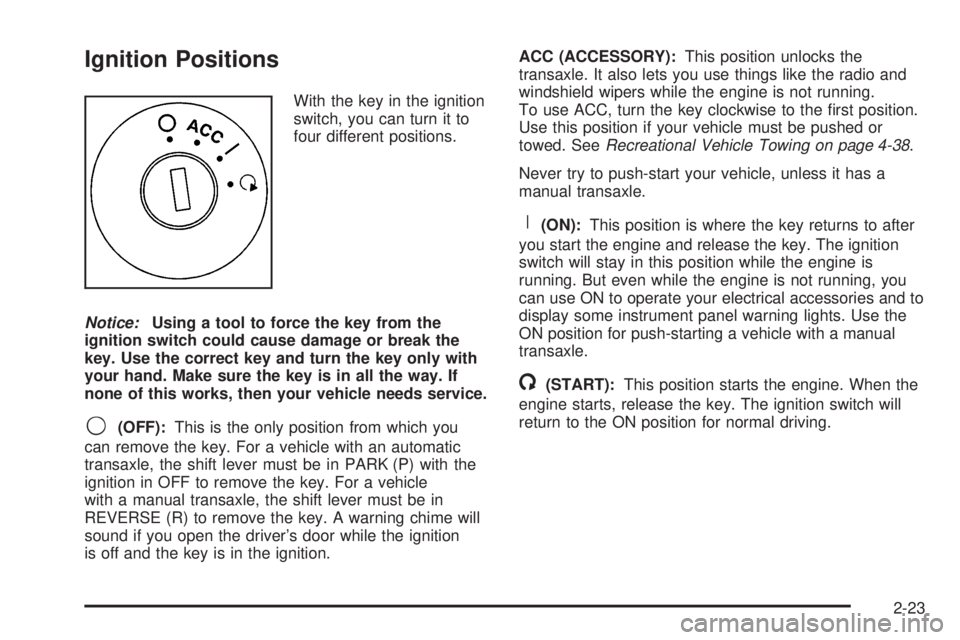
Ignition Positions
With the key in the ignition
switch, you can turn it to
four different positions.
Notice:Using a tool to force the key from the
ignition switch could cause damage or break the
key. Use the correct key and turn the key only with
your hand. Make sure the key is in all the way. If
none of this works, then your vehicle needs service.
9(OFF):This is the only position from which you
can remove the key. For a vehicle with an automatic
transaxle, the shift lever must be in PARK (P) with the
ignition in OFF to remove the key. For a vehicle
with a manual transaxle, the shift lever must be in
REVERSE (R) to remove the key. A warning chime will
sound if you open the driver’s door while the ignition
is off and the key is in the ignition.ACC (ACCESSORY):This position unlocks the
transaxle. It also lets you use things like the radio and
windshield wipers while the engine is not running.
To use ACC, turn the key clockwise to the rst position.
Use this position if your vehicle must be pushed or
towed. SeeRecreational Vehicle Towing on page 4-38.
Never try to push-start your vehicle, unless it has a
manual transaxle.
R(ON):This position is where the key returns to after
you start the engine and release the key. The ignition
switch will stay in this position while the engine is
running. But even while the engine is not running, you
can use ON to operate your electrical accessories and to
display some instrument panel warning lights. Use the
ON position for push-starting a vehicle with a manual
transaxle.
/(START):This position starts the engine. When the
engine starts, release the key. The ignition switch will
return to the ON position for normal driving.
2-23
Page 108 of 416

NEUTRAL (N):In this position, your engine does not
connect with the wheels. To restart when you are
already moving, use NEUTRAL (N) only. Also, use
NEUTRAL (N) when your vehicle is being towed.
{CAUTION:
Shifting into a drive gear while your engine is
running at high speed is dangerous. Unless
your foot is rmly on the brake pedal, your
vehicle could move very rapidly. You could
lose control and hit people or objects. Do not
shift into a drive gear while your engine is
running at high speed.
Notice:Shifting out of PARK (P) or NEUTRAL (N)
while the engine is running at high speed may
damage the transaxle. The repairs would not be
covered by your warranty. Be sure the engine is not
running at high speeds when shifting your vehicle.AUTOMATIC OVERDRIVE (D):This position is for
normal driving. If you need more power for passing,
and you are:
Going less than 35 mph (55 km/h), push your
accelerator pedal about halfway down.
Going about 35 mph (55 km/h) or more, push the
accelerator all the way down.
You will shift down to the next gear and have more
power.
Notice:If your vehicle seems to start up rather
slowly or not shift gears when you go faster, and you
continue to drive your vehicle that way, you could
damage the transaxle. Have your vehicle serviced
right away. You can drive in LOW (L) when you are
driving less than 35 mph (55 km/h) and AUTOMATIC
OVERDRIVE (D) for higher speeds until then.
THIRD (3):This position, available on the SE model, is
also used for normal driving. However, it offers more
power and lower fuel economy than AUTOMATIC
OVERDRIVE (D). Here are some times you might
choose THIRD (3) instead of AUTOMATIC
OVERDRIVE (D):
When driving on hilly, winding roads.
When towing a trailer, so there is less shifting
between gears.
When going down a steep hill.
2-30
Page 117 of 416

Mirrors
Manual Rearview Mirror
The mirror can be adjusted two ways. First, to adjust
the height of the mirror, adjust the arm that connects the
mirror to the windshield. Second, adjust the angle of
the mirror, by moving the mirror to a position that allows
you to see out of the back window.
To reduce glare from headlamps behind you, move the
lever toward you to the night position. To return the
mirror to the daytime position, move the lever away
from you.
Manual Rearview Mirror with
OnStar
®
Your vehicle may have a rearview mirror with the
OnStar®system.
Control buttons for the OnStar
®system are at the
bottom of the mirror. See your GM dealer for more
information on the OnStar
®system and how to
subscribe to OnStar®. Also, seeOnStar®System on
page 2-44for more information about the services
OnStar
®provides.
Mirror Operation
While sitting in a comfortable driving position, adjust the
rearview mirror so you can see clearly behind your
vehicle. Grip it in the center to move it up or down and
side to side. The day/night control, located at the
bottom of the mirror, adjusts the mirror to reduce
headlamp glare from behind during evening or dark
conditions. Move the control to the right for night
conditions. Return it to the center for daytime use.
Automatic Dimming Rearview Mirror
with OnStar
®and Compass
Your vehicle may have an automatic dimming rearview
mirror with a compass and OnStar®controls. For
more information about OnStar®, seeOnStar®System
on page 2-44.
The automatic dimming feature turns on each time the
vehicle is started. To turn automatic dimming off or
on, press the left button below the mirror. A green
indicator light will be on when automatic dimming is on.
There are also three OnStar
®buttons located at the
bottom of the mirror. See your dealer for more
information on the system and how to subscribe to
OnStar
®. SeeOnStar®System on page 2-44for more
information about the service OnStar®provides.
2-39
Page 122 of 416

OnStar®System
OnStar®uses global positioning system (GPS) satellite
technology, wireless communications, and call centers
to provide you with a wide range of safety, security,
information, and convenience services.
A complete OnStar
®user’s guide and the terms and
conditions of the OnStar®Subscription Service
Agreement are included in the vehicle’s glove box
literature. For more information, visit www.onstar.com
or www.onstarcanada.com. Contact OnStar
®at
1-888-4-ONSTAR (1-888-466-7827), or press the
OnStar
®button to speak to an OnStar®advisor
24 hours a day, 7 days a week.
Terms and conditions of the Subscription Service
Agreement can be found at www.onstar.com or
www.onstarcanada.com.
OnStar®Services
For new vehicles equipped with OnStar®, the Safe and
Sound Plan is included for the rst year. You can
extend this plan beyond the rst year, or upgrade to the
Directions and Connections Plan to meet your needs.
For more information, press the OnStar
®button to speak
with an advisor.
Safe and Sound Plan
Advanced Automatic Collision Notication
Automatic Notication of Airbag Deployment
Emergency Services
Roadside Assistance
Stolen Vehicle Tracking
AccidentAssist
Remote Door Unlock/Vehicle Alert
Remote Diagnostics
Online Concierge
Directions and Connections Plan
All Safe and Sound Plan Services
Driving Directions
RideAssist
Information and Convenience Services
2-44
Page 132 of 416

Security Light...............................................3-44
Cruise Control Light......................................3-44
Highbeam On Light.......................................3-44
Service Vehicle Soon Light............................3-44
Fuel Gage...................................................3-45
Low Fuel Warning Light.................................3-45
Driver Information Center (DIC).......................3-45
DIC Operation and Displays...........................3-46
DIC Warnings and Messages.........................3-48
DIC Vehicle Personalization............................3-52
Audio System(s).............................................3-54
Setting the Time for Radios without
Radio Data Systems (RDS)........................3-55
Setting the Time for Radios with
Radio Data Systems (RDS)........................3-55Radio with CD (Base Level)...........................3-56
Radio with CD (Up Level)..............................3-61
Radio with Six-Disc CD.................................3-71
Theft-Deterrent Feature..................................3-86
Audio Steering Wheel Controls
(Three Spoke)...........................................3-86
Audio Steering Wheel Controls
(Four Spoke)............................................3-87
Radio Reception...........................................3-87
Care of Your CDs and DVDs.........................3-88
Care of the CD and DVD Player.....................3-88
Fixed Mast Antenna
(Retractable Hardtop).................................3-88
Backglass Antenna.......................................3-89
XM™ Satellite Radio Antenna System.............3-89
Section 3 Instrument Panel
3-2
Page 161 of 416

Speedometer and Odometer
Your speedometer lets you see your speed in both
miles per hour (mph) and kilometers per hour (km/h).
Your odometer shows how far your vehicle has
been driven, in either miles (used in the United States)
or kilometers (used in Canada).
When in manual shift mode, the odometer will change
from the vehicle’s mileage to the letter M, for manual
mode, and a number indicating the requested gear
range when moving the shift lever forward or rearward.
For more information seeAutomatic Transaxle
Operation on page 2-28.
Your vehicle has a tamper resistant odometer.
Repair or replacement of your instrument panel
cluster should only be performed by a qualied
GM service center.
Trip Odometer
The trip odometer can display how far you have driven
since you last reset it.
For more information seeDIC Operation and Displays
on page 3-46.
Tachometer
The tachometer
shows your engine
speed in revolutions
per minute (rpm).
Notice:If you operate the engine with the
tachometer in the shaded warning area, your vehicle
could be damaged, and the damages would not
be covered by your warranty. Do not operate
the engine with the tachometer in the shaded
warning area.
3-31
Page 163 of 416

Airbag Readiness Light
There is an airbag readiness light on the instrument
panel, which shows the airbag symbol. The system
checks the airbag’s electrical system for malfunctions.
The light tells you if there is an electrical problem.
The system check includes the airbag sensors, the
airbag modules, the wiring and the diagnostic module.
For more information on the airbag system, see
Airbag System on page 1-56.
This light will come on
when you start your
vehicle, and it will ash for
a few seconds. Then
the light should go out.
This means the system
is ready.
If the airbag readiness light stays on after you start the
vehicle or comes on when you are driving, your
airbag system may not work properly. Have your vehicle
serviced right away.{CAUTION:
If the airbag readiness light stays on after you
start your vehicle, it means the airbag system
may not be working properly. The airbags in
your vehicle may not inate in a crash, or they
could even inate without a crash. To help
avoid injury to yourself or others, have your
vehicle serviced right away if the airbag
readiness light stays on after you start
your vehicle.
The airbag readiness light should ash for a few
seconds when you turn the vehicle on. If the light does
not come on then, have it xed so it will be ready to
warn you if there is a problem.
If there is a problem with the airbag system in your
vehicle, the Service airbag message will appear on the
DIC display. SeeDIC Warnings and Messages on
page 3-48for more information.
3-33