2006 NISSAN SENTRA lock
[x] Cancel search: lockPage 102 of 256
OPENER OPERATION
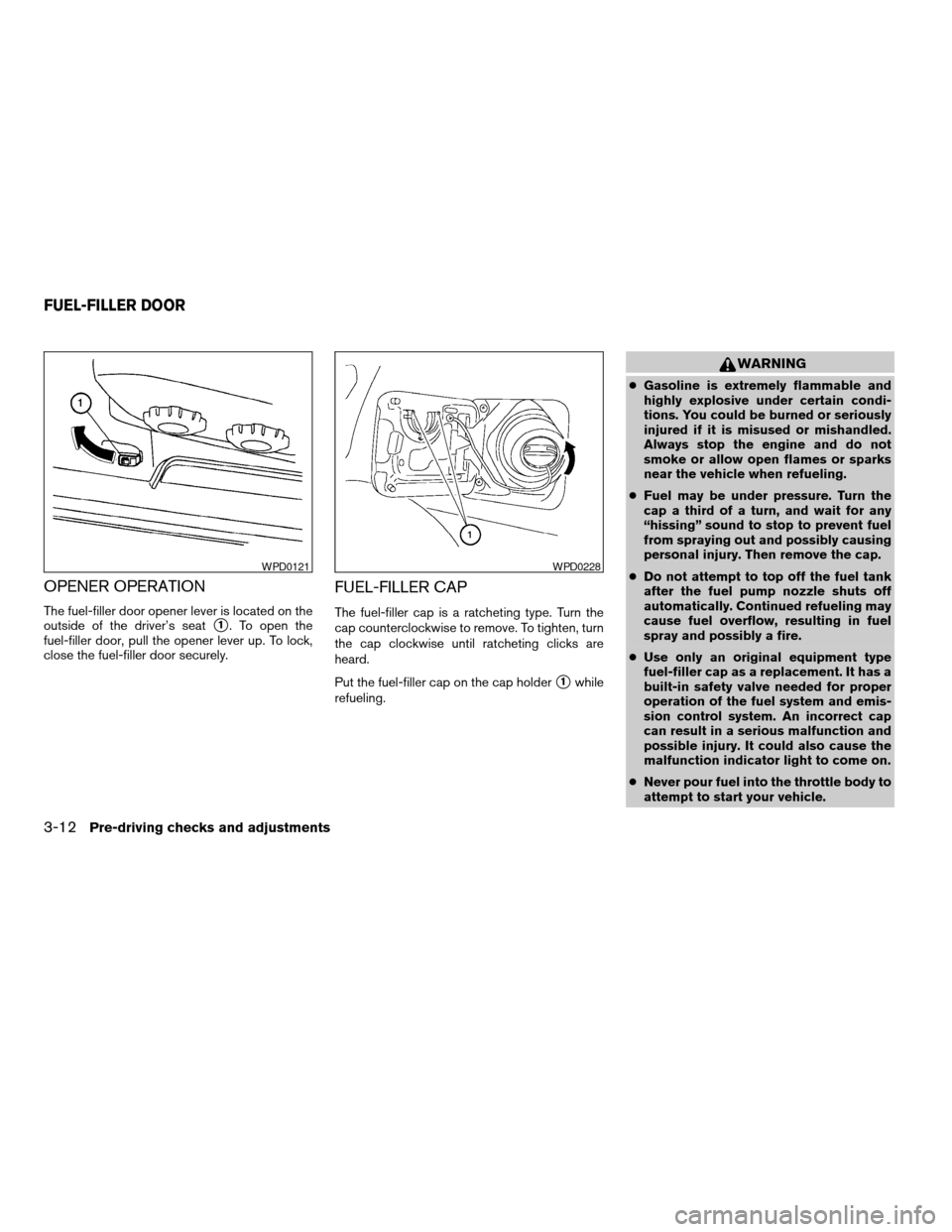
The fuel-filler door opener lever is located on the
outside of the driver’s seat
s1. To open the
fuel-filler door, pull the opener lever up. To lock,
close the fuel-filler door securely.
FUEL-FILLER CAP
The fuel-filler cap is a ratcheting type. Turn the
cap counterclockwise to remove. To tighten, turn
the cap clockwise until ratcheting clicks are
heard.
Put the fuel-filler cap on the cap holder
s1while
refueling.
WARNING
cGasoline is extremely flammable and
highly explosive under certain condi-
tions. You could be burned or seriously
injured if it is misused or mishandled.
Always stop the engine and do not
smoke or allow open flames or sparks
near the vehicle when refueling.
cFuel may be under pressure. Turn the
cap a third of a turn, and wait for any
“hissing” sound to stop to prevent fuel
from spraying out and possibly causing
personal injury. Then remove the cap.
cDo not attempt to top off the fuel tank
after the fuel pump nozzle shuts off
automatically. Continued refueling may
cause fuel overflow, resulting in fuel
spray and possibly a fire.
cUse only an original equipment type
fuel-filler cap as a replacement. It has a
built-in safety valve needed for proper
operation of the fuel system and emis-
sion control system. An incorrect cap
can result in a serious malfunction and
possible injury. It could also cause the
malfunction indicator light to come on.
cNever pour fuel into the throttle body to
attempt to start your vehicle.
WPD0121WPD0228
FUEL-FILLER DOOR
3-12Pre-driving checks and adjustments
ZREVIEW COPYÐ2006 Sentra(b15)
Owners ManualÐUSA_English(nna)
09/01/05Ðdebbie
X
Page 103 of 256
cDo not fill a portable fuel container in
the vehicle or trailer. Static electricity
can cause an explosion of flammable
liquid, vapor or gas in any vehicle or
trailer. To reduce the risk of serious
injury or death when filling portable fuel
containers:
– Always place the container on the
ground when filling.
– Do not use electronic devices when
filling.
– Keep the pump nozzle in contact
with the container while you are fill-
ing it.
– Use only approved portable fuel con-
tainers for flammable liquid.
CAUTION
cIf fuel is spilled on the vehicle body,
flush it away with water to avoid paint
damage.cTighten until the fuel-filler cap clicks.
Failure to tighten the fuel-filler cap
properly may cause the
mal-
function indicator light (MIL) to illumi-
nate. If the
light illuminates be-
cause the fuel-filler cap is loose or
missing, tighten or install the cap and
continue to drive the vehicle.
The
light should turn off after a
few driving trips. If the
light
does not turn off after a few driving
trips, have the vehicle inspected by a
NISSAN dealer.
cFor additional information, see the
“Malfunction indicator light (MIL)” in
the “Instruments and Controls” section
earlier in this manual.
TILT OPERATION
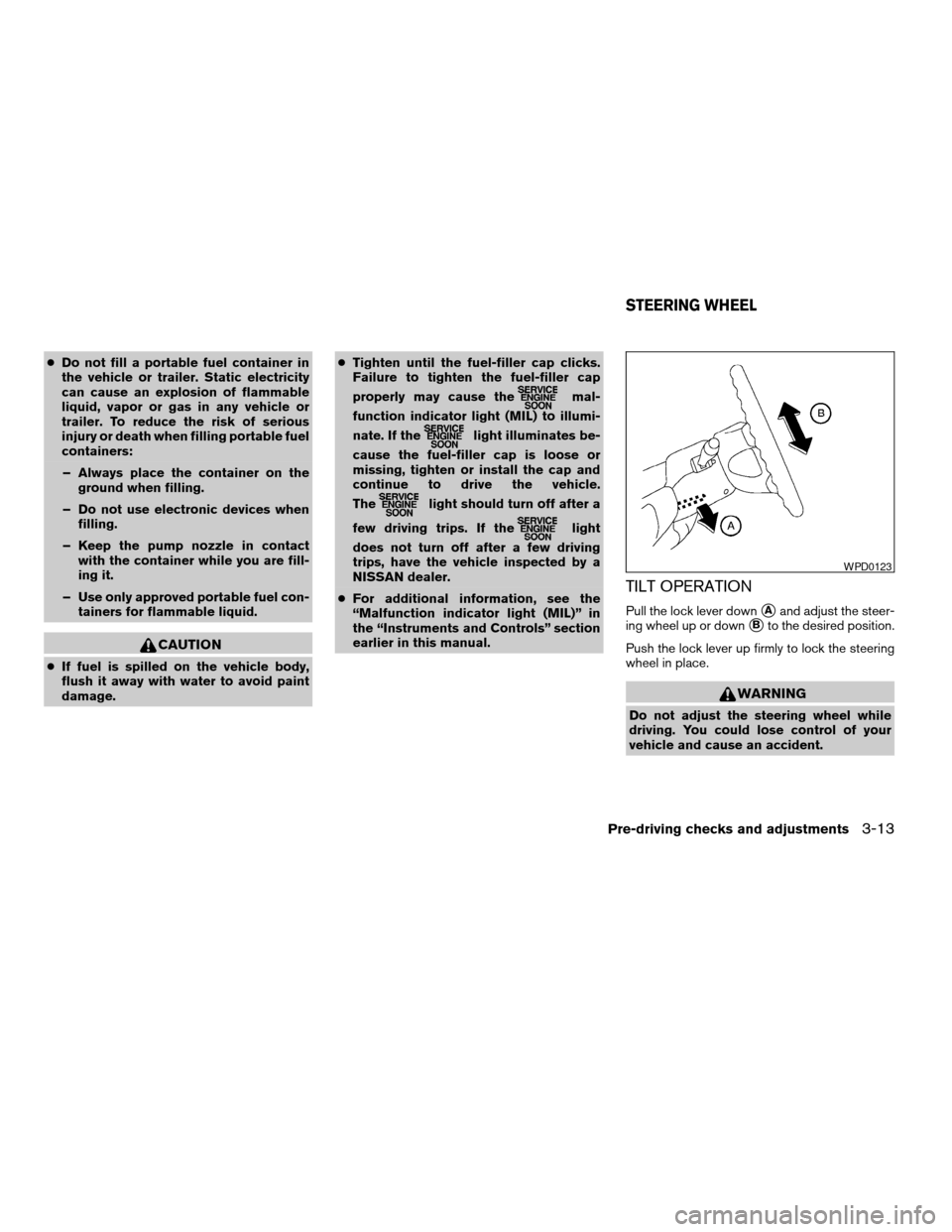
Pull the lock lever downsAand adjust the steer-
ing wheel up or down
sBto the desired position.
Push the lock lever up firmly to lock the steering
wheel in place.
WARNING
Do not adjust the steering wheel while
driving. You could lose control of your
vehicle and cause an accident.
WPD0123
STEERING WHEEL
Pre-driving checks and adjustments3-13
ZREVIEW COPYÐ2006 Sentra(b15)
Owners ManualÐUSA_English(nna)
09/01/05Ðdebbie
X
Page 117 of 256

the vehicle outside of any metal or large building
for satellite radio to receive all of the necessary
data.
No satellite radio reception is available and “NO
SAT” is displayed when the SAT band option is
selected unless optional satellite receiver and
antenna are installed and an XMTor SIRIUS™
satellite radio service subscription is active. Sat-
ellite radio is not available in Alaska, Hawaii and
Guam.
Satellite radio performance may be affected if
cargo carried on the roof blocks the satellite radio
signal.
If possible, do not put cargo over the satellite
antenna.
AUDIO OPERATION PRECAUTIONS
Compact disc (CD) player
cOnly use high quality 4.7 inches (12 cm)
round discs that have the “COMPACTdisc DIGITAL AUDIO” logo on the disc
or packaging.
cDuring cold weather or rainy days, the
player may malfunction due to the hu-
midity. If this occurs, remove the CD
and dehumidify or ventilate the player
completely.
cThe player may skip while driving on
rough roads.
cThe CD player sometimes cannot func-
tion when the compartment tempera-
ture is extremely high or low.
Decrease/increase the temperature
before use.
cDo not expose the CD to direct sun-
light.
cCDs that are in poor condition or are
dirty, scratched or covered with finger-
prints may not work properly.
cThe following CDs may not work prop-
erly:
cCopy control compact discs (CCCD)
cRecordable compact discs (CD-R)
cRewritable compact discs (CD-RW)
LHA0099
Heater, air conditioner and audio systems4-11
ZREVIEW COPYÐ2006 Sentra(b15)
Owners ManualÐUSA_English(nna)
09/01/05Ðdebbie
X
Page 118 of 256

cDo not use the following CDs as they
may cause the CD player to malfunc-
tion:
c3.1 in (8 cm) discs with an adapter
cCDs that are not round
cCDs with a paper label
cCDs that are warped, scratched, or
have abnormal edges
1. RADIO button
2. Scan button
3. ON·OFF/Volume control knob
4. CD insert slot
5. Audio button
6. CD eject button7. AUX Jack
8. Radio manual tuning buttons/clock set
buttons/seek buttons
9. Clock button
10. CAT (if so equipped) or MUTE (if so
equipped) button
LHA0499
4-12Heater, air conditioner and audio systems
ZREVIEW COPYÐ2006 Sentra(b15)
Owners ManualÐUSA_English(nna)
09/01/05Ðdebbie
X
Page 120 of 256

Adjusting tone quality and speaker balance
To adjust BASS/TREBLE or FADER/BALANCE,
press the AUDIO button until the desired mode
(BASS, TREBLE, FADER, or BALANCE) ap-
pears in the display. Press the
orbutton to adjust BASS and TREBLE to the de-
sired level. Use theorbutton also
to adjust FADER or BALANCE modes. FADER
adjusts the sound level between the front and
rear speakers and BALANCE adjusts the sound
between the right and left speakers.
Clock operation
Pressing the clock button alternates the clock
and the radio/CD player options in the display.
Clock set
1. Press and hold the CLOCK button for more
than 2.0 seconds to enter the clock set
mode.
2. Press the CLOCK button until the hour
flashes in the display screen, then use
the
orbuttons to adjust and
set the hour.
3. Press the CLOCK button again until the
minutes flash in the display screen, then use
the
orbuttons to adjust and
set the minutes.
LHA0330
4-14Heater, air conditioner and audio systems
ZREVIEW COPYÐ2006 Sentra(b15)
Owners ManualÐUSA_English(nna)
09/01/05Ðdebbie
X
Page 121 of 256
4. Press the CLOCK button again to exit the
clock set mode and store the time setting.
Clock priority mode
In this mode the clock is shown in the display. If
any radio or CD functions are activated, the radio
or CD display illuminates for 10 seconds then
returns to the clock mode.
NOTE:
After clock adjustment, the radio is in the
clock priority mode.
FM/AM/SAT radio operation
FM/AM/SAT band select
Push the RADIO button to change from AM to
FM and SAT (Satellite) (if so equipped) recep-
tion.
No Satellite radio reception is available and “NO
SAT” will be displayed when the SAT band option
is selected unless optional satellite receiver and
antenna were factory installed and an XMTor
Sirius™ satellite radio service subscription is ac-
tive. Satellite radio is not available in Alaska,
Hawaii and Guam.
The FM stereo indicator, ST, illuminates during
FM stereo reception. When the stereo broadcast
signal is weak, the radio automatically changes
from stereo to monaural reception.
TUNE/SEEK buttons
WARNING
The radio should not be tuned while driv-
ing so full attention may be given to ve-
hicle operation.
Push the
orbutton for less than 0.5
seconds for manual tuning.
SEEK tuning
Push the
orbutton for more than
1.5 seconds to seek through the frequencies.
SEEK tuning begins from low to high frequen-
cies, or high to low frequencies depending on
which button is pushed, and stops at the next
broadcasting station. Once the highest broad-
casting station is reached, the radio continues in
the SEEK mode at the lowest broadcasting sta-
tion.
SCAN button
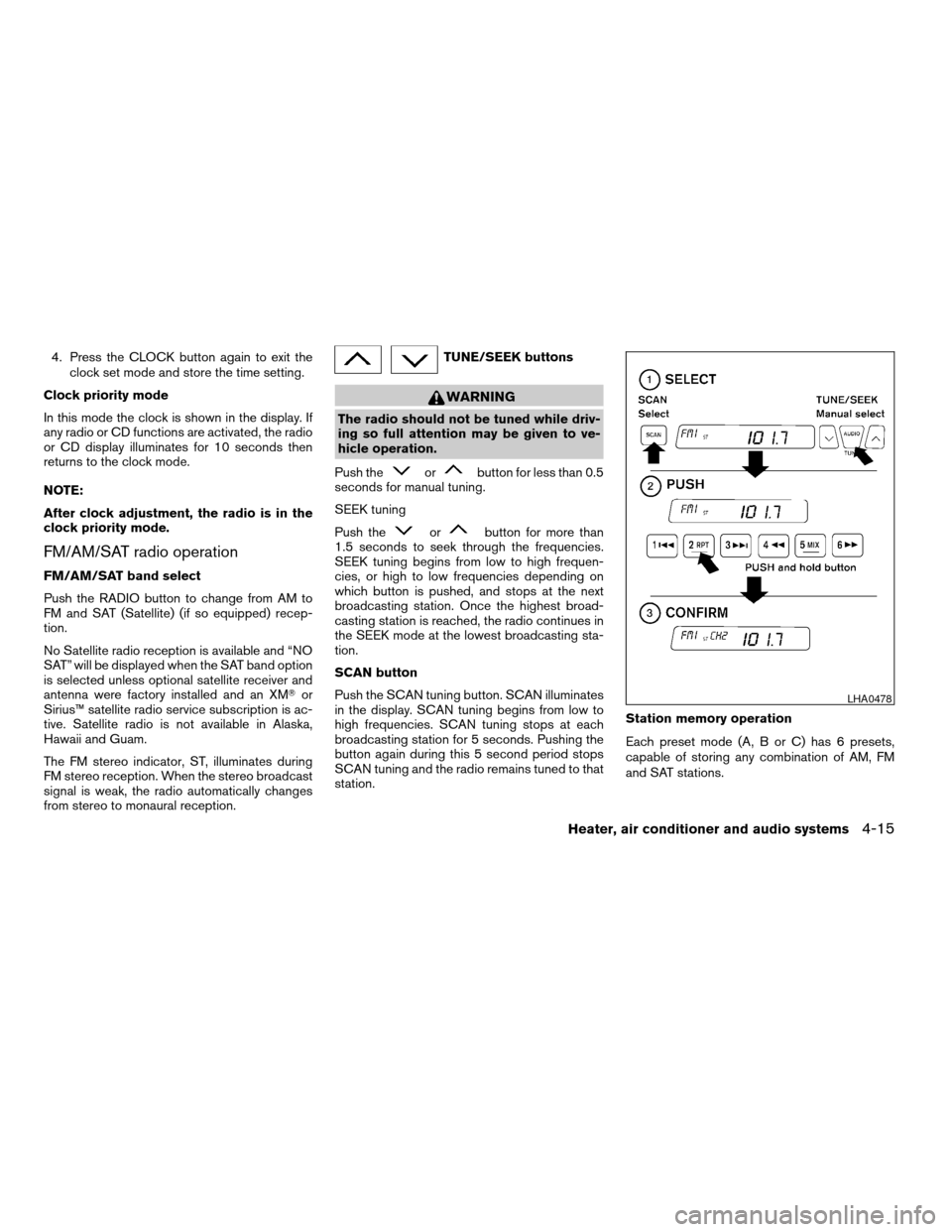
Push the SCAN tuning button. SCAN illuminates
in the display. SCAN tuning begins from low to
high frequencies. SCAN tuning stops at each
broadcasting station for 5 seconds. Pushing the
button again during this 5 second period stops
SCAN tuning and the radio remains tuned to that
station.Station memory operation
Each preset mode (A, B or C) has 6 presets,
capable of storing any combination of AM, FM
and SAT stations.
LHA0478
Heater, air conditioner and audio systems4-15
ZREVIEW COPYÐ2006 Sentra(b15)
Owners ManualÐUSA_English(nna)
09/01/05Ðdebbie
X
Page 126 of 256
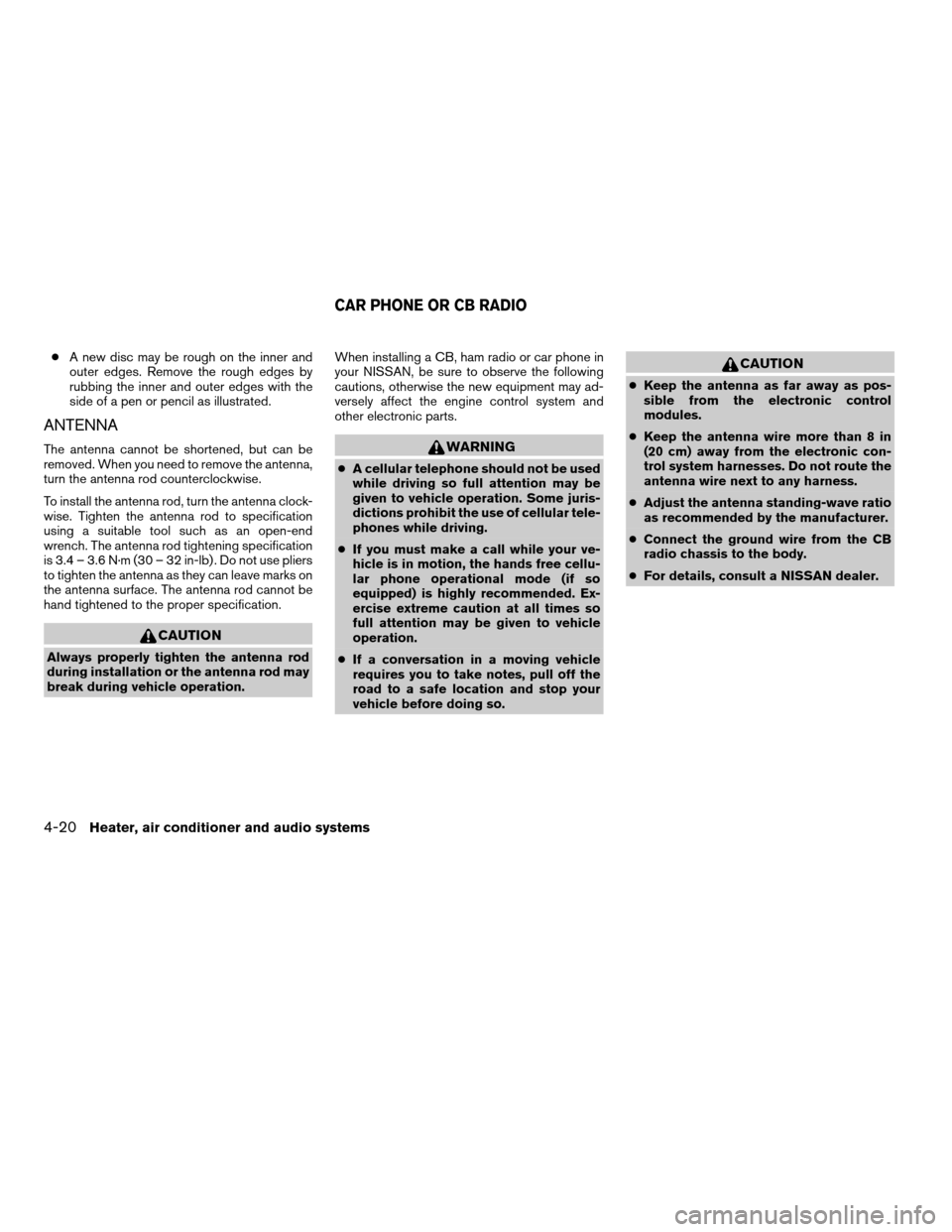
cA new disc may be rough on the inner and
outer edges. Remove the rough edges by
rubbing the inner and outer edges with the
side of a pen or pencil as illustrated.
ANTENNA
The antenna cannot be shortened, but can be
removed. When you need to remove the antenna,
turn the antenna rod counterclockwise.
To install the antenna rod, turn the antenna clock-
wise. Tighten the antenna rod to specification
using a suitable tool such as an open-end
wrench. The antenna rod tightening specification
is 3.4 – 3.6 N·m (30 – 32 in-lb) . Do not use pliers
to tighten the antenna as they can leave marks on
the antenna surface. The antenna rod cannot be
hand tightened to the proper specification.
CAUTION
Always properly tighten the antenna rod
during installation or the antenna rod may
break during vehicle operation.When installing a CB, ham radio or car phone in
your NISSAN, be sure to observe the following
cautions, otherwise the new equipment may ad-
versely affect the engine control system and
other electronic parts.
WARNING
cA cellular telephone should not be used
while driving so full attention may be
given to vehicle operation. Some juris-
dictions prohibit the use of cellular tele-
phones while driving.
cIf you must make a call while your ve-
hicle is in motion, the hands free cellu-
lar phone operational mode (if so
equipped) is highly recommended. Ex-
ercise extreme caution at all times so
full attention may be given to vehicle
operation.
cIf a conversation in a moving vehicle
requires you to take notes, pull off the
road to a safe location and stop your
vehicle before doing so.
CAUTION
cKeep the antenna as far away as pos-
sible from the electronic control
modules.
cKeep the antenna wire more than 8 in
(20 cm) away from the electronic con-
trol system harnesses. Do not route the
antenna wire next to any harness.
cAdjust the antenna standing-wave ratio
as recommended by the manufacturer.
cConnect the ground wire from the CB
radio chassis to the body.
cFor details, consult a NISSAN dealer.
CAR PHONE OR CB RADIO
4-20Heater, air conditioner and audio systems
ZREVIEW COPYÐ2006 Sentra(b15)
Owners ManualÐUSA_English(nna)
09/01/05Ðdebbie
X
Page 127 of 256

5 Starting and driving
Precautions when starting and driving................5-2
Exhaust gas (carbon monoxide)..................5-2
Three-way catalyst..............................5-2
Avoiding collision and rollover....................5-3
Drinking alcohol/drugs and driving................5-3
Ignition switch.....................................5-4
Automatic transmission..........................5-4
Manual transmission............................5-5
Key positions..................................5-5
Nissan Vehicle Immobilizer System
(if so equipped)................................5-5
Before starting the engine..........................5-6
Starting the engine................................5-6
Driving the vehicle.................................5-7
Automatic transmission (if so equipped)...........5-7
Manual transmission...........................5-11
Parking brake....................................5-13
Cruise control (if so equipped).....................5-14
Precautions on cruise control...................5-14Cruise control operations.......................5-14
Break-in schedule................................5-15
Increasing fuel economy...........................5-16
Parking/parking on hills............................5-17
Power steering...................................5-18
Brake system....................................5-18
Brake precautions.............................5-18
Anti-lock brake system (ABS)
(if so equipped)...............................5-18
Cold weather driving..............................5-20
Freeing a frozen door lock......................5-20
Anti-freeze....................................5-20
Battery.......................................5-20
Draining of coolant water.......................5-20
Tire equipment................................5-20
Special winter equipment.......................5-21
Driving on snow or ice.........................5-21
Engine block heater (if so equipped).............5-22
ZREVIEW COPYÐ2006 Sentra(b15)
Owners ManualÐUSA_English(nna)
09/01/05Ðdebbie
X