2006 NISSAN ALTIMA 200
[x] Cancel search: 200Page 67 of 304
SUPPLEMENTAL AIR BAG
WARNING LIGHT
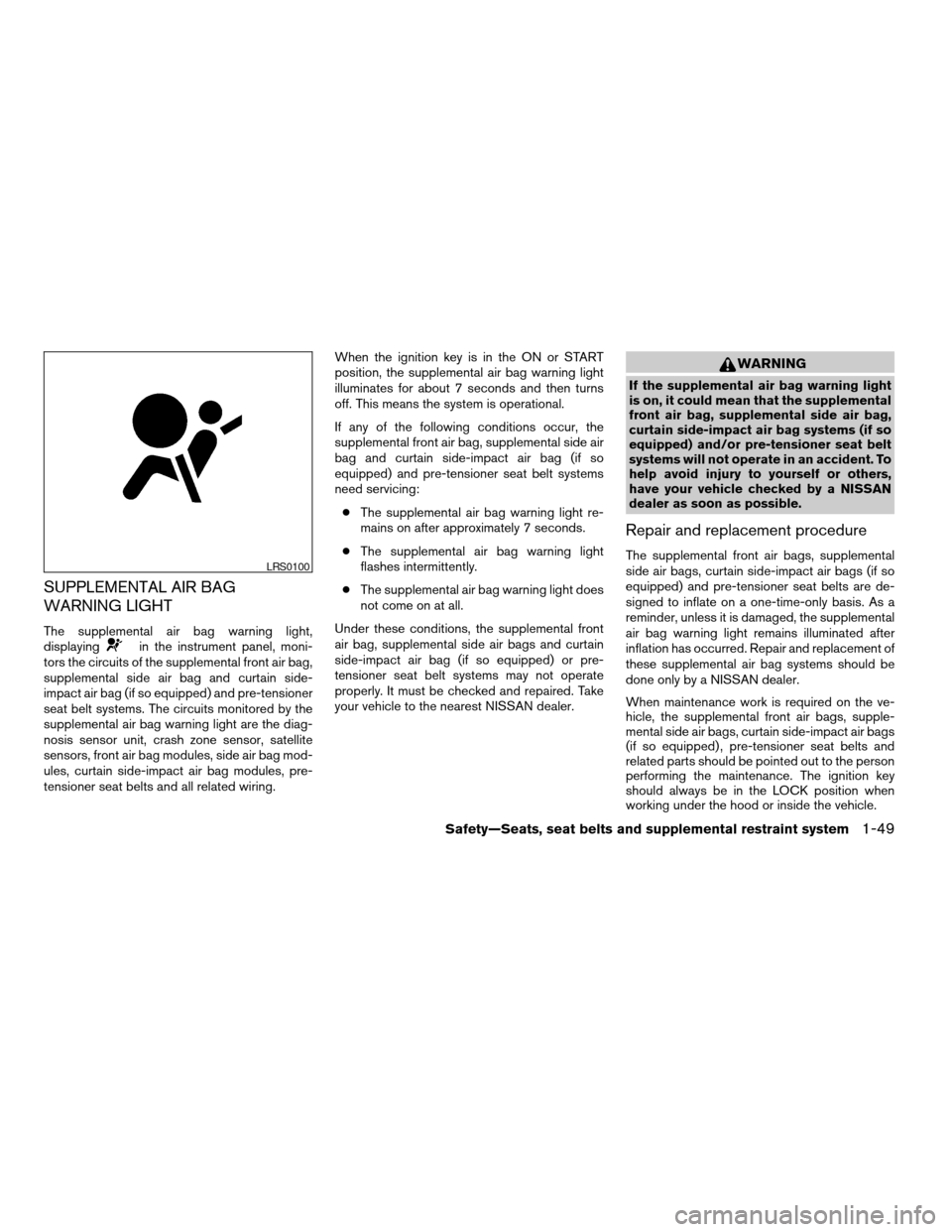
The supplemental air bag warning light,
displayingin the instrument panel, moni-
tors the circuits of the supplemental front air bag,
supplemental side air bag and curtain side-
impact air bag (if so equipped) and pre-tensioner
seat belt systems. The circuits monitored by the
supplemental air bag warning light are the diag-
nosis sensor unit, crash zone sensor, satellite
sensors, front air bag modules, side air bag mod-
ules, curtain side-impact air bag modules, pre-
tensioner seat belts and all related wiring.When the ignition key is in the ON or START
position, the supplemental air bag warning light
illuminates for about 7 seconds and then turns
off. This means the system is operational.
If any of the following conditions occur, the
supplemental front air bag, supplemental side air
bag and curtain side-impact air bag (if so
equipped) and pre-tensioner seat belt systems
need servicing:
cThe supplemental air bag warning light re-
mains on after approximately 7 seconds.
cThe supplemental air bag warning light
flashes intermittently.
cThe supplemental air bag warning light does
not come on at all.
Under these conditions, the supplemental front
air bag, supplemental side air bags and curtain
side-impact air bag (if so equipped) or pre-
tensioner seat belt systems may not operate
properly. It must be checked and repaired. Take
your vehicle to the nearest NISSAN dealer.
WARNING
If the supplemental air bag warning light
is on, it could mean that the supplemental
front air bag, supplemental side air bag,
curtain side-impact air bag systems (if so
equipped) and/or pre-tensioner seat belt
systems will not operate in an accident. To
help avoid injury to yourself or others,
have your vehicle checked by a NISSAN
dealer as soon as possible.
Repair and replacement procedure
The supplemental front air bags, supplemental
side air bags, curtain side-impact air bags (if so
equipped) and pre-tensioner seat belts are de-
signed to inflate on a one-time-only basis. As a
reminder, unless it is damaged, the supplemental
air bag warning light remains illuminated after
inflation has occurred. Repair and replacement of
these supplemental air bag systems should be
done only by a NISSAN dealer.
When maintenance work is required on the ve-
hicle, the supplemental front air bags, supple-
mental side air bags, curtain side-impact air bags
(if so equipped) , pre-tensioner seat belts and
related parts should be pointed out to the person
performing the maintenance. The ignition key
should always be in the LOCK position when
working under the hood or inside the vehicle.LRS0100
Safety—Seats, seat belts and supplemental restraint system1-49
ZREVIEW COPYÐ2006 Altima(l30)
Owners ManualÐUSA_English(nna)
09/08/05Ðdebbie
X
Page 68 of 304
WARNING
cOnce a supplemental front air bag,
supplemental side air bag or curtain
side-impact air bag has inflated, the air
bag module will not function again and
must be replaced. Additionally, if any of
the supplemental front air bags inflate,
the activated pre-tensioner seat belts
must also be replaced. The air bag mod-
ule and pre-tensioner seat belt system
should be replaced by a NISSAN dealer.
The air bag module and pre-tensioner
seat belt system cannot be repaired.
cThe supplemental front air bag, side air
bag and curtain side-impact air bag sys-
tems, and the pre-tensioner seat belt
system should be inspected by a
NISSAN dealer if there is any damage to
the front end or side portion of the
vehicle.
cIf you need to dispose of the supple-
mental air bag, pre-tensioner seat belt
system or scrap the vehicle, contact a
NISSAN dealer. Correct supplemental
air bag and pre-tensioner seat belt sys-
tem disposal procedures are set forth in
the appropriate NISSAN Service
Manual. Incorrect disposal procedures
could cause personal injury.
1-50Safety—Seats, seat belts and supplemental restraint system
ZREVIEW COPYÐ2006 Altima(l30)
Owners ManualÐUSA_English(nna)
09/08/05Ðdebbie
X
Page 70 of 304

2 Instruments and controls
Instrument panel...................................2-2
Meters and gauges................................2-3
Speedometer and odometer.....................2-4
Trip computer (if so equipped)...................2-5
Tachometer....................................2-7
Engine coolant temperature gauge...............2-8
Fuel gauge....................................2-8
Engine oil pressure gauge (if so equipped)........2-9
Voltmeter (if so equipped)......................2-10
Fuel consumption gauge (if so equipped)........2-10
Warning/indicator lights and audible reminders......2-11
Checking bulbs...............................2-11
Warning lights................................2-11
Indicator lights................................2-14
Audible reminders.............................2-15
Security systems.................................2-16
Vehicle security system (if so equipped)..........2-16
Nissan vehicle immobilizer system...............2-17
Windshield wiper and washer switch...............2-19
Switch operation..............................2-19
Rear window and outside mirror (if so equipped)
defroster switch..................................2-20
Headlight and turn signal switch....................2-21Xenon headlights (if so equipped)...............2-21
Headlight control switch........................2-21
Daytime running light system (Canada only)......2-24
Instrument brightness control...................2-24
Turn signal switch.............................2-25
Fog light switch (if so equipped)................2-25
Hazard warning flasher switch.....................2-26
Horn............................................2-26
Heated seat (if so equipped).......................2-27
Traction control system (TCS) off switch
(if so equipped)..................................2-28
Power outlet.....................................2-28
Cigarette lighter and ashtray (if so equipped)........2-29
Storage.........................................2-30
Map pockets..................................2-30
Seatback pockets (if so equipped)..............2-31
Sunglasses holder.............................2-31
Cup holders..................................2-32
Glove box....................................2-33
Console box..................................2-33
Instrument panel storage (if so equipped)........2-35
Covered storage box (if so equipped)............2-36
Grocery hooks (if so equipped).................2-36
ZREVIEW COPYÐ2006 Altima(l30)
Owners ManualÐUSA_English(nna)
09/08/05Ðdebbie
X
Page 71 of 304

Cargo net (if so equipped)......................2-37
Windows........................................2-38
Power windows...............................2-38
Sunroof (if so equipped)...........................2-40
Automatic sunroof.............................2-40
Interior light......................................2-41
Map lights.......................................2-42
Trunk light.......................................2-43
HomeLinkTuniversal transceiver (if so equipped).....2-43
Programming HomeLinkT.......................2-44Programming HomeLinkTfor Canadian
customers....................................2-44
Operating the HomeLinkTuniversal
transceiver....................................2-44
Programming trouble-diagnosis.................2-45
Clearing the programmed information............2-45
Rolling code programming......................2-45
Reprogramming a single HomeLinkTbutton......2-46
If your vehicle is stolen.........................2-46
ZREVIEW COPYÐ2006 Altima(l30)
Owners ManualÐUSA_English(nna)
09/08/05Ðdebbie
X
Page 72 of 304
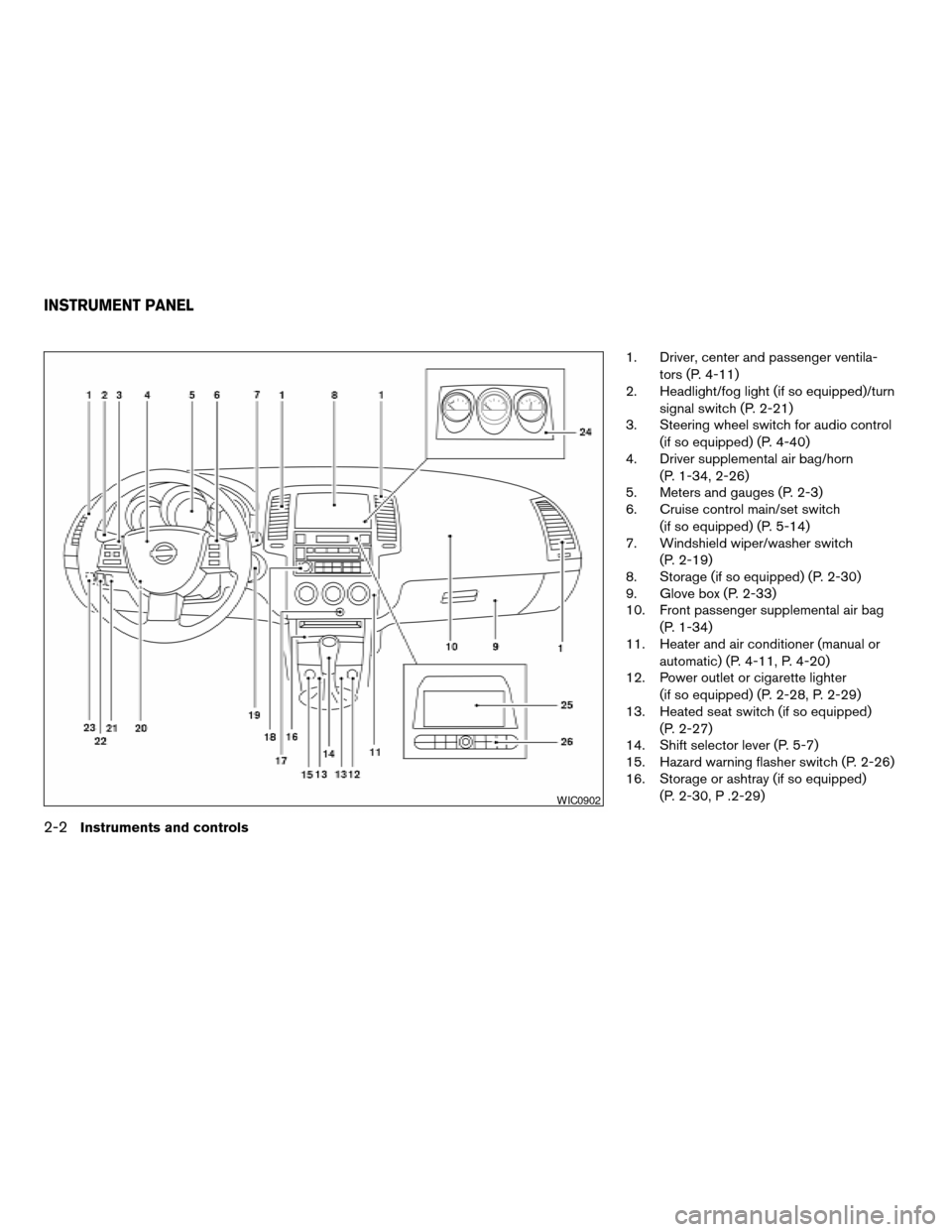
1. Driver, center and passenger ventila-
tors (P. 4-11)
2. Headlight/fog light (if so equipped)/turn
signal switch (P. 2-21)
3. Steering wheel switch for audio control
(if so equipped) (P. 4-40)
4. Driver supplemental air bag/horn
(P. 1-34, 2-26)
5. Meters and gauges (P. 2-3)
6. Cruise control main/set switch
(if so equipped) (P. 5-14)
7. Windshield wiper/washer switch
(P. 2-19)
8. Storage (if so equipped) (P. 2-30)
9. Glove box (P. 2-33)
10. Front passenger supplemental air bag
(P. 1-34)
11. Heater and air conditioner (manual or
automatic) (P. 4-11, P. 4-20)
12. Power outlet or cigarette lighter
(if so equipped) (P. 2-28, P. 2-29)
13. Heated seat switch (if so equipped)
(P. 2-27)
14. Shift selector lever (P. 5-7)
15. Hazard warning flasher switch (P. 2-26)
16. Storage or ashtray (if so equipped)
(P. 2-30, P .2-29)
WIC0902
INSTRUMENT PANEL
2-2Instruments and controls
ZREVIEW COPYÐ2006 Altima(l30)
Owners ManualÐUSA_English(nna)
09/08/05Ðdebbie
X
Page 73 of 304

17. Front passenger air bag status light
(P. 1-43)
18. Audio system controls (if so equipped)
(P. 4-23)
19. Ignition switch (P. 5-4)
20. Tilt/telescopic steering wheel controls
(P. 3-13)
21. Traction control system (TCS) off
switch (if so equipped) (P. 2-28)
22. Instrument brightness control (P. 2-24)
23. Trunk opener (P. 3-10)
24. Meters and gauges (if so equipped)
(P. 2-3)
25. Navigation system* (if so equipped)
(P. 4-2)
26. Navigation system* controls
(if so equipped) (P. 4-2)
*: Refer to the separate Navigation System
Owner’s Manual.
See the page number indicated in paren-
theses for operating details.
1. Tachometer
2. Warning/indicator lights
3. Speedometer
4. Engine coolant temperature gauge
5. Fuel gauge6. Odometer/twin trip odometer/trip com-
puter (if so equipped)
LIC0681
METERS AND GAUGES
Instruments and controls2-3
ZREVIEW COPYÐ2006 Altima(l30)
Owners ManualÐUSA_English(nna)
09/08/05Ðdebbie
X
Page 74 of 304

Triple meter (if so equipped):
1. Fuel consumption gauge
2. Engine oil pressure gauge
3. Voltmeter1. Speedometer
2. Odometer/twin trip display
3. Change button
SPEEDOMETER AND ODOMETER
Speedometer
The speedometer indicates vehicle speed in
miles per hour (MPH) and kilometers per hour
(km/h) .
Odometer/Twin trip odometer (if so
equipped)
The odometer/twin trip odometer (if so equipped)
is displayed when the ignition key is in the ON
position.
The odometer records the total distance the ve-
hicle has been driven.
The twin trip odometer (if so equipped) records
the distance of individual trips.
LIC0746LIC0682
2-4Instruments and controls
ZREVIEW COPYÐ2006 Altima(l30)
Owners ManualÐUSA_English(nna)
09/08/05Ðdebbie
X
Page 75 of 304

Changing the display:
For vehicles equipped with trip computer and
without navigation system, pushing the change
button changes the display as follows:
Trip
!Trip!Outside temperature
!Distance to Empty!Average economy!
Average speed!Elapsed time!Trip
For additional information, refer to “Trip com-
puter” later in this section.For vehicles equipped with trip computer and
navigation system, pushing the change button
changes the display as follows:
Trip
!Trip!Outside temperature
!Trip
For vehicles with navigation system, refer to
“How to use the ’trip’ button” in the “Display
screen, heater, air conditioner and audio sys-
tems” section later in this manual.
Resetting the trip odometer:
Pushing the change button for more than 1 sec-
ond resets the trip odometer to zero.
TRIP COMPUTER (if so equipped)
The display of the trip computer is situated in the
speedometer display. When the ignition is turned
to ON, the display scrolls all the modes of the trip
computer and then shows the mode chosen be-
fore the ignition switch is turned OFF.
Display without navigation system
WIC0601
Display with navigation system
LIC0719
Instruments and controls2-5
ZREVIEW COPYÐ2006 Altima(l30)
Owners ManualÐUSA_English(nna)
09/08/05Ðdebbie
X