Page 116 of 481
115 Controls in detail
Lighting
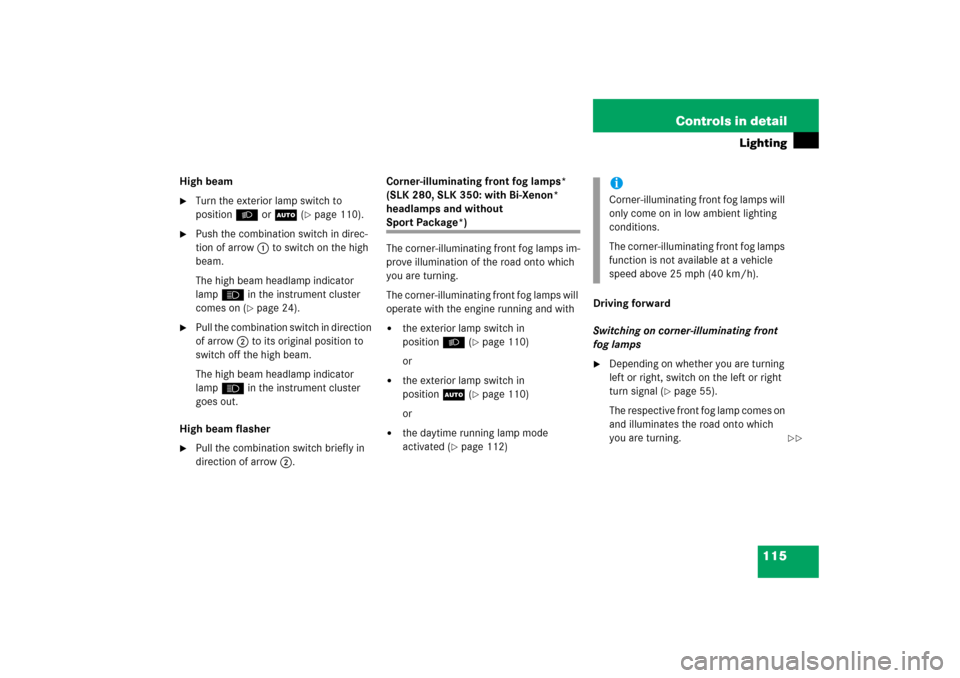
High beam�
Turn the exterior lamp switch to
positionBorU (
�page 110).
�
Push the combination switch in direc-
tion of arrow1 to switch on the high
beam.
The high beam headlamp indicator
lampA in the instrument cluster
comes on (
�page 24).
�
Pull the combination switch in direction
of arrow2 to its original position to
switch off the high beam.
The high beam headlamp indicator
lampA in the instrument cluster
goes out.
High beam flasher
�
Pull the combination switch briefly in
direction of arrow2.Corner-illuminating front fog lamps*
(SLK 280, SLK 350: with Bi-Xenon*
headlamps and without
Sport Package*)
The corner-illuminating front fog lamps im-
prove illumination of the road onto which
you are turning.
The corner-illuminating front fog lamps will
operate with the engine running and with�
the exterior lamp switch in
positionB (
�page 110)
or
�
the exterior lamp switch in
positionU (
�page 110)
or
�
the daytime running lamp mode
activated (
�page 112)Driving forward
Switching on corner-illuminating front
fog lamps
�
Depending on whether you are turning
left or right, switch on the left or right
turn signal (
�page 55).
The respective front fog lamp comes on
and illuminates the road onto which
you are turning.
iCorner-illuminating front fog lamps will
only come on in low ambient lighting
conditions.
The corner-illuminating front fog lamps
function is not available at a vehicle
speed above 25 mph (40 km/h).
��
Page 121 of 481

120 Controls in detailInstrument clusterA full view illustration of the instrument
cluster can be found in the “At a glance”
section (
�page 24).
The multifunction display in the instrument
cluster is activated when you
�
open a door
�
switch on exterior lighting
�
switch on ignition (
�page 36)
�
press reset buttonJ (
�page 24)
For information on changing the instru-
ment cluster settings, e.g. the language,
see “Instrument cluster submenu”
(
�page 137).
Instrument cluster illumination
Adjusting
The knobs for adjusting the instrument
cluster illumination are on the left side of
the instrument cluster (
�page 24).
1Brightening illumination (knob+)
2Dimming illumination (knob-)
3Reset buttonJ Brightening illumination
�
Press knob+ briefly.
The instrument cluster illumination
brightens.
Dimming illumination
�
Press knob- briefly.
The instrument cluster illumination
dims.
iOpening a door or pressing the reset
buttonJwithout switching on the ig-
nition or the exterior lighting activates
the multifunction display illumination
only for 30 seconds.
iThe instrument cluster illumination
automatically adjusts to the ambient
light.
You can only adjust the brightness of
the instrument cluster illumination
when it is dark outside.iWith the exterior lighting switched on,
the brightness of the switches in the
center console will be adjusted when
using knob+or-.
Page 122 of 481

121 Controls in detail
Instrument cluster
Tachometer
The red marking on the tachometer
(�page 24) denotes excessive engine
speed.
To help protect the engine, the fuel supply
is interrupted if the engine is operated
within the red marking.
Outside temperature indicator
The outside temperature is displayed in
the multifunction display (
�page 129).The temperature sensor is located in the
front bumper area. Due to its location, the
sensor can be affected by road or engine
heat during idling or slow driving. There-
fore, the accuracy of the displayed temper-
ature can only be verified by comparison to
a thermometer placed next the sensor, not
by comparison to external displays, e.g.
bank signs, etc.
When moving the vehicle into colder ambi-
ent temperatures (e.g. when leaving your
garage), you will notice a delay before the
lower temperature is displayed.
A delay also occurs when ambient temper-
atures rise. This prevents inaccurate tem-
perature displays caused by heat radiated
from the engine during idling or slow driv-
ing.
!Avoid driving at excessive engine
speeds, as it may result in serious en-
gine damage that is not covered by the
Mercedes-Benz Limited Warranty.
Warning!
G
The outside temperature indicator is not de-
s i g n e d t o s e r v e a s a n i c e - w a r n i n g d e v i c e a n d
is therefore unsuitable for that purpose.
Indicated temperatures just above the freez-
ing point do not guarantee that the road sur-
face is free of ice. The road may still be icy,
especially in wooded areas or on bridges.
Page 123 of 481
122 Controls in detailInstrument clusterTrip odometer�
Make sure you are viewing the stan-
dard display menu (
�page 128).
�
Press and hold reset buttonJuntil
the trip odometer is reset.
Clock
Vehicles with COMAND*:
The clock in the instrument cluster can be
synchronized with the time set in
COMAND using the time synchronization
with head unit feature (
�page 139), or set
independently from COMAND using the
control system (
�page 139) with the time
synchronization with head unit feature set
to
Off
.
For setting the time in COMAND, see sep-
arate COMAND operating instructions.
For setting the time with audio system,
(
�page 139).
Page 124 of 481
123 Controls in detail
Control system
�Control system
The control system is activated as soon as
the SmartKey in the starter switch is
turned to position1. The control system
enables you to�
call up information about your vehicle
�
change vehicle settings
For example, you can use the control sys-
tem to find out when your vehicle is next
due for service, to set the language for
messages in the instrument cluster dis-
play, and much more.
The control system relays information to
the multifunction display.
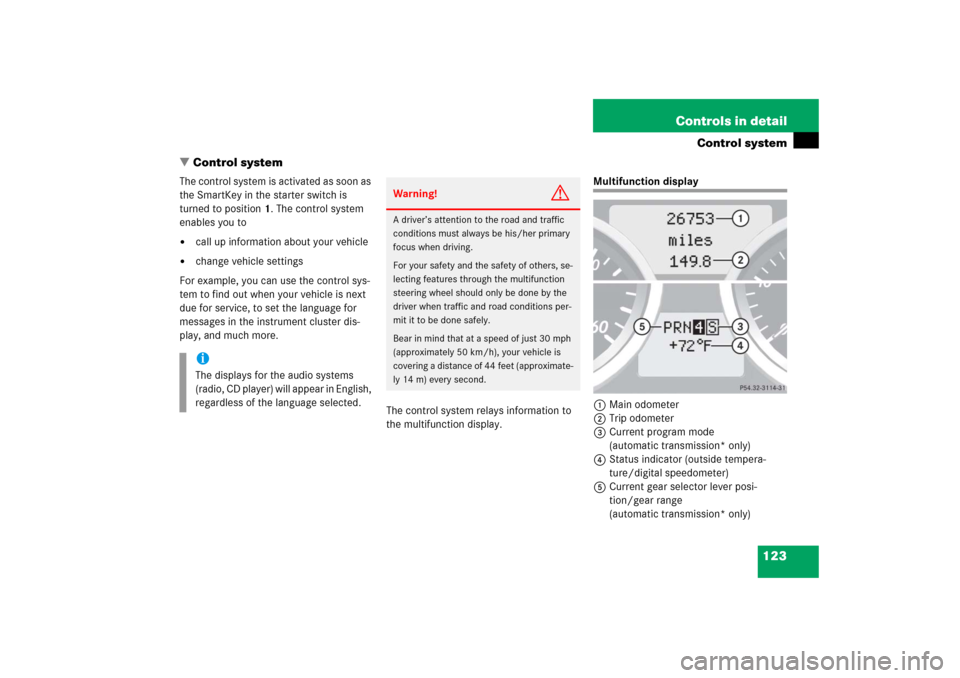
Multifunction display
1Main odometer
2Trip odometer
3Current program mode
(automatic transmission* only)
4Status indicator (outside tempera-
ture/digital speedometer)
5Current gear selector lever posi-
tion/gear range
(automatic transmission* only)
iThe displays for the audio systems
(radio, CD player) will appear in English,
regardless of the language selected.
Warning!
G
A driver’s attention to the road and traffic
conditions must always be his/her primary
focus when driving.
For your safety and the safety of others, se-
lecting features through the multifunction
steering wheel should only be done by the
driver when traffic and road conditions per-
mit it to be done safely.
Bear in mind that at a speed of just 30 mph
(approximately 50 km/h), your vehicle is
covering a distance of 44 feet (approximate-
ly 14 m) every second.
Page 128 of 481
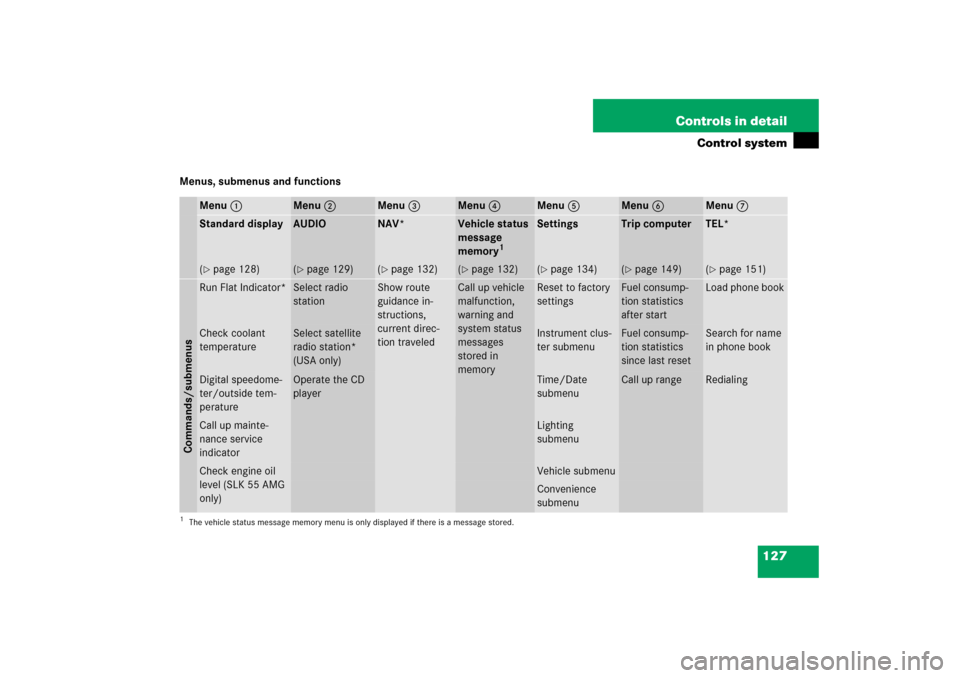
127 Controls in detail
Control system
Menus, submenus and functions
Menu1
Menu2
Menu3
Menu4
Menu5
Menu6
Menu7
Standard display
AUDIO
NAV*
Vehicle status
message
memory
1
Settings
Trip computer
TEL*
(�page 128)
(�page 129)
(�page 132)
(�page 132)
(�page 134)
(�page 149)
(�page 151)
Commands/submenusRun Flat Indicator*
Select radio
station
Show route
guidance in-
structions,
current direc-
tion traveled
Call up vehicle
malfunction,
warning and
system status
messages
stored in
memory
Reset to factory
settings
Fuel consump-
tion statistics
after start
Load phone book
Check coolant
temperature
Select satellite
radio station*
(USA only)
Instrument clus-
ter submenu
Fuel consump-
tion statistics
since last reset
Search for name
in phone book
Digital speedome-
ter/outside tem-
perature
Operate the CD
player
Time/Date
submenu
Call up range
Redialing
Call up mainte-
nance service
indicator
Lighting
submenu
Check engine oil
level (SLK 55 AMG
only)
Vehicle submenuConvenience
submenu
1The vehicle status message memory menu is only displayed if there is a message stored.
Page 135 of 481

134 Controls in detailControl systemSettings menu
In the
Settings...
menu are two func-
tions:
�
The function
To reset: Press reset
button for 3 seconds
for resetting all
settings to factory standard.
�
A collection of submenus for perform-
ing individual settings for your vehicle.
�
Press buttonèorÿ repeatedly
until the
Settings...
menu appears in
the multifunction display.The following settings and submenus are
available in the
Settings...
menu:Resetting all settings
You can reset all the functions of all sub-
menus to the factory settings.
�
Press the reset buttonJon the instru-
ment cluster (
�page 24) for approxi-
mately 3 seconds.
The request to press the reset
buttonJonce more to confirm ap-
pears in the multifunction display.
�
Press the reset buttonJagain.
The functions of all submenus will be
reset to the factory settings.
The message
Reset to factory
settings
appears in the multifunction
display.
Function
Page
Resetting all settings
134
Submenus in the Settings menu
135
Instrument cluster submenu
137
Time/date submenu
137
Lighting submenu
143
Vehicle submenu
147
Convenience submenu
147
Page 137 of 481
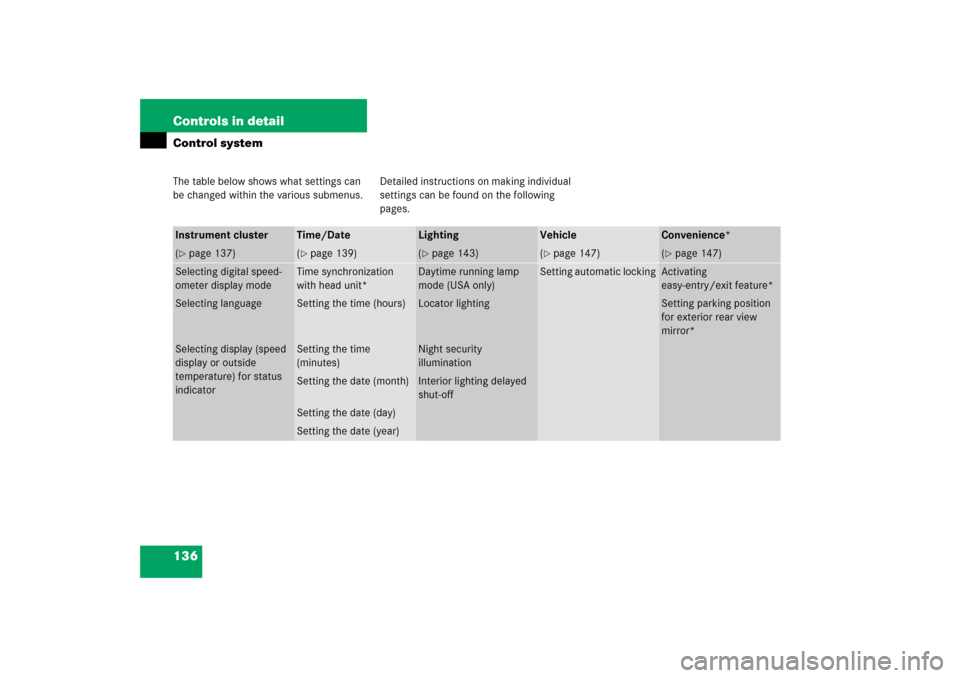
136 Controls in detailControl systemThe table below shows what settings can
be changed within the various submenus.Detailed instructions on making individual
settings can be found on the following
pages.Instrument cluster
Time/Date
Lighting
Vehicle
Convenience*
(�page 137)
(�page 139)
(�page 143)
(�page 147)
(�page 147)
Selecting digital speed-
ometer display mode
Time synchronization
with head unit*
Daytime running lamp
mode (USA only)
Setting automatic locking
Activating
easy-entry/exit feature*
Selecting language
Setting the time (hours)
Locator lighting
Setting parking position
for exterior rear view
mirror*
Selecting display (speed
display or outside
temperature) for status
indicator
Setting the time
(minutes)
Night security
illumination
Setting the date (month)
Interior lighting delayed
shut-off
Setting the date (day)Setting the date (year)