Page 26 of 539

25 At a glance
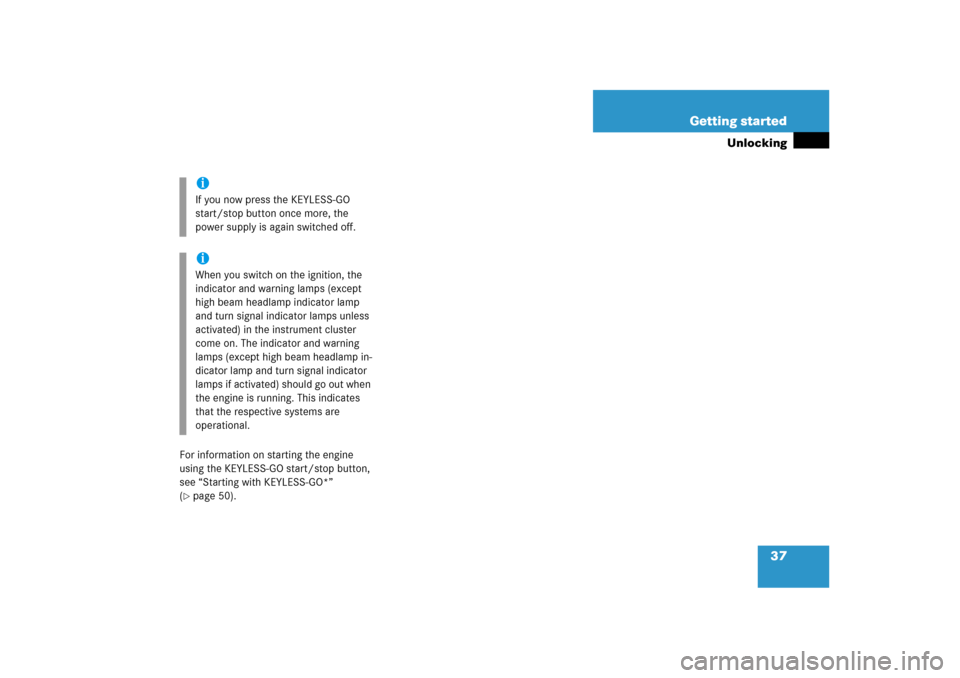
Instrument cluster
Item
Page
1
LLeft turn signal
indicator lamp
2
To dim instrument cluster
illumination
148
3
Reset button for:Adjusting instrument cluster
illumination
148
4
Multifunction display with:Trip odometer
150
Main odometer
150
5
To brighten instrument clus-
ter illumination
148
6
KRight turn signal
indicator lamp
7
Tachometer with:
388
Item
Page
1Supplemental
Restraint System
(SRS) indicator lamp
390
?Engine malfunction
indicator lamp,
USA only
385
±Engine malfunction
indicator lamp,
Canada only
385
AHigh beam headlamp
indicator
54
8
Fuel gauge with:Fuel tank reserve warning
lamp
388
9
Multifunction display
with:Outside temperature display
150
Gear position indicator
185
Item
Page
a
Clock
b
Speedometer with:-Antilock Brake Sys-
tem (ABS) indicator
lamp
382
;Brake warning lamp,
USA only
383
3Brake warning lamp,
Canada only
383
vESP
® warning lamp
387
lDistance warning
lamp
Warning lamp without
function. It illuminates when
the ignition is on. It should
go out when the engine is
running.HCombination low tire
pressure/TPMS mal-
function telltale*
391
Page 35 of 539
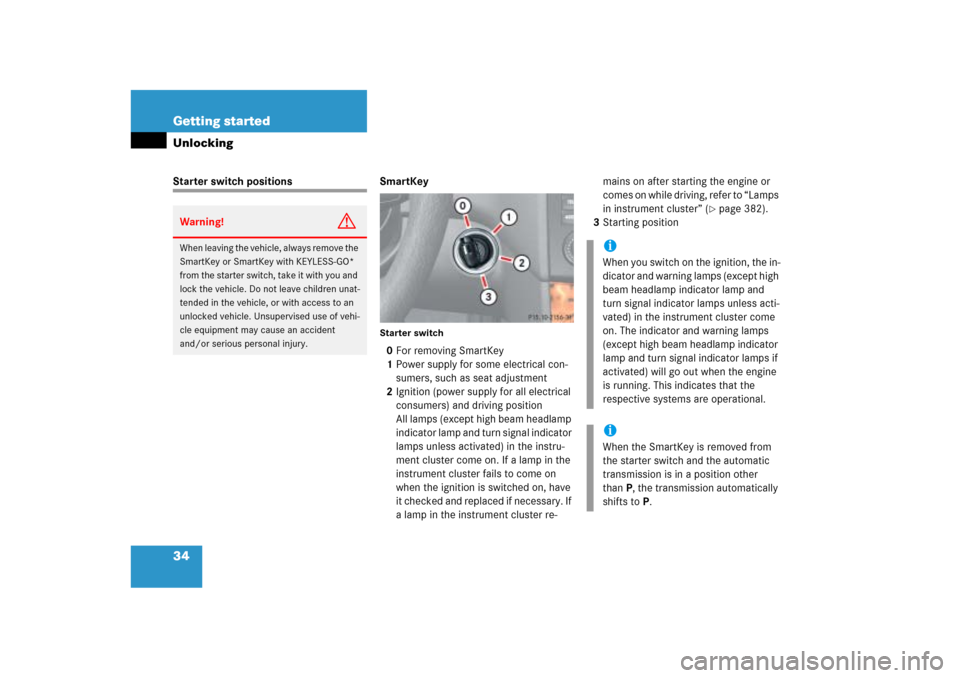
34 Getting startedUnlockingStarter switch positions SmartKey
Starter switch0For removing SmartKey
1Power supply for some electrical con-
sumers, such as seat adjustment
2Ignition (power supply for all electrical
consumers) and driving position
All lamps (except high beam headlamp
indicator lamp and turn signal indicator
lamps unless activated) in the instru-
ment cluster come on. If a lamp in the
instrument cluster fails to come on
when the ignition is switched on, have
it checked and replaced if necessary. If
a lamp in the instrument cluster re-mains on after starting the engine or
comes on while driving, refer to “Lamps
in instrument cluster” (
�page 382).
3Starting position
Warning!
G
When leaving the vehicle, always remove the
SmartKey or SmartKey with KEYLESS-GO*
from the starter switch, take it with you and
lock the vehicle. Do not leave children unat-
tended in the vehicle, or with access to an
unlocked vehicle. Unsupervised use of vehi-
cle equipment may cause an accident
and/or serious personal injury.
iWhen you switch on the ignition, the in-
dicator and warning lamps (except high
beam headlamp indicator lamp and
turn signal indicator lamps unless acti-
vated) in the instrument cluster come
on. The indicator and warning lamps
(except high beam headlamp indicator
lamp and turn signal indicator lamps if
activated) will go out when the engine
is running. This indicates that the
respective systems are operational.iWhen the SmartKey is removed from
the starter switch and the automatic
transmission is in a position other
thanP, the transmission automatically
shifts toP.
Page 37 of 539
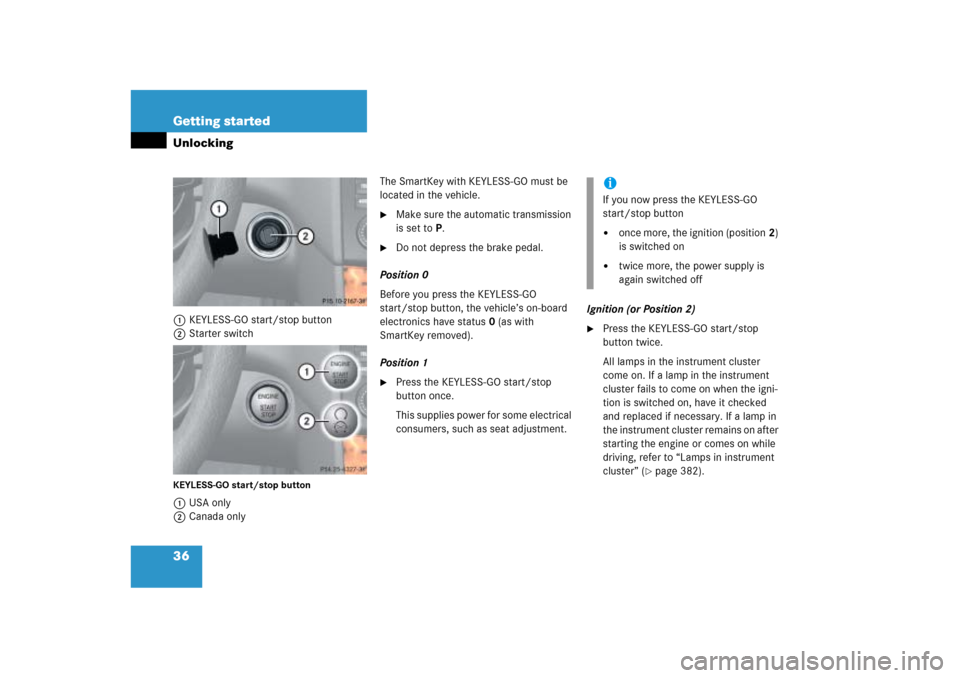
36 Getting startedUnlocking1KEYLESS-GO start/stop button
2Starter switchKEYLESS-GO start/stop button1USA only
2Canada onlyThe SmartKey with KEYLESS-GO must be
located in the vehicle.
�
Make sure the automatic transmission
is set toP.
�
Do not depress the brake pedal.
Position 0
Before you press the KEYLESS-GO
start/stop button, the vehicle’s on-board
electronics have status0 (as with
SmartKey removed).
Position 1
�
Press the KEYLESS-GO start/stop
button once.
This supplies power for some electrical
consumers, such as seat adjustment.Ignition (or Position 2)
�
Press the KEYLESS-GO start/stop
button twice.
All lamps in the instrument cluster
come on. If a lamp in the instrument
cluster fails to come on when the igni-
tion is switched on, have it checked
and replaced if necessary. If a lamp in
the instrument cluster remains on after
starting the engine or comes on while
driving, refer to “Lamps in instrument
cluster” (
�page 382).
iIf you now press the KEYLESS-GO
start/stop button�
once more, the ignition (position2)
is switched on
�
twice more, the power supply is
again switched off
Page 38 of 539
37 Getting started
Unlocking
For information on starting the engine
using the KEYLESS-GO start/stop button,
see “Starting with KEYLESS-GO*”
(�page 50).iIf you now press the KEYLESS-GO
start/stop button once more, the
power supply is again switched off.iWhen you switch on the ignition, the
indicator and warning lamps (except
high beam headlamp indicator lamp
and turn signal indicator lamps unless
activated) in the instrument cluster
come on. The indicator and warning
lamps (except high beam headlamp in-
dicator lamp and turn signal indicator
lamps if activated) should go out when
the engine is running. This indicates
that the respective systems are
operational.
Page 40 of 539

39 Getting started
Adjusting
Seat adjustment
The seat adjustment switch is located on
the entry side of each front seat base.
1 Head restraint height*
2Seat cushion tilt
3Seat height
4Backrest tilt
5Seat fore and aft adjustment�
Switch on the ignition (
�page 34).
or
�
Open the respective door.Seat fore and aft adjustment
�
Press the switch forward or backward
in the direction of arrow5.
Adjust seat to a comfortable seating
position that still allows you to reach
the accelerator/brake pedal safely.
The position should be as far to the rear
as possible, consistent with ability to
properly operate controls.
Seat height
�
Press the switch up or down in the
direction of arrow3.
!When moving the seat, make sure
there are no items in the footwell or
behind the seat. Otherwise you could
damage the seat.
When the rear bench seat is folded for-
ward, the front seats cannot be moved
to the rearmost position. Otherwise
you could damage the front seats and
the rear bench seat.!When adjusting the backrest tilt and
head restraint height, make sure that
the sun visor is folded up. If the head
restraint is in the uppermost position, it
could hit and damage the sun visor.
iThe memory function* (
�page 135)
lets you store the setting for the seat
positions together with the setting for
the steering wheel and the exterior rear
view mirrors.
Page 44 of 539
43 Getting started
Adjusting
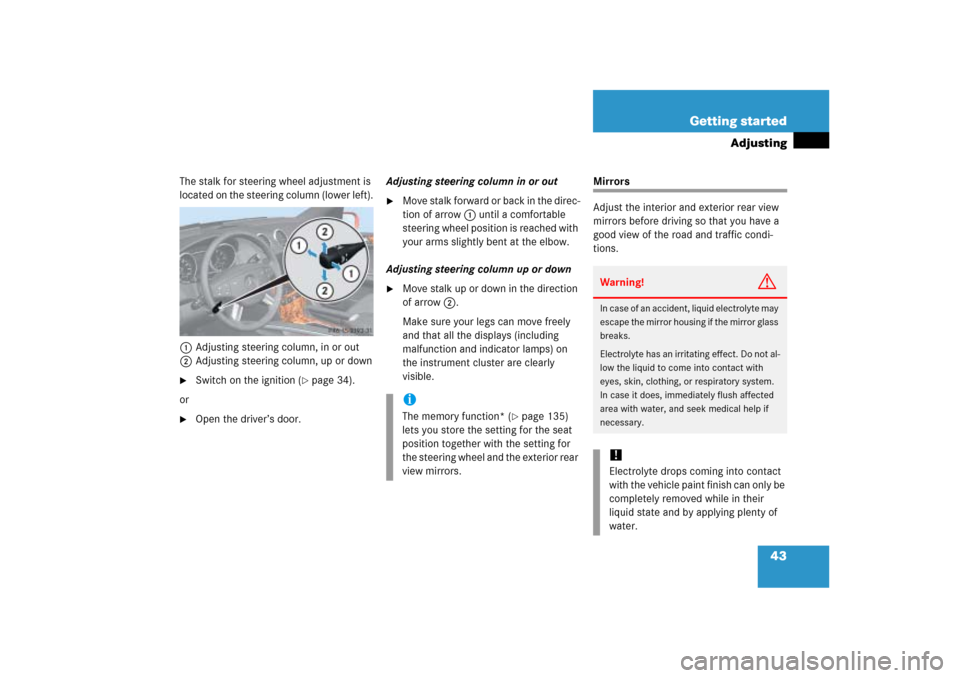
The stalk for steering wheel adjustment is
located on the steering column (lower left).
1Adjusting steering column, in or out
2Adjusting steering column, up or down�
Switch on the ignition (
�page 34).
or
�
Open the driver’s door.Adjusting steering column in or out
�
Move stalk forward or back in the direc-
tion of arrow1 until a comfortable
steering wheel position is reached with
your arms slightly bent at the elbow.
Adjusting steering column up or down
�
Move stalk up or down in the direction
of arrow2.
Make sure your legs can move freely
and that all the displays (including
malfunction and indicator lamps) on
the instrument cluster are clearly
visible.
Mirrors
Adjust the interior and exterior rear view
mirrors before driving so that you have a
good view of the road and traffic condi-
tions.
iThe memory function* (
�page 135)
lets you store the setting for the seat
position together with the setting for
the steering wheel and the exterior rear
view mirrors.
Warning!
G
In case of an accident, liquid electrolyte may
escape the mirror housing if the mirror glass
breaks.
Electrolyte has an irritating effect. Do not al-
low the liquid to come into contact with
eyes, skin, clothing, or respiratory system.
In case it does, immediately flush affected
area with water, and seek medical help if
necessary.!Electrolyte drops coming into contact
with the vehicle paint finish can only be
completely removed while in their
liquid state and by applying plenty of
water.
Page 45 of 539

44 Getting startedAdjustingInterior rear view mirror�
Manually adjust the interior rear view
mirror.
For more information, see “Rear view mir-
rors” (
�page 194).
Exterior rear view mirrorsThe buttons are located on the driver’s
door.
1Driver’s side exterior rear view mirror
button
2Adjustment button
3Passenger-side exterior rear view mir-
ror button
�
Switch on the ignition (
�page 34).
�
Press button1 for the driver’s side ex-
terior rear view mirror or button3 for
the passenger-side exterior rear view
mirror.
The indicator lamp on the respective
button comes on for
approximately 15 seconds.
�
Push adjustment button2 up, down,
left, or right according to the desired
setting.
Warning!
G
Exercise care when using the
passenger-side exterior rear view mirror.
The mirror surface is convex (outwardly
curved surface for a wider field of view). Ob-
jects in mirror are closer than they appear.
Check your interior rear view mirror or
glance over your shoulder before changing
lanes.
iIf you do not make adjustments to the
selected exterior rear view mirror
within 15 seconds, the indicator lamp
goes out. You then will have to select
the desired exterior rear view mirror
again before any adjustments can be
made. Adjustments can only be made
with the indicator lamp for the respec-
tive exterior rear view mirror button
illuminated.iThe memory function* (
�page 135)
lets you store the setting for the seat
position together with the setting for
the steering wheel and the exterior rear
view mirrors.
At low ambient temperatures, the
mirrors will be heated automatically.
Page 56 of 539
55 Getting started
Driving
The combination switch resets automati-
cally after major steering wheel move-
ments.
Windshield wipers
The combination switch is located on the
left of the steering column.Combination switch1Single wipe
Wiping with windshield washer fluid
2Switching on windshield wipers�
Switch on the ignition (
�page 34).Switching on windshield wipers
�
Turn the combination switch to the
desired position depending on the in-
tensity of the rain.
0Windshield wipers off
IIntermittent wiping
IINormal wiper speed
IIIFast wiper speed
iTo signal minor directional changes,
move combination switch to point of
resistance and release. The turn signal
flashes three times.
iVehicles with rain sensor*:
Intermittent wiping interval is depen-
dent on wetness of windshield. Pauses
between wipes are automatically con-
trolled by the rain sensor.