Page 252 of 521
251 Controls in detail
Driving systems
Distronic menu in the control system
In the Distronic menu you can read the cur-
rent settings for Distronic. What appears in
the multifunction display depends on
whether Distronic and the distance warn-
ing function are turned on or off.�
Press buttonè orÿ repeatedly
until you see one of the following dis-
plays.Distronic deactivated
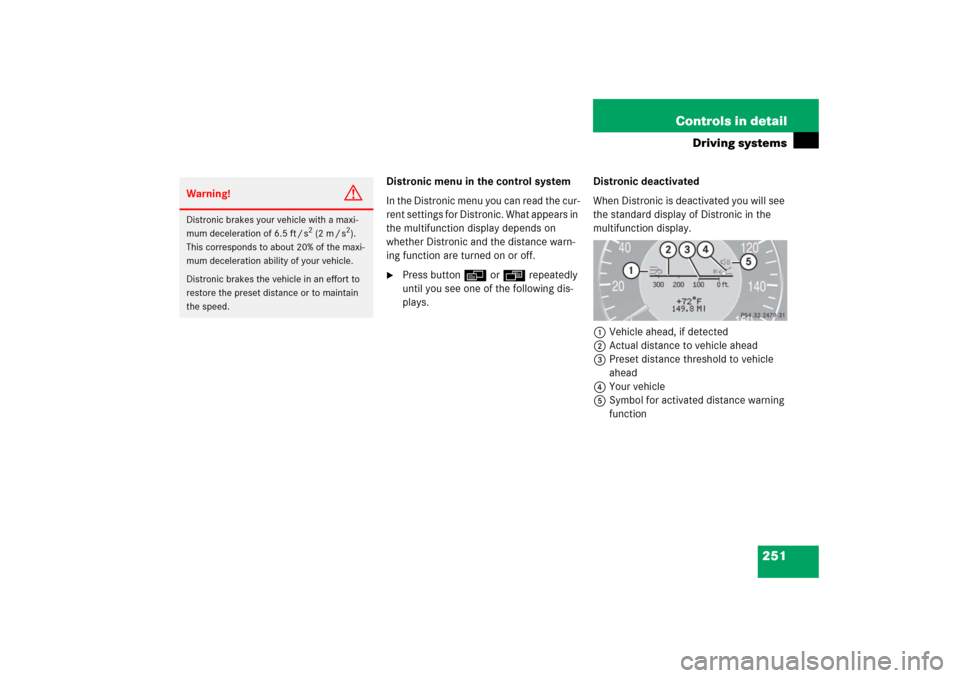
When Distronic is deactivated you will see
the standard display of Distronic in the
multifunction display.
1Vehicle ahead, if detected
2Actual distance to vehicle ahead
3Preset distance threshold to vehicle
ahead
4Your vehicle
5Symbol for activated distance warning
function
Warning!
G
Distronic brakes your vehicle with a maxi-
mum deceleration of 6.5 ft / s
2 (2 m / s
2).
This corresponds to about 20% of the maxi-
mum deceleration ability of your vehicle.
Distronic brakes the vehicle in an effort to
restore the preset distance or to maintain
the speed.
Page 254 of 521

253 Controls in detail
Driving systems
Setting the current speed�
Accelerate or decelerate to the desired
speed.
�
Briefly lift or depress the cruise control
lever.
The current speed is set.
�
Remove your foot from the accelerator
pedal.Setting a higher speed
�
Briefly tip the cruise control lever in di-
rection of arrow1 (
�page 252) to in-
crease vehicle speed in increments of
5 mph (Canada: 10 km/h).
The new speed is set.
The stored speed is displayed in the
multifunction display for approximately
5 seconds (
�page 252), and one or
two segments around the stored speed
come on in the speedometer
(
�page 249).Setting a lower speed
�
Briefly tip the cruise control lever in di-
rection of arrow2 (
�page 252) to de-
crease vehicle speed in increments of
5 mph (Canada: 10 km/h).
The new speed is set.
The stored speed is displayed in the
multifunction display for approximately
5 seconds (
�page 252), and one or
two segments around the stored speed
come on in the speedometer
(
�page 249).
iIf you do not take your foot off the
accelerator completely, the following
message will appear in the multifunc-
tion display: Distronic
overrideThe distance to a slower moving vehi-
cles in front of you will not be set. Your
vehicle speed will then be determined
only by the accelerator pedal position.
iDepressing the accelerator pedal does
not deactivate Distronic. After brief ac-
celeration (e.g. for passing), the cruise
control will resume the last speed set.
iWhen you use the cruise control lever
to decelerate, the brakes will be ap-
plied to support deceleration.
In addition, the transmission will auto-
matically downshift on long downhill
grades.
Page 255 of 521
254 Controls in detailDriving systemsFine adjustment in 1 mph
(Canada: 1 km/h) increments
Faster�
Briefly tip the cruise control lever in di-
rection of arrow4 (
�page 252).Setting to last stored speed
(“Resume” function)
�
Briefly tip the cruise control lever in di-
rection of arrow4 (
�page 252).
Distronic is activated and set to the last
stored speed.
�
Remove your foot from the accelerator
pedal.Deactivating Distronic
There are several ways to deactivate the
Distronic system:
�
Briefly tip the cruise control lever in di-
rection of arrow3 (
�page 252).
or
�
Step on the brake pedal.
Distronic will be deactivated. The last
speed set will be stored into memory.
Warning!
G
The speed stored in memory should only be
set again if prevailing road conditions per-
mit. Possible acceleration or deceleration
differences arising from returning to the pre-
set speed could cause an accident and/or
serious injury to you and others.
iThe following message will appear in
the multifunction display for approxi-
mately 5 seconds:Distronic offThe last stored speed is deleted when
you turn off the engine.
Page 256 of 521

255 Controls in detail
Driving systems
Distronic deactivates automatically when:�
you set the parking brake
�
you drive slower than 20 mph
(30 km/h)
�
the ESP
® is active (
�page 94) or you
deactivate the ESP
®
�
you move the gear selector lever into
positionN
A signal will sound. The
Distronic off
message appears in the multifunction
display for approximately 5 seconds.Setting the following distance in
Distronic
You can set the specified following dis-
tance for Distronic by varying the time set-
ting between 1.0 and 2.0 seconds. Using
this time setting and the current speed of
your vehicle, Distronic calculates and sets
the required following distance to the vehi-
cle ahead. The set distance will be shown
in the multifunction display.
The thumbwheel for making the time set-
ting is located on the lower section of the
center console.1Distance warning function on/off
switch
2Indicator lamp
3Thumbwheel for setting distance
Increasing distance
Increasing the distance setting tells
Distronic to maintain a greater following
distance to the vehicle ahead.
�
Turn thumbwheel3 towards¯.
Warning!
G
Distronic switches off and releases the
brakes when the vehicle decelerates below
the minimum speed of 20 mph (30 km/h)
by operation of the system. At that time the
driver must apply the brakes in order to re-
duce vehicle speed further or bring it to a
stop.
Warning!
G
It is up to the driver to exercise discretion to
select the appropriate setting given road
conditions, traffic, driver’s preferred driving
style and applicable laws and driving recom-
mendations for safe following distance.
Page 257 of 521
256 Controls in detailDriving systemsDecreasing distance
Decreasing the distance setting tells
Distronic to maintain a smaller following
distance to the vehicle ahead.�
Turn thumbwheel3 towards®.
Distance warning function
When Distronic is deactivated, this func-
tion will continue to warn you when recog-
nizing a stationary obstacle or a slower
vehicle moving in the vehicle’s path and
the danger of a collision exists:
�
The distance warning lampl in the
instrument cluster comes on.
�
An intermittent warning will sound if
necessary.
If these warnings are issued, you must
brake manually to maintain a safe distance
and avoid a collision with the vehicle
ahead.
When pressing the brake pedal, the warn-
ing sound ceases. The warning sound will
also cease when the distance to the vehi-cle ahead is sufficient again without apply-
ing the brakes. In this case, the distance
warning lamp will also go out.Activating
�
Press switch1.
Indicator lamp 2 on the switch comes
on. A loudspeaker symbol appears in
the multifunction display (
�page 252).
Deactivating
�
Press switch1.
Indicator lamp 2 on the switch goes
out. No loudspeaker symbol appears in
the multifunction display.
Warning!
G
If the distance warning lampl in the in-
strument cluster comes on while driving
and/or an intermittent warning sounds, im-
mediate attention on the part of the driver is
required. As required by the traffic situation,
apply the brakes and navigate around a pos-
sible obstacle. However, do not drive by re-
lying on the distance warning function, as
this will result in an emergency braking ap-
plication. Especially depending on road sur-
face conditions and driver reaction, this will
not always enable you to avoid a collision.iComplex driving situations are not al-
ways fully recognized by Distronic. This
could result in wrong or missing dis-
tance warnings.
Page 261 of 521

260 Controls in detailDriving systems1Damping button
2Indicator lamps�
Start the engine.
�
Press the damping button1 until the
desired suspension style is set.Vehicle level control
Your vehicle automatically adjusts its ride
height to
�
increase vehicle safety
�
reduce fuel consumption
The following vehicle chassis ride heights
can be selected:
�
Normal
�
Raised
The vehicle chassis ride height is raised or
lowered according to the selected level
setting and to the vehicle speed:
�
At a speed exceeding approximately
68 mph (110 km/h) with normal level
set or exceeding 75 mph (120 km/h)
with raised level set, the ride height is
reduced automatically. The table on
the next page provides an overview of
the vehicle levels.
�
With decreasing speed, the ride height
is again raised to the normal level.
!If you have selected the Comfort sus-
pension tuning, the vehicle lowers
slightly when you lock it within approx-
imately 60 seconds after switching off
the engine. When parking, make sure
that your vehicle cannot come into con-
tact with other objects, such as a curb,
while lowering. Your vehicle could oth-
erwise be damaged.iThe selected suspension style is stored
in memory, even after the SmartKey is
removed from the starter switch.
Page 263 of 521
262 Controls in detailDriving systemsThe following vehicle level settings can be
selected when the vehicle is stationary and
the engine is running:Vehicle level
when stationary
Indicator lamp
Suspension
tuning
Use for
Ride height increase
over normal
Automatic lowering
Normal
Lamp off
Comfort
For driving on normal
roads
None
Max. approx. 0.4 in (10 mm)
Normal
Lamp off
Sport 1 or 2
For driving on normal
roads
None
Max. approx. 0.6 in (15 mm)
Raised
Lamp on
Comfort
For driving on rough
roads or with snow
chains
Approx. 0.8 in (20 mm)
Max. approx. 1.2 in (30 mm)
Raised
Lamp on
Sport 1 or 2
For driving on rough
roads or with snow
chains
Approx. 0.8 in (20 mm)
Max. approx. 1.4 in (35 mm)
Page 296 of 521

295 Controls in detail
Useful features
Step 2:�
If you have previously programmed an
signal transmitter button and wish to
retain its programming, proceed to
step 3.
If you are programming the integrated
remote control for the first time, press
and hold the two outer signal transmit-
ter buttons2 and4 and release
them only when the indicator lamp1
begins to flash after approximately
20 seconds (do not hold the button for
longer than 30 seconds). This proce-
dure erases any previous settings for
all three channels and initializes the
memory.
If you later wish to program a second
and/or third hand-held transmitter to
the remaining two signal transmitter
buttons, do not repeat this step and be-
gin directly with step 3.Step 3:
�
Hold the end of the hand-held remote
control5 of the device you wish to
train approximately 2 to 5 in
(5 to 12 cm) away from the signal
transmitter button (2, 3 or4) to be
programmed, while keeping the indica-
tor lamp1 in view.
Step 4:
�
Using both hands, simultaneously
press the hand-held remote control
button6 and the desired signal trans-
mitter button (2, 3 or4). Do not
release the buttons until step 5 is com-
pleted.
The indicator lamp1 will flash, first
slowly and then rapidly.Step 5:
�
After the indicator lamp1 changes
from a slow to a rapidly flashing light,
release the hand-held remote control
button and the signal transmitter but-
ton.
Step 6:
�
Press and hold the just-trained signal
transmitter button (2, 3 or4) and
observe the indicator lamp1.iThe indicator lamp1 flashes immedi-
ately the first time the signal transmit-
ter button is programmed. If this button
has already been programmed, the in-
dicator lamp will only start flashing af-
ter 20 seconds.
��