Page 118 of 473
117 Controls in detail
Lighting
Locator lighting and night security
illumination
The locator lighting and the night security
illumination are described in the “Control
system” section, see “Set locator lighting”
(
�page 145) and “Setting night security
illumination” (
�page 146).Fog lamps
Front fog lamps
�Switch on the low beam headlamps
(
�page 114).
�Pull out the exterior lamp switch to first
stop.
The front fog lamps switch on.
The green indicator lamp‡ in the
exterior lamp switch comes on
(
�page 114).
�Push in the exterior lamp switch.
The front fog lamps switch off.
The green indicator lamp‡ in the
exterior lamp switch goes out.
Warning!G
In low ambient lighting or foggy conditions,
only switch from positionU toB with
the vehicle at a standstill in a safe location.
Switching fromU toB will briefly
switch off the headlamps. Doing so while
driving in low ambient lighting conditions
may result in an accident.
i
Fog lamps will operate with the parking
lamps and/or the low beam headlamps
on. Fog lamps should only be used in
conjunction with low beam headlamps.
Consult your State or Province Motor
Vehicle Regulations regarding permis-
sible lamp operation.
i
Fog lamps cannot be switched on with
the exterior lamp switch in
positionU. For switching on the fog
lamps, turn the exterior lamp switch to
positionB first.
Page 119 of 473
118 Controls in detail
Lighting
Rear fog lamp (driver’s side only)
�Switch on the front fog lamps
(
�page 117).
�Pull out the exterior lamp switch to
second stop.
The rear fog lamp is switched on.
The yellow indicator lamp† in the
exterior lamp switch comes on
(
�page 114).
�Push in the exterior lamp switch to first
stop.
The rear fog lamp switches off.
The yellow indicator lamp† in the
exterior lamp switch goes out.
The front fog lamps remain lit.
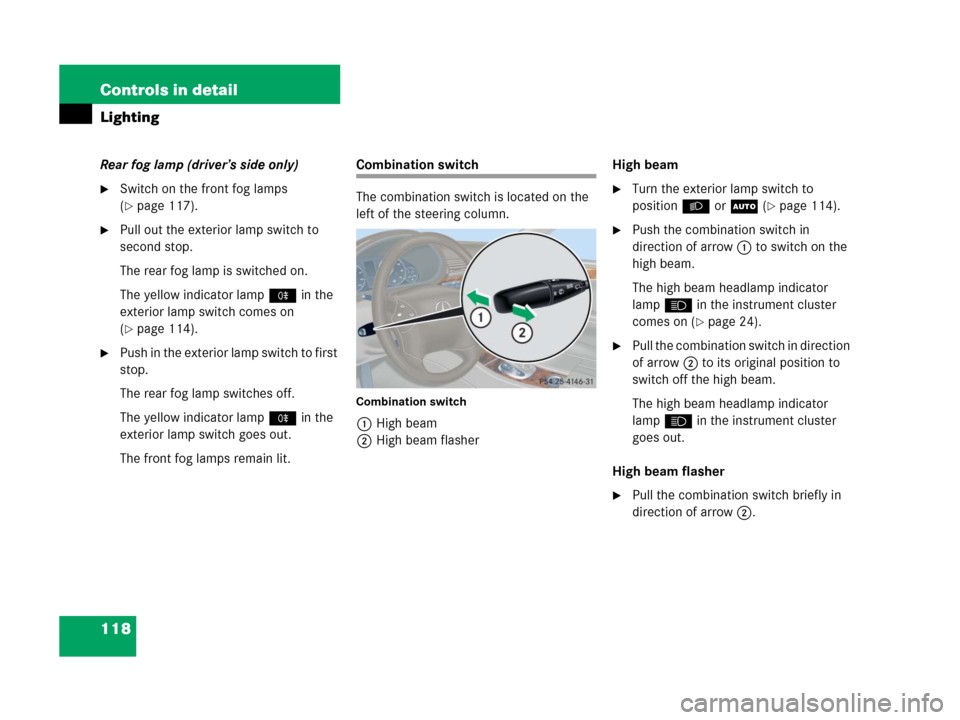
Combination switch
The combination switch is located on the
left of the steering column.
Combination switch
1High beam
2High beam flasherHigh beam
�Turn the exterior lamp switch to
positionB orU (
�page 114).
�Push the combination switch in
direction of arrow1 to switch on the
high beam.
The high beam headlamp indicator
lampA in the instrument cluster
comes on (
�page 24).
�Pull the combination switch in direction
of arrow2 to its original position to
switch off the high beam.
The high beam headlamp indicator
lampA in the instrument cluster
goes out.
High beam flasher
�Pull the combination switch briefly in
direction of arrow2.
Page 120 of 473
119 Controls in detail
Lighting
Hazard warning flasher
The hazard warning flasher can be
switched on at all times, even with the
SmartKey removed from the starter
switch.
The hazard warning flasher switches on
automatically when an air bag deploys.
The hazard warning flasher switch is
located on the upper part of the center
console.
1Hazard warning flasher switchSwitching on hazard warning flasher
�Press hazard warning flasher
switch1.
All turn signals are flashing.Switching off hazard warning flasher�Press hazard warning flasher switch1
again.
i
With the hazard warning flasher
activated and the combination switch
set for either left or right turn, only the
respective turn signals will operate
when the SmartKey is in the starter
switch position1 or 2.
i
If the hazard warning flasher has been
activated automatically, press hazard
warning flasher switch1 once to
switch it off.
Page 121 of 473
120 Controls in detail
Lighting
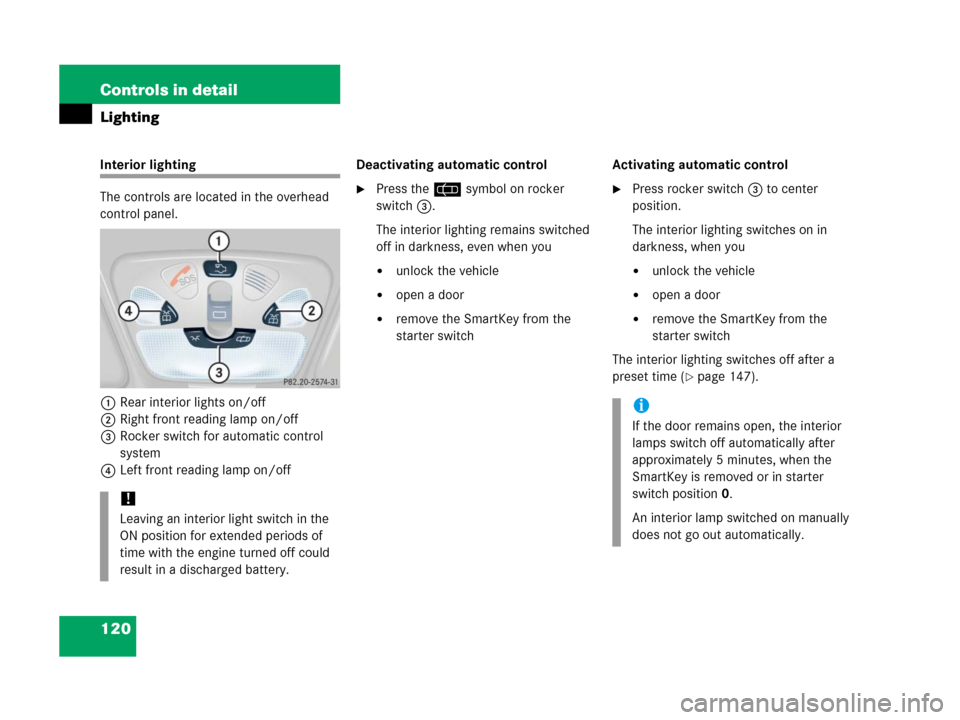
Interior lighting
The controls are located in the overhead
control panel.
1Rear interior lights on/off
2Right front reading lamp on/off
3Rocker switch for automatic control
system
4Left front reading lamp on/offDeactivating automatic control
�Press the= symbol on rocker
switch3.
The interior lighting remains switched
off in darkness, even when you
�unlock the vehicle
�open a door
�remove the SmartKey from the
starter switchActivating automatic control
�Press rocker switch3 to center
position.
The interior lighting switches on in
darkness, when you
�unlock the vehicle
�open a door
�remove the SmartKey from the
starter switch
The interior lighting switches off after a
preset time (
�page 147).
!
Leaving an interior light switch in the
ON position for extended periods of
time with the engine turned off could
result in a discharged battery.
i
If the door remains open, the interior
lamps switch off automatically after
approximately 5 minutes, when the
SmartKey is removed or in starter
switch position0.
An interior lamp switched on manually
does not go out automatically.
Page 122 of 473
121 Controls in detail
Lighting
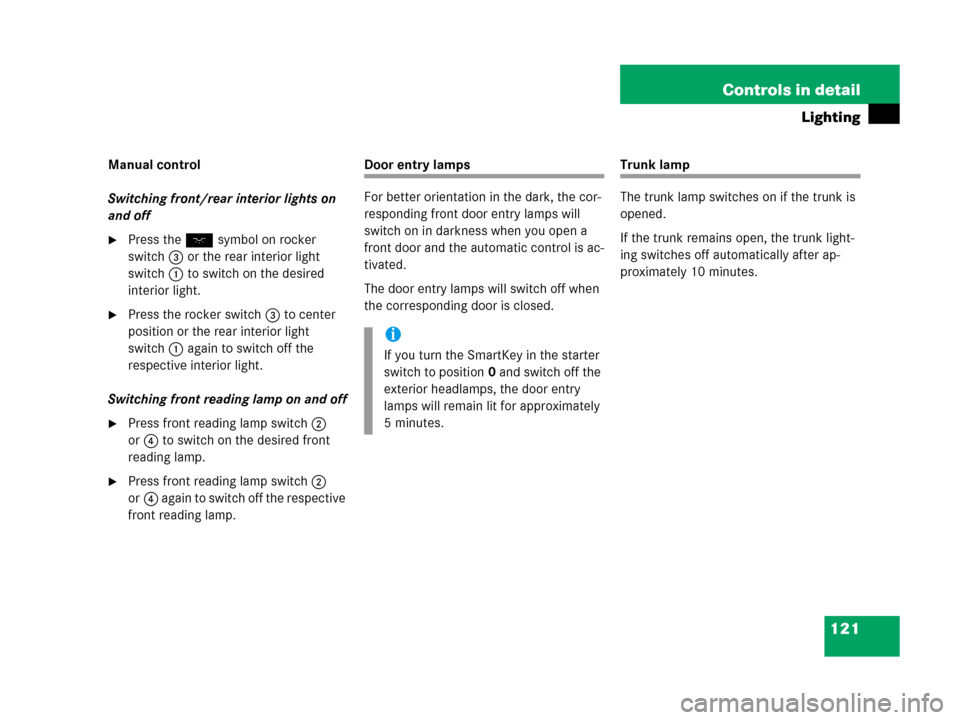
Manual control
Switching front/rear interior lights on
and off
�Press theW symbol on rocker
switch3 or the rear interior light
switch1 to switch on the desired
interior light.
�Press the rocker switch3 to center
position or the rear interior light
switch1 again to switch off the
respective interior light.
Switching front reading lamp on and off
�Press front reading lamp switch2
or4 to switch on the desired front
reading lamp.
�Press front reading lamp switch2
or4 again to switch off the respective
front reading lamp.
Door entry lamps
For better orientation in the dark, the cor-
responding front door entry lamps will
switch on in darkness when you open a
front door and the automatic control is ac-
tivated.
The door entry lamps will switch off when
the corresponding door is closed.Trunk lamp
The trunk lamp switches on if the trunk is
opened.
If the trunk remains open, the trunk light-
ing switches off automatically after ap-
proximately 10 minutes.
i
If you turn the SmartKey in the starter
switch to position0 and switch off the
exterior headlamps, the door entry
lamps will remain lit for approximately
5 minutes.
Page 123 of 473

122 Controls in detail
Instrument cluster
For a full view illustration of the instrument
cluster, see “At a glance” (
�page 24).
1Reset button
The instrument cluster is activated when
you
�open a door
�switch on the ignition (�page 33)
�press reset button1
�switch on the exterior lighting
You can change the instrument cluster
settings in the Instrument cluster submenu
of the control system (
�page 138).
Instrument cluster illumination
Use reset button1 to adjust the
illumination brightness for the instrument
cluster.
To brighten illumination
�Turn reset button1 clockwise.
The instrument cluster illumination will
brighten.
To dim illumination
�Turn reset button1 counterclock-
wise.
The instrument cluster illumination will
dim.
Warning!G
No messages will be displayed if either the
instrument cluster or the multifunction dis-
play is inoperative.
As a result, you will not be able to see infor-
mation about your driving conditions, such
as speed or outside temperature, warning/
indicator lamps, malfunction/warning mes-
sages or the failure of any systems. Driving
characteristics may be impaired.
If you must continue to drive, please do so
with added caution. Visit an authorized
Mercedes-Benz Center as soon as possible.
i
The instrument cluster illumination is
dimmed or brightened automatically to
suit ambient light conditions.
The instrument cluster illumination will
also be adjusted automatically when
you switch on the vehicle’s exterior
lamps.
Page 130 of 473

129 Controls in detail
Control system
Menus, submenus and functions
Menu1Menu2Menu3Menu4Menu5Menu6Menu7
Standard
displayAUDIONAV*Vehicle status
message memorySettingsTrip computerTelephone*
(�page 130)(�page 131)(�page 134)(�page 134)(�page 135)(�page 150)(�page 152)
Commands/submenus
Run Flat
Indicator*
(Canada only)Select radio
stationShow route guid-
ance instructions,
current direction
traveledCall up vehicle mal-
function, warning and
system status messag-
es stored in memory
1
1The vehicle status message memory menu is only displayed if there is a message stored.
Reset to
factory
settingsFuel consumption
statistics after
startLoad phone
book
Digital speed-
ometer or out-
side temperatureSelect satellite
radio station*
(USA only)Instrument
cluster sub-
menuFuel consumption
statistics since
the last resetSearch for
name in
phone book
Call up main-
tenance service
displayOperate
CD player* Time/Date
submenuDistance to emp-
ty
Check engine oil
levelLighting
submenu
Vehicle
submenu
Convenience
submenu
Page 137 of 473
136 Controls in detail
Control system
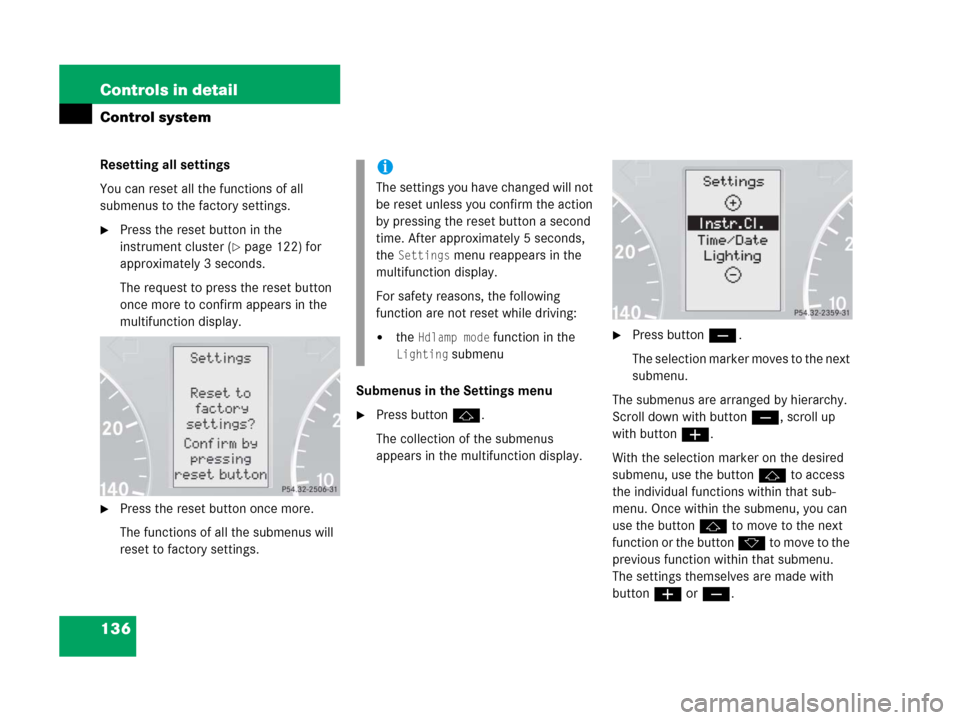
Resetting all settings
You can reset all the functions of all
submenus to the factory settings.
�Press the reset button in the
instrument cluster (
�page 122) for
approximately 3 seconds.
The request to press the reset button
once more to confirm appears in the
multifunction display.
�Press the reset button once more.
The functions of all the submenus will
reset to factory settings.Submenus in the Settings menu
�Press buttonj.
The collection of the submenus
appears in the multifunction display.
�Press buttonç.
The selection marker moves to the next
submenu.
The submenus are arranged by hierarchy.
Scroll down with buttonç, scroll up
with buttonæ.
With the selection marker on the desired
submenu, use the buttonj to access
the individual functions within that sub-
menu. Once within the submenu, you can
use the button j to move to the next
function or the button k t o m o v e t o t h e
previous function within that submenu.
The settings themselves are made with
buttonæ orç.
i
The settings you have changed will not
be reset unless you confirm the action
by pressing the reset button a second
time. After approximately 5 seconds,
the
Settings menu reappears in the
multifunction display.
For safety reasons, the following
function are not reset while driving:
�the Hdlamp mode function in the
Lighting submenu