Page 260 of 651
STEERING WHEEL AND MIRRORS
239
Drive the vehicle slowly (at 8 km/h [5 mph] or lower) in a circle
until the direction is displayed. If there is not enough space to
drive in a circle, drive around the block until the direction is
displayed.
After driving in 1 to 3 circles in the above method, calibration
is complete with the direction shown on the display. Perform
circling calibration just after you have purchased
your Lexus. And then always perform circling calibration
after the battery has been removed, replaced or
disconnected.
� Do not perform circling calibration of the compass in a place
where the earth’s magnetic field is subject to interference by
artificial magnetic fields (underground parking, under a steel
tower, between buildings, roof parking, near a crossing,
near a large vehicle, etc.).
� During calibration, do not operate electric systems (moon
roof, power windows, etc.) as they may interfere with the
calibration.
Page 274 of 651

AIR CONDITIONING
253
This button allows the air intake to select the OUTSIDE AIR
mode automatically. This is to clean up the front view more
quickly. If you want to return the setting to the
RECIRCULATED
AIR mode, push the air intake control button
once again.
Push the “A/C” button for dehumidified heating or cooling. This
setting clears the front view more quickly.
CAUTION
Do not use the windshield air flow button during cooled
air operation in extremely humid weather. The
difference between the temperature of the outside air
and that of the windshield could cause the outer surface
of the windshield to fog up blocking your vision.
(c) Operating tips
� To cool off your Lexus after it has been parked in the hot sun,
drive with the windows open for a few minutes. After the
excess heat has blown away, close the windows. This vents
the hot air, allowing the air conditioning to cool the interior
more quickly.
� Make sure the air intake grilles in front of the windshield are
not blocked (by leaves or snow, for example).
� If air flow control is not satisfactory, check the side vents and
rear vents. (See “(d) Side vents and rear vents”.)
� On humid days, do not blow cold air on the windshield. The
windshield could fog up because of the difference in air
temperature on the inside and outside of the windshield.
� Keep the area under the front seats clear to allow air to
circulate throughout the vehicle.
� On cold days, set the fan speed to high for a minute to help
clear the intake ducts of snow or moisture. This can reduce
the amount of fogging on the windows.
� When driving on dusty roads, close all windows. If dust
thrown up by the vehicle is still drawn into the vehicle after
closing the windows, it is recommended that the air intake
control button be set to the OUTSIDE AIR mode to take in
the fresh air and the fan speed selector to any setting except
OFF.
Page 289 of 651

AUDIO
268Automatic Sound Levelizer (ASL):
When the audio sound
becomes dif ficult to be heard due to road noise, wind noise, etc.
during driving, the system adjusts to the optimum volume and
tone quality according to the noise level. While the Automatic
Sound Levelizer is on, “ASL” appears on the display.
Push the “AUDIO CONTROL” knob until the desired mode.
Turn the knob to suit your preference.
(c) Your radio antennas
Detachable antenna: To remove a detachable antenna,
carefully turn it counterclockwise.
NOTICE
To prevent damage to the antenna, make sure it is
removed before driving your vehicle through an
automatic car wash.
Wire antenna: The wire antenna is mounted inside the back
door window.
NOTICE
� When cleaning the inside of the back door window, be
careful not to scratch or damage the wire antennas or
connectors.
� Putting a window tint (especially, conductive or
metallic type) on the back door window may af fect the
reception of radio or mobile telephone. For the
installation of the window tint, consult with your
Lexus dealer.
(d) Your cassette player
When you insert a cassette, the exposed tape should face to
the right.
NOTICE
Never try to disassemble or oil any part of the cassette
player. Do not insert anything other than cassette tapes
into the slot.
Page 308 of 651

AUDIO
287
Automatic Sound Levelizer (ASL):
When the audio sound
becomes dif ficult to be heard due to road noise, wind noise, etc.
during driving, the system adjusts to the optimum volume and
tone quality according to the noise level. While the Automatic
Sound Levelizer is on, “ASL” appears on the display.
Push the “AUDIO CONTROL” knob until the desired mode.
Turn the knob to suit your preference.
(c) Your radio antennas
Detachable antenna: To remove an detachable antenna,
carefully turn it counterclockwise.
NOTICE
To prevent damage to the antenna, make sure it is
removed before driving your vehicle through an
automatic car wash.
Wire antenna: The wire antenna is mounted inside the back
door window.
NOTICE
� When cleaning the inside of the back door window, be
careful not to scr atch or damage the wire antennas or
connectors.
� Putting a window tint (especially, conductive or
metallic type) on the quarter windows may affect the
reception of radio or mobile telephone. For the
installation of the window tint, consult with your
Lexus dealer.
(d) Your cassette player
When you insert a cassette, the exposed tape should face to
the right.
NOTICE
Never try to disassemble or oil any part of the cassette
player. Do not insert anything other than cassette tapes
into the slot.
Page 328 of 651
AUDIO
307
Display
To use the display, push the lock release button and lower
the display until you hear a click.
You can adjust the display to your desired angle.
To close, push up the display until you hear a click.
Page 331 of 651
AUDIO
310(b) Using the remote control
To use the rear seat entertainment system remote control,
direct
the signal output portion of the remote control to the
signal reception portion of the rear seat entertainment
system display.
The remote control does not operate properly when the signal
reception portion of the display is exposed to direct sunlight.
Block the display from direct sunlight.
CAUTION
To reduce the chance of injury in case of an accident or
a sudden stop while driving, stow the remote control in
the console box or front seatback pocket when it is not
in use.
Page 332 of 651
AUDIO
311
NOTICE
Observe the followings, otherwise the remote control
may be damaged.
�Do not drop or strongly knock the remote control
against hard objects.
� Do not sit on or place heavy objects on the remote
control.
� Do not leave the remote control exposed to high
temperatures (such as on the instrument panel) for a
long time, otherwise the remote control may be
damaged.
(c) Locating the remote control
If you lose sight of the remote control, push and hold the
“CURSOR (REMOTE)” button on the DVD player unit until you
hear a beep. A buzzer sounds from the remote control to let you
know where it is.
To stop the buzzer, push any button of the remote control.
If the remote control is located close to something that blocks
the signal, such as some kind of metal, the remote control may
not receive the signal and the buzzer may not sound.
Page 373 of 651
AUDIO
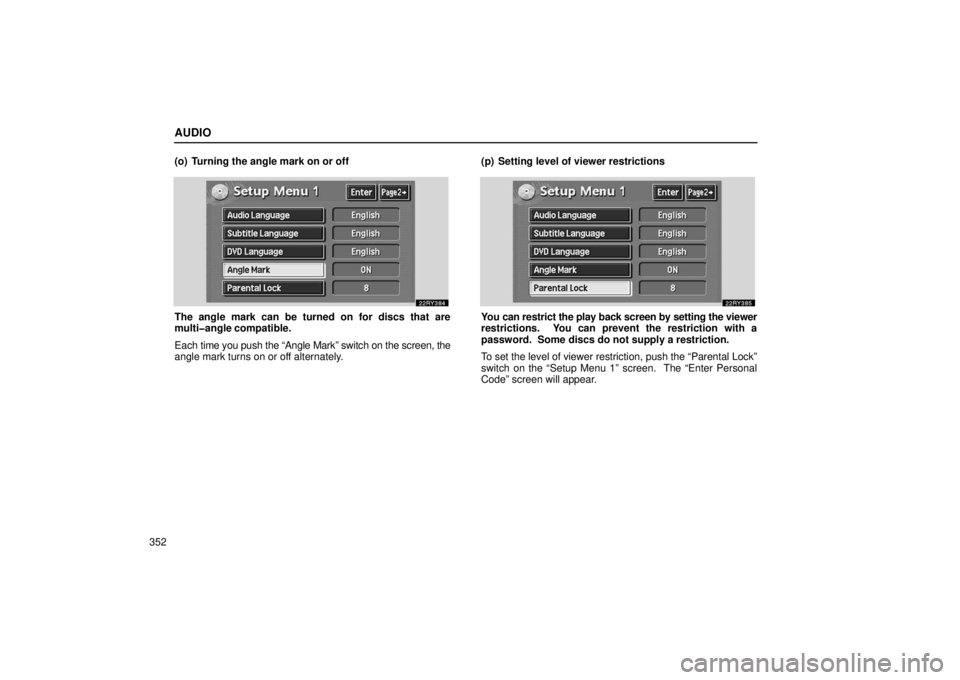
352(o) Turning the angle mark on or off
The angle mark can be turned on for discs that are
multiangle compatible.
Each
time you push the “Angle Mark” switch on the screen, the
angle mark turns on or off alternately. (p) Setting level of viewer restrictionsYou can restrict the play back screen by setting the viewer
restrictions. You can prevent the restriction with a
password. Some discs do not supply a restriction.
To set the level of viewer restriction, push the “Parental Lock”
switch on the “Setup Menu 1” screen. The “Enter Personal
Code” screen will appear.
![LEXUS RX330 2006 Owners Manual STEERING WHEEL AND MIRRORS
239
Drive the vehicle slowly (at 8 km/h [5 mph] or lower) in a circle
until the direction is displayed. If there is not enough space to
drive in a circle, drive around the](/manual-img/36/58030/w960_58030-259.png "LEXUS RX330 2006 Owners Manual STEERING WHEEL AND MIRRORS
239
Drive the vehicle slowly (at 8 km/h [5 mph] or lower) in a circle
until the direction is displayed. If there is not enough space to
drive in a circle, drive around the")