9
1-2. Opening, closing and locking the doors and trunk
1
Before driving
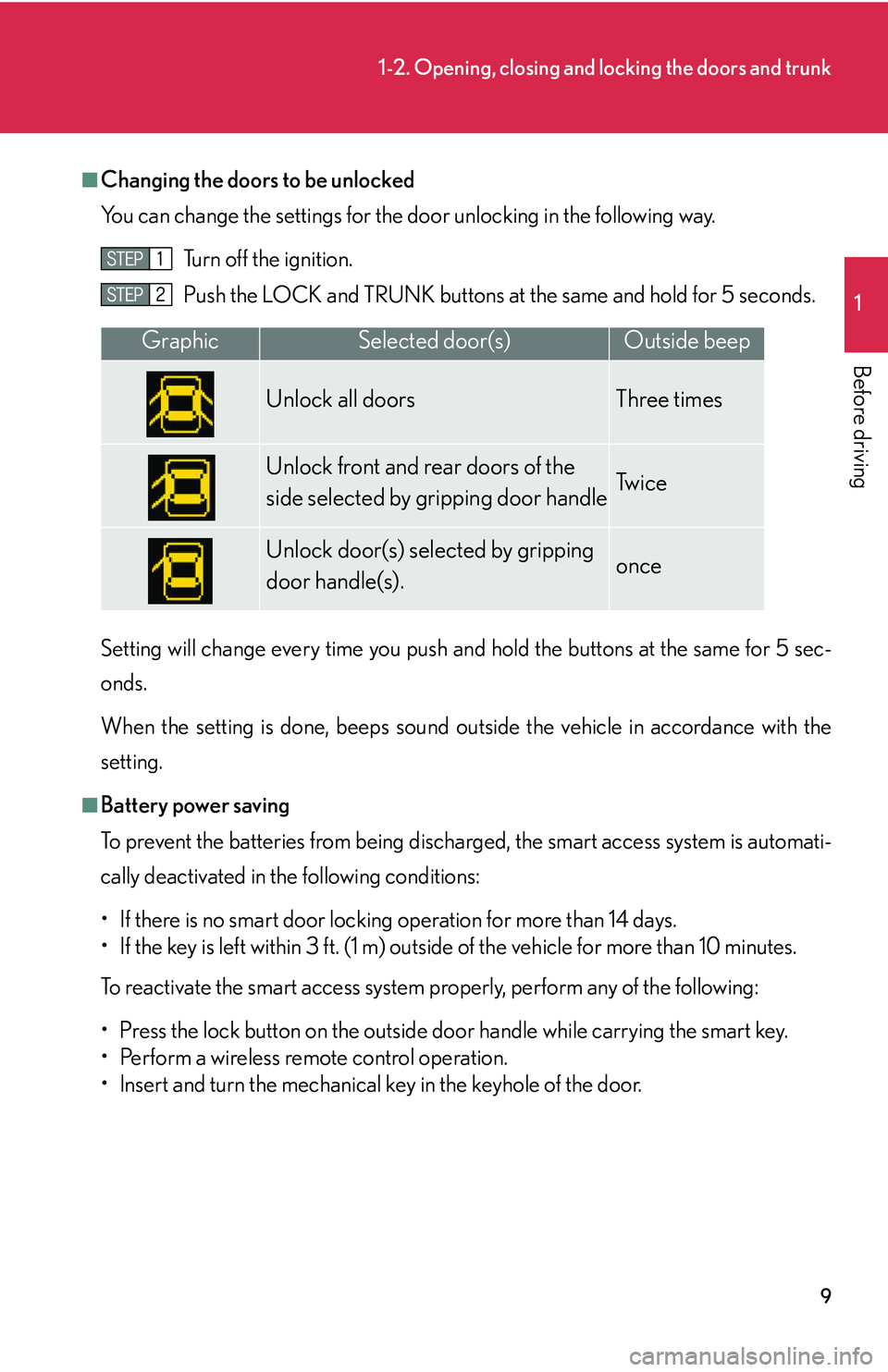
■Changing the doors to be unlocked
You can change the settings for the door unl
ocking in the following way.
Turn off the ignition.
Push the LOCK and TRUNK buttons at
the same and hold for 5 seconds.
Setting will change every time you push an d hold the bu
ttons at the same for 5 sec-
onds.
When the setting is done, beeps sound outside the vehicle in accordance with the
setting.
■Battery power saving
To prevent the batteries from being discharged, the smart access system is automati -
cally deactivated in the following conditions:
• If there is no smart door locking operation for more than 14 days.
• If the key is left within 3 ft. (1 m) outside of the vehicle for more than 10 minutes.
To reactivate the smart access system properly, perform any of the following:
• Press the lock button on the outside do o
r handle while carrying the smart key.
• Perform a wireless remote control operation.
• lnsert and turn the mechanical key in the keyhole of the door.
GraphicSelected door(s)Outside beep
Unlock all doors Three times
Unlock front and rear doors of the
side selected by gripping door handleTw i c e
Unlock door(s) selected by gripping
door handle(s).once
28
1-3. Adjustable components
■If the battery is disconnected
The computer’s memory will b
e erased and the memorized positions will have to be
set again.
CAUTION
■Caution of wrong operation
Take care during seat adjustment that the seat does not strike the rear passenger or
squeeze
your body against the steering wheel.
If this happens, you can stop the moveme nt b
y pressing another driving position
memory button.
NOTICE
■When using the smart or wireless keys to change your vehicle’s settings
Pushing the “LOCK” button for longer than 2-3 seconds will activate an alarm.
( P.12 )