Page 65 of 110

STARTING AND DRIVING
403
2
Cancelling the preset speed
You can cancel the preset speed by doing any of the following:
a. Pulling the control lever, in the ”CANCEL” direction.
b. Depressing the brake pedal.
c. Pushing the “ON−OFF” button.
If cancelled by a. or b., the multi−information display shows
“RADAR READY” and the dynamic radar cruise control enters
the ready mode.
If cancelled by c., the “CRUISE” indicator light goes off in the
instrument cluster and the multi−information display shows
“CRUISE OFF”. In this case, the preset speed data is cleared,
and you must set the speed from the beginning.
In the following case, the preset speed automatically
cancels out. At this time, the multi−information display
shows “RADAR READY” and the dynamic radar cruise
control enters the ready mode.
The vehicle speed falls below about 40 km/h (25 mph). (40
km/h (25 mph) is designated as a cancel speed.)
CAUTION
In this case, the warning tone reminds you that the
dynamic radar cruise control is cancelled and you must
apply the brakes to slow the vehicle.
In the following cases, the warning messages appear and
the preset speed automatically cancels out. When
dynamic radar cruise control is restored, the warning
messages turn off and dynamic radar cruise control
enters “RADAR READY” mode.
a. The slip indicator light blinks and a warning tone sounds.
(This occurs when the vehicle is about to skid.)
b. The driving pattern selector switch is set to snow mode.
c. The anti−lock brake system is activated by automatic
braking. (The warning tone sounds.)
d. The sensor does not operate properly because a foreign
matter sticks to the sensor.
e. The wipers are operated at high speed (including high
speed operation with the wiper lever in the “AUTO” position.)
NOTICE
If the preset speed automatically cancels out for other
than the above reasons, do not operate the dynamic
radar cruise control. Although it is no problem to
continue driving, have your vehicle checked by your
Lexus dealer at the earliest opportunity.
Page 66 of 110

STARTING AND DRIVING
404
3
Resetting to a faster speed
Press the control lever upward in the ”+ RES” direction and
hold it. The displayed speed will increase in increments of 5
mph (for the U.S.A.) or 5 km/h (for Canada). Release the lever
when the desired speed is attained. The vehicle will gradually
increase to the displayed speed.
Depressing the accelerator pedal and pressing the control
lever downward in the “– SET” direction will not reset to a faster
speed. At this time the set speed falls by 5 mph (for the U.S.A.)
or 5 km/h (for Canada).
CAUTION
When the vehicle−to−vehicle distance control is on (on
follow−up cruising), your cruising speed is regulated in
proportion to the speed of the vehicle ahead, so
increasing the preset vehicle speed using the control
lever does not accelerate the vehicle. However, if the
vehicle ahead leaves the lane, your cruising speed will
increase up to the preset speed because the preset
speed has been set higher using the control lever.
Confirm the setting on the multi−information display.
4
Resetting to a slower speed
Press the control lever downward in the “– SET” direction and
hold it. The displayed speed will decrease in increments of 5
mph (for the U.S.A.) or 5 km/h (for Canada). Release the lever
when the desired speed is attained. The vehicle will gradually
decrease to the displayed speed.
A quicker way to reset the preset speed is to depress the brake
pedal and then press the control lever downward in the “– SET”
direction.
If the control lever is released when the vehicle speed exceeds
the upper limit of the preset speed traveling downhill while you
are pressing the control lever downward, the system will
memorize the upper limit of the preset speed as a preset
speed.
Even if you downshift the transmission from “D” or “6” (sixth
range) to “5” (fifth range), or from “D” or “5” (fifth range) to “4”
(fourth range) in the vehicle−to−vehicle distance control mode,
engine braking will not be enabled because this mode is not
cancelled. To decrease the vehicle speed, reset to a slower
speed with the cruise control lever or depress the brake pedal.
If you use the brake pedal, cruise control is cancelled.
Page 67 of 110

STARTING AND DRIVING
405
5
Resuming the preset speed
If the preset speed has been cancelled, when you push the
lever up in the “+ RES” direction while “RADAR READY”
shows up on the multi−information display and at a vehicle
speed of about more than 40 km/h (25 mph), the speed set
prior to cancellation will be restored.
During follow−up cruising, if there are no vehicles running
ahead because they have changed lanes, your vehicle will
accelerate gradually up to the preset speed.CAUTION
�Deceleration cruising function and approach
warning do not operate when the vehicle ahead is at
a stop or driving very slowly.
�While vehicle−to−vehicle distance control is on (on
follow−up cruising), acceleration and deceleration
are automatically performed in proportion to the
speed of the vehicle ahead detected. However, if the
vehicle ahead of you decelerates abruptly or if
another vehicle cuts in ahead of you, your vehicle
may collide with the vehicle ahead unless you
manually depress the brake pedal to slow down your
vehicle. If you need to accelerate because the vehicle
ahead or you changes lanes, then depress the
acceleration pedal.
�Depending on the road configuration (curved roads,
left and right continuous curved roads, driving at the
start or end of the curve, narrow driving lanes due to
road construction) or your vehicle condition
(steering wheel maneuvering, position in the lane or
unstable driving because of an accident or
breakdown), vehicles in other lanes or surrounding
objects will be detected, resulting in a control failure
or the activated approach warning. This may also
result in a very close distance between vehicles due
to a failure to detect the vehicle ahead. Maneuvering
the steering wheel in response to a violent lateral
wind will cause similar conditions.
Page 68 of 110
STARTING AND DRIVING
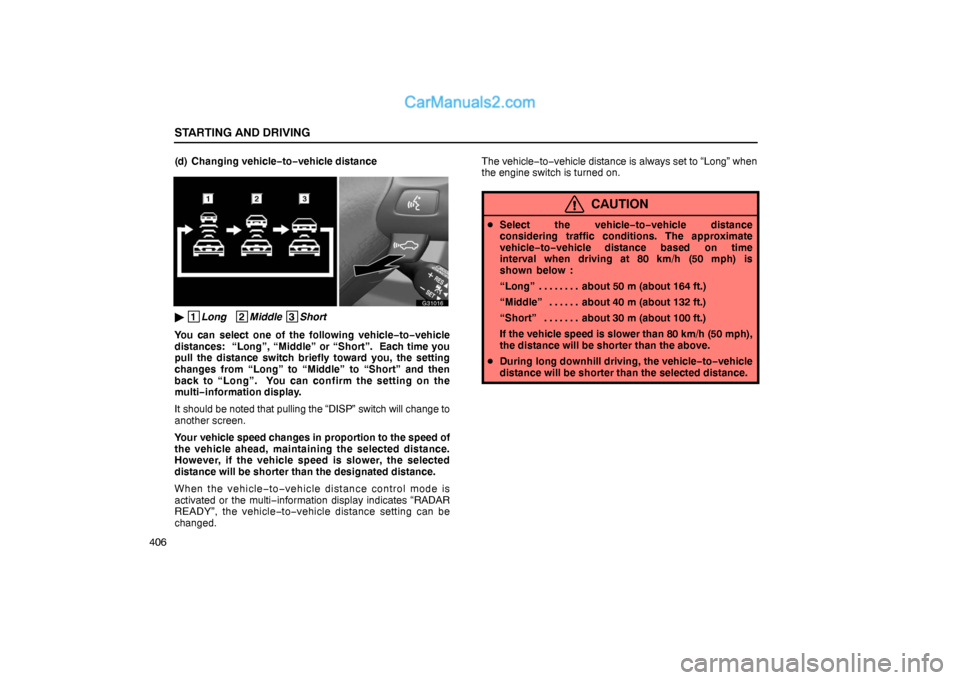
406(d) Changing vehicle−to−vehicle distance
G31016
� 1
Long 2
Middle 3
Short
You can select one of the following vehicle−to−vehicle
distances: “Long”, “Middle” or “Short”. Each time you
pull the distance switch briefly toward you, the setting
changes from “Long” to “Middle” to “Short” and then
back to “Long”. You can confirm the setting on the
multi−information display.
It should be noted that pulling the “DISP” switch will change to
another screen.
Your vehicle speed changes in proportion to the speed of
the vehicle ahead, maintaining the selected distance.
However, if the vehicle speed is slower, the selected
distance will be shorter than the designated distance.
When the vehicle−to−vehicle distance control mode is
activated or the multi−information display indicates “RADAR
READY”, the vehicle−to−vehicle distance setting can be
changed.The vehicle−to−vehicle distance is always set to “Long” when
the engine switch is turned on.
CAUTION
�Select the vehicle−to−vehicle distance
considering traffic conditions. The approximate
vehicle−to−vehicle distance based on time
interval when driving at 80 km/h (50 mph) is
shown below :
“Long” about 50 m (about 164 ft.). . . . . . . .
“Middle” about 40 m (about 132 ft.). . . . . .
“Short” about 30 m (about 100 ft.). . . . . . .
If the vehicle speed is slower than 80 km/h (50 mph),
the distance will be shorter than the above.
�During long downhill driving, the vehicle−to−vehicle
distance will be shorter than the selected distance.
Page 69 of 110
STARTING AND DRIVING
407 (e) Braking control
Dynamic radar cruise control is not a collision avoidance
system. If an approach warning is activated, depress the brake
pedal to decelerate to ensure an appropriate
vehicle−to−vehicle distance.
G31017
� 1
Under the vehicle−to−vehicle distance control
2
Braking activated
Braking control is operating only when the vehicle−to−vehicle
distance control mode is selected and your vehicle speed
exceeds about 40 km/h (25 mph).
If you are getting closer to the vehicle ahead at relatively higher
speed than those of the vehicle ahead or if engine braking
cannot be applied properly, braking control is automatically
activated. At this time, “BRAKE” flashes on the
multi−information display, indicating that the brakes are being
used.
CAUTION
Braking control will not ensure that your vehicle will
reduce speed appropriately. Do not rely on dynamic
radar cruise control to prevent collision.
Page 70 of 110

STARTING AND DRIVING
408(f) Approach warning
G31018
CAUTION
While you are cruising in the vehicle−to−vehicle
distance control mode, if the vehicle ahead decelerates
abruptly or if another vehicle cuts in ahead of you,
inadequate braking will make your vehicle closer to the
vehicle ahead of you and the multi−information display
flashes and beeps. The driver must depress the brake
pedal to slow down, ensuring collision avoidance or
that sufficient vehicle−to−vehicle distance is
maintained.
�The approach warning may not turn on even if the
vehicle drives closer to the vehicle ahead in the
following conditions:
♦Your vehicle and the vehicle ahead are cruising at
almost the same speed.
♦The vehicle ahead is cruising at a faster speed than
yours. (The distance between the vehicles will
become longer.)
♦Pay special attention to the very slow vehicle at the
end of the line in heavy traffic or at the tollgate.
♦Immediately after the speed setting.
♦The accelerator pedal is depressed or immediately
after the release of the accelerator pedal.
Page 71 of 110

STARTING AND DRIVING
409 (g) Millimeter wave radar sensor
G31019
� 1
Millimeter wave grille cover
2
Millimeter wave radar sensor
The millimeter wave radar sensor is used for
vehicle−to−vehicle distance control cruising. When the
millimeter wave radar sensor is disabled for some reason,
the warning message appears on the multi−information
display. For details, see “Vehicle−to−vehicle distance
control mode failure warning” on page 410.
CAUTION
To ensure that the dynamic radar cruise control system
will function properly while driving, observe the
following:
�Always keep the millimeter wave radar sensor and
grille cover clean. When cleaning, use a soft cloth
and be careful not to damage the sensor and grille
cover.
�Avoid strong impacts around the millimeter wave
radar sensor. An incorrect millimeter wave radar
sensor alignment will result in system malfunction.
A special device is required to adjust the millimeter
wave radar sensor alignment. Be sure to have the
sensor adjusted by your Lexus dealer.
�Do not disassemble the millimeter wave radar
sensor.
�Do not affix a sticker (including a transparent sticker)
or attach an accessory around the millimeter radar
sensor or the grille cover.
�Do not modify or paint the grille cover. When
replacing the grille cover, be sure to use a genuine
grille cover.
Page 72 of 110

STARTING AND DRIVING
410For vehicles sold in U.S.A.
FCC WARNING
Changes or modifications not expressly approved by the
party responsible for compliance could void the user’s
authority to operate the equipment.
FCC RF exposure information
This device complies with the FCC RF exposure
requirements.
For vehicles sold in Canada
Operation is subject to the following two conditions;
(1) this device may not cause interference, and
(2) this device must accept any interference received,
including interference that may cause undesired
operation of the device.
(h) Vehicle−to−vehicle distance control mode failure
warning
G31020
If there is trouble somewhere in the dynamic radar cruise
control while the vehicle−to−vehicle distance control mode is
on, the ”CRUISE” indicator light in the instrument cluster
flashes, the master warning light comes on and the warning
tone sounds, and one or more of the following warning
messages will appear on the multi−information display.
�“CLEAN RADAR SENSOR”
�“CRUISE NOT AVAILABLE”
�“CHECK CRUISE SYSTEM”
If any warning message shown above appears, the preset
speed automatically cancels out.
 1
1 2
2 3
3 4
4 5
5 6
6 7
7 8
8 9
9 10
10 11
11 12
12 13
13 14
14 15
15 16
16 17
17 18
18 19
19 20
20 21
21 22
22 23
23 24
24 25
25 26
26 27
27 28
28 29
29 30
30 31
31 32
32 33
33 34
34 35
35 36
36 37
37 38
38 39
39 40
40 41
41 42
42 43
43 44
44 45
45 46
46 47
47 48
48 49
49 50
50 51
51 52
52 53
53 54
54 55
55 56
56 57
57 58
58 59
59 60
60 61
61 62
62 63
63 64
64 65
65 66
66 67
67 68
68 69
69 70
70 71
71 72
72 73
73 74
74 75
75 76
76 77
77 78
78 79
79 80
80 81
81 82
82 83
83 84
84 85
85 86
86 87
87 88
88 89
89 90
90 91
91 92
92 93
93 94
94 95
95 96
96 97
97 98
98 99
99 100
100 101
101 102
102 103
103 104
104 105
105 106
106 107
107 108
108 109
109
