Page 49 of 354
Knowing your vehicle92
3
1
2
3
4
5
6
7
8
9
Center console storageThese compartments can be used to
store small items required by the
driver or front passenger.
Type A (if equipped)
To open either of the console storage
compartments, pull up on the locking
tab (
➀) or (
➁). To use the center console as arm-
rest, push the release button then it
rises.
To lower the center console, push
the release button and press it down.
Type B (if equipped)
To open the console storage com-
partment, pull up on the locking tab.
1KMA2165
1KMA2166
1KMA2190
➀
➁
KM CAN (ENG) 3 (55~)new.qxd 7/29/05 9:37 AM Page 92
Page 50 of 354
393
1
2
3
4
5
6
7
8
9
Knowing your vehicle
Glove boxThe glove box can be locked and
unlocked with a master key.
To open the glove box, make sure it
is unlocked, then pull the handle (
➀)
and the glove box will automatically
open (
➁). Close the glove box after
use.
✽ ✽ NOTICEDo not apply excessive force when
using the key in the glovebox lock.
Doing so may damage the parts.
Sunglass holder A sunglass storage compartment is
provided on the overhead console.
To open the sunglass holder, press
the cover and the holder will slowly
open. Place your sunglasses in the
compartment door with the lenses
facing out. Push to close.✽ ✽NOTICEMake sure the sunglass holder is
closed while driving.
1KMA2168
1KMA2164
KM CAN (ENG) 3 (55~)new.qxd 7/29/05 9:37 AM Page 93
Page 55 of 354
Knowing your vehicle98
3
1
2
3
4
5
6
7
8
9
Digital clockWhenever the battery terminals,
ROOM LP fuse, or Power Connect
are disconnected, you must reset the
time.
When the ignition switch is in the
ACC or ON position, the clock but-
tons operates as follows:
HOUR:
Pressing the “H” button with your
finger, a pencil or similar object will
advance the time displayed by one
hour.
MINUTE: Pressing the “M” button with your
finger, a pencil or similar object will
advance the time displayed by one
minute. RESET:
To clear away minutes, press the
“R” button with your finger, a pencil
or similar object. Then the clock will
be set precisely on the hour.
For example, if the “R” button is
pressed while the time is between
9:01 and 9:29, the display will be
reset to 9:00.
9:01 ~ 9:29 ➾ 9:00
9:30 ~ 9:59 ➾ 10:00
To change the 12 hour format to the
24 hour format, press the “R” button
for more than 4 seconds.
For example, if the “R” button is
pressed for more than 4 seconds
while the time is 10:15 p.m., the dis-
play will be changed to 22:15.
1KMN2157
KM CAN (ENG) 3 (55~)new.qxd 7/29/05 9:37 AM Page 98
Page 60 of 354
3 103
1
2
3
4
5
6
7
8
9
Knowing your vehicle
2. Remove the two (2) screws, andthen remove the overhead con-
sole. 3. Insert the emergency handle (pro-
vided with the vehicle) and turn
the handle clockwise to open or
counterclockwise to close.
Resetting the sunroofWhenever the vehicle battery is dis-
connected or discharged, or you use
the emergency handle to operate the
sunroof, you have to reset your sun-
roof system as follows:
1. Turn the ignition key to the ON position.
2. According to the position of the sunroof, do as follows.
1) in case that the sunroof hasclosed completely or been tilt-
ed :
Press the TILT UP button until
the sunroof has tilted upward
completely.
2) in case that the sunroof has slide-opened:
Press and hold the CLOSE
button for more than 5 seconds
until the sunroof has closed
completely. Press the TILT UP
button until the sunroof has tilt-
ed upward completely.
1KMA2031
1KMA2032
KM CAN (ENG) 3 (55~)new.qxd 7/29/05 9:37 AM Page 103
Page 67 of 354
101
2
3
4
5
6
7
8
9
Keys / 3-2
Remote keyless entry / 3-3
Theft-alarm system / 3-5
Immobilizer system / 3-7
Door locks / 3-9
Window / 3-16
Seat / 3-19
Safety belts / 3-30
Airbags-supplemental restraint system / 3-54
Hood / 3-80
Fuel filler lid / 3-82
Mirrors / 3-85
Interior lights / 3-89
Storage compartment / 3-91
Interior features / 3-94
Sunroof / 3-100
Luggage net / 3-104
Tonneau cover / 3-105
Luggage center box / 3-107
Roof rack / 3-108
Antenna / 3-109
Knowing your vehicle
10
KM CAN (ENG) 3 (~54)new.qxd 7/29/05 9:33 AM Page 1
Page 68 of 354
Knowing your vehicle23
1
2
3
4
5
6
7
8
9
The key code number is stamped on
the plate attached to the key set.
Should you lose your keys, this num-
ber will enable an authorized Kia
Dealer to duplicate the keys easily.
Remove the plate and store it in a
safe place. Also, record the code
number and keep it in a safe and
handy place, but not in the vehicle.
Key operations➀Master key
Used to start the engine, lock and unlock the doors, lock and unlock
the glove box.
➁ Transmitter (if equipped)
Used to lock and unlock the
doors.
✽ ✽
NOTICEUse only Kia original parts for the
ignition key in your vehicle. If an
aftermarket key is used, the ignition
switch may not return to ON after
START. If this happens, the starter
will continue to operate causing
damage to the starter motor and
possible fire due to excessive current
in the wiring.
KEYS
1KMB20011KMB2002
1KMA2001
WARNING
- Ignition key
Leaving children unattended in
a vehicle with the ignition key is
dangerous even if the key is not
in the ignition. Children copy
adults and they could place the
key in the ignition. The ignition
key would enable children to
operate power windows or other
controls, or even make the vehi-
cle move, which could result in
serious bodily injury or even
death. Never leave the keys in
your vehicle with unsupervised
children.
➀
➁
Type A
Type B
KM CAN (ENG) 3 (~54)new.qxd 7/29/05 9:33 AM Page 2
Page 69 of 354
33
Knowing your vehicle
1
2
3
4
5
6
7
8
9
➀
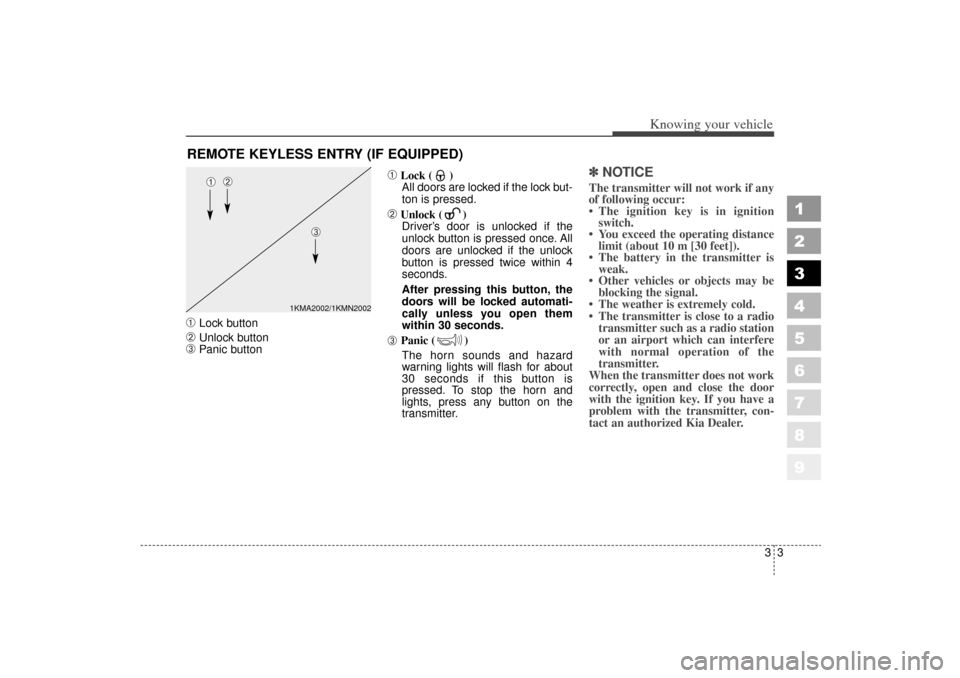
Lock button
➁
Unlock button
➂
Panic button
➀
Lock ( )All doors are locked if the lock but-
ton is pressed.
➁
Unlock ( ) Driver’s door is unlocked if the
unlock button is pressed once. All
doors are unlocked if the unlock
button is pressed twice within 4
seconds.
After pressing this button, the
doors will be locked automati-
cally unless you open them
within 30 seconds.
➂
Panic ( )
The horn sounds and hazard
warning lights will flash for about
30 seconds if this button is
pressed. To stop the horn and
lights, press any button on the
transmitter.
✽ ✽ NOTICEThe transmitter will not work if any
of following occur:
• The ignition key is in ignition
switch.
You exceed the operating distance limit (about 10 m [30 feet]).
The battery in the transmitter is weak.
Other vehicles or objects may be blocking the signal.
The weather is extremely cold.
The transmitter is close to a radio transmitter such as a radio station
or an airport which can interfere
with normal operation of the
transmitter.
When the transmitter does not work
correctly, open and close the door
with the ignition key. If you have a
problem with the transmitter, con-
tact an authorized Kia Dealer.
REMOTE KEYLESS ENTRY (IF EQUIPPED)
1KMA2002/1KMN2002
➀
➁
➂
KM CAN (ENG) 3 (~54)new.qxd 7/29/05 9:33 AM Page 3
Page 71 of 354
35
Knowing your vehicle
1
2
3
4
5
6
7
8
9
✽ ✽NOTICEThe keyless entry system transmit-
ter is designed to give you years of
troublefree use, however it can mal-
function if exposed to moisture or
static electricity. If you are unsure
how to use your transmitter or
replace the battery, contact an
authorized Kia dealer. For replacement transmitters, see an
Authorized Kia Dealer for reprogram-
ming.✽ ✽NOTICE Using the wrong battery can cause
the transmitter to malfunction. Be
sure to use the correct battery.
To avoid damaging the transmit- ter, don't drop it, get it wet, or
expose it to heat or sunlight.
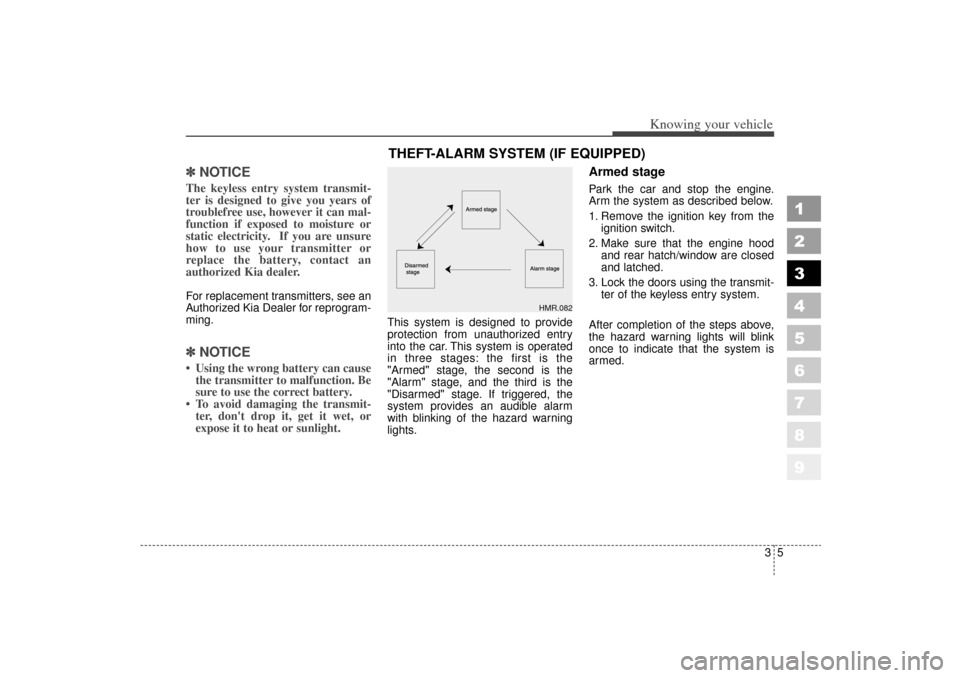
This system is designed to provide
protection from unauthorized entry
into the car. This system is operated
in three stages: the first is the
"Armed" stage, the second is the
"Alarm" stage, and the third is the
"Disarmed" stage. If triggered, the
system provides an audible alarm
with blinking of the hazard warning
lights.
Armed stagePark the car and stop the engine.
Arm the system as described below.
1. Remove the ignition key from the
ignition switch.
2. Make sure that the engine hood and rear hatch/window are closed
and latched.
3. Lock the doors using the transmit- ter of the keyless entry system.
After completion of the steps above,
the hazard warning lights will blink
once to indicate that the system is
armed.
THEFT-ALARM SYSTEM (IF EQUIPPED)
HMR.082
KM CAN (ENG) 3 (~54)new.qxd 7/29/05 9:33 AM Page 5