Page 157 of 312
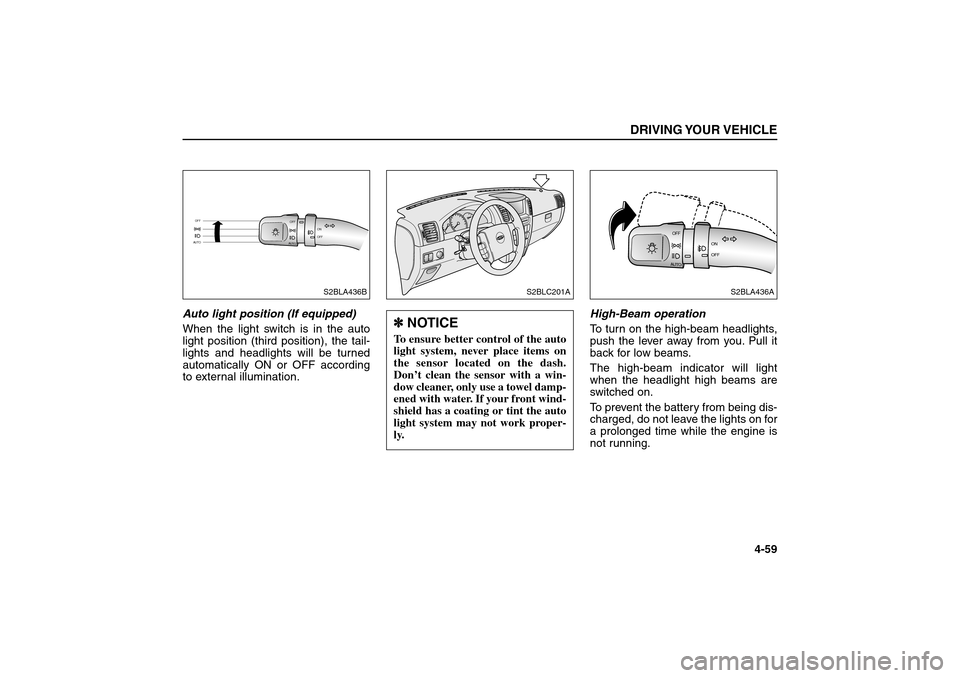
Auto light position (If equipped)
When the light switch is in the auto
light position (third position), the tail-
lights and headlights will be turned
automatically ON or OFF according
to external illumination.High-Beam operation
To turn on the high-beam headlights,
push the lever away from you. Pull it
back for low beams.
The high-beam indicator will light
when the headlight high beams are
switched on.
To prevent the battery from being dis-
charged, do not leave the lights on for
a prolonged time while the engine is
not running.
DRIVING YOUR VEHICLE
4-59
A
U
T
OOFF
OFFON
AUTOOFF
S2BLA436B
S2BLC201A
A
U
TOOFF
OFFON
S2BLA436A
✽ ✽
NOTICETo ensure better control of the auto
light system, never place items on
the sensor located on the dash.
Don’t clean the sensor with a win-
dow cleaner, only use a towel damp-
ened with water. If your front wind-
shield has a coating or tint the auto
light system may not work proper-
ly.
BL-ENG (CAN)-4.qxd 7/28/05 5:55 PM Page 59
Page 158 of 312

Flashing Headlights
To flash the headlights, pull the lever
toward you. It will return to the normal
position when released. The head-
light switch does not need to be on to
use this flashing feature.Turn Signals
The ignition switch must be on for the
turn signals to function. To turn on the
turn signals, move the lever up or
down. Green arrow indicators on the
instrument panel indicate which turn
signal is operating. They will self-can-
cel after a turn is completed. If the
indicator continues to flash after a
turn, manually return the lever to the
OFF (middle) position.Lane change signals
To signal a lane change, move the
turn signal lever slightly and hold it in
position. The lever will return to the
OFF (center) position when released.
If an indicator stays on and does not
flash or if it flashes abnormally, one of
the turn signal bulbs may be burned
out and will require replacement.DRIVING YOUR VEHICLE4-60
AUTOOFF
OFFON
S2BLA438
A
U
T
OOFF
OFFONS2BLA439
BL-ENG (CAN)-4.qxd 7/28/05 5:55 PM Page 60
Page 161 of 312
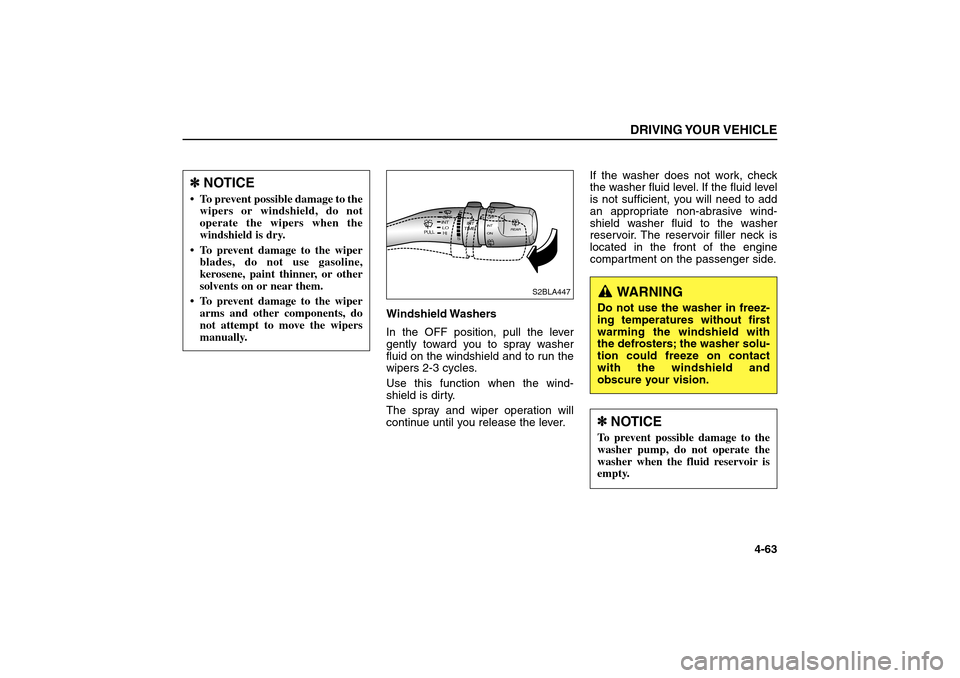
Windshield Washers
In the OFF position, pull the lever
gently toward you to spray washer
fluid on the windshield and to run the
wipers 2-3 cycles.
Use this function when the wind-
shield is dirty.
The spray and wiper operation will
continue until you release the lever.If the washer does not work, check
the washer fluid level. If the fluid level
is not sufficient, you will need to add
an appropriate non-abrasive wind-
shield washer fluid to the washer
reservoir. The reservoir filler neck is
located in the front of the engine
compartment on the passenger side.
DRIVING YOUR VEHICLE
4-63
HILO
O
N
INT
INT
OFF
OFF
FS
REAR
INT
TIME
PULL
S2BLA447
✽ ✽
NOTICE To prevent possible damage to the
wipers or windshield, do not
operate the wipers when the
windshield is dry.
To prevent damage to the wiper
blades, do not use gasoline,
kerosene, paint thinner, or other
solvents on or near them.
To prevent damage to the wiper
arms and other components, do
not attempt to move the wipers
manually.
WARNING
Do not use the washer in freez-
ing temperatures without first
warming the windshield with
the defrosters; the washer solu-
tion could freeze on contact
with the windshield and
obscure your vision.✽ ✽
NOTICETo prevent possible damage to the
washer pump, do not operate the
washer when the fluid reservoir is
empty.
BL-ENG (CAN)-4.qxd 7/28/05 5:55 PM Page 63
Page 171 of 312
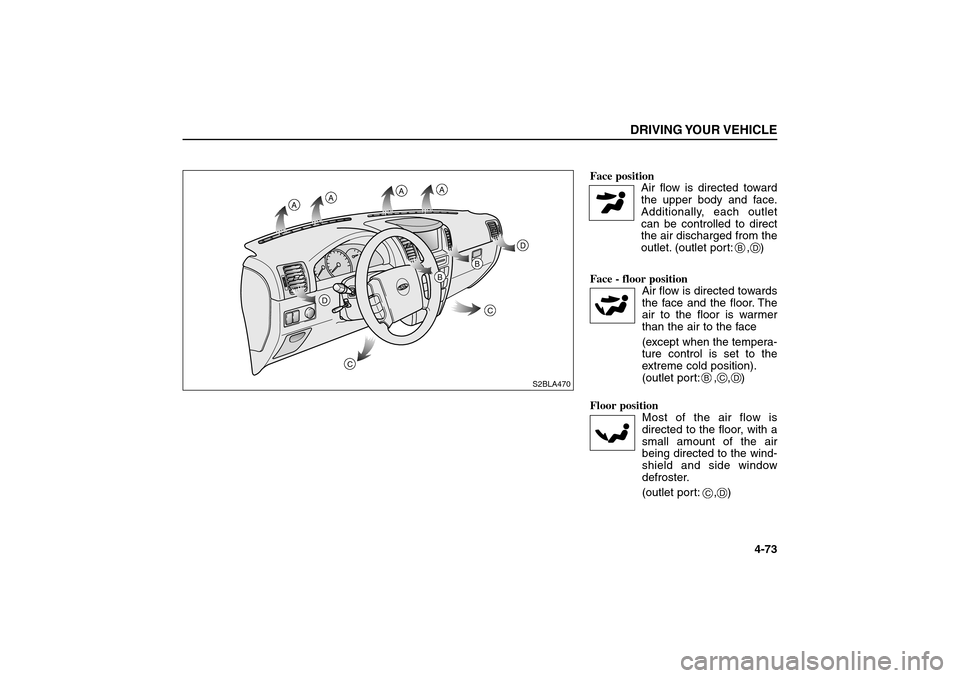
Face position
Air flow is directed toward
the upper body and face.
Additionally, each outlet
can be controlled to direct
the air discharged from the
outlet. (outlet port: , )
Face - floor position
Air flow is directed towards
the face and the floor. The
air to the floor is warmer
than the air to the face
(except when the tempera-
ture control is set to the
extreme cold position).
(outlet port: , , )
Floor position
Most of the air flow is
directed to the floor, with a
small amount of the air
being directed to the wind-
shield and side window
defroster.
(outlet port: , )
DRIVING YOUR VEHICLE
4-73
S2BLA470
A
A
A
A
D
D
C
C
B
B
B
D
BC
C
D
D
BL-ENG (CAN)-4.qxd 7/28/05 5:55 PM Page 73
Page 181 of 312

Mode Selection Button
The mode selection button controls
the direction of the air flow through
the ventilation system.
The air flow outlet port is same as
manual climate control system.
Face position
Air flow is directed toward
the upper body and face.
Additionally, each outlet
can be controlled to direct
the air discharged from the
outlet. (outlet port: , )
DRIVING YOUR VEHICLE
4-83
B
D
MODE
✽ ✽
NOTICEIt should be noted that prolonged
operation of the heating in recircu-
lated air position will cause fogging
of the windshield and side windows
and the air within the passenger
compartment will become stale.
In addition, prolonged use of the air
conditioning with the “recirculated
air position” selected, will result in
excessively dry air in the passenger
compartment.
CAUTION
Continued climate control sys-
tem operation in the recirculat-
ed air position may allow
humidity to increase inside
vehicle which may fog the glass
and obscure visibility.
WARNING
Do not sleep in a vehicle with air
conditioning system or heating
system on. It may cause serious
harm or death due to a drop in
the oxygen level and/or body
temperature.
BL-ENG (CAN)-4.qxd 7/28/05 5:56 PM Page 83
Page 182 of 312

Face - floor position
Air flow is directed towards
the face and the floor. The
air to the floor is warmer
than the air to the face
(except when the tempera-
ture control is set to the
extreme cold position).
(outlet port: , , )
Floor position
Most of the air flow is
directed to the floor, with a
small amount of the air
being directed to the wind-
shield and side window
defroster.
(outlet port: , )Floor - defrost position
Most of the air flow is
directed to the floor and
the windshield with a small
amount directed to the
side window defrosters.
(outlet port: , , )
The air conditioning will
automatically on based on
the ambient temperature
and outside(fresh) air posi-
tion will be selected auto-
matically. If you don’t want
the air-conditioning or out-
side (fresh) air position
press the corresponding
button to cancel the
opeation.Defrost Button
Most of the air flow is directed to the
windshield with a small amount of air
directed to the side window
defrosters. (outlet port: , )
When the defrost button is pressed
the outside (fresh) air position will
automatically selected and the air will
be discharged through the windshield
defrost vents. The air conditioning will
automatically operate based on
ambient temperature. If you don’t
want the air-conditioning or outside
(fresh) air position press the corre-
sponding button to cancel the opera-
tion.DRIVING YOUR VEHICLE4-84
B
A
C
C
C
D
D
D
A
D
BL-ENG (CAN)-4.qxd 7/28/05 5:56 PM Page 84
Page 188 of 312
5-1
DRIVING TIPSFuel Requirements . . . . . . . . . . . . . . . . . . . . . . . . . . . . . . . . . 5-2
Emission Control System . . . . . . . . . . . . . . . . . . . . . . . . . . . 5-3
Tips on Driving Your Vehicle . . . . . . . . . . . . . . . . . . . . . . . . . 5-5
Suggestions for Economical Operation . . . . . . . . . . . . . . . . 5-6
Special Driving Conditions . . . . . . . . . . . . . . . . . . . . . . . . . . 5-8
Using Four-Wheel Drive . . . . . . . . . . . . . . . . . . . . . . . . . . . . 5-14
Weight of the Vehicle - with and without a Trailer . . . . . . . .5-32
Trailer Towing . . . . . . . . . . . . . . . . . . . . . . . . . . . . . . . . . . . . 5-34
Overloading . . . . . . . . . . . . . . . . . . . . . . . . . . . . . . . . . . . . . 5-43
Label Information . . . . . . . . . . . . . . . . . . . . . . . . . . . . . . . . . 5-43
5
BL-ENG (CAN)-5.qxd 7/28/05 5:56 PM Page 1
Page 196 of 312

Rocking the Vehicle
If it is necessary to rock the vehicle to
free it from snow, sand, or mud, first
turn the steering wheel right and left
to clear the area around your front
wheels. Then, shift back and forth
between 1 (First) and R (Reverse) in
vehicles equipped with a manual
transmission or R (Reverse) and any
forward gear in vehicles equipped
with an automatic transmission. Do
not race the engine, and spin the
wheels as little as possible. If you are
still stuck after a few tries, have the
vehicle pulled out by a tow vehicle to
avoid engine overheating and possi-
ble damage to the transmission,
transfer case (if equipped), or differ-
ential.Driving at Night
Because night driving presents many
more hazards than driving in the day-
light, here are some important tips to
remember:
Slow down and keep more distance
between you and other vehicles, as
it may be more difficult to see at
night, especially in areas where
there may not be any street lights.
Adjust your mirrors to reduce the
glare from other driver’s headlights.
Keep your headlights clean and
properly aimed. Dirty or improperly
aimed headlights will make it much
more difficult to see at night.
Avoid staring directly at the head-
lights of oncoming vehicles. You
could be temporarily blinded, and it
will take several seconds for your
eyes to readjust to the darkness.
DRIVING TIPS
5-9
✽ ✽
NOTICEProlonged rocking may cause
engine over-heating, transmission
or transfer case (if equipped) dam-
age or failure, and tire damage.
WARNING- Spinning Tires
Do not spin the wheels, espe-
cially at speeds more than 35
mph (56 km/h). Spinning the
wheels at high speeds when the
vehicle is stationary could
cause a tire to overheat,
explode and injure bystanders.
BL-ENG (CAN)-5.qxd 7/28/05 5:56 PM Page 9