Page 102 of 281
1 23456789Ignition switch / 4-2
Starting the engine / 4-4Manual transaxle / 4-6Automatic transaxle / 4-7Brake system / 4-13
Steering wheel / 4-20
Instrument cluster / 4-23 Gauges / 4-25
Warnings and indicators / 4-26Lighting / 4-33
Wipers and washers / 4-38
Defroster / 4-41
Hazard warning flasher / 4-42
Manual climate control system / 4-43
Windshield defrosting and defogging / 4-52Theft-alarm system / 4-53
Driving your vehicle
Page 103 of 281

Driving your vehicle
2
4
1 23456789
Ignition switch and anti-theft
steering column lock
Ignition switch position
LOCK
The steering wheel locks to protect
against theft. The ignition key can be
removed only in the LOCK position.
When turning the ignition switch to
the LOCK position, push the key
inward at the ACC position and turn
the key toward the LOCK position. ACC (Accessory)
The steering wheel is unlocked and
electrical accessories are operative. ON
The warning lights can be checked
before the engine is started. This is
the normal running position after the
engine is started.
Do not leave the ignition switch ON if
the engine is not running to preventbattery discharge.
START
Turn the ignition key to the START
position to start the engine. The
engine will crank until you release
the key; then it returns to the ON
position. The brake warning lamp
can be checked in this position.
If difficulty is experienced in turning the ignition key to the START posi-tion, turn the steering wheel rightand left to release the tension and then turn the key.
IGNITION SWITCH
1XTA3017
Page 104 of 281

43
1 23456789
Driving your vehicle
(Continued)
• Never reach for the ignitionswitch, or any other controls
through the steering wheel
while the vehicle is in motion.
The presence of your hand orarm in this area could cause a
loss of vehicle control, an
accident and serious bodily
injury or death.
Do not place any movable objects around the driver’s
seat as they may move while
driving, interfere with the driv-er and lead to an accident.WARNING - Ignition key
Never turn the ignition switch to LOCK or ACC while the
vehicle is moving. This wouldresult in loss of directional
control and braking function,
which could cause an immedi-ate accident.
The anti-theft steering column lock is not a substitute for the
parking brake. Before leaving
the driver’s seat, always make
sure the shift lever is engagedin 1 st
gear for manual transaxle
or P (Park) for automatic
transaxle, set the parking
brake fully and shut the
engine off. Unexpected and
sudden vehicle movement
may occur if these precau-tions are not taken.
(Continued)
Page 122 of 281
421
1 23456789
Driving your vehicle
Tilt steering (if equipped)
A tilt steering wheel allows you to
adjust the steering wheel before you
drive. You can also raise it to the
highest level to give your legs more
room when you exit and enter the
vehicle.
The steering wheel should be posi-
tioned so that it is comfortable for
you to drive, while permitting you to
see the instrument panel warning
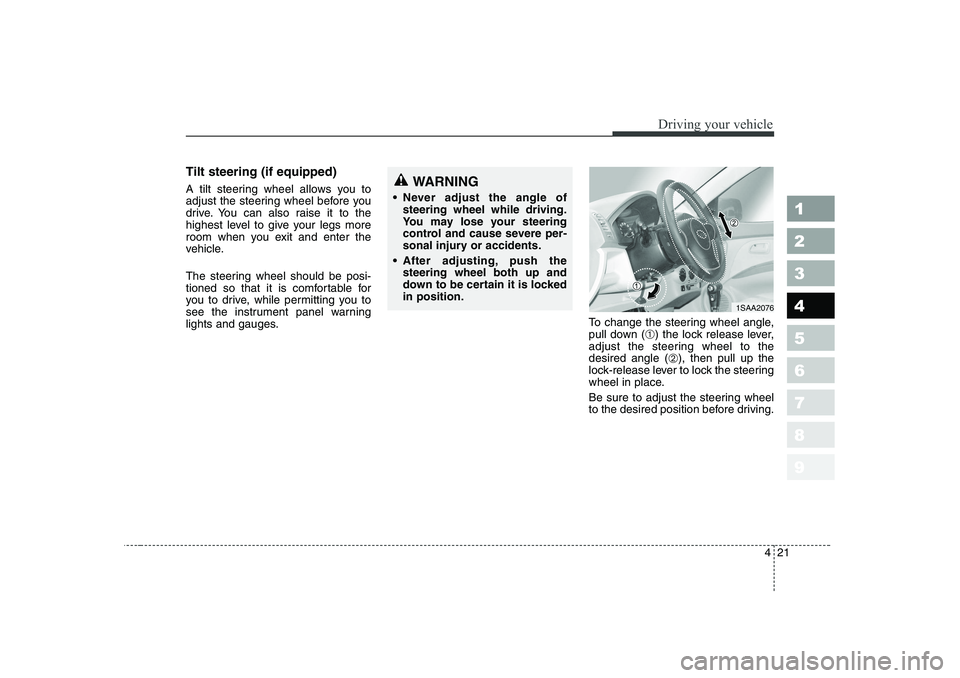
lights and gauges.To change the steering wheel angle,
pull down (
➀) the lock release lever,
adjust the steering wheel to thedesired angle ( ➁), then pull up the
lock-release lever to lock the steering
wheel in place.
Be sure to adjust the steering wheel
to the desired position before driving.WARNING
Never adjust the angle of steering wheel while driving.
You may lose your steering
control and cause severe per-
sonal injury or accidents.
After adjusting, push thesteering wheel both up and
down to be certain it is lockedin position.
1SAA2076
Page 123 of 281
Driving your vehicle
22
4
1 23456789
Horn
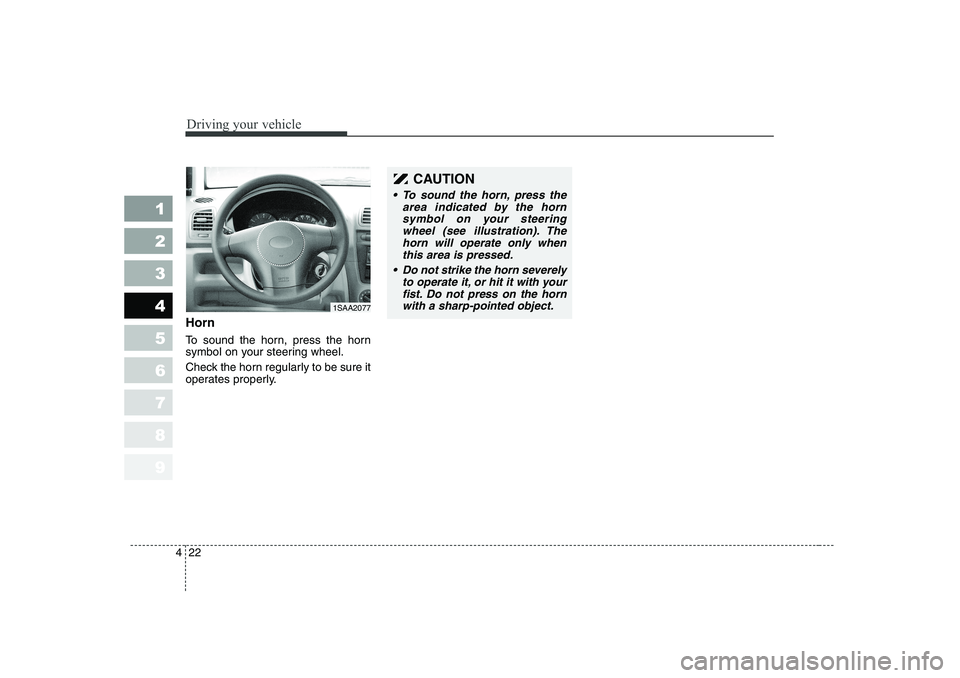
To sound the horn, press the horn
symbol on your steering wheel.
Check the horn regularly to be sure it
operates properly.
CAUTION
To sound the horn, press the
area indicated by the hornsymbol on your steering wheel (see illustration). Thehorn will operate only whenthis area is pressed.
Do not strike the horn severely
to operate it, or hit it with your fist. Do not press on the hornwith a sharp-pointed object.
1SAA2077
Page 132 of 281

431
1 23456789
Driving your vehicle
Malfunction indicator (if equipped)
This indicator light is part of the Engine Control System which moni-
tors various emission control system
components. If this light illuminates
while driving, it indicates that a
potential problem has been detected
somewhere in the emission controlsystem.
Generally, your vehicle will continue
to be drivable and will not need tow-
ing, but have the system checked by
an authorized Kia Dealer as soon as
possible.Electric power steer- ing system(EPS) warn-ing Light (if equipped,
diesel engine only) This indicator light comes on about 3
seconds after the ignition key is
turned to the
“ON ”position or after
the engine is started, it will go out.This light also comes on when the
EPS has some troubles. If this light
illuminates while driving, take your
car to the authorized Kia Dealer and
have the system checked.CAUTION
Prolonged driving with the
Emission Control SystemMalfunction Indicator Light ( ) illuminated may causedamage to the emission con- trol systems which couldeffect drivability and/or fueleconomy.
If the EmissionControl System
Malfunction Indicator Light ( ) begins to flash ON and OFF, potential catalytic con-verter damage is possible which could result in loss ofengine power. Have the Engine Control System inspected assoon as possible by an author- ized Kia Dealer.
EPS
CAUTION
When you move the electric
power steering back-end andforth-end continuously in stop position, steering wheel playsheavily to operate anti-overloadsystem. It is normal condition. It returns to be normal gettingtime.
Page 161 of 281

Driving tips
6
5
SUGGESTIONS FOR ECONOMICAL OPERATION
Your vehicle's fuel economy depends
mainly on your style of driving, where
you drive and when you drive.
Each of these factors affects how
many kilometers (miles) you can get
from a liter (gallon) of fuel. To operate
your vehicle as economically as pos-
sible, use the following driving sug-
gestions to help save money in bothfuel and repairs:
Avoid lengthy warm-up idling. Once the engine is running
smoothly, begin driving.
Remember, engine warm-up may
take a little longer on cold days.
Save fuel by accelerating slowly after stopping.
Keep the engine in tune and follow the recommended periodic mainte-
nance schedule. This will increase
the life of all parts and lower your
operating costs. Do not use the air conditioner
unnecessarily.
Slow down when driving on rough roads.
For longer tire life and better fuel economy, always keep the tiresinflated to the recommended pres-
sures.
Maintain a safe distance from other vehicles to avoid sudden stops.
This will reduce wear on brake lin-
ings and pads. Driving in such a
way will also save fuel because
extra fuel is required to accelerate
back to driving speed.
Do not carry unnecessary weight in the vehicle.
Do not rest your foot on the brake pedal while driving. This can cause
needless wear, possible damage
to the brakes, and poor fuel econo-
my.
Improper wheel alignment results in faster tire wear and lower fuel
economy. Open windows at high speeds can
reduce fuel economy.
Fuel economy is less in crosswinds and headwinds. To help offset
some of this loss, slow down when
driving in these conditions.
Keeping a vehicle in good operating
condition is important both for econ-
omy and safety. Therefore, have an
authorized Kia dealer performscheduled inspections and mainte-
nance.
1 23456789
WARNING - Engine off
during motion
Never turn the engine off to
coast down hills or anytime the
vehicle is in motion. The power
steering and power brakes willnot function without the engine
running. Instead, keep the
engine on and downshift to an
appropriate gear for engine
braking effect.
Page 162 of 281

57
Driving tips
SPECIAL DRIVING CONDITIONS
Hazardous driving conditions
When hazardous driving conditions
are encountered such as water,
snow, ice, mud, sand, or similar haz-
ards, follow these suggestions:
Drive cautiously and allow extra distance for braking.
Avoid sudden movements in brak- ing or steering.
When braking, pump the brake pedal with a light up-and-down
motion until the vehicle is stopped.
✽✽ NOTICE
Do not pump the brake pedal on a
vehicle equipped with ABS.
If stalled in snow, mud, or sand, use second gear. Accelerate slow-
ly to avoid spinning the drive
wheels.
Use sand, rock salt, tire chains, or other non-slip material under the
drive wheels to provide traction
when stalled in ice, snow, or mud. Rocking the vehicle
If it is necessary to rock the vehicle
to free it from snow, sand, or mud,
first turn the steering wheel right and
left to clear the area around your
front wheels. Then, shift back and
forth between 1 (First) and R
(Reverse) in vehicles equipped with
a manual transaxle or R (Reverse)
and any forward gear in vehiclesequipped with an automatic
transaxle. Do not race the engine,and spin the wheels as little as pos-
sible. If you are still stuck after a few
tries, have the vehicle pulled out by a
tow vehicle to avoid engine overheat-
ing and possible damage to the
transaxle.
✽✽
NOTICE
Prolonged rocking may cause engine
over-heating, transaxle damage or
failure, and tire damage.
1 23456789
WARNING - Downshifting
Downshifting with an automatic
transaxle, while driving on slip-
pery surfaces can cause an
accident. The sudden change intire speed could cause the tires
to skid. Be careful when down-
shifting on slippery surfaces.