Page 90 of 344

3. Close and lock all doors, hood and
trunk lid.
Lock all doors by pushing the LOCK
button on the keyfob, the Intelli-
gent Key or by pushing any front door
handle request switch or turning the
door key. When using the remote key-
less entry, the hazard indicators will
operate as shown in ªRemote keyless
entry systemº or ªIntelligent Key
systemº in the ª3. Pre-driving checks
and adjustmentsº section.
4. Confirm that the security indicator
light
q A
comes on. The security indica-
tor light glows for about 30 seconds
and then blinks. The system is now
armed. If, during this 30-second time
period, the door is unlocked by the
key, the remote keyless entry or the
front door request switch, or the igni-
tion switch is turned to the ACC or ON
position, the system will not be
armed.
Even when the driver and/or passengers
are in the vehicle, the system will be
armed with all doors, hood and trunk lid
locked and ignition switch off. Turn the ig-
nition switch to the ACC position to turn off
the system. Vehicle security system activation The security system will give the following
alarm:
O The headlights blink and the horn
sounds intermittently.
O The alarm automatically turns off after
approximately 50 seconds. However,
the alarm reactivates if the vehicle is
tampered with again. The alarm can
be shut off by unlocking a door with
the key, by pushing any front door
handle request switch or by pushing
the UNLOCK button on the keyfob
or Intelligent Key.
The alarm is activated by:
O Opening the door without using the
key or keyfob or Intelligent Key.
O Opening the trunk lid without using
the keyfob or Intelligent Key.
O Opening the hood.
How to stop an activated alarm The alarm will stop only by unlocking a
door with the key, by pushing any door
handle request switch or by pushing the
UNLOCK button on keyfob or Intelli-
gent Key. The alarm will not stop if the ig- nition switch is turned to the ACC or ON
position.
If the system does not operate as de-
scribed above, have it checked by an
INFINITI dealer.
INFINITI VEHICLE IMMOBILIZER
SYSTEM The INFINITI Vehicle Immobilizer System
will not allow the engine to start without
the use of the registered key.
If the engine fails to start using the regis-
tered key (for example, when interference
is caused by another registered key, an
automated toll road device or automated
payment device on the key ring), restart
the engine using the following proce-
dures:
1. Leave the ignition switch in the ON po-
sition for approximately 5 seconds.
2. Turn the ignition switch to the OFF or
LOCK position and wait approximately
10 seconds.
3. Repeat steps 1 and 2.
4. Restart the engine while holding the
device (which may have caused the in-
2-18 Instruments and controls
w 06.1.4/V35-D/V5.0
X
Page 101 of 344

If the power supply is disconnected, the
clock will not indicate the correct time. Re-
adjust the time.
ADJUSTING THE TIME To move the time forward, push the
button
q 1
.
To move the time backward, push the
button
q 2
.
Push and hold each adjusting switch to
move the time forward or backward con-
tinuously. The power outlet is for powering electrical
accessories such as cellular telephones.
CAUTION O The outlet and plug may be hot during or
immediately after use.
O This power outlet is not designed for use
with a cigarette lighter unit.
O Do not use with accessories that exceed a
12 volt, 120W (10A) power draw. Do not
use double adapters or more than one
electrical accessory. O Use power outlets with the engine running
to avoid discharging the vehicle battery.
O Avoid using power outlets when the air
conditioner, headlights or rear window de-
froster is on.
O Before inserting or disconnecting a plug,
be sure the electrical accessory being used
is turned OFF.
O Push the plug in as far as it will go. If good
contact is not made, the plug may overheat
or the internal temperature fuse may open.
O When not in use, be sure to close the cap.
Do not allow water to contact the outlet.SIC2568 SIC1840B
Automatic transmission model SIC2673
Manual transmission modelsCLOCK POWER OUTLET
Instruments and controls
2-29
w 06.1.5/V35-D/V5.0
X
Page 104 of 344
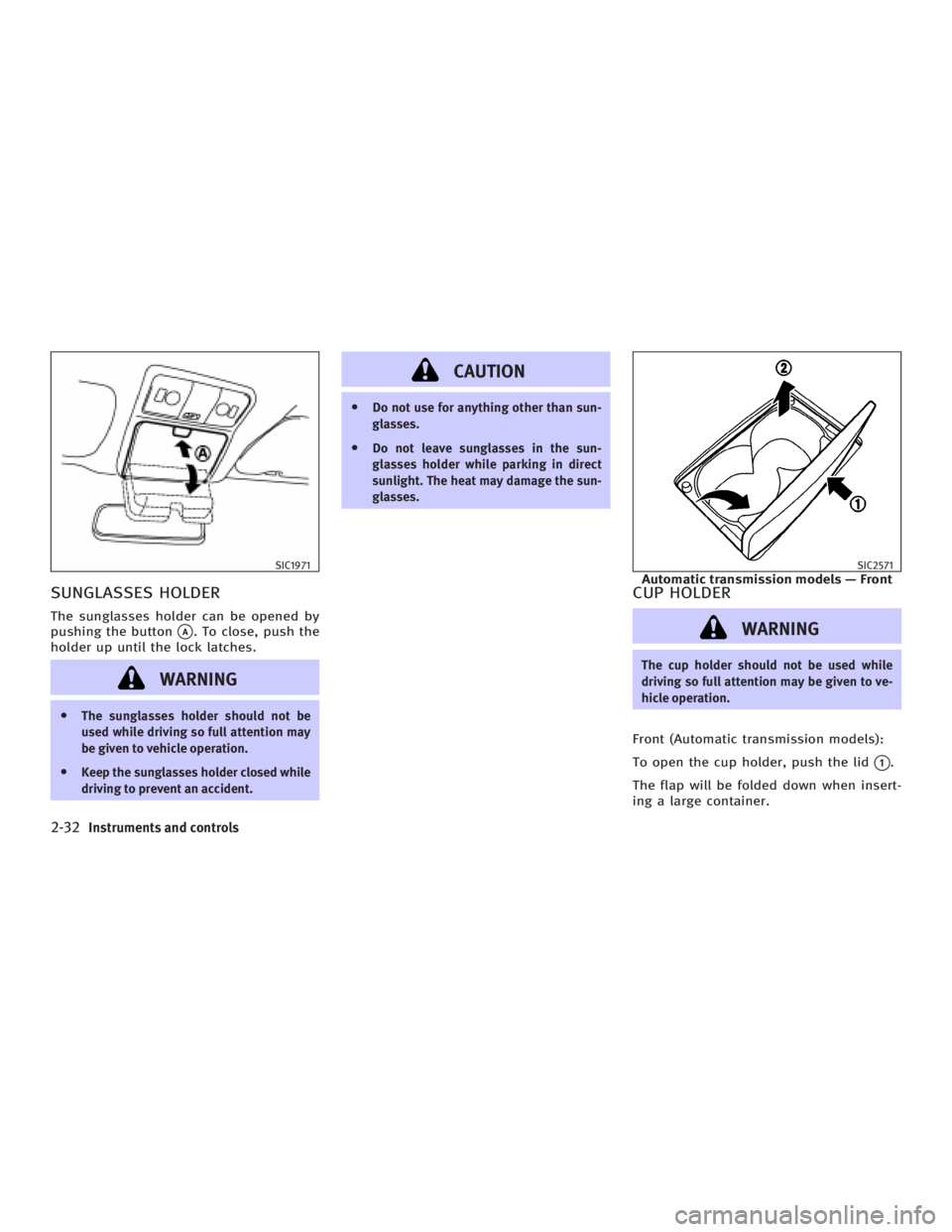
SUNGLASSES HOLDER The sunglasses holder can be opened by
pushing the button
q A
. To close, push the
holder up until the lock latches.
WARNINGO The sunglasses holder should not be
used while driving so full attention may
be given to vehicle operation.
O Keep the sunglasses holder closed while
driving to prevent an accident. CAUTION O Do not use for anything other than sun-
glasses.
O Do not leave sunglasses in the sun-
glasses holder while parking in direct
sunlight. The heat may damage the sun-
glasses.
CUP HOLDER
WARNING The cup holder should not be used while
driving so full attention may be given to ve-
hicle operation.
Front (Automatic transmission models):
To open the cup holder, push the lid
q 1
.
The flap will be folded down when insert-
ing a large container.SIC1971 SIC2571
Automatic transmission models Ð Front
2-32 Instruments and controls
w 06.1.4/V35-D/V5.0
X
Page 105 of 344
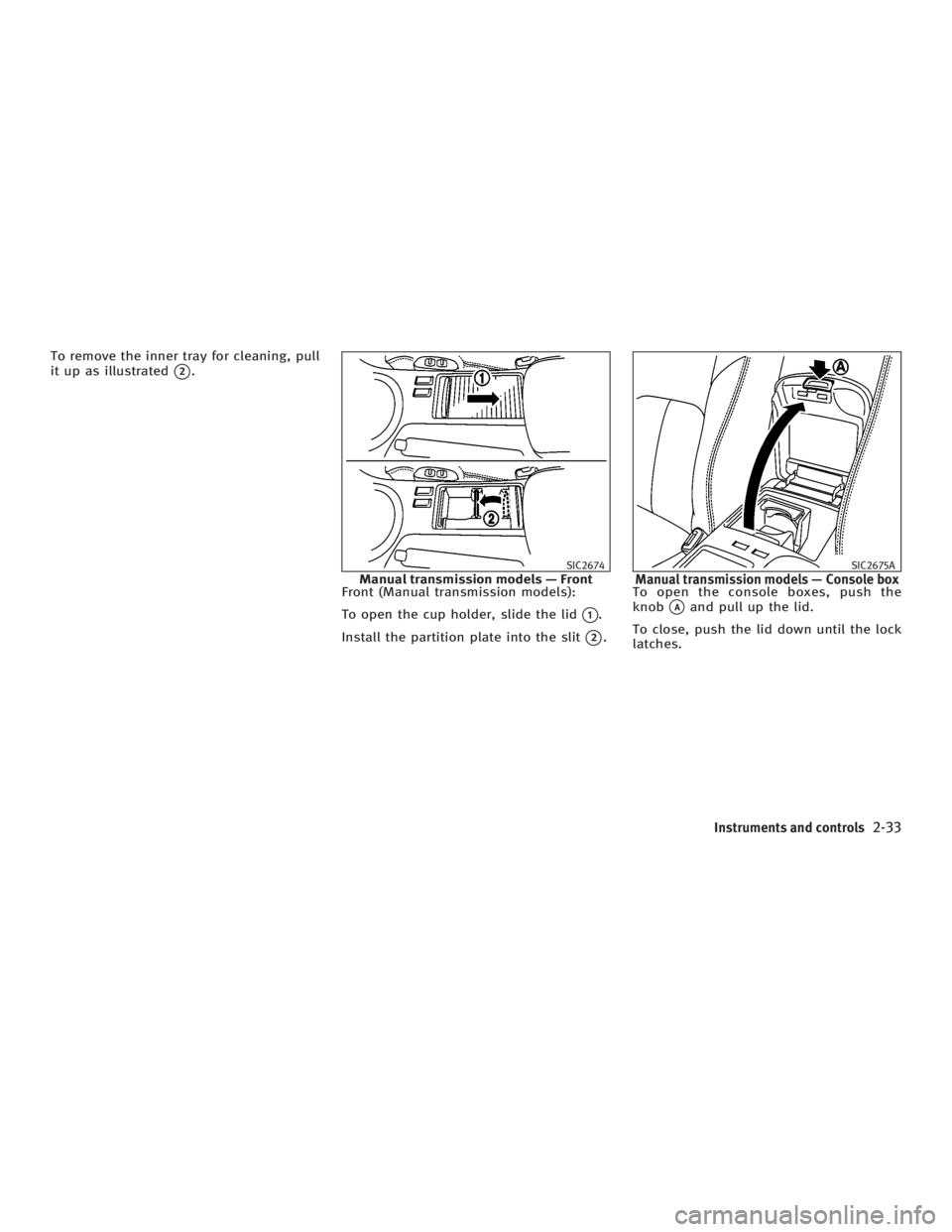
To remove the inner tray for cleaning, pull
it up as illustrated
q 2
.
Front (Manual transmission models):
To open the cup holder, slide the lid
q 1
.
Install the partition plate into the slit
q 2
. To open the console boxes, push the
knob
q A
and pull up the lid.
To close, push the lid down until the lock
latches. SIC2674
Manual transmission models Ð Front SIC2675A
Manual transmission models Ð Console box
Instruments and controls
2-33
w 06.1.4/V35-D/V5.0
X
Page 107 of 344
GLOVE BOX To open the glove box, pull the handle
q 1
.
To close, push the lid in until the lock
latches.
To lock
q 2
/unlock
q 3
the glove box, use
the master key.
The glove box light illuminates when the
glove box is opened with the headlight
switch on. WARNING Keep glove box lid closed while driving to
help prevent injury in an accident or a
sudden stop.
UPPER GLOVE BOX (except for
navigation system equipped
models) To open the upper glove box, push the
button
q A
.
To close, push the lid down until the lock
latches.
The upper glove box light illuminates
when the upper glove box is opened with
the headlight switch on.SIC2573 SIC1848A
Instruments and controls
2-35
w 06.1.4/V35-D/V5.0
X
Page 111 of 344

STOWING GOLF BAGS (Coupe) Normally, two standard golf bags can be
stowed in the trunk. Insert the top of the
golf bag into left side of the trunk room
q 1
then put the bag forward
q 2
. Insert
the top of the 2nd golf bag into right side
of the trunk room
q 3
and pull it in all the
way
q 4
.
In some cases, you may not be able to
stow two golf bags in your vehicle, de-
pending on their sizes or types. POWER WINDOWS
WARNING O Make sure that all passengers have their
hands, etc. inside the vehicle while it is
in motion and before closing the win-
dows. Use the window lock switch to
prevent unexpected use of the power
windows.
O Do not leave children unattended inside
the vehicle. They could unknowingly ac-
tivate switches or controls and become
trapped in a window. Unattended chil-
dren could become involved in serious
accidents.
The power windows operate when the ig-
nition key is in the ON position and for
about 45 seconds, after the ignition
switch is turned to the OFF position. If the
driver's door or the front passenger's
door is opened during this period of
about 45 seconds, power to the windows
is canceled. Main power window switch
(driver's side) 1. Driver side window
2. Front passenger side window
3. Rear left passenger side window
4. Rear right passenger side window
5. Window lock button
To open or close the window, push down
q A
or pull up
q B
the switch and hold it.
The main switch (driver side switches) will
open or close all the windows.SIC2209 SIC2576
Sedan Ð Main switchWINDOWS
Instruments and controls
2-39
w 06.1.4/V35-D/V5.0
X
Page 112 of 344
Locking passenger's windows When the lock button
q C
is pushed in,
only the driver side window can be
opened or closed. Push it in again to can-
cel.
Passenger side power window
switch The passenger side switch will open or
close only the corresponding window. To
open or close the window, hold the switch
down or up.
Automatic operation (For front
door windows or all door
windows, if so equipped) To fully open or close the window, com-
pletely push down or pull up the switch
and release it; it need not be held. The
window will automatically open or close
all the way. To stop the window, just push
or lift the switch in the opposite direction.
Auto reverse function (Automatic
operation equipped model) If the control unit detects somethingSIC2577
Coupe Ð Main switch SIC1892E
Front passenger side SIC2578
Sedan Ð Type A
2-40 Instruments and controls
w 06.1.4/V35-D/V5.0
X
Page 116 of 344

ROOM LIGHT The room light has a two-position switch.
When the switch is in the door position
q 1
, the room light will illuminate when a
door is opened.
The light will stay on for about 30 sec-
onds when:
O The doors are unlocked by the keyfob,
a key, power door lock switch or using
the Intelligent Key system while all
doors are closed. O The driver's door is opened and then
closed while the key is removed from
the ignition switch or the ignition is
turned to the LOCK position (Intelli-
gent Key system).
O The key is removed from the ignition
switch or the ignition is turned to the
LOCK position (Intelligent Key system)
while all doors are closed.
The light will turn off while the 30 second
timer is activated, when:
O The driver's door is locked either with
the keyfob, a key or the power door
lock switch.
O The ignition switch is turned to the ON
position.
When the switch is in the OFF position
q 2
, the room light does not illuminate, re-
gardless of any condition.
MAP LIGHTS When the switch is pushed in, the light
will turn on. When the switch is pushed
again, the light will turn off.
When the map light switch is in the ON po-
sition, it will automatically turn off 30 min-
utes after the ignition switch has been
turned to the OFF position. To turn on the
light again, turn the ignition switch to the
ON position.
The map, personal, and vanity mirror
lights will automatically turn off 30 min-
utes after the latest operation of the fol-SIC2580 SIC2581
INTERIOR LIGHTS
2-44 Instruments and controls
w 06.1.4/V35-D/V5.0
X