2006 INFINITI G35 seat adjustment
[x] Cancel search: seat adjustmentPage 147 of 344
WARNINGO Do not drive with the trunk lid open. This
could allow dangerous exhaust gases to
be drawn into the vehicle. See ªPrecau-
tions when starting and drivingº in the
ª5. Starting and drivingº section for ex-
haust gas.
O Closely supervise children when they are
around cars to prevent them from
playing and becoming locked in the
trunk where they could be seriously in-
jured. Keep the car locked, with the rear
seatback and trunk lid securely latched
when not in use, and prevent children's
access to car keys.
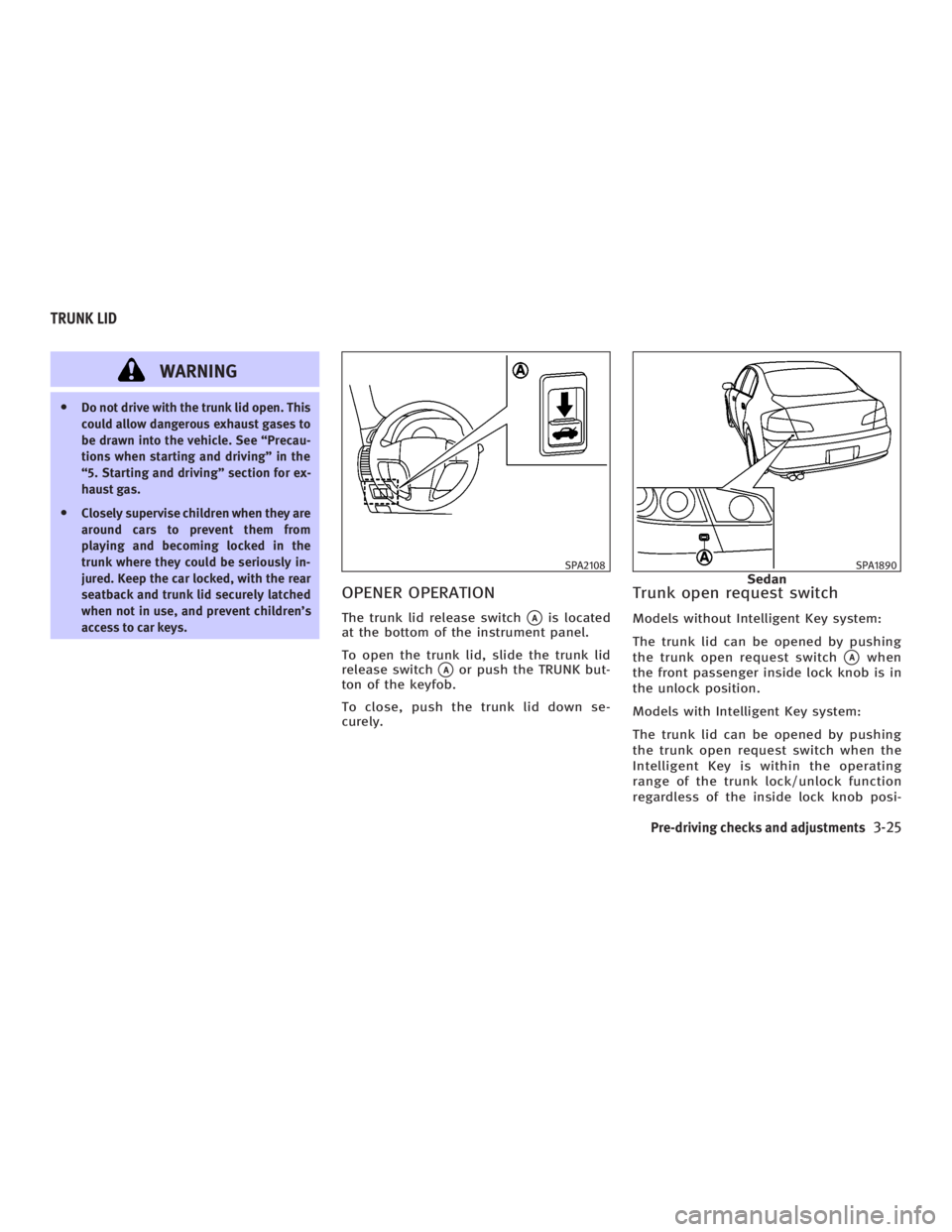
OPENER OPERATION The trunk lid release switch
q A
is located
at the bottom of the instrument panel.
To open the trunk lid, slide the trunk lid
release switch
q A
or push the TRUNK but-
ton of the keyfob.
To close, push the trunk lid down se-
curely. Trunk open request switch Models without Intelligent Key system:
The trunk lid can be opened by pushing
the trunk open request switch
q A
when
the front passenger inside lock knob is in
the unlock position.
Models with Intelligent Key system:
The trunk lid can be opened by pushing
the trunk open request switch when the
Intelligent Key is within the operating
range of the trunk lock/unlock function
regardless of the inside lock knob posi- SPA2108 SPA1890
SedanTRUNK LID
Pre-driving checks and adjustments
3-25
w 06.1.4/V35-D/V5.0
X
Page 149 of 344

INTERIOR TRUNK LID RELEASE The interior trunk lid release mechanism
provides a means of escape in the event
of becoming locked inside the trunk.
The handle
q 1
is located on the back side
of the trunk lid inside the trunk compart-
ment.
To open the trunk lid from the inside, pull
the release handle towards you until the
lock releases and push up on the trunk lid.
The release lever is made of a material that
glows in the dark after a brief exposure to
ambient light. SECONDARY TRUNK LID RELEASE The secondary trunk lid release mecha-
nism allows opening of the trunk lid in
the event of the loss of electrical power
such as a discharged battery.
The handle
q 1
is located on the back side
of the trunk lid inside the trunk compart-
ment.
Sedan Access the handle through the interior
trunk access hole (rear seat armrest).SPA1591B
Sedan SPA1561A
Coupe SPA1590A
Sedan
Pre-driving checks and adjustments
3-27
w 06.1.4/V35-D/V5.0
X
Page 150 of 344
To open the trunk lid from the rear seat,
pull the release handle towards front of ve-
hicle until the lock releases.
Return the handle to the original position
by securing the latch. Otherwise, it may
cause water to leak into the trunk.
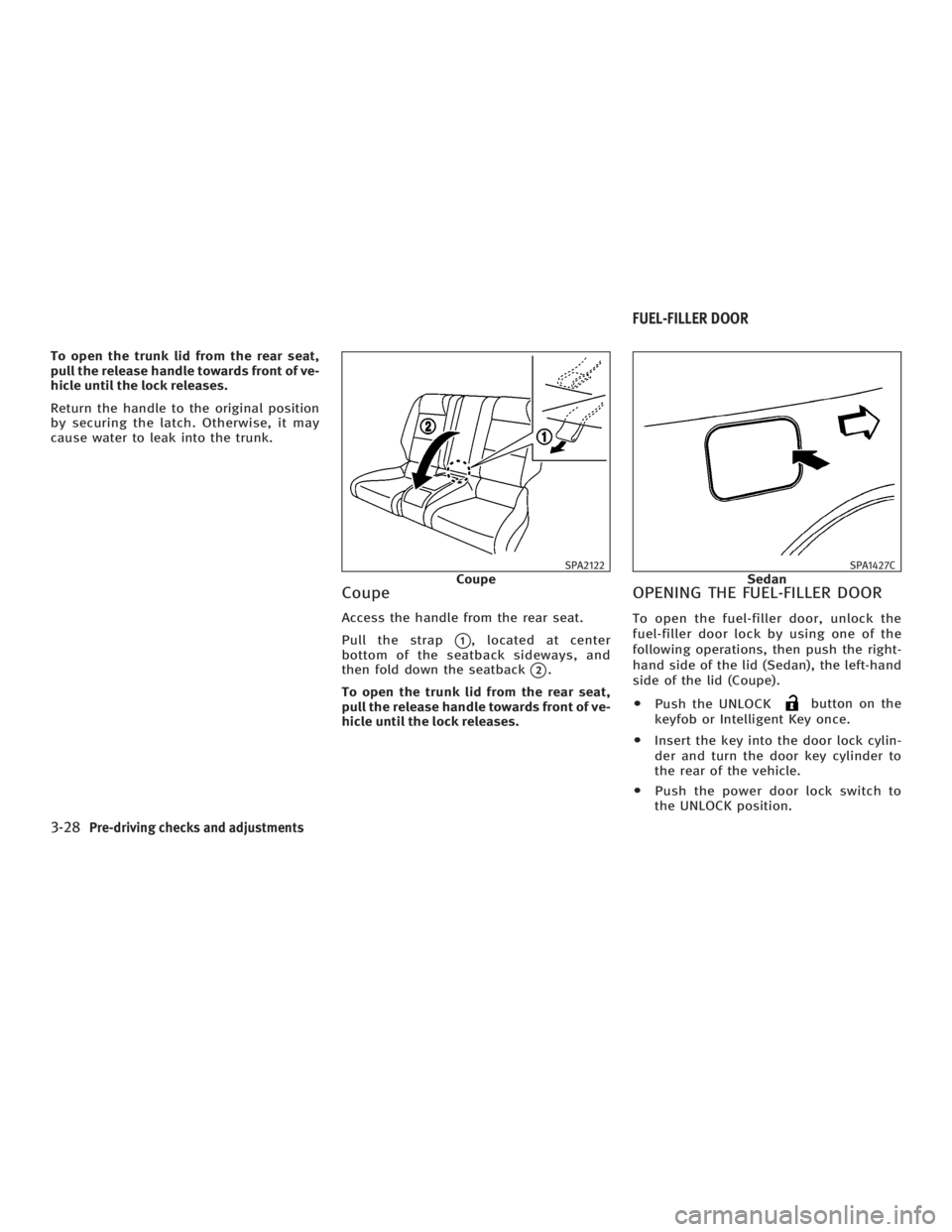
Coupe Access the handle from the rear seat.
Pull the strap
q 1
, located at center
bottom of the seatback sideways, and
then fold down the seatback
q 2
.
To open the trunk lid from the rear seat,
pull the release handle towards front of ve-
hicle until the lock releases. OPENING THE FUEL-FILLER DOOR To open the fuel-filler door, unlock the
fuel-filler door lock by using one of the
following operations, then push the right-
hand side of the lid (Sedan), the left-hand
side of the lid (Coupe).
O Push the UNLOCK button on the
keyfob or Intelligent Key once.
O Insert the key into the door lock cylin-
der and turn the door key cylinder to
the rear of the vehicle.
O Push the power door lock switch to
the UNLOCK position. SPA2122
Coupe SPA1427C
SedanFUEL-FILLER DOOR
3-28 Pre-driving checks and adjustments
w 06.1.4/V35-D/V5.0
X
Page 153 of 344
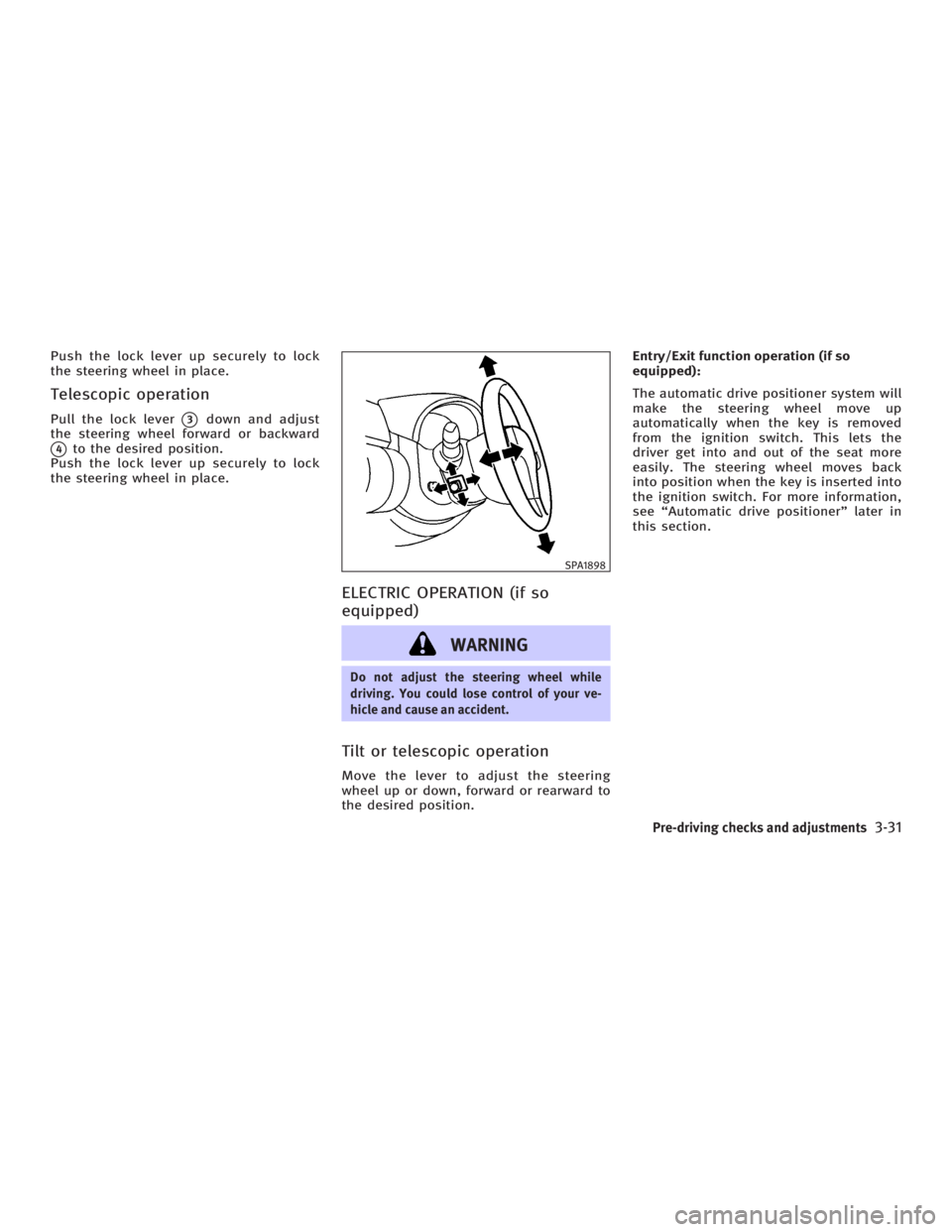
Push the lock lever up securely to lock
the steering wheel in place.
Telescopic operation Pull the lock lever
q 3
down and adjust
the steering wheel forward or backward
q 4
to the desired position.
Push the lock lever up securely to lock
the steering wheel in place.
ELECTRIC OPERATION (if so
equipped)
WARNING Do not adjust the steering wheel while
driving. You could lose control of your ve-
hicle and cause an accident.
Tilt or telescopic operation Move the lever to adjust the steering
wheel up or down, forward or rearward to
the desired position. Entry/Exit function operation (if so
equipped):
The automatic drive positioner system will
make the steering wheel move up
automatically when the key is removed
from the ignition switch. This lets the
driver get into and out of the seat more
easily. The steering wheel moves back
into position when the key is inserted into
the ignition switch. For more information,
see ªAutomatic drive positionerº later in
this section. SPA1898
Pre-driving checks and adjustments
3-31
w 06.1.4/V35-D/V5.0
X
Page 156 of 344

Foldable outside mirrors Fold the outside mirror by pushing it to-
ward the rear of the vehicle. AUTOMATIC DRIVE POSITIONER
OPERATION The automatic drive positioner system
has two features:
O Entry/exit function (only available on
models equipped with automatic
transmission)
O Memory storage function
ENTRY/EXIT FUNCTION (if so
equipped) This system is designed so that the driv-
er's seat and steering column will auto-
matically move when the automatic trans-
mission selector lever is in the P (Park)
position. This allows the driver to get into
and out of the driver's seat more easily.
(This feature is not available on models
equipped with manual transmission.)
The driver's seat will slide backward and
the steering wheel will move up when the
driver's door is opened with the key or ig-
nition switch in the LOCK position.
The driver's seat and steering wheel will
return to the previous positions:
O When the key is inserted into the igni-
tion switch after closing the driver's door, or when the driver's door is
closed after inserting the key into the
ignition switch.
O When the ignition switch is pushed
with the driver's door closed.
O When the key or ignition switch is
turned to the ON position.
Initializing entry/exit function The entry/exit function can be activated
or cancelled by pushing and holding the
SET switch for more than 10 seconds
while the ignition switch is in the LOCK
position. The indicator light will blink
once when the function is cancelled, and
the indicator light will blink twice when
the function is activated. If the battery
cable is disconnected, or if the fuse
opens, the entry/exit function will be can-
celled. In such a case, after connecting
the battery or replacing with a new fuse,
open and close the driver's door more
than two times with the ignition switch or
ignition switch in the LOCK position. The
entry/exit function will be activated.SPA1829
AUTOMATIC DRIVE POSITIONER (if so
equipped)
3-34 Pre-driving checks and adjustments
w 06.1.4/V35-D/V5.0
X
Page 157 of 344

q 1
Coupe
q 2
Sedan
MEMORY STORAGE FUNCTION Two positions for the driver's seat and
steering column can be stored in the au- tomatic drive positioner memory. Follow
these procedures to use the memory sys-
tem.
1. For vehicles equipped with automatic
transmission, move the selector lever
to the P (Park) position.
For vehicles equipped with manual
transmission, move the shift lever to
the N (Neutral) position and apply the
parking brake.
2. Adjust the driver's seat and steering
column to the desired positions by
manually operating each adjusting
switch. For additional information, see
ªSeatsº in the ª1. Safety Ð Seats, seat
belts and supplemental restraint
systemº section and ªSteering wheelº
earlier in this section.
3. Turn the ignition ON.
4. Push the SET switch and, within 5 sec-
onds, push the memory switch (1 or 2)
fully for at least 1 second.
The indicator light for the pushed
memory switch will come on and stay
on for approximately 5 seconds after
pushing the switch. After the indicator
light goes off, the selected positions are stored in the selected memory (1
or 2).
If a new memory is stored in the same
memory switch, the previous memory
will be deleted.
Linking a keyfob or Intelligent Key
to a stored memory position A keyfob or Intelligent Key can be linked
to a stored memory position with the fol-
lowing procedure.
1. Follow the steps for storing a memory
position.
2. While the indicator light for the
memory switch being set is illumi-
nated for 5 seconds, push the
button on the keyfob or Intelli-
gent Key. The indicator light will blink.
After the indicator light goes off, the
keyfob or Intelligent Key is linked to
that memory setting.
With the key removed from the ignition
switch, push the button on the
keyfob or Intelligent Key. The driver's seat
and steering wheel will move to the
memorized position.SPA2159
Pre-driving checks and adjustments
3-35
w 06.1.4/V35-D/V5.0
X
Page 158 of 344

Confirming memory storage O Turn the ignition ON and push the SET
switch. If the main memory has not
been stored, the indicator light will
come on for approximately 0.5 sec-
onds. When the memory has stored in
position, the indicator light will stay
on for approximately 5 seconds.
O If the battery cable is disconnected, or
if the fuse opens, the memory will be
canceled.
Reset the desired position using the
previous procedure.
Selecting the memorized position 1. For vehicles equipped with automatic
transmission, move the selector lever
to the P (Park) position.
For vehicles equipped with manual
transmission, move the shift lever in
the N (Neutral) position and apply the
parking brake.
2. Use one of the following methods to
move the driver's seat and the
steering wheel.
O Turn the ignition switch to the ªONº
position and push the memory switch (1 or 2) fully for at least 1
second.
O Within 45 seconds of opening the
driver's door, push the memory
switch (1 or 2) fully for at least 1
second.
The driver's seat and steering column
will move to the memorized position
with the indicator light flashing, and
then the light will stay on for approxi-
mately 5 seconds.
SYSTEM OPERATION The automatic drive positioner system will
not work or will stop operating under the
following conditions:
O when the vehicle speed is above 4
MPH (7 km/h).
O when the adjusting switch for the driv-
er's seat and steering column is
turned on while the automatic drive
positioner is operating.
O when the cancel switch (if so
equipped) is pushed to the CANCEL
side. (However, it will not be cancelled
if the switch is pushed while the seat
and steering column are returning to the previous positions (entry/exit
function).)
O when the memory switch 1 or 2 is not
pushed and held for at least 1 second.
O when the seat has already been
moved to the memorized position.
O when no seat position is stored in the
memory switch.
O when the parking brake is not applied.
Ð MT models
O when the speed is above 4 MPH (7
km/h) while the parking brake is ap-
plied. Ð MT models
To restart the drive positioner system,
move the parking brake to off and on.
O when the front seat is folded for oper-
ating the walk-in mechanism (if so
equipped).
O when the engine is started while the
automatic drive positioner is operating.
O when the AT selector lever is moved
from the P position to any other posi-
tion. (However, it will not be cancelled
if the switch is pushed while the seat
and steering column are returning to
the previous positions (entry/exit
function).)
3-36 Pre-driving checks and adjustments
w 06.1.4/V35-D/V5.0
X
Page 332 of 344

Your vehicle is equipped with a variety of
computers that monitor and control a
number of systems to optimize perfor-
mance and help service technicians with
diagnosis and repair. Some of the com-
puters monitor emission control systems,
braking systems, engine systems, trans-
mission systems, tire pressure systems,
and air bag systems. Some data about ve-
hicle operation may be stored in the com-
puters for use during servicing. Other
data may be stored if a crash event oc-
curs. For example, vehicle speed, brake
application, steering angle, air bag readi-
ness, air bag performance, and seat belt
use by the driver or passenger may be re-
corded. These types of systems are some-
times called Event Data Recorders. Special equipment can be used to access
the electronic data that may be stored in
the vehicle's computers (sounds are not
recorded). INFINITI and INFINITI dealers
have equipment to access some of this
data; others may also have this equip-
ment. The data may be retrieved during
routine vehicle servicing or for special re-
search. It might also be accessed with the
consent of the vehicle owner or lessee, in
response to a request by law enforce-
ment, or as otherwise required or permit-
ted by law. A genuine INFINITI Service Manual is the
best source of service and repair informa-
tion for your vehicle. Filled with wiring
diagrams, illustrations and step-by-step
diagnostic and adjustment procedures,
this manual is the same one used by the
factory trained technicians working at an
INFINITI dealer. Also available are genuine
INFINITI Owner's Manuals, and genuine
INFINITI Service and Owner's Manuals for
older INFINITI models.
In the USA:
For current pricing and availability of
genuine INFINITI Service Manuals for the
2000 model year and later, contact:
Tweddle Litho Company
1-800-450-9491
www.nissan-techinfo.com
For current pricing and availability of
genuine INFINITI Service Manuals for the
1999 model year and prior, see an INFINITI
dealer, or contact:
Resolve Corporation
20770 Westwood Road
Strongsville, OH 44136
1-800-247-5321
For current pricing and availability of
genuine INFINITI Owner's Manuals for thisEVENT DATA RECORDERS
OWNER'S MANUAL/SERVICE MANUAL
ORDER INFORMATION
9-26 Technical and consumer information
w 06.1.5/V35-D/V5.0
X