2006 INFINITI G35 battery
[x] Cancel search: batteryPage 141 of 344

TROUBLE-SHOOTING GUIDE Symptom Possible Cause Remedy
When pushing the door handle
request switch The outside buzzer sounds for approxi-
mately 2 seconds. The doors cannot be locked. Take out the Intelligent Key from the ve-
hicle and push the door handle request
switch.
Turn the ignition switch to the LOCK posi-
tion and push the door handle request
switch while carrying the Intelligent Key
with you.
Close all the doors securely and push the
door handle request switch while carrying
the Intelligent Key with you.
When closing the doors The outside buzzer sounds for approxi-
mately 10 seconds. The ignition switch is not turned to the
LOCK position. Turn the ignition switch to the LOCK posi-
tion.
The Intelligent Key warning light in the
instrument panel blinks in red and the
outside buzzer sounds 3 times. The Intelligent Key is not in the vehicle. Be sure to carry the Intelligent Key with
you.
The outside buzzer sounds for approxi-
mately 3 seconds and all doors unlock. The Intelligent Key has been left in the
vehicle. Take out the Intelligent Key from the ve-
hicle and close the door.
When closing the trunk The outside buzzer sounds and the
trunk opens. The Intelligent Key has been left in the
trunk room. Take out the Intelligent Key from the trunk
room and close the trunk.
When opening the driver's door An inside warning chime sounds con-
tinuously. The ignition switch is not in the LOCK
position, or the mechanical key or valet
key is inserted into the ignition switch. Turn the ignition switch to the LOCK posi-
tion.
Remove the mechanical key or valet key
from the ignition switch.
When stopping the engine The P position selecting warning light
in the instrument panel blinks in red. The selector lever is not in the P posi-
tion. Make sure that the selector lever is in the P
position.
When turning the ignition switch An inside warning chime sounds con-
tinuously. The ignition switch is not turned to the
LOCK position. Turn the ignition switch to the LOCK posi-
tion.
When starting the engine The Intelligent Key warning light in the
instrument panel blinks in green. The battery charge is low. Replace the battery with a new one. See
ªKEYFOB BATTERY REPLACEMENTº in the ª8.
Maintenance and do-it-yourselfº section.
When pushing the ignition switch The Intelligent Key warning light in the
instrument panel comes on in red. The Intelligent Key is not in the vehicle. If the Intelligent Key warning light comes
on in red even while you are carrying the
Intelligent Key, the battery is completely
discharged. Replace the battery with a new
one. See ªKEYFOB BATTERY REPLACEMENTº
in the ª8. Maintenance and do-it-yourselfº
section.
Pre-driving checks and adjustments
3-19
w 06.1.4/V35-D/V5.0
X
Page 142 of 344

Troubleshooting examples When it is difficult to turn the ignition
switch
O Push the ignition switch and turn it to
the left and then to the right.
O While gently turning the steering
wheel to the left or right, turn the igni-
tion switch.
OPERATION WITH INTELLIGENT
REMOTE KEYLESS ENTRY SYSTEM It is possible to lock/unlock all doors,
fuel-filler door, activate the panic alarm
and open the windows by pushing the
buttons on the Intelligent Key from out-
side the vehicle.
Before locking the doors, make sure the
key is not left in the vehicle.
The LOCK /UNLOCK button on
the Intelligent Key can operate at a dis-
tance of approximately 33 ft (10 m) from
the vehicle. (The effective distance de-
pends upon the conditions around the ve-
hicle.)
As many as 4 Intelligent Keys can be used
with one vehicle. For information concern-
ing the purchase and use of additional In-
telligent Key, contact an INFINITI dealer. The lock and unlock buttons on the Intel-
ligent Key will not operate when:
O the Intelligent Key is too far away from
the vehicle
O the Intelligent Key battery runs down
After locking with the Intelligent remote
keyless entry function, pull the door
handle to make sure the doors are se-
curely locked.
The operating range varies depending on
the environment. To securely operate the
lock and unlock buttons, approach the ve-
hicle to about 3 ft (1 m) from the door.
The panic alarm will not activate when the
mechanical key or the valet key is in the ig-
nition switch.
q 1
LOCK button
q 2
UNLOCK button
q 3
TRUNK button
q 4
PANIC button
How to use remote keyless entry
system Locking doors and fuel-filler door:
1. Remove the mechanical key or the va-
let key if any key is in the ignition
switch.*1
2. Close all the doors.*2 SPA1895
3-20 Pre-driving checks and adjustments
w 06.1.4/V35-D/V5.0
X
Page 145 of 344
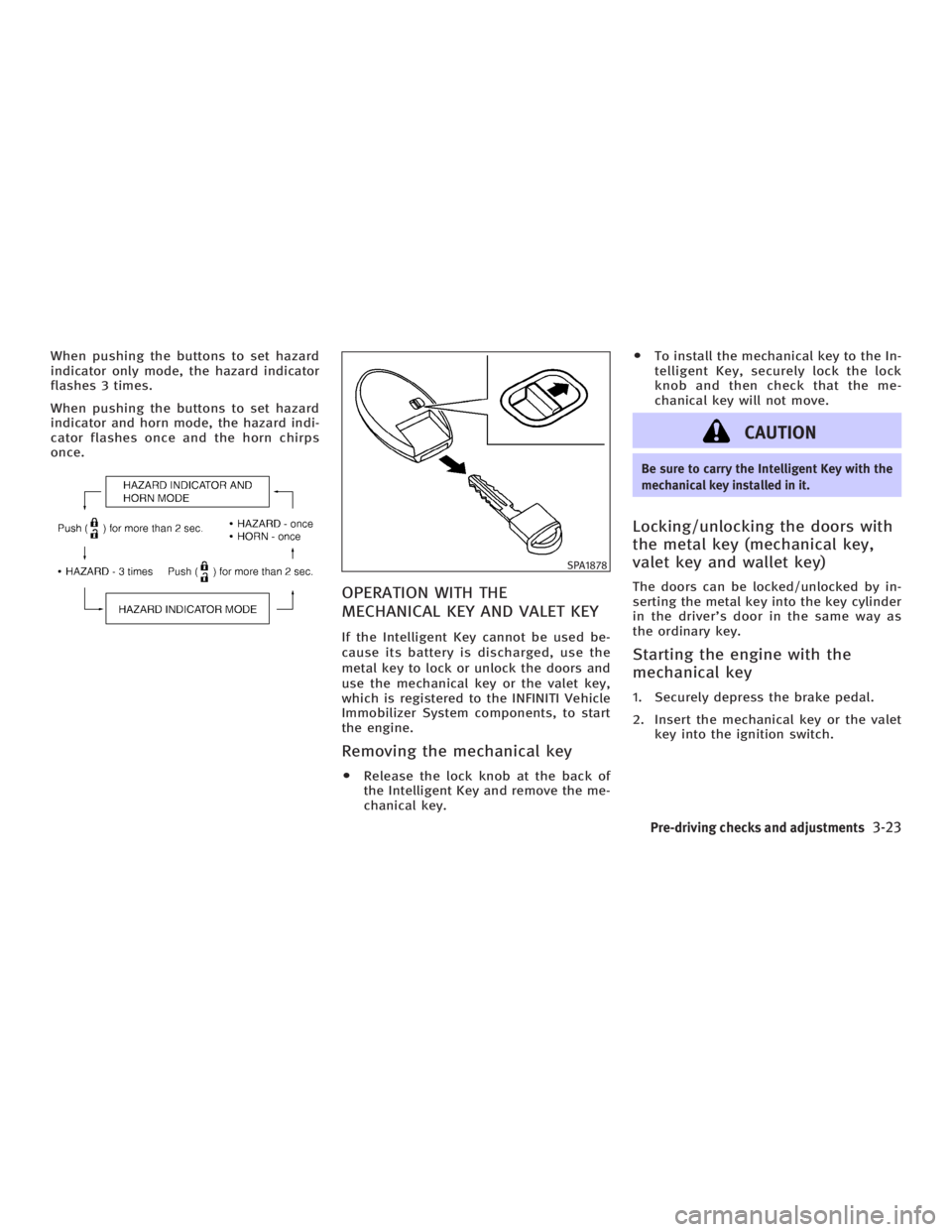
When pushing the buttons to set hazard
indicator only mode, the hazard indicator
flashes 3 times.
When pushing the buttons to set hazard
indicator and horn mode, the hazard indi-
cator flashes once and the horn chirps
once.
OPERATION WITH THE
MECHANICAL KEY AND VALET KEY If the Intelligent Key cannot be used be-
cause its battery is discharged, use the
metal key to lock or unlock the doors and
use the mechanical key or the valet key,
which is registered to the INFINITI Vehicle
Immobilizer System components, to start
the engine.
Removing the mechanical key O Release the lock knob at the back of
the Intelligent Key and remove the me-
chanical key. O To install the mechanical key to the In-
telligent Key, securely lock the lock
knob and then check that the me-
chanical key will not move.
CAUTION Be sure to carry the Intelligent Key with the
mechanical key installed in it.
Locking/unlocking the doors with
the metal key (mechanical key,
valet key and wallet key) The doors can be locked/unlocked by in-
serting the metal key into the key cylinder
in the driver's door in the same way as
the ordinary key.
Starting the engine with the
mechanical key 1. Securely depress the brake pedal.
2. Insert the mechanical key or the valet
key into the ignition switch. SPA1878
Pre-driving checks and adjustments
3-23
w 06.1.4/V35-D/V5.0
X
Page 149 of 344

INTERIOR TRUNK LID RELEASE The interior trunk lid release mechanism
provides a means of escape in the event
of becoming locked inside the trunk.
The handle
q 1
is located on the back side
of the trunk lid inside the trunk compart-
ment.
To open the trunk lid from the inside, pull
the release handle towards you until the
lock releases and push up on the trunk lid.
The release lever is made of a material that
glows in the dark after a brief exposure to
ambient light. SECONDARY TRUNK LID RELEASE The secondary trunk lid release mecha-
nism allows opening of the trunk lid in
the event of the loss of electrical power
such as a discharged battery.
The handle
q 1
is located on the back side
of the trunk lid inside the trunk compart-
ment.
Sedan Access the handle through the interior
trunk access hole (rear seat armrest).SPA1591B
Sedan SPA1561A
Coupe SPA1590A
Sedan
Pre-driving checks and adjustments
3-27
w 06.1.4/V35-D/V5.0
X
Page 156 of 344

Foldable outside mirrors Fold the outside mirror by pushing it to-
ward the rear of the vehicle. AUTOMATIC DRIVE POSITIONER
OPERATION The automatic drive positioner system
has two features:
O Entry/exit function (only available on
models equipped with automatic
transmission)
O Memory storage function
ENTRY/EXIT FUNCTION (if so
equipped) This system is designed so that the driv-
er's seat and steering column will auto-
matically move when the automatic trans-
mission selector lever is in the P (Park)
position. This allows the driver to get into
and out of the driver's seat more easily.
(This feature is not available on models
equipped with manual transmission.)
The driver's seat will slide backward and
the steering wheel will move up when the
driver's door is opened with the key or ig-
nition switch in the LOCK position.
The driver's seat and steering wheel will
return to the previous positions:
O When the key is inserted into the igni-
tion switch after closing the driver's door, or when the driver's door is
closed after inserting the key into the
ignition switch.
O When the ignition switch is pushed
with the driver's door closed.
O When the key or ignition switch is
turned to the ON position.
Initializing entry/exit function The entry/exit function can be activated
or cancelled by pushing and holding the
SET switch for more than 10 seconds
while the ignition switch is in the LOCK
position. The indicator light will blink
once when the function is cancelled, and
the indicator light will blink twice when
the function is activated. If the battery
cable is disconnected, or if the fuse
opens, the entry/exit function will be can-
celled. In such a case, after connecting
the battery or replacing with a new fuse,
open and close the driver's door more
than two times with the ignition switch or
ignition switch in the LOCK position. The
entry/exit function will be activated.SPA1829
AUTOMATIC DRIVE POSITIONER (if so
equipped)
3-34 Pre-driving checks and adjustments
w 06.1.4/V35-D/V5.0
X
Page 158 of 344

Confirming memory storage O Turn the ignition ON and push the SET
switch. If the main memory has not
been stored, the indicator light will
come on for approximately 0.5 sec-
onds. When the memory has stored in
position, the indicator light will stay
on for approximately 5 seconds.
O If the battery cable is disconnected, or
if the fuse opens, the memory will be
canceled.
Reset the desired position using the
previous procedure.
Selecting the memorized position 1. For vehicles equipped with automatic
transmission, move the selector lever
to the P (Park) position.
For vehicles equipped with manual
transmission, move the shift lever in
the N (Neutral) position and apply the
parking brake.
2. Use one of the following methods to
move the driver's seat and the
steering wheel.
O Turn the ignition switch to the ªONº
position and push the memory switch (1 or 2) fully for at least 1
second.
O Within 45 seconds of opening the
driver's door, push the memory
switch (1 or 2) fully for at least 1
second.
The driver's seat and steering column
will move to the memorized position
with the indicator light flashing, and
then the light will stay on for approxi-
mately 5 seconds.
SYSTEM OPERATION The automatic drive positioner system will
not work or will stop operating under the
following conditions:
O when the vehicle speed is above 4
MPH (7 km/h).
O when the adjusting switch for the driv-
er's seat and steering column is
turned on while the automatic drive
positioner is operating.
O when the cancel switch (if so
equipped) is pushed to the CANCEL
side. (However, it will not be cancelled
if the switch is pushed while the seat
and steering column are returning to the previous positions (entry/exit
function).)
O when the memory switch 1 or 2 is not
pushed and held for at least 1 second.
O when the seat has already been
moved to the memorized position.
O when no seat position is stored in the
memory switch.
O when the parking brake is not applied.
Ð MT models
O when the speed is above 4 MPH (7
km/h) while the parking brake is ap-
plied. Ð MT models
To restart the drive positioner system,
move the parking brake to off and on.
O when the front seat is folded for oper-
ating the walk-in mechanism (if so
equipped).
O when the engine is started while the
automatic drive positioner is operating.
O when the AT selector lever is moved
from the P position to any other posi-
tion. (However, it will not be cancelled
if the switch is pushed while the seat
and steering column are returning to
the previous positions (entry/exit
function).)
3-36 Pre-driving checks and adjustments
w 06.1.4/V35-D/V5.0
X
Page 162 of 344

WARNINGO Positioning of the heating or air condi-
tioning controls and display controls
should not be done while driving, in
order that full attention may be given to
driving operation.
O Do not disassemble or modify this
system. If you do, it may result in acci-
dents, fire, or electric shock.
O Do not use this system if you notice any
abnormality, such as a frozen screen or
lack of sound. Continued use of the
system may result in accident, fire or
electric shock.
O In case you notice any foreign object in
the system hardware, spill liquid on it, or
notice smoke or smell coming from it,
stop using the system immediately and
contact an INFINITI dealer. Ignoring such
conditions may lead to accidents, fire, or
electric shock. When you use this system, make sure the
engine is running.
If you use the system with the engine not
running (ignition ON or ACC) for a long
time, it will use up all the battery power,
and the engine will not start.
Reference symbols:
ªENTERº button Ð This is a button on the
control panel.
ª Display º key Ð This is a select key on
the screen. By selecting this key you can
proceed to the next function. NAMES OF THE COMPONENTS 1., 2., 5., 6., 9., 10. and 11.
For Navigation control buttons: refer to
the separate Navigation Owner's Manual.
3. ªSETTINGº button (P. 4-7)
4. ªINFOº button (P. 4-3)
7. Joystick and ªENTERº button (P. 4-3)
8. brightness control button
(P. 4-9)
12. ªBACKº button (P. 4-3) SAA1301
SAFETY NOTE
CONTROL PANEL BUTTONS Ð WITH
NAVIGATION SYSTEM
4-2 Display screen, heater, air conditioner and audio systems
w 06.1.4/V35-D/V5.0
X
Page 175 of 344

FM RADIO RECEPTION Range: FM range is normally limited to 25
to 30 miles (40 to 48 km), with monaural
(single channel) FM having slightly more
range than stereo FM. External influences
may sometimes interfere with FM station
reception even if the FM station is within
25 miles (40 km). The strength of the FM
signal is directly related to the distance
between the transmitter and receiver. FM
signals follow a line-of-sight path, exhib-
iting many of the same characteristics as
light. For example they will reflect off ob-
jects. Fade and drift: As your vehicle moves
away from a station transmitter, the sig-
nals will tend to fade and/or drift.
Static and flutter: During signal interfer-
ence from buildings, large hills or due to
antenna position, usually in conjunction
with increased distance from the station
transmitter, static or flutter can be heard.
This can be reduced by adjusting the
treble control counterclockwise to reduce
treble response.
Multipath reception: Because of the re-
flective characteristics of FM signals, di-
rect and reflected signals reach the re-
ceiver at the same time. The signals may
cancel each other, resulting in momentary
flutter or loss of sound.
AM RADIO RECEPTION AM signals, because of their low fre-
quency, can bend around objects and
skip along the ground. In addition, the
signals can be bounced off the iono-
sphere and bent back to earth. Because
of these characteristics. AM signals are
also subject to interference as they travel
from transmitter to receiver.
Fading: Occurs while the vehicle is
passing through freeway underpasses or in areas with many tall buildings. It can
also occur for several seconds during
ionospheric turbulence even in areas
where no obstacles exist.
Static: Caused by thunderstorms, elec-
trical power lines, electric signs and even
traffic lights.
SATELLITE RADIO RECEPTION (if so
equipped) When the satellite radio is first installed
or the battery has been replaced, the sat-
ellite radio may not work properly. This is
not a malfunction. Wait more than 10 min-
utes with satellite radio ON for satellite
radio to receive all of the necessary data.
No satellite radio reception is available
unless optional satellite receiver and an-
tenna are installed and an XM or
SIRIUS TM
satellite radio service subscrip-
tion is active.
Satellite radio is not available in Alaska
and Hawaii.
Satellite radio performance may be af-
fected if cargo carried on the roof blocks
the satellite radio signal.
If possible, do not put cargo over the sat-
ellite antenna.SAA0306
Display screen, heater, air conditioner and audio systems
4-15
w 06.1.4/V35-D/V5.0
X