2006 INFINITI G35 service
[x] Cancel search: servicePage 175 of 344

FM RADIO RECEPTION Range: FM range is normally limited to 25
to 30 miles (40 to 48 km), with monaural
(single channel) FM having slightly more
range than stereo FM. External influences
may sometimes interfere with FM station
reception even if the FM station is within
25 miles (40 km). The strength of the FM
signal is directly related to the distance
between the transmitter and receiver. FM
signals follow a line-of-sight path, exhib-
iting many of the same characteristics as
light. For example they will reflect off ob-
jects. Fade and drift: As your vehicle moves
away from a station transmitter, the sig-
nals will tend to fade and/or drift.
Static and flutter: During signal interfer-
ence from buildings, large hills or due to
antenna position, usually in conjunction
with increased distance from the station
transmitter, static or flutter can be heard.
This can be reduced by adjusting the
treble control counterclockwise to reduce
treble response.
Multipath reception: Because of the re-
flective characteristics of FM signals, di-
rect and reflected signals reach the re-
ceiver at the same time. The signals may
cancel each other, resulting in momentary
flutter or loss of sound.
AM RADIO RECEPTION AM signals, because of their low fre-
quency, can bend around objects and
skip along the ground. In addition, the
signals can be bounced off the iono-
sphere and bent back to earth. Because
of these characteristics. AM signals are
also subject to interference as they travel
from transmitter to receiver.
Fading: Occurs while the vehicle is
passing through freeway underpasses or in areas with many tall buildings. It can
also occur for several seconds during
ionospheric turbulence even in areas
where no obstacles exist.
Static: Caused by thunderstorms, elec-
trical power lines, electric signs and even
traffic lights.
SATELLITE RADIO RECEPTION (if so
equipped) When the satellite radio is first installed
or the battery has been replaced, the sat-
ellite radio may not work properly. This is
not a malfunction. Wait more than 10 min-
utes with satellite radio ON for satellite
radio to receive all of the necessary data.
No satellite radio reception is available
unless optional satellite receiver and an-
tenna are installed and an XM or
SIRIUS TM
satellite radio service subscrip-
tion is active.
Satellite radio is not available in Alaska
and Hawaii.
Satellite radio performance may be af-
fected if cargo carried on the roof blocks
the satellite radio signal.
If possible, do not put cargo over the sat-
ellite antenna.SAA0306
Display screen, heater, air conditioner and audio systems
4-15
w 06.1.4/V35-D/V5.0
X
Page 181 of 344

1. CD EJECT button
2. CD play button
3. RADIO (FM/AM/SAT*) band select
button
4. Audio display
5. PTY/CAT (Type A), SSV (Type B) button
6. DISP (Display) CHANGE button
7. SEEK, APS REW/APS FF, TRACK
CHANGE button
8. CD LOAD button
9. POWER ON z OFF button, Volume control
knob
10. AUTO z P (Automatic preset) button
11. RPT (repeat) play (Type A), RPT (re-
peat) play/CAT button (Type B)
12. SCAN tuning button
13. Station preset (FM/AM/SAT)/CD insert
or CD play select button
14. AUDIO (BASS, TREBLE, FADER, BAL-
ANCE, SSV (Type A only)) button
15. RADIO TUNE/FF z REW/AUDIO (BASS,
TREBLE, FADER, BALANCE, SSV (Type A
only)) ADJUSTING button
* No satellite radio reception is available
unless optional satellite receiver and
antenna are installed and an XM or
SIRIUS TM
satellite radio service sub-
scription is active. SAA0937
Type A
SAA0938
Type B
Display screen, heater, air conditioner and audio systems
4-21
w 06.1.4/V35-D/V5.0
X
Page 183 of 344

(With satellite radio)
AM ! FM1 ! FM2 ! SAT1 ! SAT2 ! AM
No satellite radio reception is available
unless optional satellite receiver and an-
tenna are installed and an XM or SIRI-
US TM
satellite radio service subscription
is active.
Satellite radio is not available in Alaska
and Hawaii.
When the RADIO band select button is
pushed while the ignition switch is in the
ACC or ON position, the radio will come
on at the station last played.
The last station/channel played will also
come on when the ON z OFF/VOL control
knob is pushed to ON.
If another audio source is playing when
the RADIO button is turned to ON, the
other audio source will automatically be
turned off and the last radio station
played will come on.
The FM stereo indicator ST will glow
during FM stereo reception. When the ste-
reo broadcast signal is weak, the radio
will automatically change from stereo to
monaural reception. TUNE (Tuning):
WARNING The radio should not be tuned while driving
so full attention may be given to vehicle op-
eration.
Push these buttons for manual tuning. To
move quickly through the channels, push
and hold either of the TUNE buttons down
for more than 0.5 second.
SEEK tuning:
For AM and FM radio:
Push the SEEK button or ,to
tune from high to low or low to high fre-
quencies and stops at the next broadcast-
ing station.
For satellite radio:
Push the SEEK button or to
seek channels of the next or previous cat-
egory. SCAN tuning:
Push the SCAN tuning button to tune from
low to high frequencies and stops at each
broadcasting station for 5 seconds. Push-
ing the button again during this 5 sec-
onds period will stop SCAN tuning and
the radio will remain tuned to that sta-
tion.
If the SCAN tuning button is not pushed
within 5 seconds, SCAN tuning moves to
the next station.
DISPLAY:
O By pushing the DISP button for more
than 1.5 seconds while receiving FM
radio waves, ªPS NAMEº switches be-
tween ON and OFF (Type A only).
O Pushing the DISP button will display
additional information about the satel-
lite radio broadcast (for example:
Artist name, Title).
Keep pushing the DISP button, and it
will change the information of the sat-
ellite radio broadcast to be displayed
as follows:
CH Number ! CH Name ! Artist
Name ! Song Title ! CH Number
Display screen, heater, air conditioner and audio systems
4-23
w 06.1.4/V35-D/V5.0
X
Page 191 of 344

Your INFINITI is equipped with the
Bluetooth Hands-Free Phone System. If
you are an owner of a Bluetooth enabled
cellular phone, you can set up the wire-
less connection between your cellular
phone and the in-vehicle phone module. With Bluetooth wireless technology, you
can make or receive a hands-free tele-
phone call with your cellular phone in the
vehicle.
Once your cellular phone is paired to the
in-vehicle phone module, no other phone connecting procedure is required. Your
phone is automatically connected with
the in-vehicle phone module when the ig-
nition switch is turned to the ON position
with the paired cellular phone turned on
and carried in the vehicle.
You can register up to 5 different
Bluetooth cellular phones to the in-
vehicle phone module. However, you can
talk on only one cellular phone at a time.
Before using the Bluetooth Hands-Free
Phone System, refer to the following
notes.
O Set up the wireless connection be-
tween a cellular phone and the in-
vehicle phone module before using
the Bluetooth Hands-Free Phone Sys-
tem.
O Some Bluetooth enabled cellular
phones may not be recognized by the
in-vehicle phone module. Please visit
www.infiniti.com/bluetooth for a rec-
ommended phone list.
O You will not be able to use a hands-
free phone under the following condi-
tions:
Ð Your vehicle is outside of the tele-
phone service area. SAA1302
Display screen, heater, air conditioner and audio systems
4-31
w 06.1.4/V35-D/V5.0
X
Page 230 of 344

BRAKING PRECAUTIONS The brake system has two separate hy-
draulic circuits. If one circuit malfunc-
tions, you will still have braking ability at
two wheels.
Vacuum assisted brake
The brake booster aids braking by using
engine vacuum. If the engine stops, you
can stop the vehicle by depressing the
brake pedal. However, greater foot pres-
sure on the brake pedal will be required
to stop the vehicle and the stopping dis-
tance will be longer.
Wet brakes
When the vehicle is washed or driven
through water, the brakes may get wet.
As a result, your braking distance will be
longer and the vehicle may pull to one
side during braking.
To dry brakes, drive the vehicle at a safe
speed while lightly tapping the brake
pedal to heat-up the brakes. Do this until
the brakes return to normal. Avoid driving
the vehicle at high speeds until the
brakes function correctly.
Parking brake break-in
Break-in the parking brake shoes when-
ever the stopping effect of the parking brake is weakened or whenever the park-
ing brake shoes and/or drums/rotors are
replaced, in order to assure the best
braking performance.
This procedure is described in the vehicle
service manual and can be performed by
your INFINITI dealer.
Using the brakes
Avoid resting your foot on the brake pedal
while driving. This will cause overheating
of the brakes, increases wear on the
brakes and pads, and reduces gas
mileage.
To help save the brakes and to prevent
the brakes from overheating, reduce
speed and downshift to a lower gear be-
fore going down a slope or long grade.
Overheated brakes may reduce braking
performance and could result in loss of
vehicle control.
WARNING O While driving on a slippery surface, be
careful when braking, accelerating or
downshifting. Abrupt braking or accel- erating could cause the wheels to skid
and result in an accident.
O If the engine is not running or is turned
off while driving, the power assist for the
brakes will not work. Braking will be
harder.
ANTI-LOCK BRAKE SYSTEM (ABS) The anti-lock brake system (ABS) controls
the brakes so the wheels will not lock when
braking abruptly or when braking on slip-
pery surfaces. The system detects the rota-
tion speed at each wheel and varies the
brake fluid pressure to prevent each wheel
from locking and sliding. By preventing
wheel lockup, the system helps the driver
maintain steering control and helps to mini-
mize swerving and spinning on slippery sur-
faces.
Using the system Depress the brake pedal and hold it
down.BRAKE SYSTEM
5-26 Starting and driving
w 06.1.4/V35-D/V5.0
X
Page 238 of 344

Every new INFINITI comes with a 4 year,
unlimited mileage Roadside Assistance
plan. In the event of a roadside
emergency, Roadside Assistance Service
is available to you. Please refer to your
Warranty Booklet (U.S.) or Warranty &
Roadside assistance information booklet
(Canada) for details. Both the Warranty
Booklet and Roadside Assistance Calling
Card in your Owner's Literature Portfolio
provide the Toll-Free Number to call for
assistance. Roadside Assistance is
provided 24 hours a day, 365 days a year,
for 4 years from the date sold to give
emergency roadside help, in the event of
mechanical or nonmechanical trouble(s)
such as flat tires, out-of-gas, dead battery,
lost keys, mechanical breakdown,
accident, etc. TIRE PRESSURE MONITORING
SYSTEM (TPMS) This vehicle is equipped with the tire pres-
sure monitoring system (TPMS). It monitors
tire pressure of all tires except the spare.
When the low tire pressure warning light is
lit, or flashing continuously one or more of
your tires is significantly under-inflated. If
the vehicle is being driven with low tire
pressure, the TPMS will activate and warn
you of it by the low tire pressure warning
light. This system will activate only when
the vehicle is driven at speeds above 16
MPH (25 km/h). For more details, refer to
ªWarning/indicator lights and audible re-
mindersº in the ª2. Instruments and con-
trolsº section and ªTire pressure moni-
toring system (TPMS)º in the ª5. Starting
and drivingº section.
WARNING O If the low tire pressure warning light illu-
minates while driving, avoid sudden
steering maneuvers or abrupt braking,
reduce vehicle speed, pull off the road to
a safe location and stop the vehicle as
soon as possible. Serious vehicle damage could occur and may lead to an
accident and could result in serious per-
sonal injury. Check the tire pressure for all
four tires. Adjust the tire pressure to the
recommended COLD tire pressure shown
on the Tire and Loading Information label
to turn the low tire pressure warning light
OFF. If you have a flat tire, replace it with a
spare tire as soon as possible.
O When a spare tire is mounted or a wheel is
replaced, tire pressure will not be indi-
cated, the TPMS will not function and the
low tire pressure warning light will flash.
Contact your INFINITI dealer as soon as
possible for tire replacement and/or
system resetting.
O Replacing tires with those not originally
specified by INFINITI could affect the
proper operation of the TPMS.
O
Do not inject any tire liquid or aerosol tire
sealant into the tires, as this may cause a
malfunction of the tire pressure sensors.
CHANGING A FLAT TIRE If you have a flat tire, follow the instruc-
tions below.ROADSIDE ASSISTANCE PROGRAM FLAT TIRE
6-2 In case of emergency
w 06.1.13/V35-D/V5.0
X
Page 248 of 344
When towing your vehicle, all State (Pro-
vincial in Canada) and local regulations
for towing must be followed. Incorrect
towing equipment could damage your ve-
hicle. Towing instructions are available
from an INFINITI dealer. Local service op-
erators are generally familiar with the ap-
plicable laws and procedures for towing.
To assure proper towing and to prevent
accidental damage to your vehicle,
INFINITI recommends having a service op-
erator tow your vehicle. It is advisable to
have the service operator carefully read
the following precautions.
WARNINGO Never ride in a vehicle that is being
towed.
O Never get under your vehicle after it has
been lifted by a tow truck.
CAUTIONO When towing, make sure that the trans-
mission, axles, steering system and powertrain are in working condition. If
any unit is damaged, dollies must be
used.
O Always attach safety chains before
towing.
For information about towing your vehicle
behind a recreational vehicle (RV), refer to
ªFlat towingº in the ª9. Technical and
consumer informationº section of this
manual.
If needed, Roadside Assistance is avail-
able. Please see your Warranty Informa-
tion Booklet or Roadside Assistance I.D.
Card for the toll-free number to call (U.S.)
or Warranty Information Booklet (Canada).
TOWING RECOMMENDED BY
INFINITI
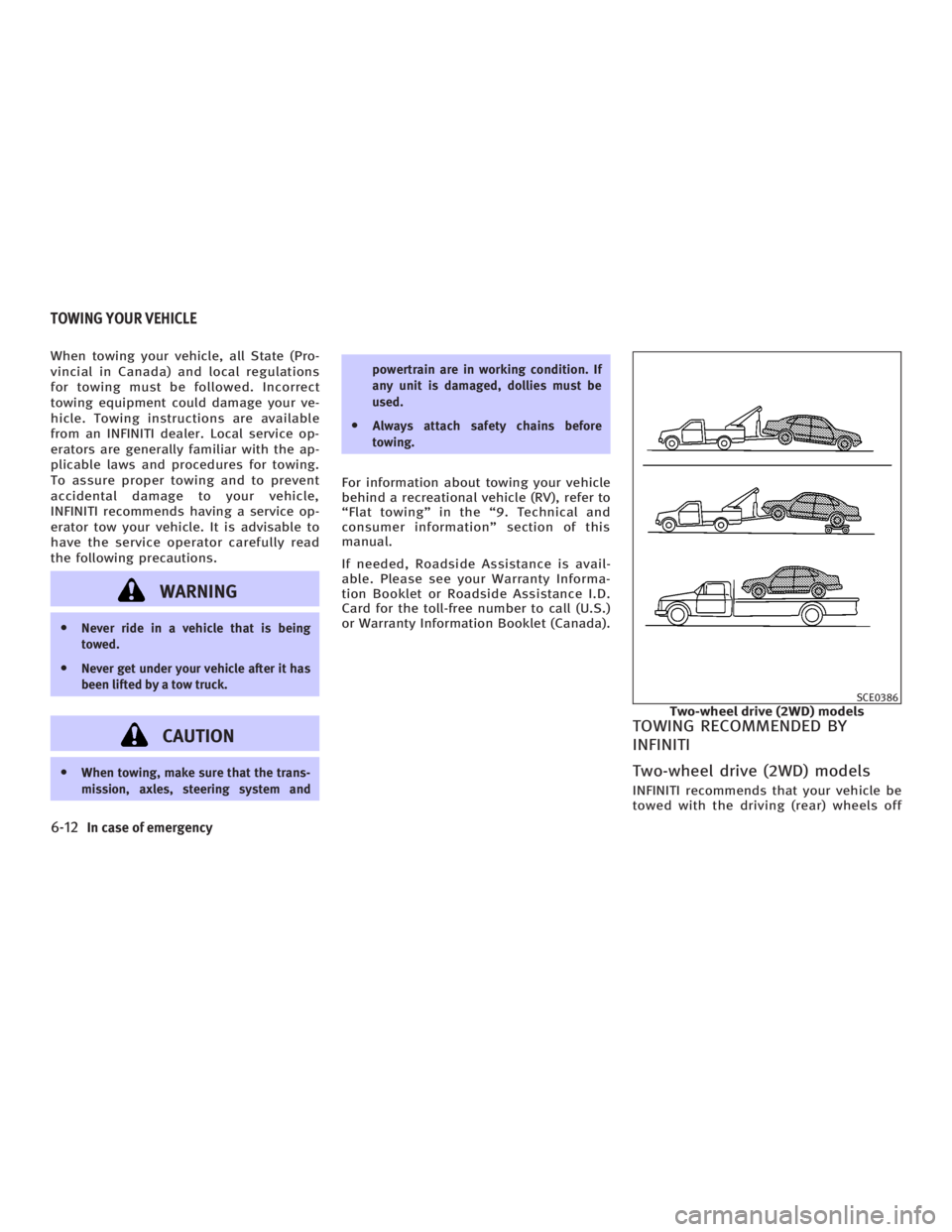
Two-wheel drive (2WD) models INFINITI recommends that your vehicle be
towed with the driving (rear) wheels off SCE0386
Two-wheel drive (2WD) modelsTOWING YOUR VEHICLE
6-12 In case of emergency
w 06.1.4/V35-D/V5.0
X
Page 252 of 344
O Release the accelerator pedal before
shifting between R and D (automatic
transmission models) or 1st and R
(manual transmission models).
O Do not spin the tires above 35 MPH (55
km/h).
5. If the vehicle cannot be freed after a
few tries, contact a professional
towing service to remove the vehicle.
6-16 In case of emergency
w 06.1.4/V35-D/V5.0
X