2006 HYUNDAI TUCSON clock
[x] Cancel search: clockPage 11 of 289
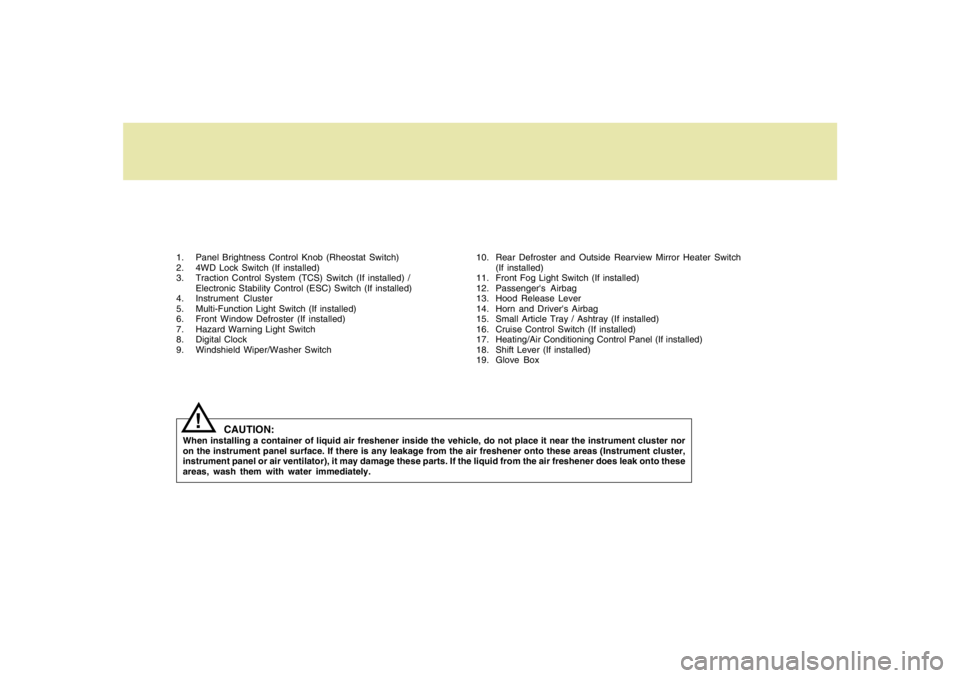
1. Panel Brightness Control Knob (Rheostat Switch)
2. 4WD Lock Switch (If installed)
3. Traction Control System (TCS) Switch (If installed) /
Electronic Stability Control (ESC) Switch (If installed)
4. Instrument Cluster
5. Multi-Function Light Switch (If installed)
6. Front Window Defroster (If installed)
7. Hazard Warning Light Switch
8. Digital Clock
9. Windshield Wiper/Washer Switch10. Rear Defroster and Outside Rearview Mirror Heater Switch
(If installed)
11. Front Fog Light Switch (If installed)
12. Passenger's Airbag
13. Hood Release Lever
14. Horn and Driver's Airbag
15. Small Article Tray / Ashtray (If installed)
16. Cruise Control Switch (If installed)
17. Heating/Air Conditioning Control Panel (If installed)
18. Shift Lever (If installed)
19. Glove Box
CAUTION:
When installing a container of liquid air freshener inside the vehicle, do not place it near the instrument cluster nor
on the instrument panel surface. If there is any leakage from the air freshener onto these areas (Instrument cluster,
instrument panel or air ventilator), it may damage these parts. If the liquid from the air freshener does leak onto these
areas, wash them with water immediately.
!
Page 55 of 289

1
FEATURES OF YOUR HYUNDAI
43
!
WARNING:
WARNING:
o The side impact airbag is supplemental
to the driver's and the passenger's seat
belt systems and is not a substitute for
them. Your seat belts must be worn at all
times while the vehicle is in motion. The
airbags deploy only in certain side im-
pact conditions severe enough to cause
significant injury to the vehicle occu-
pants.
o For best protection from the side impact
airbag system and to avoid being injured
by the deploying side impact airbag,
!
HTB072
Side airbag
sensorboth front seat occupants should sit in
an upright position with the seat belt
properly fastened. The driver's hands
should be placed on the steering wheel
at the 9:00 and 3:00 o'clock positions.
The passenger's arms and hands should
be placed on their laps.
o Do not use any accessory seat covers.
o Use of seat covers could reduce or pre-
vent the effectiveness of the system.
o Do not install any accessories on or near
the side impact airbag.
o Do not place any objects over the airbag
or between the airbag and yourself.
o Do not place any objects (an umbrella,
bag, etc.) between the front door and the
front seat. Such objects may become
dangerous projectiles and cause injury
if the supplemental side impact air bag
inflates.
o To prevent unexpected deployment of
the side impact air bag that may result in
personal injury, avoid impact to the side
airbag sensor when the ignition key is on.
B990C01LZ-GATCurtain AirbagCurtain airbags are located along both sides of
the roof rails above the front and rear doors.
They are designed to help protect the heads of
the front seat occupants and the rear outboard
seat occupants in certain side impact collisions.
The curtain airbags are designed to deploy only
during certain side impact collisions, depending
on the crash severity, angle, speed and impact.
The curtain airbags are not designed to deploy
in all side impact situations, collisions from the
front or rear of the vehicle or in most rollover
situations.
HJM2056
Curtain Airbag
Page 75 of 289
1
FEATURES OF YOUR HYUNDAI
63
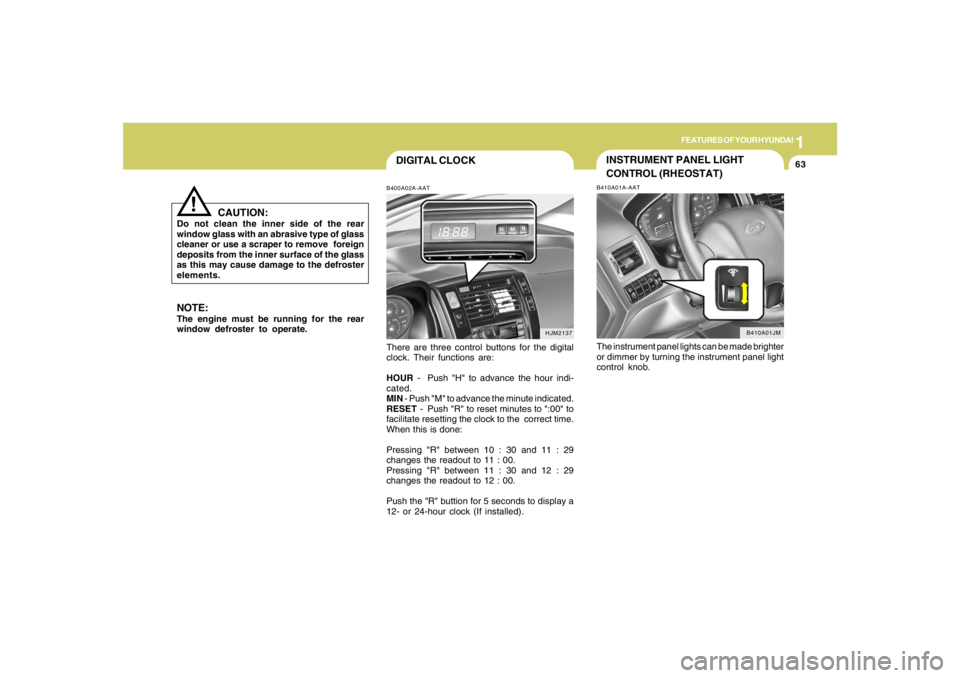
DIGITAL CLOCKB400A02A-AATThere are three control buttons for the digital
clock. Their functions are:
HOUR - Push "H" to advance the hour indi-
cated.
MIN - Push "M" to advance the minute indicated.
RESET - Push "R" to reset minutes to ":00" to
facilitate resetting the clock to the correct time.
When this is done:
Pressing "R" between 10 : 30 and 11 : 29
changes the readout to 11 : 00.
Pressing "R" between 11 : 30 and 12 : 29
changes the readout to 12 : 00.
Push the "R" buttion for 5 seconds to display a
12- or 24-hour clock (If installed).
HJM2137
NOTE:The engine must be running for the rear
window defroster to operate.
CAUTION:
Do not clean the inner side of the rear
window glass with an abrasive type of glass
cleaner or use a scraper to remove foreign
deposits from the inner surface of the glass
as this may cause damage to the defroster
elements.
!
INSTRUMENT PANEL LIGHT
CONTROL (RHEOSTAT)B410A01A-AATThe instrument panel lights can be made brighter
or dimmer by turning the instrument panel light
control knob.
B410A01JM
Page 80 of 289
1FEATURES OF YOUR HYUNDAI68
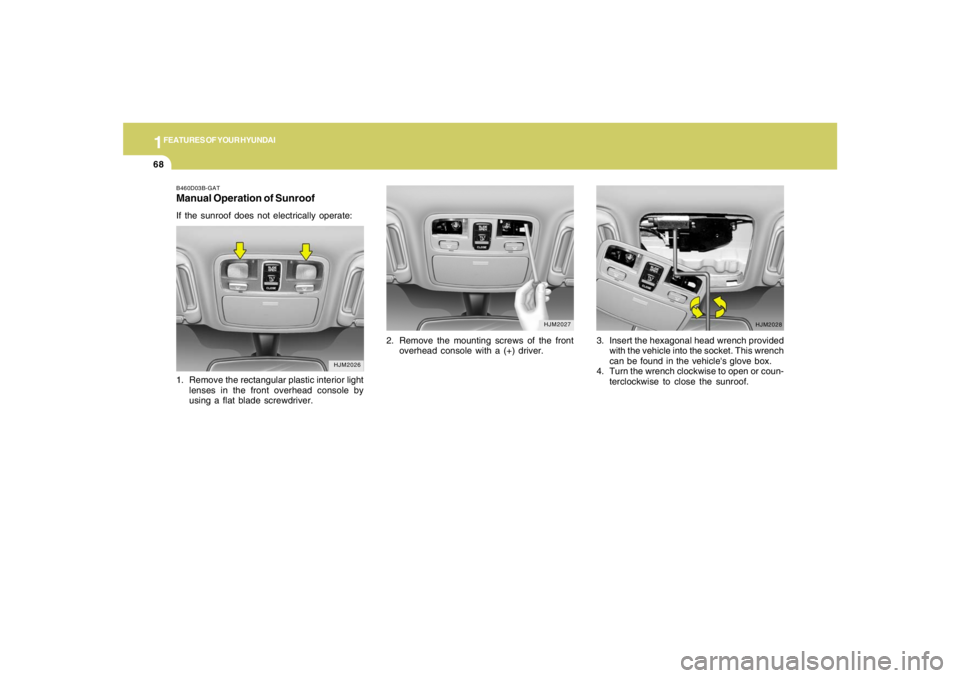
B460D03B-GATManual Operation of SunroofIf the sunroof does not electrically operate:
2. Remove the mounting screws of the front
overhead console with a (+) driver.
HJM2026
HJM2027
1. Remove the rectangular plastic interior light
lenses in the front overhead console by
using a flat blade screwdriver.
HJM2028
3. Insert the hexagonal head wrench provided
with the vehicle into the socket. This wrench
can be found in the vehicle's glove box.
4. Turn the wrench clockwise to open or coun-
terclockwise to close the sunroof.
Page 120 of 289
1FEATURES OF YOUR HYUNDAI
108
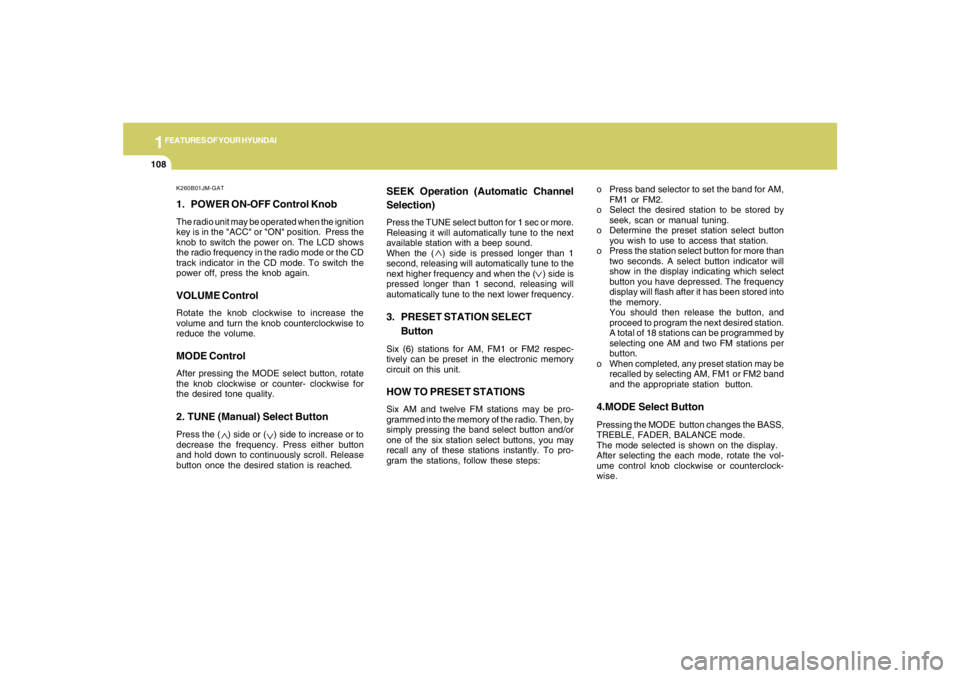
K260B01JM-GAT1. POWER ON-OFF Control KnobThe radio unit may be operated when the ignition
key is in the "ACC" or "ON" position. Press the
knob to switch the power on. The LCD shows
the radio frequency in the radio mode or the CD
track indicator in the CD mode. To switch the
power off, press the knob again.VOLUME ControlRotate the knob clockwise to increase the
volume and turn the knob counterclockwise to
reduce the volume.MODE ControlAfter pressing the MODE select button, rotate
the knob clockwise or counter- clockwise for
the desired tone quality.2. TUNE (Manual) Select ButtonPress the ( ) side or ( ) side to increase or to
decrease the frequency. Press either button
and hold down to continuously scroll. Release
button once the desired station is reached.
SEEK Operation (Automatic Channel
Selection)Press the TUNE select button for 1 sec or more.
Releasing it will automatically tune to the next
available station with a beep sound.
When the ( ) side is pressed longer than 1
second, releasing will automatically tune to the
next higher frequency and when the ( ) side is
pressed longer than 1 second, releasing will
automatically tune to the next lower frequency.3. PRESET STATION SELECT
ButtonSix (6) stations for AM, FM1 or FM2 respec-
tively can be preset in the electronic memory
circuit on this unit.HOW TO PRESET STATIONSSix AM and twelve FM stations may be pro-
grammed into the memory of the radio. Then, by
simply pressing the band select button and/or
one of the six station select buttons, you may
recall any of these stations instantly. To pro-
gram the stations, follow these steps:o Press band selector to set the band for AM,
FM1 or FM2.
o Select the desired station to be stored by
seek, scan or manual tuning.
o Determine the preset station select button
you wish to use to access that station.
o Press the station select button for more than
two seconds. A select button indicator will
show in the display indicating which select
button you have depressed. The frequency
display will flash after it has been stored into
the memory.
You should then release the button, and
proceed to program the next desired station.
A total of 18 stations can be programmed by
selecting one AM and two FM stations per
button.
o When completed, any preset station may be
recalled by selecting AM, FM1 or FM2 band
and the appropriate station button.
4.MODE Select ButtonPressing the MODE button changes the BASS,
TREBLE, FADER, BALANCE mode.
The mode selected is shown on the display.
After selecting the each mode, rotate the vol-
ume control knob clockwise or counterclock-
wise.
Page 121 of 289
1
FEATURES OF YOUR HYUNDAI
109109109109109
!
BASS ControlTo increase the bass, rotate the knob clock-
wise, while to decrease the bass, rotate the
knob counterclockwise.TREBLE ControlTurn to the left or right for the desired treble tone.FAD (Fader Control)Turn the control knob clockwise to emphasize
rear speaker sound (front speaker sound will be
attenuated). When the control knob is turned
counterclockwise, front speaker sound will be
emphasized (rear speaker sound will be attenu-
ated).BALANCE ControlRotate the knob clockwise to emphasize right
speaker sound. (Left speaker sound will be
attenuated) When the control knob is turned
counter clockwise, left speaker sound will be
emphasized (Right speaker sound will be at-
tenuated).
CAUTION:
o Do not place beverages close to the
audio system. The playback mechanism
may be damaged if you spill them.
o Do not impact on the audio system, or
the playback mechanism could be dam-
aged.
Page 126 of 289
1FEATURES OF YOUR HYUNDAI
114
!
HMP280B01TB-GAT1. POWER ON-OFF Controlo The radio unit may be operated when the
ignition key is in the "ACC" or "ON" position.
Press the button to switch the power on. The
display shows the radio frequency in the
radio mode, the tape direction indicator in the
tape mode or CD
ˆMP3 track in either the
CD
ˆMP3 mode or CD AUTO CHANGER
mode. To switch the power off, press the
button again.
o Push the FM
ˆAM, TAPE or CD
ˆMP3 to turn
on that function without pushing Power
ON
ˆOFF control knob.
VOLUME ControlRotate the knob clockwise to increase the
volume and turn the knob counterclockwise to
reduce the volume.2. BAND SelectorPressing the band selector FM
ˆAM changes
the AM, FM1 and FM2 bands. The mode se-
lected is shown on the display.
3. TUNE (Manual) Select KnobPush the TUNE select knob (JOY STICK)
upwards or downwards to increase or de-
crease the frequency. Release the knob when
the station is selected.SEEK Operation
(Automatic Channel Selection)Push the TUNE select knob (JOY STICK) to the
right or left, the frequency will be automatically
tuned to the next higher or lower available
station.
4. SCANWhen the scan button is pressed, the frequency
will increase and the receivable stations will be
tuned in one after another, receiving each sta-
tion for 5 seconds. To stop scanning, press the
scan button again.5. Best Station Memory (BSM)When the BSM button is pressed the six chan-
nels from the highest field intensity are selected
next and stored in memory. The stations se-
lected are stored in the sequence frequency
from the first preset key.6. PRESET STATION Select ButtonsSix (6) stations for AM, FM and FM2 respec-
tively can be preset in the electronic memory
circuit.HOW TO PRESET STATIONSSix AM and twelve FM stations may be pro-
grammed into the memory of the radio. Then, by
simply pressing the band select button and/or
one of the six station select buttons, you may
recall any of these stations instantly. To pro-
gram the stations, follow these steps:
WARNING:
Don't operate the button and joy stick switch
while driving. It can cause death or serious
injury in case of an accident.
Page 127 of 289
1
FEATURES OF YOUR HYUNDAI
115115115115115
o Press band selector to set the band for AM,
FM and FM2.
o Select the desired station to be stored by
seek, scan or manual tuning.
o Determine the preset station select button
you wish to use to access that station.
o Press the station select button for more than
two seconds. Beep sound will be heard while
depressig the button. You should then re-
lease the button, and proceed to program the
next desired station. A total of 18 stations can
be programmed by selecting one AM and
two FM station per button.
o When completed, any preset station may be
recalled by selecting AM, FM or FM2 band
and the appropriate station button.
7. EQUALIZER (EQ)Press the EQ button to select the CLASSIC,
JAZZ, ROCK and DEFEAT MODE for the
desired tone quality. Each press of the button
changes the display as follows;
CLASSIC → JAZZ → ROCK → DEFEAT
8. Adjustment Mode select Button
(A.MODE).Pressing the A.MODE button changes the
BASS, BALANCE, TREBLE and FADER mode.
The mode selected is shown on the display.
After selecting the each mode, rotate the vol-
ume control knob clockwise or counterclock-
wise.BASS ControlTo increase the bass, rotate the knob clock-
wise, while to decrease the bass, rotate the
knob counterclockwise.BALANCE ControlRotate the knob clockwise to emphasize right
speaker sound. (Left speaker sound will be
attenuated) When the control knob is turned
counter clockwise, left speaker sound will be
emphasized (Right speaker sound will be at-
tenuated).TREBLE ControlTurn to the left or right for the desired treble tone.
!
FAD (Fader Control)Turn the control knob clockwise to emphasize
rear speaker sound (front speaker sound will be
attenuated). When the control knob is turned
counterclockwise, front speaker sound will be
emphasized (rear speaker sound will be attenu-
ated).
CAUTION:
o Do not place beverages close to the
audio system. The playback mechanism
may be damaged if you spill them.
o Do not impact on the audio system, or
the playback mechanism could be dam-
aged.