2006 Hyundai Accent Radio
[x] Cancel search: RadioPage 152 of 599

1FEATURES OF YOUR HYUNDAI
138
5. Best Station Memory (BSM)Button
When the BSM button is pressed, the six channels from the highest field in-tensity are selected next and stored in memory. The stations selected are stored in the sequence frequency fromthe first preset key. 6. EQ Button Press the EQ button to select the CLAS- SIC, POPS, ROCK, JAZZ and OFF MODE for the desired tone quality. Each press of the button changes thedisplay as follows;
7. PRESET STATION Select Buttons
Six stations for AM(MW, LW), FM1 and FM2 respectively can be preset in theelectronic memory circuit. HOW TO PRESET STATIONS Six AM(MW, LW) and twelve FM sta- tions may be programmed into thememory of the radio. Then, by simply pressing the AM(MW, LW) / FM select button and/or one of the six stationselect buttons, you may recall any of these stations instantly. To program the stations, follow these steps:
o Press AM(MW, LW)/FM selector to
set the band for AM(MW, LW), FM1 and FM2.
o Select the desired station to be stored
by seek or manual tuning.
o Determine the preset station select button you wish to use to accessthat station.
o Press the station select button for more than two seconds. A selectbutton indicator will show in the dis-play indicating which select button you have depressed. The frequency display will flash after it has beenstored into the memory. You should then release the button, and proceed to program the next desired station.A total of 24 stations can be pro- grammed by selecting one AM(MW, LW) and two FM station per button. o When completed, any preset station
may be recalled by selecting AM(MW, LW), FM1 or FM2 band and the appropriate station button.
! CAUTION:
o Do not place beverages close to the audio system. The audio sys- tem mechanism may be damagedif you spill them.
o Do not strike or allow anything to
impact the audio system, damageto the system mechanisms could occur.
CLASSIC POPS ROCK JAZZ DEFEAT
Page 156 of 599

1FEATURES OF YOUR HYUNDAI
142
M465F01MC-GAT 1. LOAD Button This compact disc player will accom- modate up to six compact discs.To insert multiple discs into the player, perform the following:
1. Press and release the LOAD Button.
2. Green light on the slot will be illumi-nated and the lowest number of empty slot will blink on the display. After “WAIT” is displayed on the LCD, the slot will open with “LOAD”displayed on the LCD.
3. Insert a disc partway into the slot,
label side up. The player will pull thedisc in.
When the disc is inserted, the disc willbegin to play automatically. NOTE :
o The disc can be only inserted while the green light is blinking on the slot.
o This CD player is suitable only for
12 cm discs, do not use irregularshaped CDs. To insert multiple discs do the follow- ings:
1. Press and hold the LOAD button for
one second or more. You will then hear a beep sound and the green light on the slot will be illuminated, and the numbers ofempty disc will blink on the display.
2. After “WAIT” is displayed on the LCD
with the lowest number of empty slotblinking, the slot will open with “LOAD” displayed on the LCD.
3. Insert a disc partway into the slot, label side up. The player will pull thedisc in. Once the disc is loaded, the num-bers of the empty disc will blink on the display continuously. If the next “DISC NO.” is displayedwhen the slot is illuminated, you can then load another disc.
4. Load the remaining disc by following the same procedures 1 and 2. Whenyou finished loading 6 discs, the CD player will begin to play the last CDloaded.
5. To load more than one disc but less
than six, complete Steps 1 and 2. When you have finished loading discs,press LOAD button to cancel the load-ing function or wait for 10 seconds. The CD player will begin to play the last CD loaded. As each CD starts to play, theDISC number will appear on the dis- play. NOTE : The disc player takes up to six discs. Do not try to load more than six. 2. CD/AUX Button
o Press the CD Button to start CD
playback, during radio operation or cassette tape playing.
o When discs are in the CD deck, if you press the CD button, the CD playerwill begin playing even if the radio orcassette player is being used.
o The CD player can be used when the
ignition switch is in either the “ON” or“ACC” position.
o Push the CD button to start CD
playback without pushing Power ON-OFF control knob. (Only when a CD is in the deck.
Page 166 of 599

2 DRIVING YOUR HYUNDAI
4
!
KEY POSITIONS
C040A01E
LOCK
ACC
ON
START
o "START" The engine is started in this position. It will crank until you release the key. C040A01A-AAT
NOTE: Do not hold the key in the "START" position for more than 15 seconds.
o "ON" When the key is in the "ON" position, the ignition is on and all accessories may be turned on. If the engine is notrunning, the key should not be left in the "ON" position. This will discharge the battery and may also damage theignition system.
o "ACC" With the key in the "ACC" position, some electrical accessories (radio etc.)may be operated.
o "LOCK" The key can be removed or inserted in this position. To protect against theft, the steering wheel locks by removing the key. NOTE: To unlocking the steering wheel, insert the key, and then turn the steering wheel and key simulta-neously.
WARNING:
The engine should not be turned off or the key removed from the ignition key cylinder while the ve-hicle is in motion. The steering wheel is locked by removing the key.
TO START THE ENGINE
C030A01A-GAT COMBINATION IGNITION SWITCH
o If your Hyundai is equipped with a manual transaxle, place the shift lever in neutral and depress the clutch pedal fully.
o If your Hyundai has an automatic
transaxle, place the shift lever in "P"(park).
o To start the engine, insert the igni- tion key and turn it to the "START"position. Release it as soon as the engine starts. Do not hold the key inthe "START" position for more than 15 seconds.
NOTE: For safety, the engine will not start if the shift lever is not in "P" or "N" Position (Automatic transaxle).
Page 233 of 599

6
DO-IT-YOURSELF MAINTENANCE
15
!
REPLACING THE SPARK PLUGS
WARNING:
The cooling fan is controlled by engine coolant temperature andmay sometimes operate even when the engine is not running. Use ex- treme caution when working nearthe blades of the cooling fan so that you are not injured by a rotating fan blade. As the engine coolant tem-perature decreases, the fan will auto- matically shut off. This is a normal condition.
G060B02S-AAT (Gasoline Engine only)
CHAMPION NGK RC10YCBKR5ES
Unleaded
engine Leaded
engine
RC10YC4 BKR5ES-11
G060A01L
The spark plugs should be changed at the intervals specified in the vehicle maintenances schedule in Section 5 or whenever engine performance indicatesthey should be changed. Symptoms that suggest poor spark plug perfor- mance include engine misfiring underload, loss of fuel economy, poor accel- eration, etc. When spark plugs are re- placed, always use spark plugs recom-mended by Hyundai. The use of other spark plugs can result in loss of perfor- mance, radio interference or enginedamage. NOTE: When replacing the spark plugs, genuine Hyundai replacement parts are recommended. Recommended Spark Plugs:
Unleaded: 1.0 ~ 1.1 mm (0.039 ~ 0.043 in.) Leaded: 0.7 ~ 0.8 mm(0.028 ~ 0.032 in.)
Page 247 of 599
6
DO-IT-YOURSELF MAINTENANCE
29
4. Replace the blown fuse by pressing
a new fuse of the same rating into place. The fuse should be a snug fit. If it is not, have the fuse clip repairedor replaced by a Hyundai dealer. If you do not have a spare fuse, you may be able to borrow a fuse of thesame or lower rating from an acces-
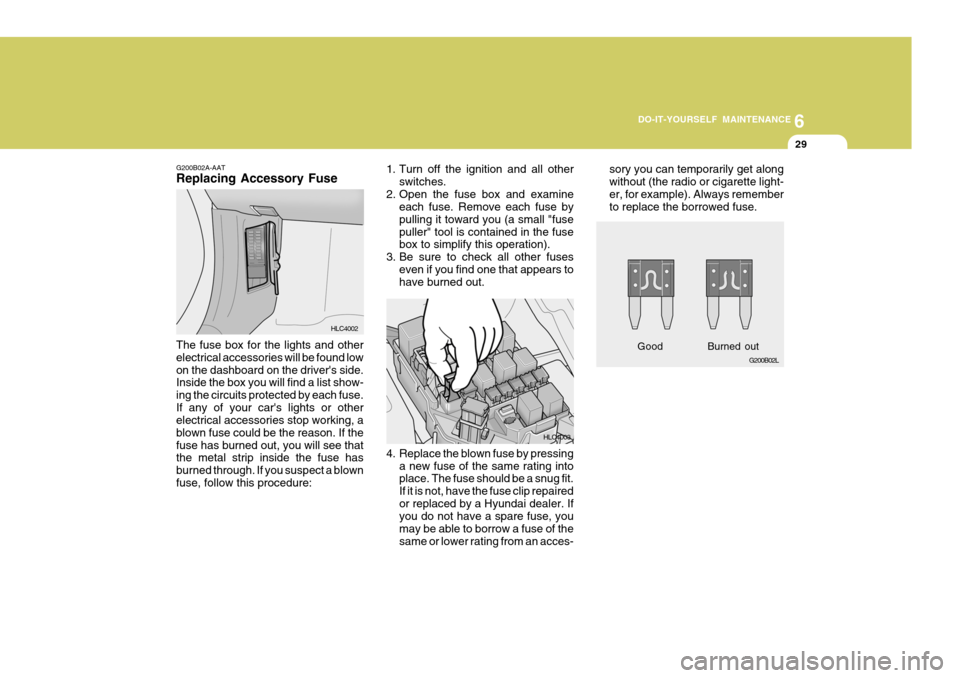
G200B02A-AAT Replacing Accessory Fuse The fuse box for the lights and other electrical accessories will be found lowon the dashboard on the driver's side. Inside the box you will find a list show- ing the circuits protected by each fuse.If any of your car's lights or other electrical accessories stop working, a blown fuse could be the reason. If thefuse has burned out, you will see that the metal strip inside the fuse has burned through. If you suspect a blownfuse, follow this procedure:
HLC40021. Turn off the ignition and all other
switches.
2. Open the fuse box and examine each fuse. Remove each fuse bypulling it toward you (a small "fusepuller" tool is contained in the fuse box to simplify this operation).
3. Be sure to check all other fuses even if you find one that appears tohave burned out.
HLC4003sory you can temporarily get along without (the radio or cigarette light-er, for example). Always remember to replace the borrowed fuse.
G200B02L
Good
Burned out
Page 281 of 599

10
INDEX
5
R Rear Seat .................................................................. 1-17
Folding Rear Seatbacks ............... ............................ 1-18
Rear Window Defroster Switch ................................ 1-66
S Seat Front seat ............................................................... 1-14
Rear seat ............................................................... 1-18
Rear seat entry (3-door model) ............................. 1-17
Seat Warmer .......................................................... 1-17
Seat Belts 2-Point type ............................................................ 1-24
3-Point system ............................................ 1-23 , 1-25
Adjustable height .................................................... 1-22
Adjusting your seat be lt .........................................1-23
Care of seat belts .................................................. 1-21
Precautions ............................................................ 1-19
Pre-tensioner seat belt (Without A/BAG) ..............1-32
Pre-tensioner seat belt (With A/BAG) ...................1-33
Pre-tensioner seat belt (With Dual-stage A/BAG) . 1-38
Spark Plugs ............................................................... 6-15
Speedometer ............................................................. 1-57
Starting ........................................................................ 2-5
Steering Wheel Freeplay .................. ........................ 6-26
Steering Wheel Tilt Lever .............. ...........................1-82Stereo Radio Operation (H215, H225, H265)
.......................................................... 1-96, 1-99, 1-104
Stereo Sound System ............................................... 1-94
Sun Visor .................................................................. 1-82
Sunroof ...................................................................... 1-71
Sunshad e .................................................................. 1-70
TTachometer ............................................................... 1-57
Theft-Alarm system ..................................................... 1-9
Tires
Balancing .................................................................. 8-5
Chains ...................................................................... 8-4
If you have a flat tire ............................................... 3-6
Information ............................................................... 8-3
Pressure ................................................................... 8-3
Replacement ............................................................ 8-5
Rotation .................................................................... 8-4
Snow tires ................................................................ 8-4
Spare tire ................................................................. 3-5
Traction .................................................................... 8-5
Towing A trailer (or vehicle) ............................................... 2-21
Emergency ............................................................. 3-13
If your car must be towed .....................................3-11
Trailer or Vehicle towing ........................................... 2-21
Page 376 of 599

1FEATURES OF YOUR HYUNDAI
94STEREO SOUND SYSTEM
or the presence of buildings, bridges or other large obstructions in the area.
FM broadcasts are transmitted at highfrequencies and do not bend to follow the earth's surface. Because of this, FM broadcasts generally begin to fadeat short distances from the station. Also, FM signals are easily affected by buildings, mountains, or other obstruc-tions. These can result in certain listen- ing conditions which might lead you to believe a problem exists with your ra-dio. The following conditions are normal and do not indicate radio trouble:
AM broadcasts can be received atgreater distances than FM broadcasts. This is because AM radio waves aretransmitted at low frequencies. These long, low frequency radio waves can follow the curvature of the earth ratherthan travelling straight out into the atmosphere. In addition, they curve around obstructions so that they canprovide better signal coverage.
B750A02A-AAT How Car Audio Works
AM and FM radio signals are broadcast from transmitter towers located around your city. They are intercepted by the radio antenna on your car. This signal isthen received by the radio and sent to your car speakers. When a strong radio signal has reachedyour vehicle, the precise engineering of your audio system ensures the best possible quality reproduction. Howev-er, in some cases the signal coming to your vehicle may not be strong and clear. This can be due to factors suchas the distance from the radio station, closeness of other strong radio stations
Ionosphere B750A02L
AM reception
Mountains
Buildings Unobstructed
area
FM radio station
B750A03L
Ionosphere
FM reception
B750A01L Obstructed area
Iron bridges
Page 377 of 599

1
FEATURES OF YOUR HYUNDAI
95
!
o Station Swapping - As an FM signal
weakens, another more powerful signal near the same frequency may begin to play. This is because your radio is designed to lock onto the clearest signal. If this occurs, selectanother station with a stronger sig- nal.
o Multi-Path Cancellation - Radio sig- nals being received from severaldirections can cause distortion or fluttering. This can be caused by adirect and reflected signal from the same station, or by signals from two stations with close frequencies. Ifthis occurs, select another station until the condition has passed.
o Fading - As your car moves away
from the radio station, the signal willweaken and sound will begin to fade. When this occurs, we suggest that you select another stronger sta- tion.
o Flutter/Static - Weak FM signals or large obstructions between thetransmitter and your radio can dis-turb the signal causing static or flut- tering noises to occur. Reducing the treble level may lessen this effectuntil the disturbance clears. B750B02Y-AAT Using a cellular phone or a two- way radio When a cellular phone is used inside the vehicle, noise may be produced from the audio equipment. This does not mean that something is wrong withthe audio equipment. In such a case, use the cellular phone at a place as far as possible from the audio equipment.!
CAUTION:
When using a communication sys- tem such as a cellular phone or a radio set inside the vehicle, a sepa-rate external antenna must be fitted. When a cellular phone or a radio set is used with an internal antennaalone, it may interfere with the vehicle's electrical system and ad- versely affect safe operation of thevehicle.
WARNING:
Don't use a cellular phone whenyou are driving, you must stop at asafe place to use a cellular phone.
B750A04L B750A05L