2006 HUMMER H3 ECO mode
[x] Cancel search: ECO modePage 160 of 410

Engine Oil Life System
Press the reset stem until OIL LIFE RESET
appears — alternating between OIL LIFE and
RESET —on the DIC display. The engine oil life
system calculates an estimate of the oil’s remaining
useful life. The CHANGE OIL message will alert you to
change your oil on a schedule consistent with your
driving conditions. Always reset the OIL LIFE message
after an oil change. To reset the message, see
Engine Oil Life System on page 5-16.
In addition to the engine oil life system monitoring the
oil life, additional maintenance is recommended in
the Maintenance Schedule in this manual. SeeEngine
Oil on page 5-13andScheduled Maintenance on
page 6-4for more information.
Language
This feature allows you to choose the language in which
the DIC display will show information.
To set your choice for this feature, perform the
following steps:
1. With the engine off, turn the key to ON.
2. Press and release the reset stem until the language
is shown on the DIC display.3. To view the next available language, press and
hold the reset stem for approximately two seconds.
Release the reset stem and press and hold
again to view each language. You can choose from
English (default), Spanish, or French.
4. Once the desired language is shown on the
DIC display, briey press the reset stem to set
your choice.
Automatic Door Locks
This feature allows you to program your door locks to a
preferred setting.
To set your choice for this feature, perform the
following steps:
1. With the engine off, turn the key to LOCK. Do not
remove the key from the ignition.
2. Press and hold the power door lock button for
approximately three seconds until the DIC
display shows the current door lock mode.
3. To view the next available mode, press and hold
the reset stem for approximately two seconds.
Release the reset stem and press and hold again to
view each mode.
4. Once the desired mode is shown on the DIC
display, briey press the reset stem to set your
choice. The DIC display will then clear.
3-42
Page 161 of 410

The following are the available modes:
Lock 1 (default):On vehicles with an automatic
transmission, this mode locks all of the doors when the
vehicle is shifted out of PARK (P) and unlocks all of
the doors when the vehicle is shifted into PARK (P).
On vehicles with a manual transmission, this mode locks
all of the doors when the vehicle speed is greater
than 15 mph (24 km/h) and unlocks all of the doors
when the key is removed from the ignition.
Lock 2:On vehicles with an automatic transmission,
this mode locks all of the doors when the vehicle
is shifted out of PARK (P) and unlocks the driver’s door
when the vehicle is shifted into PARK (P).
On vehicles with a manual transmission, this mode
locks all of the doors when the vehicle speed is greater
than 15 mph (24 km/h) and unlocks the driver’s door
when the key is removed from the ignition.
Lock 3:On vehicles with an automatic transmission,
this mode locks all of the doors when the vehicle
is shifted out of PARK (P). The doors will not
automatically unlock.
On vehicles with a manual transmission, this mode
locks all of the doors when the vehicle speed is
greater than 15 mph (24 km/h). The doors will not
automatically unlock.Remote Keyless Entry Feedback
This feature allows you to program your remote keyless
entry feedback to a preferred setting.
To set your choice for this feature, perform the
following steps:
1. With the engine off, turn the key to LOCK. Do not
remove the key from the ignition.
2. Press and hold the lock and unlock buttons on the
remote keyless entry transmitter at the same time.
Hold both buttons until the DIC display shows
the current remote keyless entry feedback mode.
3. To view the next available mode, press and hold
the reset stem for approximately two seconds.
Release the reset stem and press and hold again to
view each mode.
4. Once the desired mode is shown on the DIC
display, briey press the reset stem to set your
choice. The DIC display will then clear.
3-43
Page 162 of 410

The following are the available modes:
RFA 1 (default):This mode ashes the parking lamps
when you press the lock or unlock buttons on the
remote keyless entry transmitter.
RFA 2:This mode ashes the parking lamps and
sounds the horn when you press the lock button on the
remote keyless entry transmitter. This mode also
ashes the parking lamps when you press the unlock
button on the remote keyless entry transmitter.
RFA 3:This mode ashes the parking lamps and
sounds the horn when you press the lock or unlock
buttons on the remote keyless entry transmitter.
RFA 4:This mode disables remote keyless entry
feedback. There will be no feedback when you press
the lock or unlock buttons on the remote keyless
entry transmitter.DIC Warnings and Messages
Warning messages are displayed on the Driver
Information Center (DIC) to notify the driver that the
status of the vehicle has changed and that some action
may be needed by the driver to correct the condition.
More than one message may appear at one time. They
will appear one after the other. The messages are
displayed for four seconds each. Some messages may
not require immediate action but you should press
and release the trip odometer reset stem to
acknowledge that you received the message and clear it
from the display. Each message must be acknowledged
individually. Some messages cannot be cleared from
the display because they are more urgent. These
messages require action before they can be removed
from the DIC display. The following are the possible
messages that can be displayed and some information
about them.
AC (Air Conditioning) OFF
This message will be displayed when the engine coolant
temperature is too high and the air conditioning in
your vehicle needs to be turned off. SeeEngine
Overheating on page 5-27andClimate Control System
on page 3-21for more information. This message
will be displayed along with the ENG HOT message.
3-44
Page 168 of 410

Playing the Radio
P
(Power/Volume):Press this knob to turn the
system on and off.
Turn this knob to increase or to decrease the volume.
DISP (Display):Press this button to switch the
display between the radio station frequency and the
time. When the ignition is turned off, press this knob to
display the time.
For XM™ (if equipped), press the DISP button while in
XM™ mode to retrieve four different categories of
information related to the current song or channel:
Artist, Song Title, Category or PTY, Channel
Number/Channel Name.
To change the default on the display, press the DISP
button until you see the display you want, then hold
this knob for two seconds. The radio will produce
one beep and the selected display will now be
the default.
AUTO VOL (Automatic Volume):With automatic
volume, the audio system adjusts automatically to make
up for road and wind noise as you drive.Set the volume at the desired level. Press this button to
select LOW, MEDIUM, or HIGH. Each higher setting
will allow for more volume compensation at faster
vehicle speeds. Then as you drive, automatic volume
increases the volume, as necessary, to overcome noise
at any speed. The volume level should always sound
the same to you as you drive. NONE will appear on the
display if the radio cannot determine the vehicle
speed. To turn automatic volume off, press this button
until AVOL OFF appears on the display.
Finding a Station
BAND:Press this button to switch between FM1, FM2,
AM, or XM1 or XM2 (if equipped). The display will
show the selection.
e(Tune):Turn this knob to select radio stations.
©SEEK¨:Press and release the right or the left
arrow to go to the next or to the previous station
and stay there.
To scan stations, press and hold either arrow for more
than two seconds. SCN will appear on the display
and the radio will produce one beep. The radio will go
to a station, play for a few seconds, then go on to
the next station. Press either arrow again or one of the
pushbuttons to stop scanning presets.
3-50
Page 171 of 410

Finding a Category (CAT) Station
To select and nd a desired category perform the
following:
1. Press the CAT button to activate program
type select mode. A category will appear on
the display.
2. Press the CAT button to select a category.
3. Once the desired category is displayed, press either
SEEK arrow to select and to take you to the
categories rst station.
4. To go to another station within that category and
the category is displayed, press the CAT button
once. If the category is not displayed, press the CAT
button twice to display the category and then to
go to another station.
5. Press CAT to exit program type select mode.
If CAT times out and is no longer on the display,
go back to Step 1.
If the radio cannot nd the desired program type, NONE
will appear on the display and the radio will return to
the last station you were listening to.BAND (Alternate Frequency):Alternate frequency
allows the radio to switch to a stronger station with the
same category. To turn alternate frequency on,
press and hold BAND for two seconds. AF ON will
appear on the display. The radio may switch to stations
with a stronger frequency.
To turn alternate frequency off, press and hold BAND
again for two seconds. AF OFF will appear on the
display. The radio will not switch to other stations.
This function does not apply for XM™ Satellite
Radio Service.
Radio Messages
CAL ERR (Calibration Error):The audio system has
been calibrated for your vehicle from the factory. If
CAL ERR appears on the display it means that the radio
has not been congured properly for your vehicle and
it must be returned to your GM dealer for service.
LOC (Locked):This message is displayed when the
THEFTLOCK
®system has locked up. Take your vehicle
to your GM dealer for service.
If any error occurs repeatedly or if an error cannot be
corrected, contact your GM dealer.
3-53
Page 179 of 410

4y(Random):To random the tracks in the current
folder or playlist, press and release this pushbutton.
FLDR RDM will appear on the display. Once all of the
tracks in the current folder or playlist have been
played the system will move on to the next folder or
playlist and play all of the tracks in random order.
To random all the tracks on the CD, press and hold this
pushbutton for two seconds. You will hear a beep
and CD RDM will appear on the display. This feature
will not work with playlists.
When in random, pressing and releasing either SEEK
arrow will take you to the next or previous random track.
Press and release this pushbutton again to turn off
random play. NO RDM will appear on the display.
5
!(Previous Folder):Press this pushbutton to go
to the rst track in the previous folder. Pressing this
button while in folder random mode will take you to the
previous folder and random the tracks in that folder.
6
#(Next Folder):Press this pushbutton to go to the
rst track in the next folder. Pressing this button while
in folder random mode will take you to the next
folder and random the tracks in that folder.
©SEEK¨:Press the left arrow to go to the start of
the previous track. Press the right arrow to go to the
start of the next track. Pressing either arrow for
more than two seconds will search the previous or next
tracks at two tracks per second. Release the button
to stop searching and to play the track.
DISP (Display):Press this knob to switch between
track mode, folder/playlist mode, and time of day mode.
The display will show only eight characters, but there
can be up to four pages of text. If there are more
than eight characters in the song, folder, or playlist
name, pressing this knob within two seconds will take
you to the next page of text. If there are no other pages
to be shown, pressing this knob within two seconds
will take you to the next display mode.
Track mode will display the current track number
and the ID3 tag song name.
Folder/playlist mode will display the current folder or
playlist number and the folder/playlist name.
Time of day mode will display the time of day and
the ID3 tag song name.
To change the default on the display, press the DISP
knob until you see the display you want, then hold
this knob for two seconds. The radio will produce
one beep and the selected display will now be the
default.
3-61
Page 181 of 410
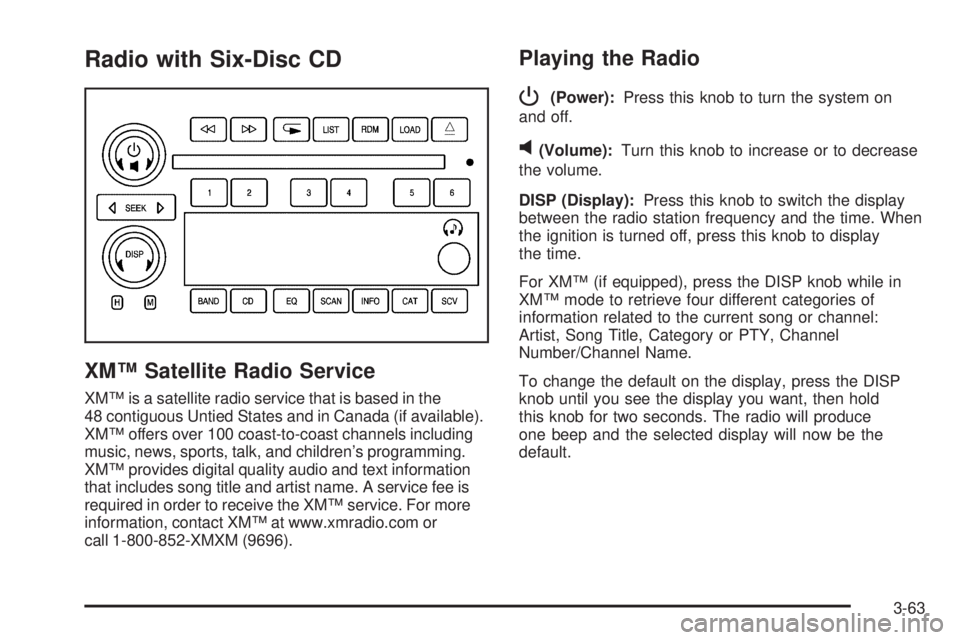
Radio with Six-Disc CD
XM™ Satellite Radio Service
XM™ is a satellite radio service that is based in the
48 contiguous Untied States and in Canada (if available).
XM™ offers over 100 coast-to-coast channels including
music, news, sports, talk, and children’s programming.
XM™ provides digital quality audio and text information
that includes song title and artist name. A service fee is
required in order to receive the XM™ service. For more
information, contact XM™ at www.xmradio.com or
call 1-800-852-XMXM (9696).
Playing the Radio
P
(Power):Press this knob to turn the system on
and off.
v(Volume):Turn this knob to increase or to decrease
the volume.
DISP (Display):Press this knob to switch the display
between the radio station frequency and the time. When
the ignition is turned off, press this knob to display
the time.
For XM™ (if equipped), press the DISP knob while in
XM™ mode to retrieve four different categories of
information related to the current song or channel:
Artist, Song Title, Category or PTY, Channel
Number/Channel Name.
To change the default on the display, press the DISP
knob until you see the display you want, then hold
this knob for two seconds. The radio will produce
one beep and the selected display will now be the
default.
3-63
Page 185 of 410

Finding a Category (CAT) Station
To select and nd a desired category perform the
following:
1. Press the CAT button to activate program
type select mode. A category will appear on
the display.
2. Press the CAT button to select a category.
3. Once the desired category is displayed, press either
SEEK arrow to select and to take you to the
categories rst station.
4. To go to another station within that category and
the category is displayed, press the CAT button
once. If the category is not displayed, press the CAT
button twice to display the category and then to
go to another station.
5. Press CAT to exit program type select mode.
If CAT times out and is no longer on the display,
go back to Step 1.
If the radio cannot nd the desired program type, NONE
will appear on the display and the radio will return to
the last station you were listening to.BAND (Alternate Frequency):Alternate frequency
allows the radio to switch to a stronger station with the
same category. To turn alternate frequency on,
press and hold BAND for two seconds. AF ON will
appear on the display. The radio may switch to stations
with a stronger frequency.
To turn alternate frequency off, press and hold BAND
again for two seconds. AF OFF will appear on the
display. The radio will not switch to other stations.
This function does not apply for XM™ Satellite
Radio Service.
Radio Messages
CAL ERR (Calibration Error):The audio system has
been calibrated for your vehicle from the factory. If
CAL ERR appears on the display it means that the radio
has not been congured properly for your vehicle and
it must be returned to your GM dealer for service.
LOC (Locked):This message is displayed when the
THEFTLOCK
®system has locked up. Take your vehicle
to your GM dealer for service.
If any error occurs repeatedly or if an error cannot be
corrected, contact your GM dealer.
3-67