Page 86 of 316
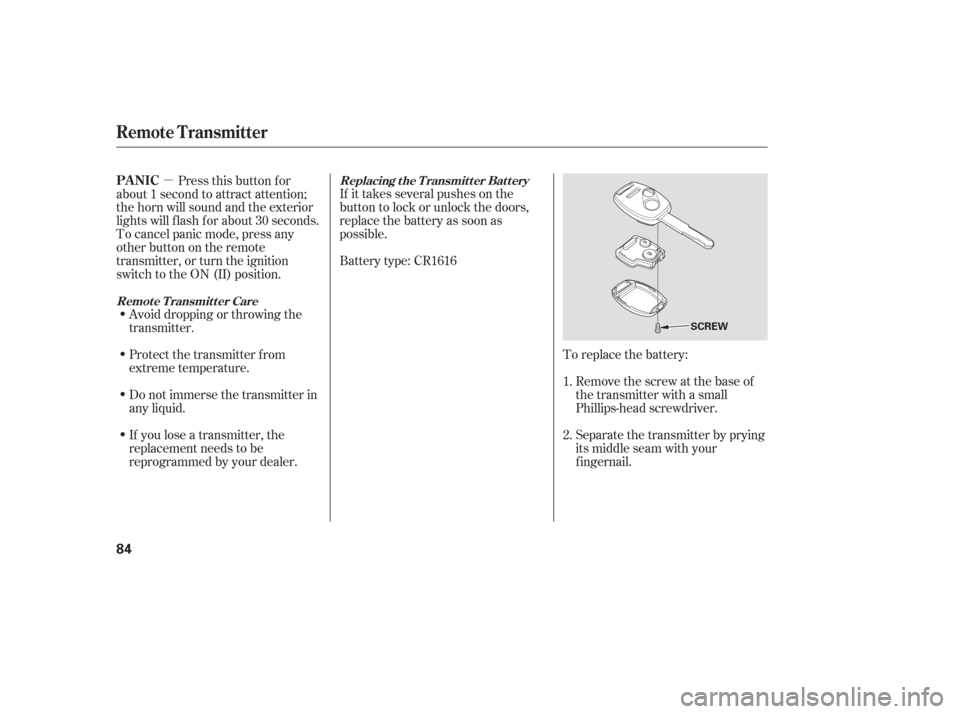
�µTo replace the battery:Remove the screw at the base of
the transmitter with a small
Phillips-head screwdriver.
Separate the transmitter by prying
its middle seam with your
f ingernail.
Battery type: CR1616 If it takes several pushes on the
button to lock or unlock the doors,
replace the battery as soon as
possible.
Pressthisbuttonfor
about 1 second to attract attention;
thehornwillsoundandtheexterior
lights will f lash f or about 30 seconds.
To cancel panic mode, press any
other button on the remote
transmitter, or turn the ignition
switch to the ON (II) position.
Avoid dropping or throwing the
transmitter.
If you lose a transmitter, the
replacement needs to be
reprogrammed by your dealer. Do not immerse the transmitter in
any liquid. Protect the transmitter from
extreme temperature. 1.
2.Replacing the Transmitter Battery
Remote Transmitter CarePA NIC
Remote Transmitter
84
SCREW
Page 101 of 316

Be caref ul when you are using the
beverage holders. A spilled liquid
that is very hot can scald you or your
passengers. Liquid can also spill
f rom the rear door pocket beverage
holders when you close the rear
doors. Use only resealable
containers in the door pockets. The
f ront beverage holders can be
installed under the slide.
Spilled liquids can damage the
upholstery, carpeting, and electrical
components in the interior.Open the glove box by pulling the
bottom of the handle. Close it with a
f irm push. Lock or unlock the glove
box with the master key.
The glove box light comes on only
when the parking lights are on.
To open the console compartment,
pull up on the lever, and lif t the lid.
Pivot the door of the console f orward
and you can store a cellular phone, a
small notepad, and business cards in
it.
Interior Convenience Items
Beverage Holders Console CompartmentGlove Box
Instruments and Controls
99
An open glove box can cause
serious injury to your passenger
inacrash,evenifthe
passenger is wearing the seat
belt.
Always keep the glove box
closed while driving.
Page 104 of 316

There is a 115 volt AC power outlet
in the rear compartment on the
driver’s side. To use the AC power
outlet, open the rear compartment
lid and open the outlet cover. Insert
the plug into the receptacle slightly,
turn it 90° clockwise, then push in
the plug all the way.
Always run the engine when you use
the AC Power Outlet.The maximum capacity f or this
power outlet is 115 volt AC at 100
watts or less. If you use an appliance
which requires more than 100 watts,
it automatically stops supplying the
power. If this happens, turn the
ignition switch of f and turn it on
again.
The AC power outlet is not
designed f or electric appliances
which require high initial peak
wattage such as cathode-ray tube
type televisions, ref rigerators,
electric pumps, etc. It is also not
suitable f or devices that process
precise data such as medical
equipment or measuring instruments.
Any appliances that require an
extremely stable power supply such
as microcomputer-controlled electric
blankets, touch sensor lamps, etc.,
should not be connected to this
outlet. ON
All the individual map lights come
on.
None of the lights come on when a
door or the tailgate is opened.
The individual map lights in the
frontcanbeturnedonandoff with
the switches next to the lights.
When this switch is in the position:
When the switch is in the OFF position:
If equipped
Interior Convenience Items, Interior L ights
AC Power Outlet
Light Control Switch
102
NOTE:
DOOR
ACTIVATED
POSITIONOFF
ON
Page 105 of 316
The individual map lights in the
second and third rows cannot be
turned on.Door
Activated
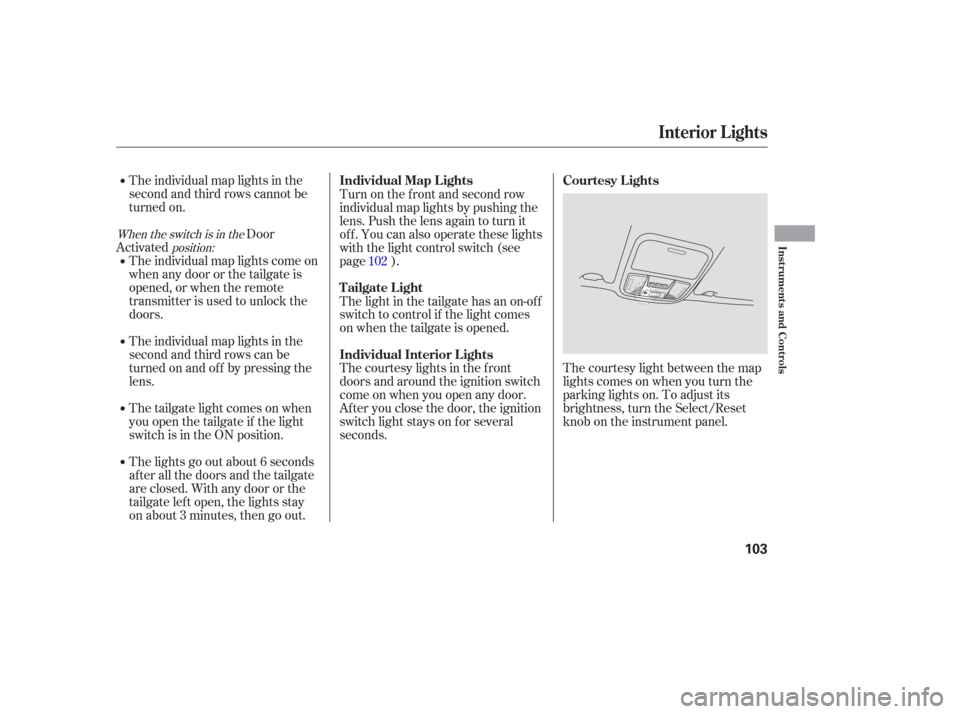
The courtesy light between the map
lights comes on when you turn the
parking lights on. To adjust its
brightness, turn the Select/Reset
knob on the instrument panel.
The individual map lights come on
whenanydoororthetailgateis
opened, or when the remote
transmitter is used to unlock the
doors.
The individual map lights in the
second and third rows can be
turned on and of f by pressing the
lens.
The tailgate light comes on when
you open the tailgate if the light
switch is in the ON position.
The lights go out about 6 seconds
after all the doors and the tailgate
are closed. With any door or the
tailgate lef t open, the lights stay
on about 3 minutes, then go out. Turn on the f ront and second row
individual map lights by pushing the
lens. Push the lens again to turn it
off. You can also operate these lights
with the light control switch (see
page ).
The light in the tailgate has an on-of f
switch to control if the light comes
on when the tailgate is opened.
The courtesy lights in the f ront
doors and around the ignition switch
come on when you open any door.
Af ter you close the door, the ignition
switch light stays on f or several
seconds.
102
When the switch is in the
position:
Interior Lights
Courtesy Lights
Individual Map L ights
Tailgate Light
Individual Interior L ights
Instruments and Controls
103
Page 176 of 316

The security system helps to protect
your vehicle and valuables f rom thef t.
The horn sounds and a combination
of headlights, parking lights, side
marker lights, and taillights f lash if
someone attempts to break into your
vehicle. This alarm continues for 2
minutes, then the system resets. To
reset an alarm system bef ore the 2
minutes have elapsed, unlock the
driver’s f ront door with the key or
the remote transmitter.Once the security system is set,
opening any door without using the
key or the remote transmitter, or the
hood, will cause it to alarm. It also
alarms if the radio is removed from
the dashboard or the wiring is cut.The security system will not set if
the hood, the tailgate, or any door is
not f ully closed. If the system will not
set, check the Door and Tailgate
Open Monitor on the instrument
panel (see page ) to see if the
doors and the tailgate are f ully
closed. Since it is not part of the
monitor display, manually check the
hood.
Do not attempt to alter this system
or add other devices to it.
The security system automatically
sets 15 seconds after you lock the
doors, hood, and the tailgate. For the
system to activate, you must lock the
doors f rom the outside with the key,
lock tab, door lock switch, or remote
transmitter. The security system
indicator next to the driver’s door
lock starts blinking immediately to
show you the system is setting itself . 66
On EX and EX-L models
Security System
174
SECURITY SYSTEM INDICATOR
Page 182 of 316
�µ
If you are training HomeLink to
operate a garage door or gate, you
should unplug the motor f or that
device during training. Repeatedly
pressing the remote control button
could burn out the motor.
HomeLink stores the code in a
permanent memory. There should
be no need to retrain HomeLink if
your vehicle’s battery goes dead or is
disconnected. The HomeLinkuniversal
transceiver built into your vehicle
canbeprogrammedtooperateupto
three remotely controlled devices
around your home, such as garage
doors, lighting, or home security
systems.
If your garage door opener was
manuf actured bef ore April 1982, you
may not be able to program
HomeLink to operate it. They do not have the safety feature that causes
the motor to stop and reverse if an
obstacle is detected during closing,
increasing the risk of injury.
Always ref er to the opening
instructions and saf ety inf ormation
that came with your garage door
opener or other equipment you
intend to operate with HomeLink. If
you do not have this inf ormation,
contact the manuf acturer of the
equipment.
For quick and accurate training,
make sure the remote control
transmitter for the device (garage
door, automatic gate, security
system, etc.) has a fresh battery.
If you just
received your vehicle and have not
trained any of the buttons in
HomeLink bef ore, you should erase
any previously learned codes bef ore
training the first button. To do this,
press and hold the two outside
buttons on the HomeLink
transceiver for about 20 seconds,
until the red indicator f lashes.
Release the buttons, then proceed to
step 1.
If you are training the second or
third buttons, go directly to step 1.
Unplug the garage door opener
motor f rom the electrical outlet.
Holdtheendof thegaragedoor
opener remote control 2 to 5
inches f rom HomeLink. Make
sure you are not blocking your
view of the red indicator in
HomeLink.
1.
2.
If equipped
HomeL ink Universal Transceiver
General Inf ormation T raining HomeL ink
Important Saf ety Precautions
Bef ore you begin
180
Page 200 of 316

Your vehicle has a higher ground
clearance that allows you to travel
over bumps, obstacles, and rough
terrain. It also provides good
visibility so you can anticipate
problems earlier.
Because your vehicle rides higher
of f the ground, it has a high center
of gravity that can cause it to roll
over if you make abrupt turns. Utility
vehicles have a signif icantly higher
roll over rate than other types of
vehicles.
To prevent rollovers or loss of
control:Take corners at slower speeds
than you would with a passenger
vehicle.
Avoid sharp turns and abrupt
maneuvers whenever possible. Make sure the doors and the
tailgate are securely closed and
locked. Check the steering wheel
adjustment (see page ). Check the adjustment of the
inside and outside mirrors (see
page ). Check the seat adjustment (see
page ). Check that any items you may be
carrying are stored properly or
f astened down securely.
Make sure all windows, mirrors,
and outside lights are clean and
unobstructed. Remove f rost, snow,
or ice.
Youshoulddothefollowingchecks
and adjustments bef ore you drive
your vehicle. Do not carry heavy cargo on the
roof . Do not modif y your vehicle in any
way that would raise the center of
gravity.
Fasten your seat belt. Check that
your passengers have f astened
their seat belts (see page ).
When you start the engine, check
the gauges and indicators in the
instrument panel (see page ).
Visually check the tires. If a tire
looks low, use a gauge to check its
pressure (see page ). 3.
2. 1. 4.
5.
6.
7.
8.
9.
15
92
61
78
87
258
See page f or additional driving of f - highway guidelines. 223
Driving Guidelines
Preparing to Drive
198
Page 209 of 316
Always use the parking brake when
you park your vehicle. Make sure
the parking brake is set f irmly or
your vehicle may roll if it is on an
incline.
Set the parking brake bef ore you put
the transmission in Park. This keeps
the vehicle from moving and putting
pressure on the parking mechanism
in the transmission.Make sure the parking brake is
f ully released bef ore driving away.
Driving with the parking brake
partially set can overheat or
damage the rear brakes. If the vehicle is f acing downhill,
turn the front wheels toward the
curb. If the vehicle is f acing uphill, turn
the front wheels away from the
curb.
Turn of f the lights.
Place any packages, valuables, etc.
in the cargo area or take them
with you.
Lock the doors.
Check the indicator on the driver’s
door to verify that the security
system is set.
Never park over dry leaves, tall
grass, or other f lammable
materials. The hot three way
catalytic converter could cause
these materials to catch on fire. Make sure the moonroof (if
equipped) and the windows are
closed.
On vehicles with security system
Parking T ips
Parking Tips
Driving
207