Page 121 of 316
�µ�µ
�µ
If you are
traveling far from home and can no
longer receive your preset stations,
you can use the auto select feature to
find stations in the local area. Use the TRE/BAS
modes to adjust the tone to your
liking.
You can use the instrument panel
brightness control knob to adjust the
illumination of the audio system (see
page ). The audio system
illuminates when the parking lights
are on, even if the radio is of f .
These two
modes adjust the strength of the
sound coming f rom each speaker.
BAL adjusts the side-to-side strength,
while FAD adjusts the f ront-to-back
strength. Eachmodeisshowninthedisplayas
it changes. Turn the MODE knob to
adjust the setting to your liking.
When the level reaches the center,
you will see ‘‘C’’ in the display. The
system will automatically return the
display to the selected audio mode
about f ive seconds af ter you stop
adjusting a mode. ,pressthe
A. SEL button. This restores the
presets you originally set.
Press the A. SEL button. ‘‘A.SEL’’
f lashes in the display, and the system
goes into scan mode f or several
seconds. It stores the f requencies of
six AM and twelve FM stations in
the preset buttons.
You will see a ‘‘0’’ displayed af ter
pressing a preset button if auto
select cannot f ind a strong station f or
every preset button. Press the MODE (TUNE) knob
repeatedly to display the Bass (BAS),
Treble (TRE), Fader (FAD), and
Balance (BAL) settings.
If you do not like the stations auto
select has stored, you can store
other f requencies on the preset
buttons. Use the TUNE, SEEK, or
SCAN f unction to f ind stations, then
store them in the preset buttons as
described previously. 76To turn of f auto selectAUTO SELECT
A udio System L ighting Treble/Bass
Balance/Fader Adjusting the Sound
Playing the Radio
Features
119
Page 126 of 316
Playing the XMSatellite Radio
124
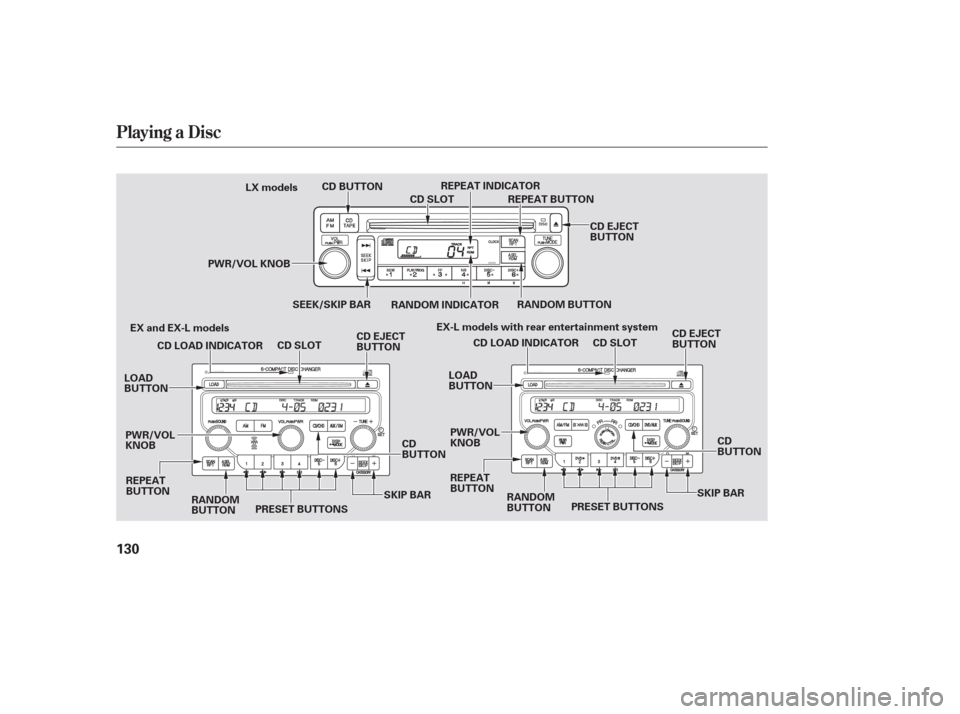
PWR/VOL
KNOBU.S. EX-L models
XM RADIO BUTTON DISP/MODE BUTTON
CATEGORY BAR PRESET BUTTONS
SCAN BUTTON
PWR/VOL
KNOB
U.S. EX-L models with rear entertainment system
TUNE KNOB
PRESET BUTTONS
SCAN BUTTON TUNE KNOB
XM RADIO BUTTON DISP/MODE BUTTON
CATEGORY BAR
Page 128 of 316
�µ
�µ �µ
�µ
�´
�µ Pick a preset number (icon) you
want f or that channel. Press and
hold the bar (icon) until you hear a
beep.
Repeat steps 2 and 3 to store the
f irst six channels.
To store a channel:
Press the XM button. Either XM1
or XM2 will show in the display. Press the XM button again or
touch the other XM icon (XM1 or
XM2) on the audio display. Store
the next six channels using steps 2
and 3.
In the category mode, only channels
within that category can be selected.
In the channel mode, all channels
can be selected.
Press either side of the CATEGORY
bar ( or ) to select another
category.
The scan f unction gives
you a sampling of all channels while
in the channel mode. In the category
mode, only the channels within that
category are scanned. To activate
scan, press the SCAN/RPT button or
touch the SCAN icon on the audio
display. The system plays each
channel in numerical order f or a f ew
seconds, then selects the next
channel. When you hear a channel
you want to continue listening to,
press the button or touch the icon
again. Youcanstoreupto12
preset channels using the six preset
buttons or preset icons on the audio
display. Each button stores one
channel f rom the XM 1band and one
channel f rom the XM 2band.
Use the TUNE knob, or the
CATEGORY or SCAN buttons to
tune to a desired channel. Once a channel is stored, press and
release the proper preset button
(icon) to tune to it.
Turn the TUNE knob lef t
or right to select channels. In the
category mode, you can only select
channels within that category.
1.
2.3.
4.
5.
Playing the XMSatellite Radio
SEEK /SK IP (CA T EGORY)
SCAN
Preset
TUNE
126
Page 132 of 316
Playing a Disc
130
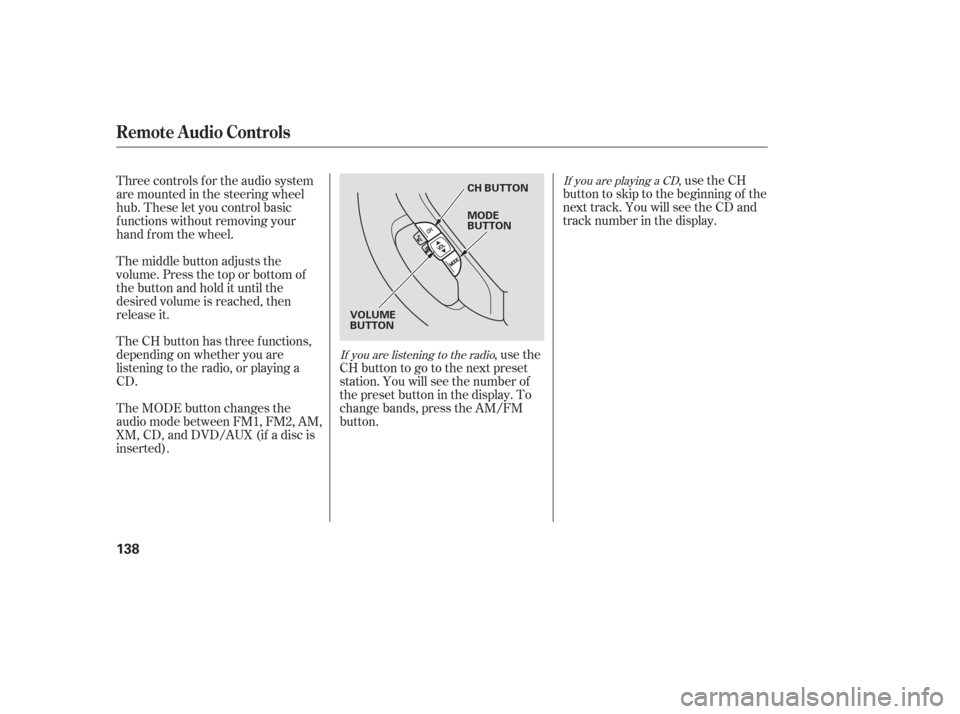
PWR/VOL KNOBREPEAT INDICATOR
CD SLOT
CD EJECT
BUTTON
CD SLOT
PWR/VOL
KNOB SEEK/SKIP BAR
RANDOM INDICATOR
CD BUTTON
CD EJECT
BUTTON
RANDOM BUTTON
RANDOM
BUTTON
REPEAT
BUTTON REPEAT BUTTON
LX models
EX and EX-L models EX-L models with rear entertainment system
CD LOAD INDICATOR
LOAD
BUTTON
CD
BUTTON
PRESET BUTTONS CD EJECT
BUTTON
CD SLOT
PWR/VOL
KNOB RANDOM
BUTTON
REPEAT
BUTTON CD LOAD INDICATOR
LOAD
BUTTON
CD
BUTTON
PRESET BUTTONS
SKIP BAR
SKIP BAR
Page 133 of 316

�µ
To load or play CDs, the ignition
switch must be in the ACCESSORY
(I) or the ON(II) position.
You operate the CD player/CD
changer with the same controls used
for the radio. To select the CD
player/CD changer, press the CD
button. The number of the track
playing is shown in the display. With
the in-dash CD changer, the disc and
track numbers are displayed. The
system will continuously play a CD
until you change modes.
Insert a CD into the CD slot. The
drive will pull the CD in the rest of
the way to play it. When the system
reaches the end of the disc, it will
return to the beginning and play the
disc again.
You cannot load and play 3-inch
(8-cm)discsinthissystem.
If you turn the system of f while a CD
is playing, either with the PWR/VOL
knob or by turning off the ignition,
the disc will stay in the drive. When
youturnthesystembackon,theCD
will begin playing where it lef t of f . To listen to satellite radio when a CD
is playing, press the AUX/XM or XM
button.
To play the radio when a CD is
playing, press the AM/FM button
(AM or FM button). Press the CD
button again to switch back to the
CD player.
To select a dif f erent disc, press the
appropriate preset button (1 6). On
models with navigation system,
touch the appropriate disc icon. If
youselectanemptypositioninthe
CD changer, the system will go into
the loading sequence.
On models with Satellite Radio
LX models
Playing a Disc, Disc Changer
To Play a CD
Features
131
Do not use discs with adhesive labels.
The label can curl up and cause the
disc to jam in the unit.
Page 136 of 316
�µ�´
To remove the disc currently in play,
press the eject ( ) button. When
a disc is removed f rom a slot, the
system automatically begins the load
sequence so you can load another
CD in that position. If you do not
remove the disc f rom the changer
within 15 seconds, the system
returns to the previous mode (AM/
FM or satellite radio). The disc will
reload into the system and will
remainthereinapausemode. To remove a dif f erent CD f rom the
changer,firstselectitwiththe
appropriate preset button. When that
CD begins playing, press the eject
button. Continue pressing the eject
button to remove all the discs from
the changer.
You can also eject discs when the
ignition switch is of f . The disc that
was last selected is ejected f irst.
To eject one disc, press and release
the eject button.
To eject all discs, press and hold the
eject button until the system beeps.
Load the desired CDs into the
magazine, and load the magazine
into the changer according to the
instructions that came with the unit.
To select the CD changer, press the
CD button. The CD and track
numbers will be displayed. To select
a dif f erent CD, use the preset 5
(DISC ) or preset 6 (DISC )
button. If you select an empty slot in
the magazine, the changer will, af ter
f inding that slot empty, try to load
the CD in the next slot.
Except f or LX model
Optional on LX models
Playing a Disc, Disc Changer
Removing CDs f rom the In-dash
CD ChangerOperating the Optional CD
Changer
134
Page 140 of 316
If you are playing a CD
If you are listening to the radio,usetheCH
buttontoskiptothebeginningof the
next track. You will see the CD and
track number in the display.
,usethe
CHbuttontogotothenextpreset
station. You will see the number of
the preset button in the display. To
change bands, press the AM/FM
button.
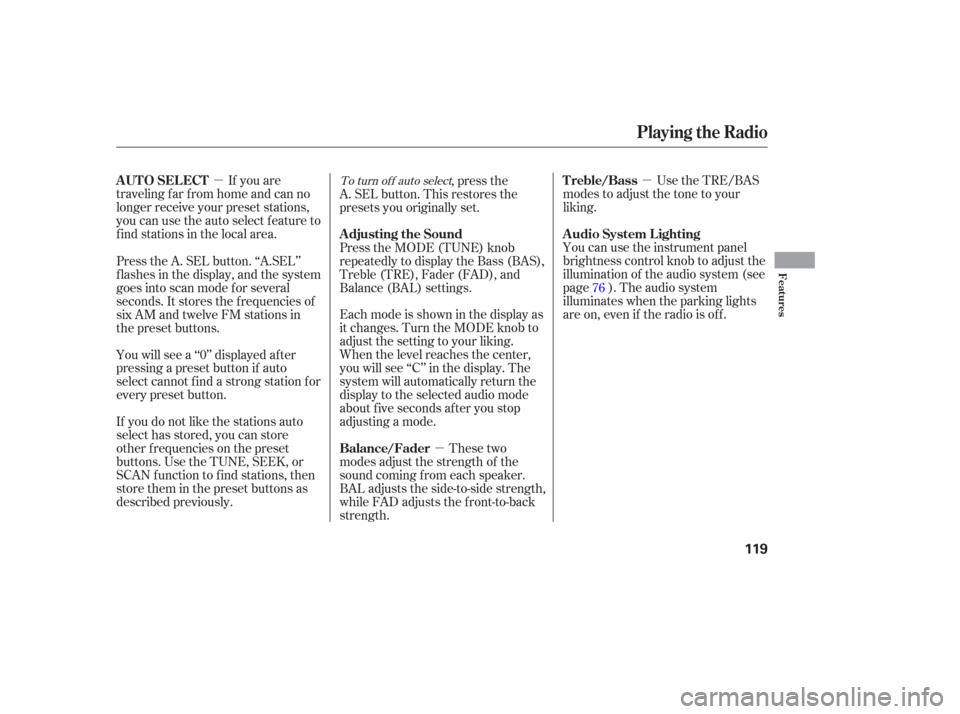
Three controls f or the audio system
are mounted in the steering wheel
hub. These let you control basic
f unctions without removing your
hand f rom the wheel.
The middle button adjusts the
volume. Press the top or bottom of
the button and hold it until the
desired volume is reached, then
release it.
The MODE button changes the
audio mode between FM1, FM2, AM,
XM, CD, and DVD/AUX (if a disc is
inserted). The CH button has three functions,
depending on whether you are
listening to the radio, or playing a
CD.
Remote Audio Controls
138
CH BUTTON
VOLUME
BUTTON MODE
BUTTON
Page 141 of 316

If you lose the card, you must obtain
the code number f rom a dealer. To
do this, you will need the system’s
serial number. Your vehicle’s audio system will
disable itself if it is disconnected
f rom electrical power f or any reason.
To make it work again, you must
enter a specif ic f ive-digit code in the
preset buttons. Because there are
hundreds of number combinations
possible f rom f ive-digits, making the
system work without knowing the
exact code is nearly impossible.
Youshouldhavereceivedacardthat
lists your audio system code number
and serial number. It is best to store
this card in a saf e place at home. In
addition, you should write the audio
system’s serial number in this owner’s
manual.You will have to store your favorite
stations in the preset buttons after
the system begins working. Your
original settings were lost when the
power was disconnected.
If your vehicle’s battery is
disconnected or goes dead, or the
radio f use is removed, the audio
system will disable itself . If this
happens, you will see ‘‘ENTER
CODE’’ in the f requency display the
nexttimeyouturnonthesystem.
Use the preset buttons (icons on
vehicles with navigation system) to
enter the code. The code is on the
radio code card included in your
owner’s manual kit. When it is
entered correctly, the radio will start
playing.
If you make a mistake entering the
code, do not start over; complete the
sequence, then enter the correct
code. You have ten tries to enter the
correct code. If you are unsuccessf ul
in ten attempts, you must then leave
the system on f or 1 hour bef ore
trying again.
On EX and EX-L models
Radio Thef t Protection
Features
139