Page 62 of 420
�Î
�Î�Î
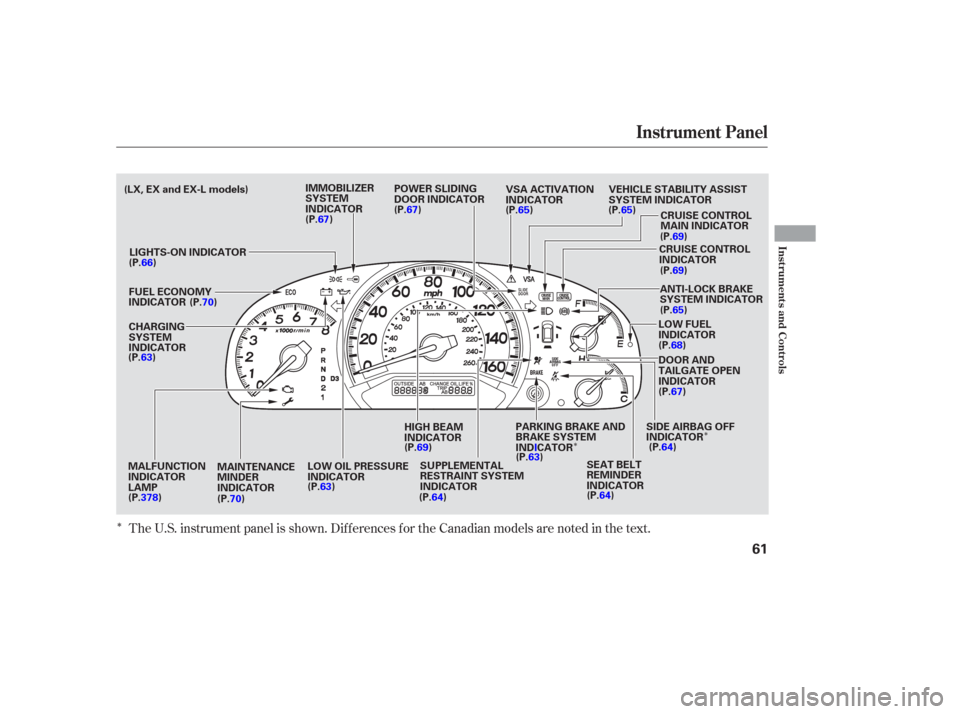
The U.S. instrument panel is shown. Dif f erences f or the Canadian models are noted in the text.
Instrument Panel
Inst rument s and Cont rols
61
SUPPLEMENTAL
RESTRAINT SYSTEM
INDICATOR
HIGH BEAM
INDICATOR
LOW OIL PRESSURE
INDICATOR
IMMOBILIZER
SYSTEM
INDICATOR
POWER SLIDING
DOOR INDICATOR
ANTI-LOCK BRAKE
SYSTEM INDICATOR
LOW FUEL
INDICATOR
DOOR AND
TAILGATE OPEN
INDICATOR
PARKING BRAKE AND
BRAKE SYSTEM
INDICATOR SEAT BELT
REMINDER
INDICATOR
CHARGING
SYSTEM
INDICATOR
CRUISE CONTROL
MAIN INDICATOR
CRUISE CONTROL
INDICATOR
LIGHTS-ON INDICATOR
SIDE AIRBAG OFF
INDICATOR
VSA ACTIVATION
INDICATOR
VEHICLE STABILITY ASSIST
SYSTEM INDICATOR
FUEL ECONOMY
INDICATOR
MALFUNCTION
INDICATOR
LAMP (P.67)
(P.67)
(P.66) (P.70)
(P.63)
(P.70) (P.63)
(P.64)
(P.69)
(P.63)
(P.64)(P.64)(P.67) (P.68)(P.69) (P.69)
(P.65)
(P.65)
(P.65)
MAINTENANCE
MINDER
INDICATOR
(LX, EX and EX-L models)
(P.378)
Page 63 of 420
�Î
�Î�Î
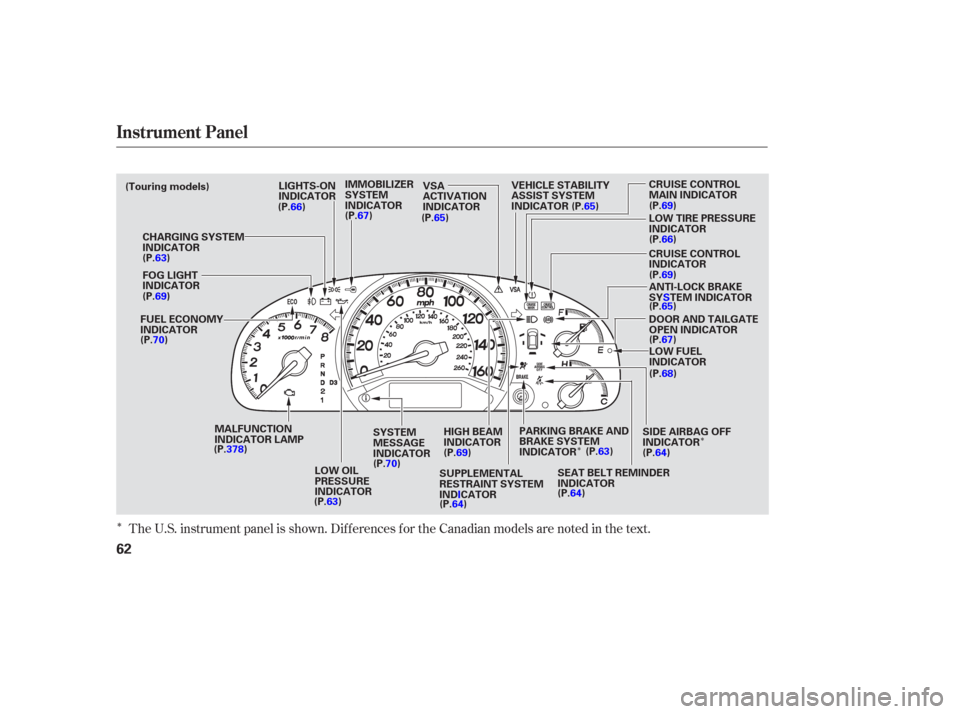
The U.S. instrument panel is shown. Dif f erences f or the Canadian models are noted in the text.
Instrument Panel
62
SEAT BELT REMINDER
INDICATORCRUISE CONTROL
INDICATOR LOW TIRE PRESSURE
INDICATOR
FOG LIGHT
INDICATOR CHARGING SYSTEM
INDICATOR
SUPPLEMENTAL
RESTRAINT SYSTEM
INDICATORCRUISE CONTROL
MAIN INDICATOR
PARKING BRAKE AND
BRAKE SYSTEM
INDICATOR
IMMOBILIZER
SYSTEM
INDICATOR
LIGHTS-ON
INDICATOR
LOW OIL
PRESSURE
INDICATOR HIGH BEAM
INDICATOR LOW FUEL
INDICATOR
DOOR AND TAILGATE
OPEN INDICATOR
VSA
ACTIVATION
INDICATOR
(Touring models)
FUEL ECONOMY
INDICATOR VEHICLE STABILITY
ASSIST SYSTEM
INDICATOR
ANTI-LOCK BRAKE
SYSTEM INDICATOR
SIDE AIRBAG OFF
INDICATOR
MALFUNCTION
INDICATOR LAMP
SYSTEM
MESSAGE
INDICATOR
(P.66)
(P.63)
(P.69)
(P.70)
(P.63)(P.70)
(P.69)
(P.64) (P.64)(P.64)
(P.63) (P.68)
(P.67)
(P.65) (P.65)
(P.69)
(P.66)
(P.69)
(P.65)
(P.67)
(P.378)
Page 64 of 420
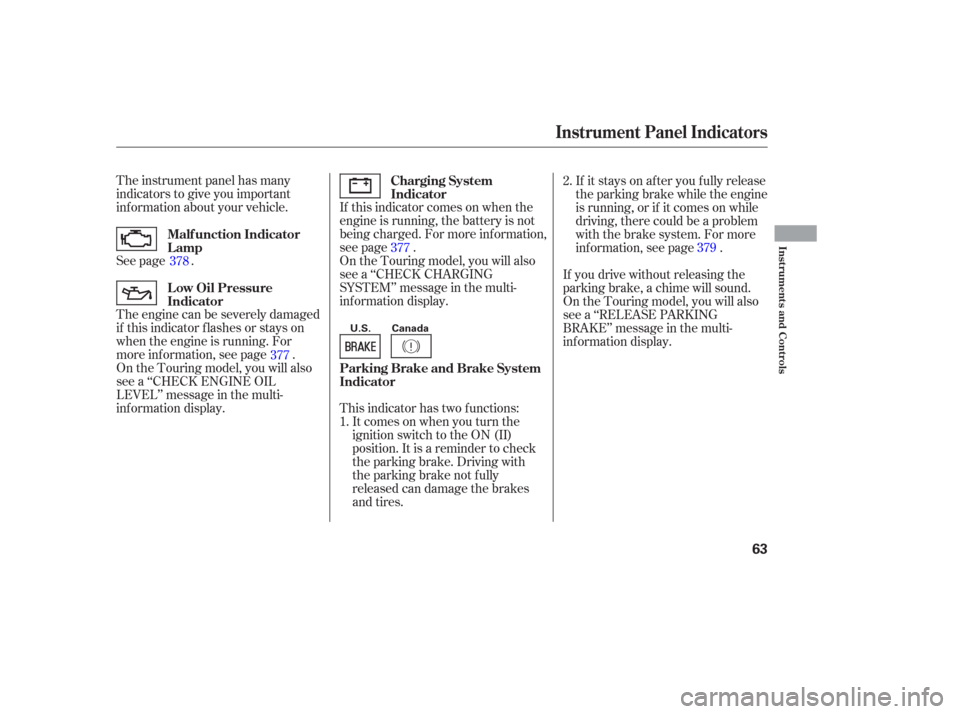
The instrument panel has many
indicators to give you important
inf ormation about your vehicle.
See page .If this indicator comes on when the
engine is running, the battery is not
being charged. For more inf ormation,
see page .
On the Touring model, you will also
see a ‘‘CHECK CHARGING
SYSTEM’’ message in the multi-
inf ormation display.
On the Touring model, you will also
see a ‘‘CHECK ENGINE OIL
LEVEL’’ message in the multi-
inf ormation display. The engine can be severely damaged
if this indicator f lashes or stays on
when the engine is running. For
more information, see page . This indicator has two f unctions:Itcomesonwhenyouturnthe
ignition switch to the ON (II)
position. It is a reminder to check
the parking brake. Driving with
the parking brake not f ully
released can damage the brakes
and tires. If it stays on af ter you f ully release
the parking brake while the engine
is running, or if it comes on while
driving, there could be a problem
with the brake system. For more
inf ormation, see page .
If you drive without releasing the
parking brake, a chime will sound.
On the Touring model, you will also
see a ‘‘RELEASE PARKING
BRAKE’’ message in the multi-
inf ormation display.
1. 2.
378
377 377
379
Malf unction Indicator
Lamp Charging System
Indicator
L ow Oil Pressure
Indicator Parking Brake and Brake System
Indicator
Instrument Panel Indicators
Inst rument s and Cont rols
63
U.S. Canada
Page 76 of 420

If you press the INFO button when
‘‘AVERAGE SPEED’’ is displayed,
the display changes to ‘‘TIRE
PRESSURE’’ using both segments.
This display is a part of tire pressure
monitoring system (TPMS). See
page f or more inf ormation.
The multi-inf ormation display
consists of an upper segment and a
lower segment. Each segment can
display two lines of messages.
In normal display mode, the upper
segment displays trip computer and
tire pressures, and the lower
segment displays the compass,
odometer, trip meter, outside
temperature, engine oil lif e, and any
maintenance items needing attention. In normal display mode, the upper
display is blank when you turn the
ignition switch to ON (II). Each time
you press the INFO button, the trip
computer changes f rom ‘‘INST.
MPG’’ to ‘‘RANGE’’ to ‘‘ELAPSED
TIME’’ to ‘‘AVERAGE SPEED’’ and
then to ‘‘AVERAGE FUEL’’ as shown
on the next page.Pressing the INFO button again
brings the display back to the initial
display of the trip computer ‘‘INST.
MPG.’’
309
CONT INUED
Multi-Inf ormation Display
Inst rument s and Cont rols
75
LOWER SEGMENTUPPER SEGMENT
INFO BUTTON
SEL RESET BUTTON
Page 87 of 420
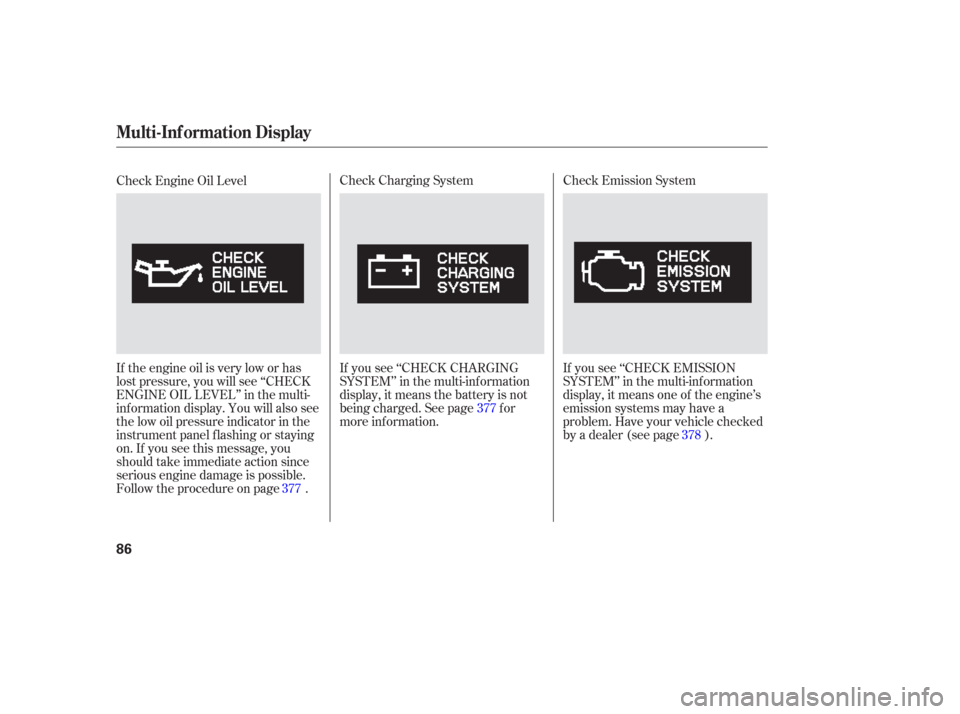
Check Emission System
If you see ‘‘CHECK EMISSION
SYSTEM’’ in the multi-inf ormation
display, it means one of the engine’s
emission systems may have a
problem. Have your vehicle checked
by a dealer (see page ).
Check Charging System
If you see ‘‘CHECK CHARGING
SYSTEM’’ in the multi-inf ormation
display, it means the battery is not
being charged. See page f or
more inf ormation.
Check Engine Oil Level
If the engine oil is very low or has
lost pressure, you will see ‘‘CHECK
ENGINE OIL LEVEL’’ in the multi-
inf ormation display. You will also see
the low oil pressure indicator in the
instrument panel f lashing or staying
on. If you see this message, you
should take immediate action since
serious engine damage is possible.
Follow the procedure on page .
377 377
378
Multi-Inf ormation Display
86
Page 330 of 420

�µ
�µ
�µ
�µ
�µ
�µ
�Ì
U.S. Vehicles:
Youshouldcheckthefollowing
items at the specif ied intervals. If
you are unsure of how to perf orm
any check, turn to the appropriate
page listed. Lights Check the operation of
the headlights, parking lights,
taillights, high-mount brake light,
and license plate lights monthly.
See page .
Engine coolant level Check the
radiator reserve tank every time
you f ill the f uel tank. See page . Engine oil level Check every
time you fill the fuel tank. See
page .
Automatic transmission Check
the f luid level monthly. See page .
Brakes Check the f luid level
monthly. See page .
Tires Check the tire pressure
monthly. Examine the tread f or
wear and foreign objects. See page .
According to state and federal
regulations, f ailure to perf orm
maintenance on the items marked
with will not void your emissions
warranties. However, all
maintenance services should be
perf ormed in accordance with the
intervals indicated by the odometer/
trip meter display or the multi-
inf ormation display.
287
288
340 341 343
354
Maintenance, replacement, or
repair of emissions control
devices and systems may be done
by any automotive repair
establishment or individual using
parts that are ‘‘certif ied’’ to EPA
standards.
Owner’s Maintenance Checks
Maintenance Minder
Maint enance
329
Page 337 of 420
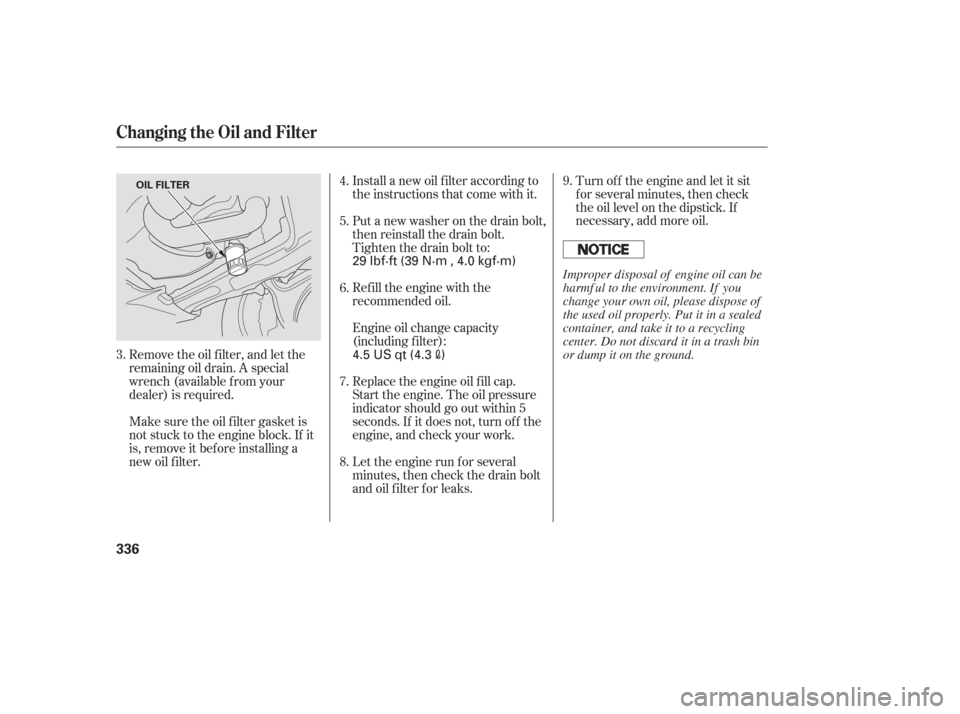
Remove the oil f ilter, and let the
remaining oil drain. A special
wrench (available from your
dealer) is required.Turn of f the engine and let it sit
f or several minutes, then check
the oil level on the dipstick. If
necessary, add more oil.
Let the engine run f or several
minutes, then check the drain bolt
and oil f ilter f or leaks. Replace the engine oil f ill cap.
Start the engine. The oil pressure
indicator should go out within 5
seconds. If it does not, turn of f the
engine, and check your work. Engine oil change capacity
(including f ilter): Refill the engine with the
recommended oil. Install a new oil f ilter according to
the instructions that come with it.
Put a new washer on the drain bolt,
then reinstall the drain bolt.
Tighten the drain bolt to:
Make sure the oil f ilter gasket is
not stuck to the engine block. If it
is, remove it bef ore installing a
new oil f ilter. 9.
8. 7. 6. 4.
5.
3.
Changing the Oil and Filter
336
OIL FILTER
4.5 US qt (4.3)
29 lbf·ft (39 N·m , 4.0 kgf·m)
Improper disposal of engine oil can be
harmf ul to the environment. If you
change your own oil, please dispose of
the used oil properly. Put it in a sealed
container, and take it to a recycling
center. Do not discard it in a trash bin
or dump it on the ground.
Page 362 of 420
This section covers the more
common problems that motorists
experience with their vehicles. It
gives you inf ormation about how to
safely evaluate the problem and what
to do to correct it. If the problem has
stranded you on the side of the road,
you may be able to get going again.
If not, you will also f ind instructions
on getting your vehicle towed................
Driving with a Flat Tire .362
......................
Compact Spare Tire .365
....................
Changing a Flat Tire .366
.............
If the Engine Won’t Start .372
Nothing Happens or theStarter Motor Operates ........................
Very Slowly .372
The Starter Operates ................................
Normally .372
................................
Jump Starting .373
..............
If the Engine Overheats .375
.........
Low Oil Pressure Indicator .377
..........
Charging System Indicator .377
.......
Malf unction Indicator Lamp .378
...........................
Readiness Codes .378
...............
Brake System Indicator .379
..................
Closing the Moonroof .380
..............................................
Fuses .381
..............................
Fuse Locations .384
......................
Emergency Towing .387
Taking Care of the Unexpected
T aking Care of t he Unexpect ed
361